> ## Documentation Index
> Fetch the complete documentation index at: https://docs.wandb.ai/llms.txt
> Use this file to discover all available pages before exploring further.
# Overview
ARIA, W\&B's AI Research and Iteration Agent, is your personalized research assistant that helps you analyze and run experiments, explain results, identify patterns across runs, recommend next steps, build visualizations and reports, and more in W\&B.
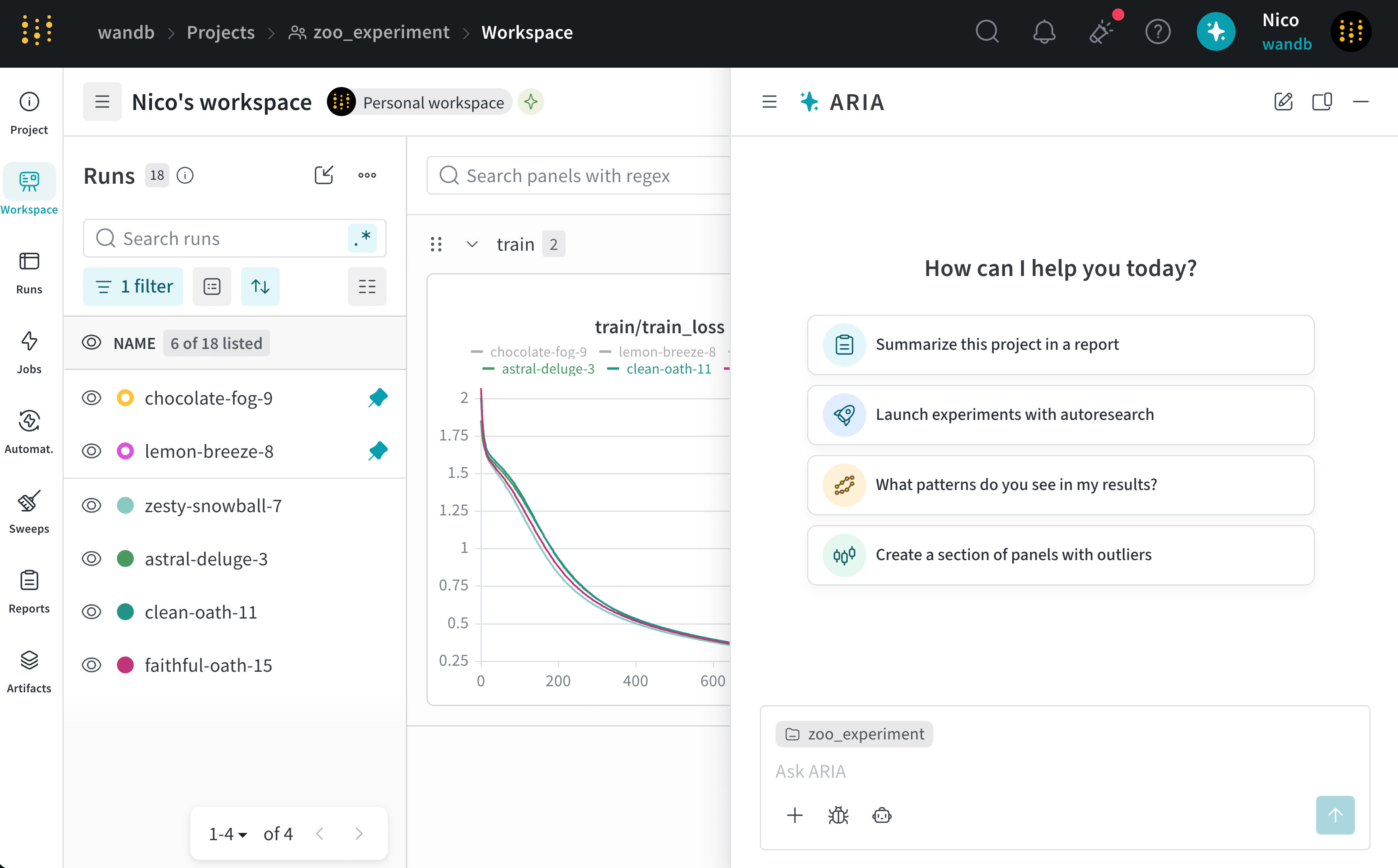 ARIA can help you:
* Analyze experiments to find patterns and insights.
* [Run experiments and sweeps to test new ideas](/aria/autoresearch).
* Propose next steps, such as recommending hyperparameters to try.
* Create plots and panels to visualize your data.
* Build saved views and reports to share insights with your team.
To [chat with ARIA](/aria/chat):
1. From any project, click the blue circle at the upper right corner of the page.
ARIA can help you:
* Analyze experiments to find patterns and insights.
* [Run experiments and sweeps to test new ideas](/aria/autoresearch).
* Propose next steps, such as recommending hyperparameters to try.
* Create plots and panels to visualize your data.
* Build saved views and reports to share insights with your team.
To [chat with ARIA](/aria/chat):
1. From any project, click the blue circle at the upper right corner of the page.
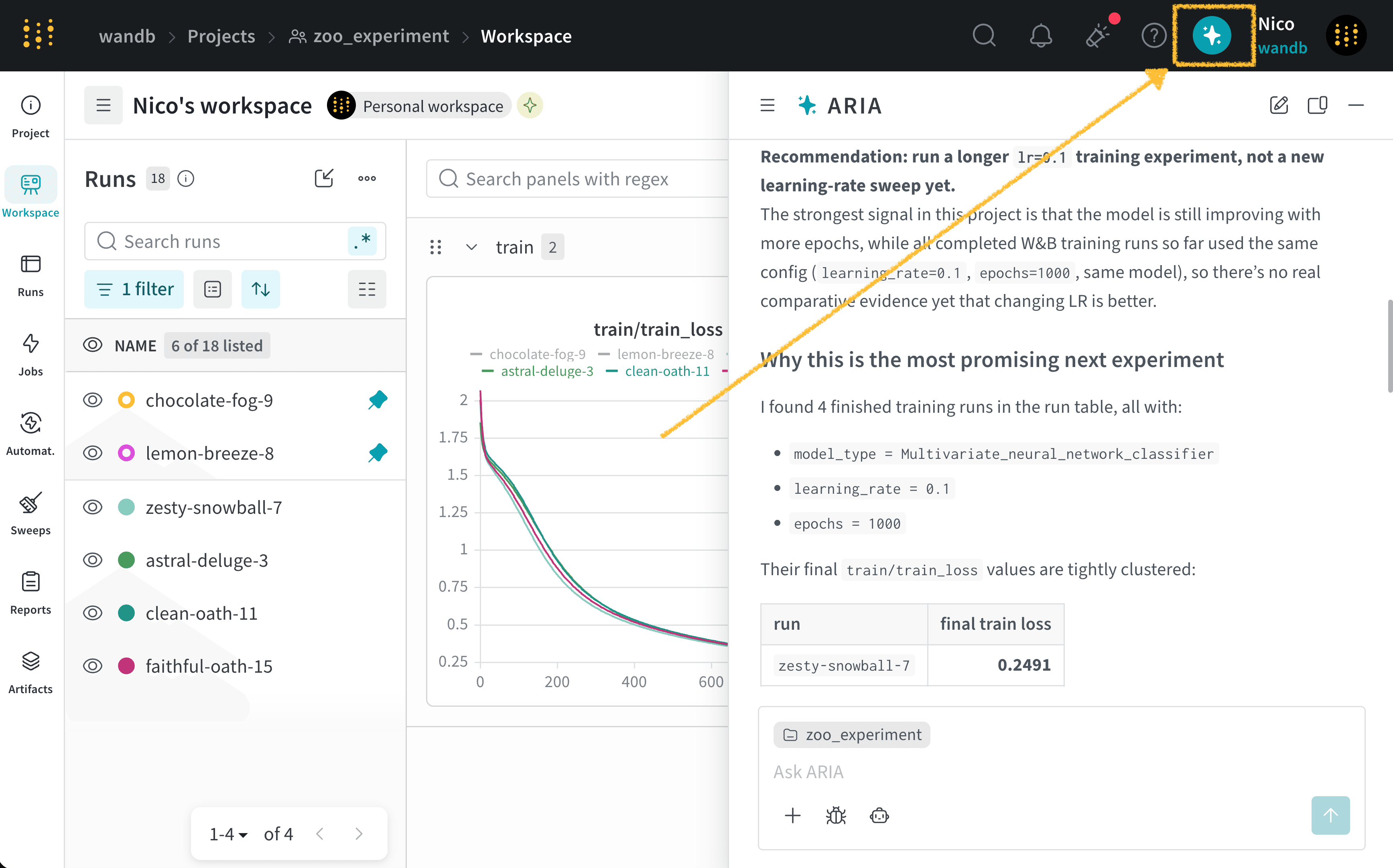 2. In the chat window, type your question or request. If you you are unsure what to ask, select a suggested prompt.
3. Click the **Send** button, the upward-pointing arrow in the lower-right corner of the chat window.
Depending on the complexity of your question, ARIA might take a few moments to respond. You can close the chat window while ARIA works and return to check the response later. If ARIA needs more information, it asks you for clarification.
While ARIA works, you might see **Thinking** and **shell** steps:
* **Thinking** steps summarize how ARIA approaches your question.
* **shell** steps show when ARIA takes an action, such as creating a panel, filtering runs, creating and running Python scripts, and more.
Click on a **Thinking** or **shell** step to expand more details about ARIA's reasoning or the action it took.
For real-world examples, see [Example chats](/aria/overview#example-chats). For more information about managing chats, see [Chat with ARIA](/aria/chat).
## Example chats
The following are examples of real chats with ARIA to illustrate how you can interact with ARIA and the types of responses you can expect.
Suppose you are an ML Engineer who has just completed a series of experiments. You want to understand what the next steps should be to improve your model's performance.
To do this, you navigate to your the project where you logged runs. You open ARIA and ask:
```text title="User prompt" theme={null}
/recommend-next-experiment
```
The following is an example of how ARIA responded to this question. First, ARIA makes reasoning steps to determine how to approach the question. For brevity, only a portion of ARIA's reasoning is shown below:
```text title="ARIA reasoning steps" theme={null}
Recommendation: run one “longer-training + held-out-eval” experiment
before changing model architecture or sweeping LR.
Use the current best setup, but train longer:
hyperparameter_config = {
"learning_rate": 0.1, # keep fixed
"epochs": 2000, # was 1000
"model_type": "Multivariate_neural_network_classifier",
"torch_seed": 0, # add for reproducibility
}
Also add logging for the existing held-out split every epoch or
every 10–50 epochs:
train/train_loss
train/train_acc
test/test_loss
test/test_acc
and save the best checkpoint by test/test_loss, not only
by training loss.
Why this is the most promising next experiment
The project has 16 finished runs, but only 4 are actual training runs;
all four used the same training config:
learning_rate = 0.1
epochs = 1000
same model: Multivariate_neural_network_classifier
So there is no real hyperparameter comparison yet. The
strongest signal is from the learning curves: all four
training losses are still improving at the final epoch, and
the minimum training loss occurs at epoch 1000 in every run.
I’d run:
learning_rate: 0.1
epochs: 2000
model_type: unchanged
random_state: keep existing dataset split, 42
add torch.manual_seed(0) and log it as torch_seed
evaluate on X_test, y_test each epoch or every 10 epochs
checkpoint on lowest test/test_loss
```
You agree with ARIA's recommendation and ask ARIA to run the experiment for you:
```text title="User prompt" theme={null}
Run that experiment for me.
```
ARIA uses W\&B Launch to run the experiment in a sandbox environment. The following image shows ARIA's response after it has completed running the experiment:
2. In the chat window, type your question or request. If you you are unsure what to ask, select a suggested prompt.
3. Click the **Send** button, the upward-pointing arrow in the lower-right corner of the chat window.
Depending on the complexity of your question, ARIA might take a few moments to respond. You can close the chat window while ARIA works and return to check the response later. If ARIA needs more information, it asks you for clarification.
While ARIA works, you might see **Thinking** and **shell** steps:
* **Thinking** steps summarize how ARIA approaches your question.
* **shell** steps show when ARIA takes an action, such as creating a panel, filtering runs, creating and running Python scripts, and more.
Click on a **Thinking** or **shell** step to expand more details about ARIA's reasoning or the action it took.
For real-world examples, see [Example chats](/aria/overview#example-chats). For more information about managing chats, see [Chat with ARIA](/aria/chat).
## Example chats
The following are examples of real chats with ARIA to illustrate how you can interact with ARIA and the types of responses you can expect.
Suppose you are an ML Engineer who has just completed a series of experiments. You want to understand what the next steps should be to improve your model's performance.
To do this, you navigate to your the project where you logged runs. You open ARIA and ask:
```text title="User prompt" theme={null}
/recommend-next-experiment
```
The following is an example of how ARIA responded to this question. First, ARIA makes reasoning steps to determine how to approach the question. For brevity, only a portion of ARIA's reasoning is shown below:
```text title="ARIA reasoning steps" theme={null}
Recommendation: run one “longer-training + held-out-eval” experiment
before changing model architecture or sweeping LR.
Use the current best setup, but train longer:
hyperparameter_config = {
"learning_rate": 0.1, # keep fixed
"epochs": 2000, # was 1000
"model_type": "Multivariate_neural_network_classifier",
"torch_seed": 0, # add for reproducibility
}
Also add logging for the existing held-out split every epoch or
every 10–50 epochs:
train/train_loss
train/train_acc
test/test_loss
test/test_acc
and save the best checkpoint by test/test_loss, not only
by training loss.
Why this is the most promising next experiment
The project has 16 finished runs, but only 4 are actual training runs;
all four used the same training config:
learning_rate = 0.1
epochs = 1000
same model: Multivariate_neural_network_classifier
So there is no real hyperparameter comparison yet. The
strongest signal is from the learning curves: all four
training losses are still improving at the final epoch, and
the minimum training loss occurs at epoch 1000 in every run.
I’d run:
learning_rate: 0.1
epochs: 2000
model_type: unchanged
random_state: keep existing dataset split, 42
add torch.manual_seed(0) and log it as torch_seed
evaluate on X_test, y_test each epoch or every 10 epochs
checkpoint on lowest test/test_loss
```
You agree with ARIA's recommendation and ask ARIA to run the experiment for you:
```text title="User prompt" theme={null}
Run that experiment for me.
```
ARIA uses W\&B Launch to run the experiment in a sandbox environment. The following image shows ARIA's response after it has completed running the experiment:
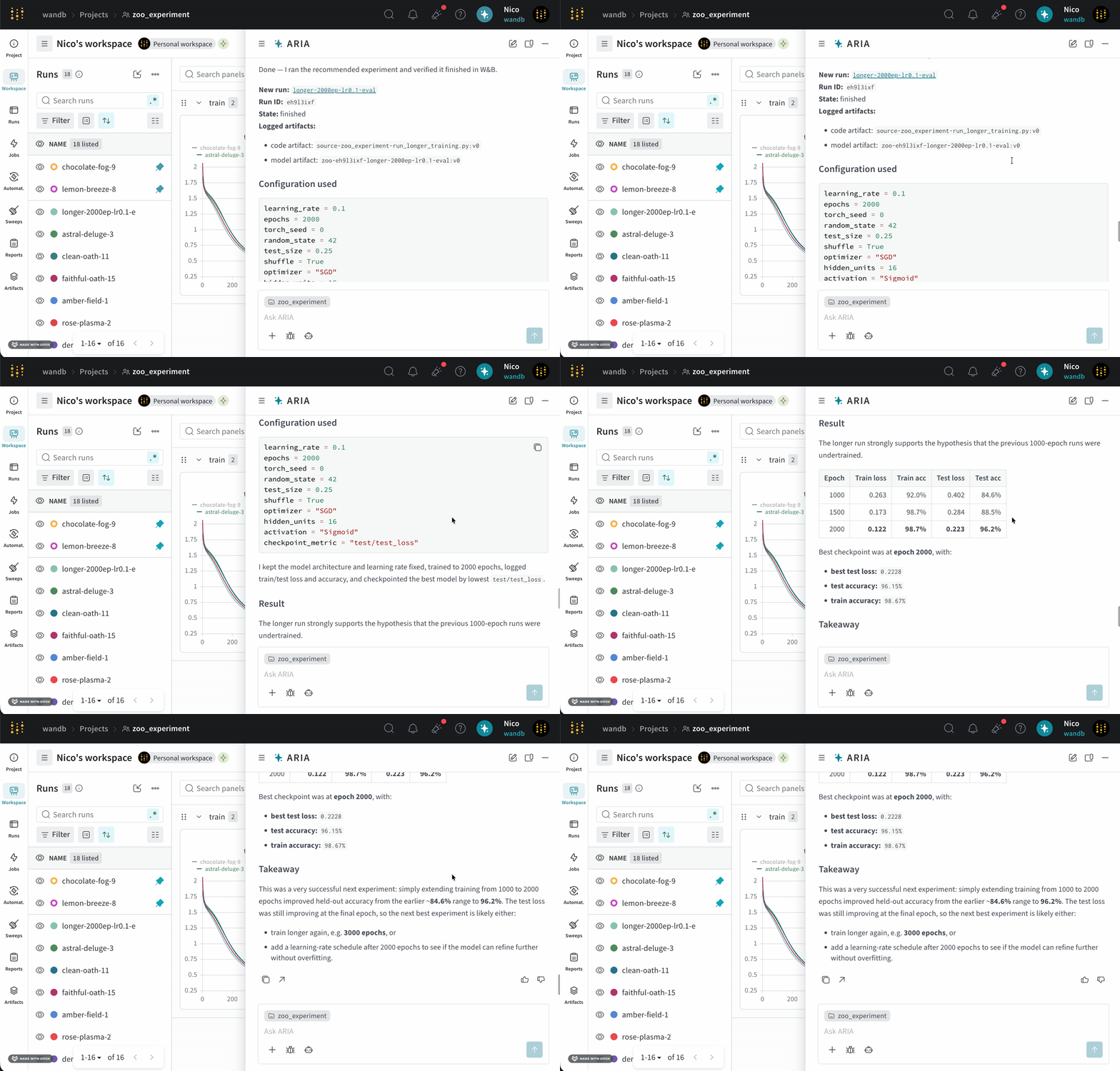 ARIA uses W\&B Launch to run experiments in a sandbox environment. See [Enable ARIA to run experiments](/aria/autoresearch#run-experiments-with-w\&b-launch) for more information.
Suppose you are an ML Engineer who has just completed a series of runs for a new model. You want to understand how your model performed, identify potential issues, and decide on your next steps.
To do this, you navigate to your the project where you logged runs. You open ARIA and ask:
```text title="User prompt" theme={null}
What patterns do you see across my runs?
```
The following is an example of how ARIA might respond to this question. First, ARIA makes reasoning steps to determine how to approach the question:
```text title="ARIA reasoning steps" theme={null}
I’m considering running a state breakdown scan with counts by state using
specific server filters. I’ll look at the array of states: ['finished',
'running', 'crashed', 'failed', 'killed', 'pending', 'preempting'] and
determine the length of each. Summing these metrics could provide
useful insights. I should also focus on identifying objective metrics
from sample keys while excluding those that start with "_" or "system/".
It’s important to compute the best min/max for numeric summary metrics too.
```
ARIA identifies that it needs to analyze the data across runs to answer the question. To do this, ARIA creates a Python script (`analyze_patterns.py`) that uses the W\&B Python SDK to query previously logged runs to identify patterns in the data. Once the script is generated, ARIA executes it within a sandbox environment.
ARIA uses W\&B Launch to run experiments in a sandbox environment. See [Enable ARIA to run experiments](/aria/autoresearch#run-experiments-with-w\&b-launch) for more information.
Suppose you are an ML Engineer who has just completed a series of runs for a new model. You want to understand how your model performed, identify potential issues, and decide on your next steps.
To do this, you navigate to your the project where you logged runs. You open ARIA and ask:
```text title="User prompt" theme={null}
What patterns do you see across my runs?
```
The following is an example of how ARIA might respond to this question. First, ARIA makes reasoning steps to determine how to approach the question:
```text title="ARIA reasoning steps" theme={null}
I’m considering running a state breakdown scan with counts by state using
specific server filters. I’ll look at the array of states: ['finished',
'running', 'crashed', 'failed', 'killed', 'pending', 'preempting'] and
determine the length of each. Summing these metrics could provide
useful insights. I should also focus on identifying objective metrics
from sample keys while excluding those that start with "_" or "system/".
It’s important to compute the best min/max for numeric summary metrics too.
```
ARIA identifies that it needs to analyze the data across runs to answer the question. To do this, ARIA creates a Python script (`analyze_patterns.py`) that uses the W\&B Python SDK to query previously logged runs to identify patterns in the data. Once the script is generated, ARIA executes it within a sandbox environment.
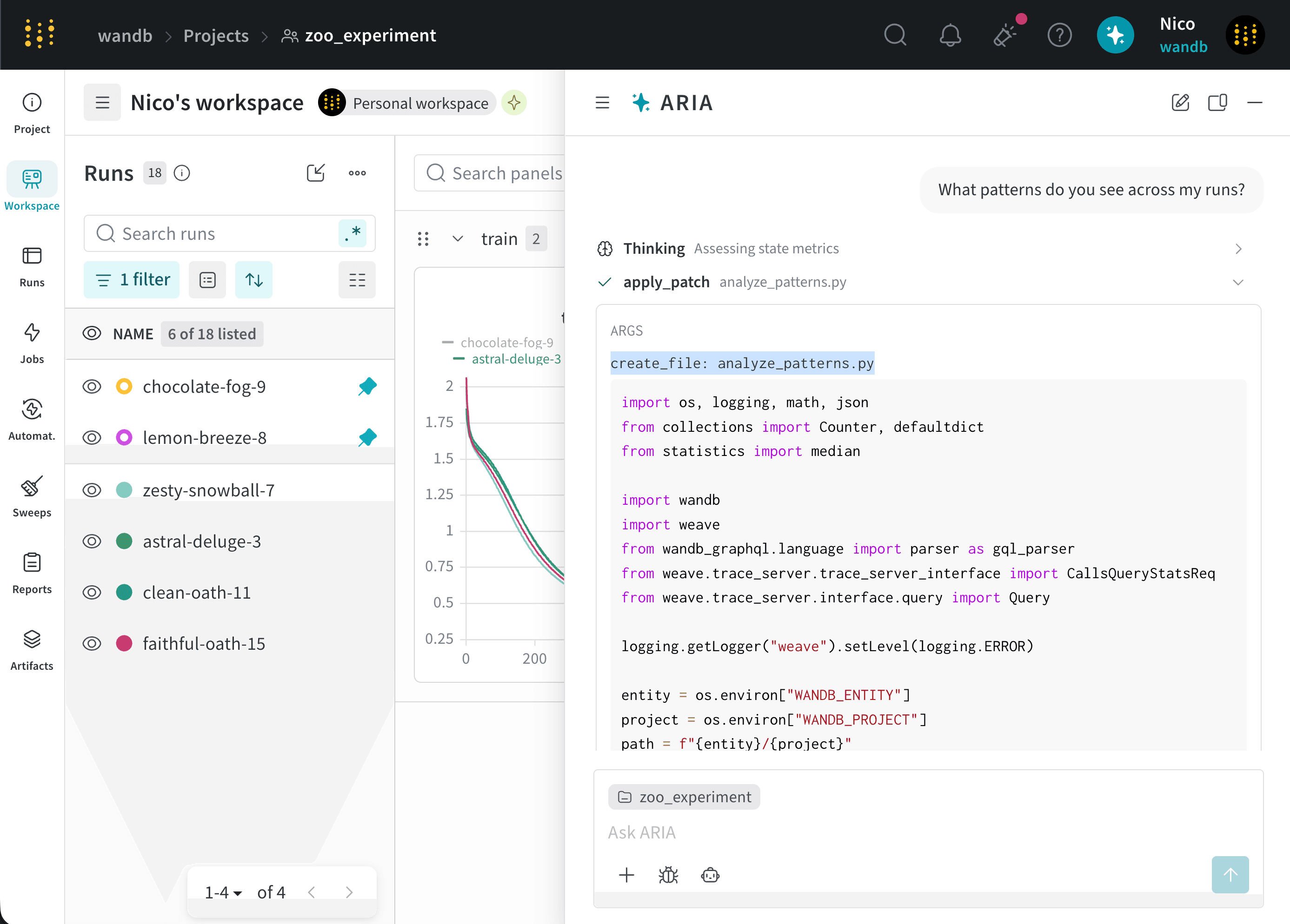 Next, ARIA uses the ouput to generate a summary of the patterns it found across the runs, which it shares in the chat.
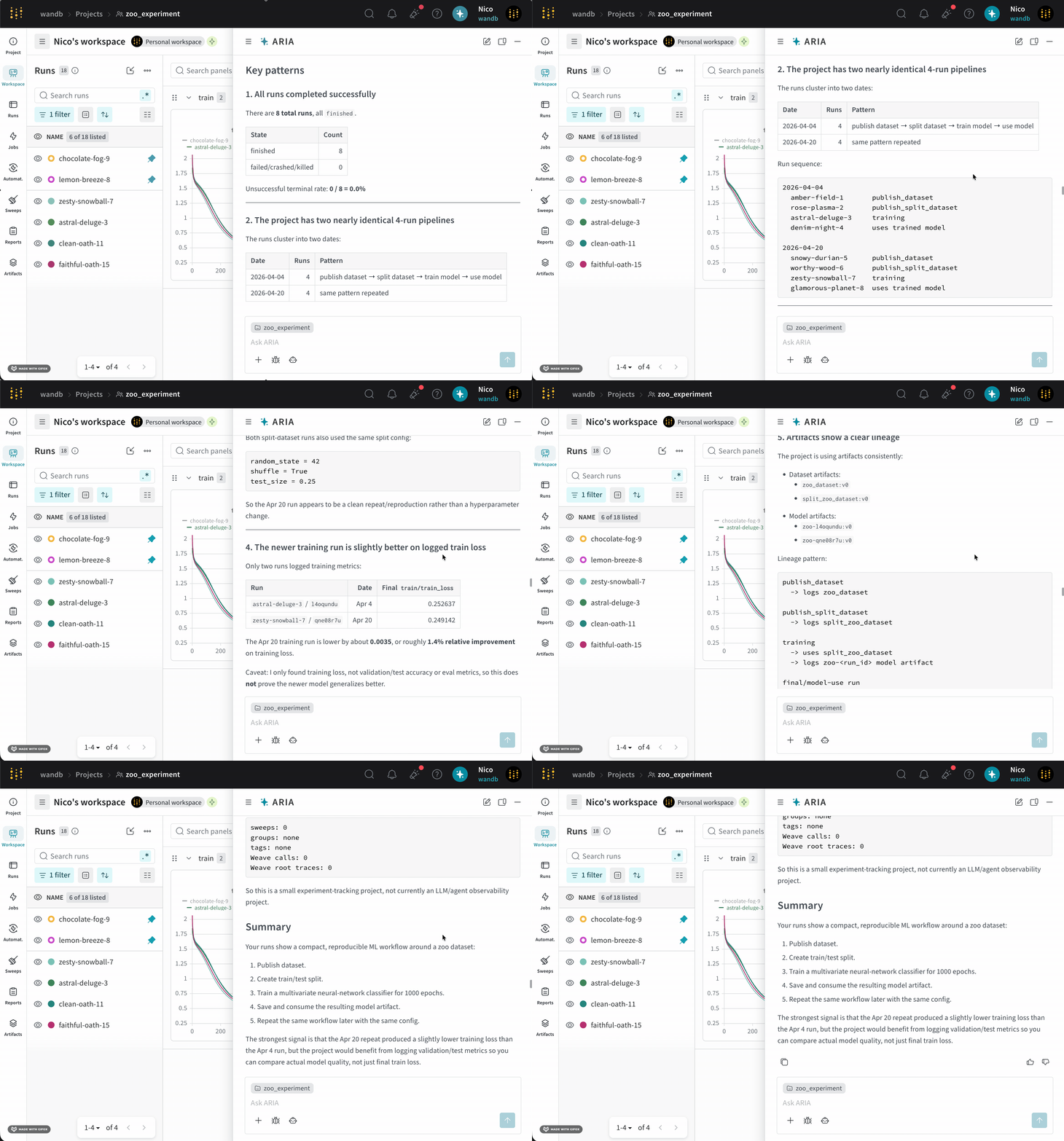 ARIA was able to identify that my current experiment does not log `validation/test` metrics and recommended logging those metrics in future runs to better understand the model's performance.
As a next step, you can ask ARIA to help set up an experiment with validation metrics logged. For example, you can ask ARIA:
```text title="User prompt" theme={null}
Can you help me update my Python script to also log validation metrics?
```
ARIA can then generate the code to log validation metrics in your training script, which you can copy and paste into your codebase.
Suppose you are an ML Engineer who has just completed a series of runs for a new model. You want to understand how your model performed and get recommendations for how to improve your model's performance in future runs. You decide to ask ARIA for recommendations on hyperparameter tuning.
You might ask ARIA:
```text title="User prompt" theme={null}
I want to conduct a sweep to improve lower my training model's loss. Do you have suggestions on what hyperparameters I should try?
```
ARIA might respond with the following reasoning steps:
```text title="ARIA reasoning steps" theme={null}
The user is looking for insights to improve training loss, so I
should suggest ranges for learning rate, optimizer, batch size,
weight decay, and other relevant parameters.
Since the user wants to conduct a sweep, I need to show the code or
instrumentation with a clear yet concise YAML or Python configuration.
I might also suggest using random or Bayesian techniques for more
effective hyperparameter selection.
```
ARIA identifies that it needs to analyze the hyperparameters used in previous runs and their relationship to the training loss to provide recommendations for hyperparameter tuning.
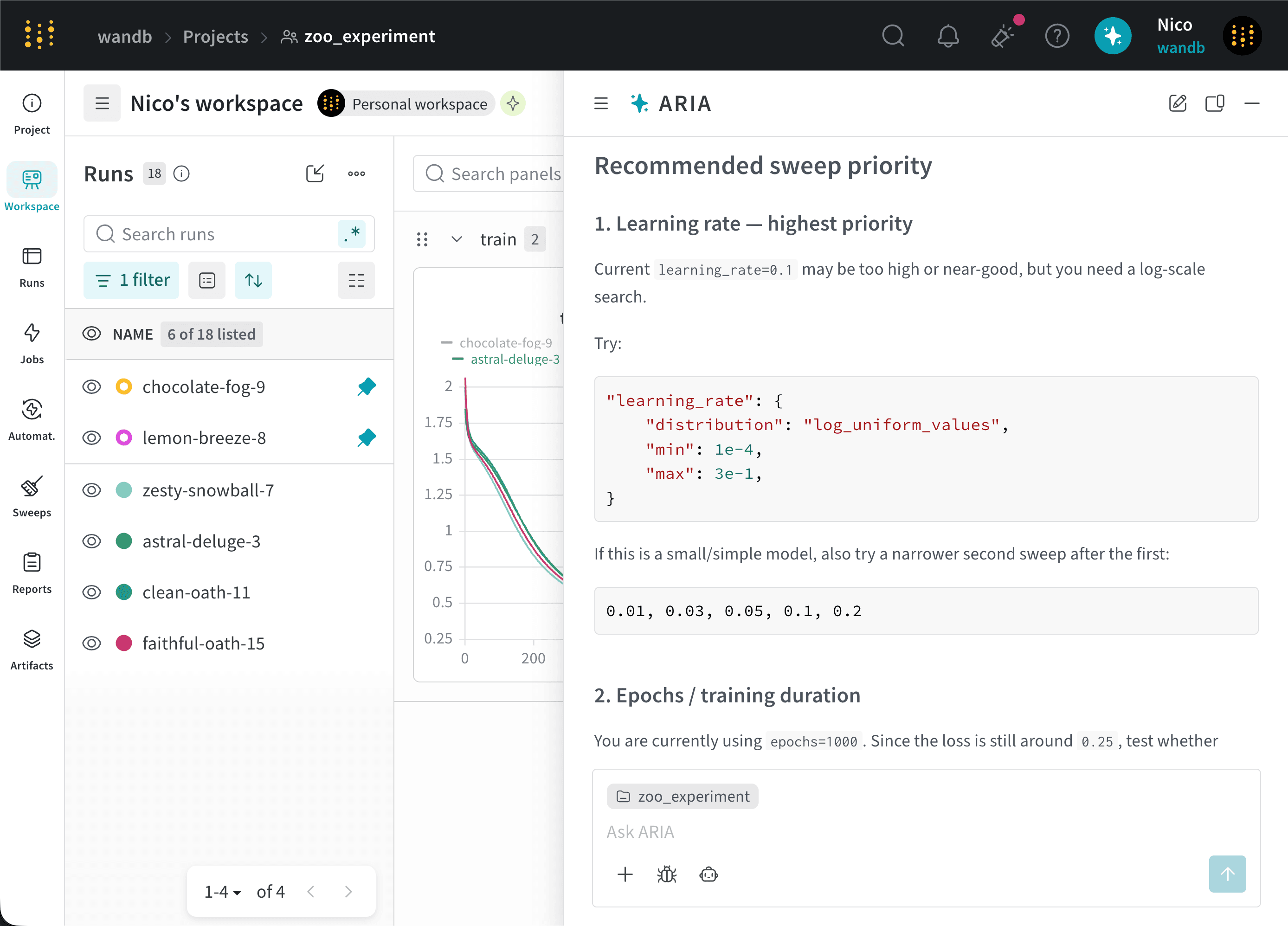
ARIA identifies that the given project used a learning rate of `0.01` for all runs. Based on these insights, ARIA recommends trying a lower learning rate, such as `0.001`, in future runs to see if that helps improve the model's performance.
ARIA also identifies that of the runs that use the SGD optimizer. Based on this insight, ARIA recommends trying a different optimizer, such as Adam (Adaptive Moment Estimation), in future runs to see if that helps improve the model's performance.
The following image shows a portion of ARIA's response with its recommendations for hyperparameter tuning:
ARIA was able to identify that my current experiment does not log `validation/test` metrics and recommended logging those metrics in future runs to better understand the model's performance.
As a next step, you can ask ARIA to help set up an experiment with validation metrics logged. For example, you can ask ARIA:
```text title="User prompt" theme={null}
Can you help me update my Python script to also log validation metrics?
```
ARIA can then generate the code to log validation metrics in your training script, which you can copy and paste into your codebase.
Suppose you are an ML Engineer who has just completed a series of runs for a new model. You want to understand how your model performed and get recommendations for how to improve your model's performance in future runs. You decide to ask ARIA for recommendations on hyperparameter tuning.
You might ask ARIA:
```text title="User prompt" theme={null}
I want to conduct a sweep to improve lower my training model's loss. Do you have suggestions on what hyperparameters I should try?
```
ARIA might respond with the following reasoning steps:
```text title="ARIA reasoning steps" theme={null}
The user is looking for insights to improve training loss, so I
should suggest ranges for learning rate, optimizer, batch size,
weight decay, and other relevant parameters.
Since the user wants to conduct a sweep, I need to show the code or
instrumentation with a clear yet concise YAML or Python configuration.
I might also suggest using random or Bayesian techniques for more
effective hyperparameter selection.
```
ARIA identifies that it needs to analyze the hyperparameters used in previous runs and their relationship to the training loss to provide recommendations for hyperparameter tuning.
ARIA identifies that the given project used a learning rate of `0.01` for all runs. Based on these insights, ARIA recommends trying a lower learning rate, such as `0.001`, in future runs to see if that helps improve the model's performance.
ARIA also identifies that of the runs that use the SGD optimizer. Based on this insight, ARIA recommends trying a different optimizer, such as Adam (Adaptive Moment Estimation), in future runs to see if that helps improve the model's performance.
The following image shows a portion of ARIA's response with its recommendations for hyperparameter tuning:
 Suppose you are a data scientist who has been analyzing your project's runs and identified interesting patterns in the data. You want to share these insights with your team in an easy-to-digest format. You decide to ask ARIA to help you create a [W\&B Report](/models/reports).
To do this, you open ARIA and ask:
```text title="User prompt" theme={null}
Create a report to share my findings with my team.
```
ARIA might respond with the following reasoning steps:
```text title="ARIA reasoning steps" theme={null}
I’m looking to query the recent 50 runs, summarizing key frequencies
and counts by using api.runs to slice them down. I'll be counting
lengths with lazy evaluation and weaving together the stats
for a proper report. I need to include a description that might
require importing different report libraries.
```
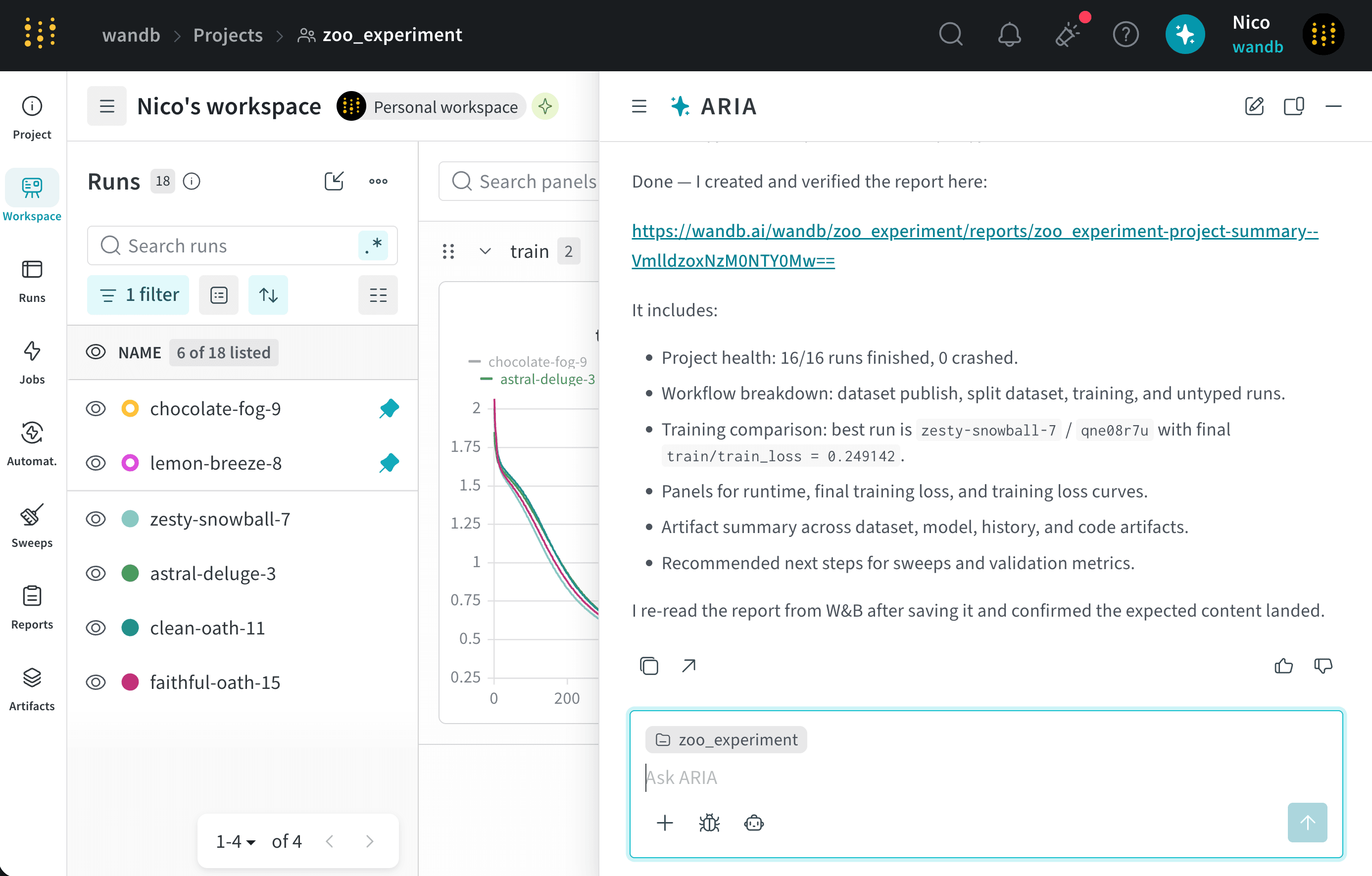
ARIA identifies that it needs to create a W\&B Report that summarizes the insights it found in the data. As part of it's reasoning process, it generates a Python script that uses the W\&B SDK to create a report with the relevant data and insights. ARIA executes this script in a sandbox environment, which creates a W\&B Report in your project.
The following image shows the how ARIA creates a W\&B Report in the sandbox environment and then returns the link to the report in the chat:
Suppose you are a data scientist who has been analyzing your project's runs and identified interesting patterns in the data. You want to share these insights with your team in an easy-to-digest format. You decide to ask ARIA to help you create a [W\&B Report](/models/reports).
To do this, you open ARIA and ask:
```text title="User prompt" theme={null}
Create a report to share my findings with my team.
```
ARIA might respond with the following reasoning steps:
```text title="ARIA reasoning steps" theme={null}
I’m looking to query the recent 50 runs, summarizing key frequencies
and counts by using api.runs to slice them down. I'll be counting
lengths with lazy evaluation and weaving together the stats
for a proper report. I need to include a description that might
require importing different report libraries.
```
ARIA identifies that it needs to create a W\&B Report that summarizes the insights it found in the data. As part of it's reasoning process, it generates a Python script that uses the W\&B SDK to create a report with the relevant data and insights. ARIA executes this script in a sandbox environment, which creates a W\&B Report in your project.
The following image shows the how ARIA creates a W\&B Report in the sandbox environment and then returns the link to the report in the chat:
 Under the hood, ARIA creates a W\&B Report using the Workspaces and Reports API.