> ## Documentation Index
> Fetch the complete documentation index at: https://docs.wandb.ai/llms.txt
> Use this file to discover all available pages before exploring further.
# Usage examples
> Learn how to use Serverless Inference with practical code examples
These examples show how to use Serverless Inference with Weave for tracing, evaluation, and comparison. Work through them to learn how to instrument model calls so you can observe their behavior, measure performance against a dataset, and compare models side by side.
The following sections walk through a basic tracing example and a more advanced evaluation workflow. Before running either example, complete the [prerequisites](/inference/prerequisites/).
## Basic example: trace Llama 3.1 8B with Weave
This example shows how to send a prompt to the Llama 3.1 8B model and trace the call with Weave. Tracing captures the full input and output of the LLM call, monitors performance, and lets you analyze results in the Weave UI.
Learn more about [tracing in Weave](/weave/guides/tracking/tracing).
In this example:
* You define a `@weave.op()`-decorated function that makes a chat completion request.
* Weave records your traces and links them to your W\&B entity and project.
* Weave automatically traces the function, logging inputs, outputs, latency, and metadata.
* The result prints in the terminal, and the trace appears in your **Traces** tab at [https://wandb.ai](https://wandb.ai).
```python theme={null}
import weave
import openai
# Set the Weave team and project for tracing
weave.init("[YOUR-TEAM]/[YOUR-PROJECT]")
client = openai.OpenAI(
base_url='https://api.inference.wandb.ai/v1',
# Create an API key at https://wandb.ai/settings
api_key="[YOUR-API-KEY]",
# Optional: Team and project for usage tracking
project="wandb/inference-demo",
)
# Trace the model call in Weave
@weave.op()
def run_chat():
response = client.chat.completions.create(
model="meta-llama/Llama-3.1-8B-Instruct",
messages=[
{"role": "system", "content": "You are a helpful assistant."},
{"role": "user", "content": "Tell me a joke."}
],
)
return response.choices[0].message.content
# Run and log the traced call
output = run_chat()
print(output)
```
After running the code, view the trace in Weave using one of the following methods:
* Click the link printed in the terminal. For example, `https://wandb.ai/[YOUR-TEAM]/[YOUR-PROJECT]/r/call/01977f8f-839d-7dda-b0c2-27292ef0e04g`.
* Navigate to [https://wandb.ai](https://wandb.ai) and select the **Traces** tab.
With the basic trace working, you can move on to a richer workflow that goes beyond inspecting individual calls.
## Advanced example: use Weave evaluations and leaderboards
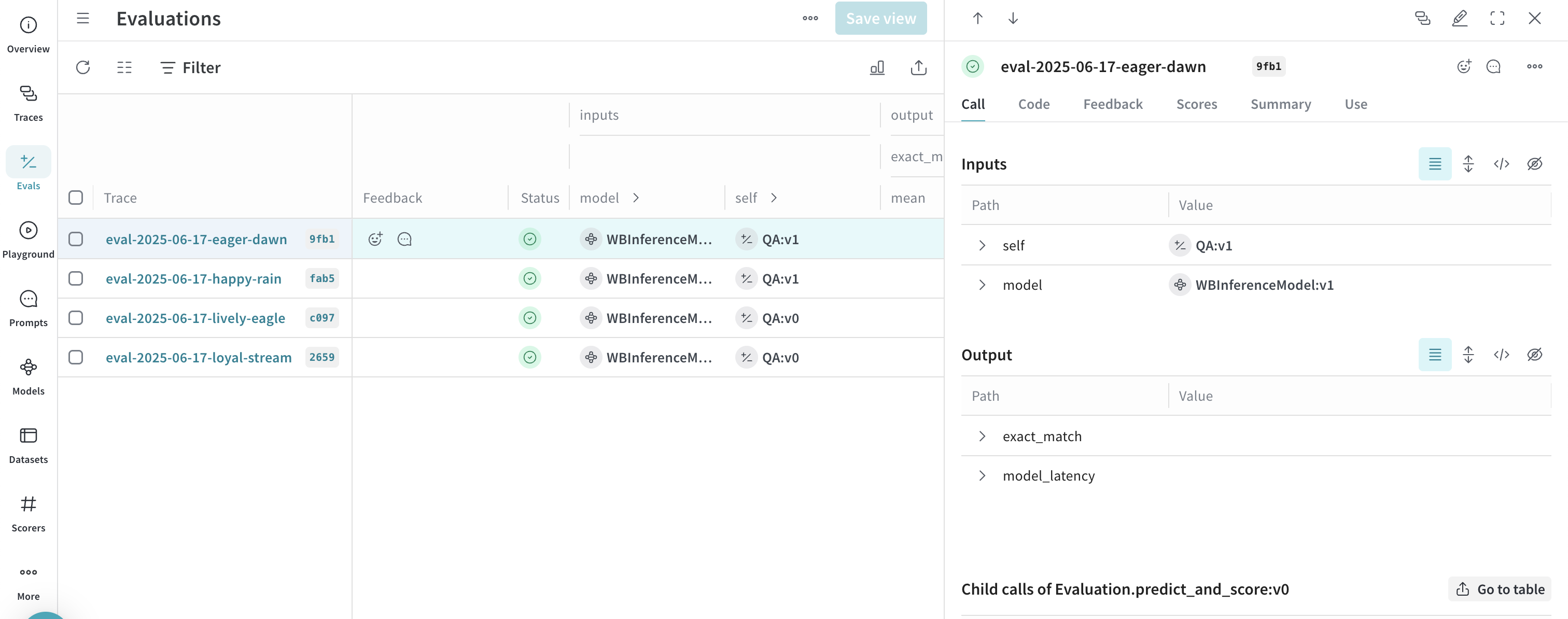
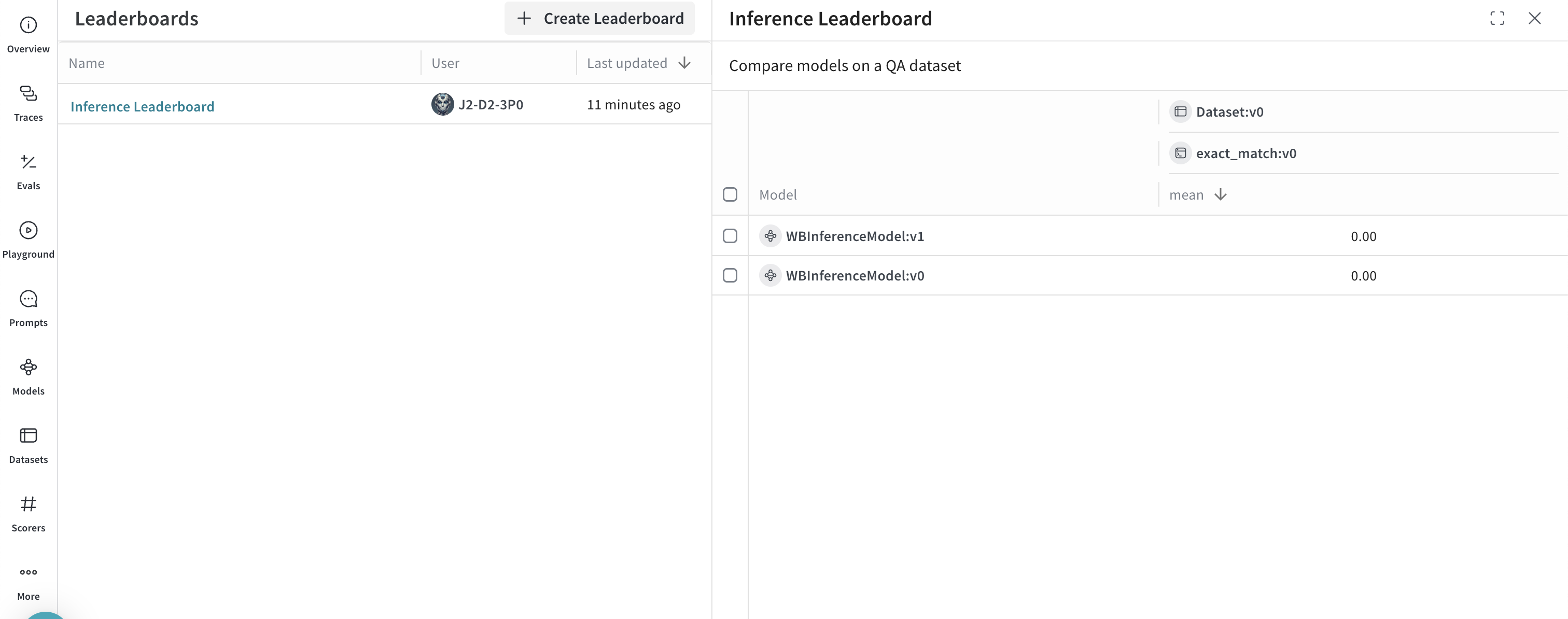
Besides tracing model calls, you can evaluate performance and publish leaderboards. This example compares two models on a question-answer dataset to show how Llama 3.1 8B and DeepSeek-V3 perform against the same prompts.
```python theme={null}
import os
import asyncio
import openai
import weave
from weave.flow import leaderboard
from weave.trace.ref_util import get_ref
# Set the Weave team and project for tracing
weave.init("[YOUR-TEAM]/[YOUR-PROJECT]")
dataset = [
{"input": "What is 2 + 2?", "target": "4"},
{"input": "Name a primary color.", "target": "red"},
]
@weave.op
def exact_match(target: str, output: str) -> float:
return float(target.strip().lower() == output.strip().lower())
class WBInferenceModel(weave.Model):
model: str
@weave.op
def predict(self, prompt: str) -> str:
client = openai.OpenAI(
base_url="https://api.inference.wandb.ai/v1",
# Create an API key at https://wandb.ai/settings
api_key="[YOUR-API-KEY]",
# Optional: Team and project for usage tracking
project="[YOUR-TEAM]/[YOUR-PROJECT]",
)
resp = client.chat.completions.create(
model=self.model,
messages=[{"role": "user", "content": prompt}],
)
return resp.choices[0].message.content
llama = WBInferenceModel(model="meta-llama/Llama-3.1-8B-Instruct")
deepseek = WBInferenceModel(model="deepseek-ai/DeepSeek-V3-0324")
def preprocess_model_input(example):
return {"prompt": example["input"]}
evaluation = weave.Evaluation(
name="QA",
dataset=dataset,
scorers=[exact_match],
preprocess_model_input=preprocess_model_input,
)
async def run_eval():
await evaluation.evaluate(llama)
await evaluation.evaluate(deepseek)
asyncio.run(run_eval())
spec = leaderboard.Leaderboard(
name="Inference Leaderboard",
description="Compare models on a QA dataset",
columns=[
leaderboard.LeaderboardColumn(
evaluation_object_ref=get_ref(evaluation).uri(),
scorer_name="exact_match",
summary_metric_path="mean",
)
],
)
weave.publish(spec)
```
After running this code, navigate to your W\&B account at [https://wandb.ai/](https://wandb.ai/) and do the following:
* Select the **Traces** tab to [view your traces](/weave/guides/tracking/tracing).
* Select the **Evals** tab to [view your model evaluations](/weave/guides/core-types/evaluations).
* Select the **Leaders** tab to [view the generated leaderboard](/weave/guides/core-types/leaderboards).
 After completing both examples, you have a set of traced model calls, a published evaluation, and a leaderboard comparing models on your dataset.
## Next steps
To continue exploring Serverless Inference, try the following:
* Explore the [API reference](/inference/api-reference/) for all available methods.
* Try models in the [UI](/inference/ui-guide/).
After completing both examples, you have a set of traced model calls, a published evaluation, and a leaderboard comparing models on your dataset.
## Next steps
To continue exploring Serverless Inference, try the following:
* Explore the [API reference](/inference/api-reference/) for all available methods.
* Try models in the [UI](/inference/ui-guide/).