> ## Documentation Index
> Fetch the complete documentation index at: https://docs.wandb.ai/llms.txt
> Use this file to discover all available pages before exploring further.
# レジストリへのアクセスを設定する
> ユーザーとチームを管理し、ロールを割り当て、ロールベースの権限を設定して、W&B Registry へのアクセスを設定します。
Registry 管理者は、レジストリの設定で、[Registry ロールを設定する](/ja/models/registry/configure_registry/#configure-registry-roles)、[ユーザーを追加する](/ja/models/registry/configure_registry/#add-a-user-or-a-team-to-a-registry)、または[ユーザーを削除する](/ja/models/registry/configure_registry/#remove-a-user-or-team-from-a-registry)ことができます。
## ユーザーの管理
### ユーザーまたはチームを追加する
Registry 管理者は、個々のユーザーまたはチーム全体を Registry に追加できます。Registry にユーザーまたはチームを追加するには、次の手順に従います。
1. W\&B Registry にアクセスします。
2. ユーザーまたはチームを追加する Registry を選択します。
3. 右上隅にある gear icon をクリックして、Registry 設定にアクセスします。
4. **Registry access** セクションで、**Add access** をクリックします。
5. **Include users and teams** フィールドに、1 つ以上のユーザー名、メールアドレス、またはチーム名を入力します。
6. **Add access** をクリックします。
[Registry でのユーザーロールの設定](/ja/models/registry/configure_registry/#configure-registry-roles) または [Registry ロールの権限](/ja/models/registry/configure_registry#role-permissions) について詳しくは、こちらを参照してください。
### ユーザーまたはチームを削除する
Registry 管理者は、レジストリから個々のユーザーまたは Teams 全体を削除できます。レジストリからユーザーまたはチームを削除するには、次の手順に従います。
1. [https://wandb.ai/registry/](https://wandb.ai/registry/) の W\&B Registry にアクセスします。
2. ユーザーを削除する対象のレジストリを選択します。
3. 右上隅の歯車アイコンをクリックして、Registry 設定にアクセスします。
4. **Registry access** セクションに移動し、削除するユーザー名、メールアドレス、またはチームを入力します。
5. **Delete** ボタンをクリックします。
チームからユーザーを削除すると、そのユーザーのレジストリへのアクセス権も削除されます。
### レジストリの所有者を変更する
Registry 管理者は、**Restricted Viewer** や **Viewer** を含む任意のメンバーをレジストリの所有者に指定できます。レジストリの所有権は主に責任の所在を明確にするためのもので、ユーザーに割り当てられたロールで付与される権限を超える追加の権限は付与されません。
所有者を変更するには:
1. [https://wandb.ai/registry/](https://wandb.ai/registry/) の W\&B Registry にアクセスします。
2. 設定するレジストリを選択します。
3. 右上にある歯車アイコンをクリックします。
4. **Registry members and roles** セクションまでスクロールします。
5. メンバーの行にカーソルを合わせます。
6. 行の末尾にある **action ()** メニューをクリックし、**Make owner** をクリックします。
## Registry ロールを設定する
このセクションでは、Registry メンバーのロールを設定する方法を説明します。各ロールの機能、優先順位、デフォルトなど、Registry ロールの詳細については、[Registry ロールの詳細](#details-about-registry-roles)を参照してください。
1. [https://wandb.ai/registry/](https://wandb.ai/registry/) の W\&B Registry にアクセスします。
2. 設定する Registry を選択します。
3. 右上にある歯車アイコンをクリックします。
4. **Registry members and roles** セクションまでスクロールします。
5. **Member** フィールドで、権限を編集するユーザーまたはチームを検索します。
6. **Registry role** 列で、ユーザーのロールをクリックします。
7. ドロップダウンから、ユーザーに割り当てるロールを選択します。
## Registry ロールの詳細
以下のセクションでは、Registry ロールについて詳しく説明します。
[チーム内でのロール](/ja/platform/app/settings-page/teams/#team-roles-and-permissions)は、いずれのレジストリでのロールにも影響せず、関連もありません。
### デフォルトロール
W\&B では、ユーザーまたはチームが Registry に追加されると、自動的にデフォルトの**Registry ロール**が割り当てられます。このロールによって、その Registry 内で実行できる操作が決まります。
| Entity | デフォルトの Registry ロール
(専用クラウド / セルフマネージド) | デフォルトの Registry ロール
(Multi-tenant Cloud) |
| ------------------------ | -------------------------------------------------------------------- | ---------------------------------------------------------- |
| チーム | Restricted Viewer (Server v0.75.0+)
Viewer (Server v0.74.x 以前) | Restricted Viewer |
| ユーザーまたはサービスアカウント (管理者以外) | Restricted Viewer (Server v0.75.0+)
Viewer (Server v0.74.x 以前) | Restricted Viewer |
| サービスアカウント (管理者以外) | Member1 | Member1 |
| 組織管理者 | Admin | Admin |
: サービスアカウントには **Viewer** または **Restricted Viewer** ロールを割り当てることはできません。サービスアカウントのアクセスがどのように決定されるかについては、[Service account access](#service-account-access) を参照してください。
Registry 管理者は、Registry 内の Users および Teams のロールを割り当てたり変更したりできます。
詳細については、[Registry でユーザーロールを設定する](/ja/models/registry/configure_registry/#configure-registry-roles) を参照してください。
### ロール権限
次の表は、各 Registry ロールと、それぞれのロールに付与される権限を示しています。
| 権限 | 権限グループ | Restricted Viewer
(Multi-tenant Cloud、招待制) | Viewer | Member | Admin |
| ---------------------------------------------------------------------------------------- | ------ | ----------------------------------------------- | :----: | :----: | :---: |
| collection の詳細を表示する | Read | ✓ | ✓ | ✓ | ✓ |
| リンクされた artifact の詳細を表示する | Read | ✓ | ✓ | ✓ | ✓ |
| Usage: `use_artifact` を使用して Registry 内の artifact を利用する | Read | | ✓ | ✓ | ✓ |
| リンクされた artifact をダウンロードする | Read | | ✓ | ✓ | ✓ |
| artifact のファイルビューアからファイルをダウンロードする | Read | | ✓ | ✓ | ✓ |
| Registry を検索する | Read | ✓ | ✓ | ✓ | ✓ |
| Registry の Settings とユーザー一覧を表示する | Read | ✓ | ✓ | ✓ | ✓ |
| collection の新しい automation を作成する | Create | | | ✓ | ✓ |
| 新しいバージョンが Added されたときの Slack notifications を有効にする | Create | | | ✓ | ✓ |
| 新しい collection を作成する | Create | | | ✓ | ✓ |
| 新しい Registry を作成する | Create | | | ✓ | ✓ |
| collection カード (説明) を編集する | Update | | | ✓ | ✓ |
| リンクされた artifact の説明を編集する | Update | | | ✓ | ✓ |
| collection のタグを追加または削除する | Update | | | ✓ | ✓ |
| リンクされた artifact のエイリアスを追加または削除する | Update | | | ✓ | ✓ |
| リンクされた artifact の [保護されたエイリアス](/ja/models/registry/aliases#protected-aliases) を追加または削除する | Update | | | | ✓ |
| [保護されたエイリアス](/ja/models/registry/aliases#protected-aliases) を作成または削除する | Update | | | | ✓ |
| 新しい artifact をリンクする | Update | | | ✓ | ✓ |
| Registry の許可されたタイプ一覧を編集する | Update | | | ✓ | ✓ |
| Registry 名を編集する | Update | | | ✓ | ✓ |
| collection を削除する | Delete | | | ✓ | ✓ |
| automation を削除する | Delete | | | ✓ | ✓ |
| Registry から artifact のリンクを解除する | Delete | | | ✓ | ✓ |
| Registry の Accepted artifact types を編集する | Admin | | | | ✓ |
| Registry の可視性 (Organization または Restricted) を変更する | Admin | | | | ✓ |
| Registry に Users を追加する | Admin | | | | ✓ |
| Registry 内のユーザーのロールを割り当てまたは変更する | Admin | | | | ✓ |
### 継承された Registry ロール
Registry のメンバーシップ一覧には、各ユーザーの継承された (有効な) Registry ロールが、各行のロールドロップダウンの横に薄いグレーで表示されます。
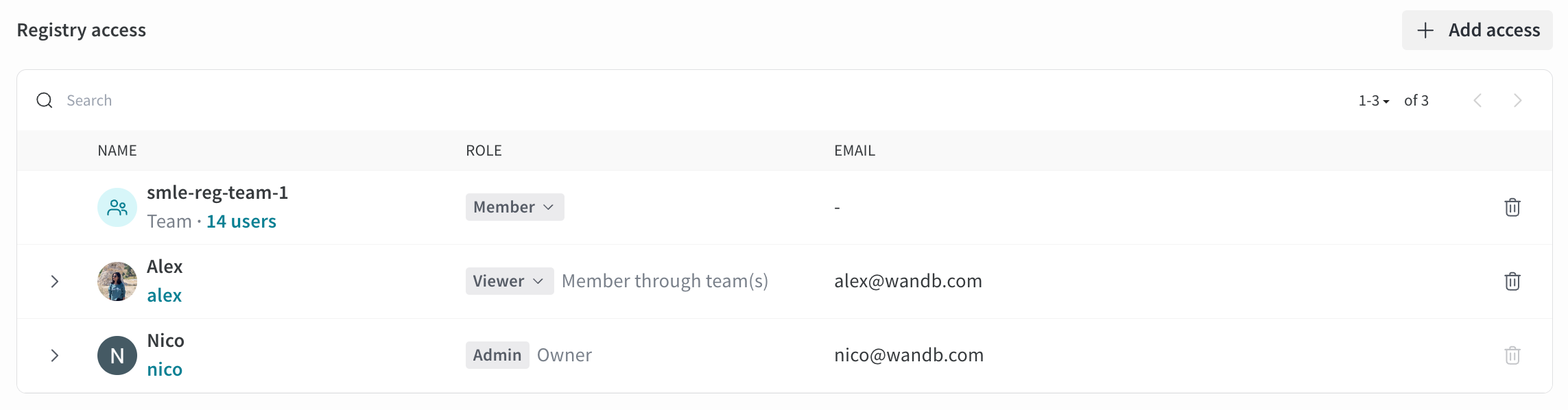 特定の Registry におけるユーザーの有効ロールは、継承によるものか明示的に割り当てられたものかを問わず、組織、Registry、その Registry を所有するチームで持つロールのうち、*最も高い* ロールになります。たとえば、次のとおりです。
* チームの **Admin** または組織の **Admin** が、チームが所有する特定の Registry で **Viewer** ロールを持っている場合、そのユーザーの Registry での実効ロールは **Admin** です。
* Registry の **Viewer** が、チームで **Member** ロールを持っている場合、そのユーザーの Registry での実効ロールは **Member** です。
* チームの **Viewer** が、特定の Registry で **Member** ロールを持っている場合、そのユーザーの Registry での実効ロールは **Member** です。
特定の Registry におけるユーザーの有効ロールは、継承によるものか明示的に割り当てられたものかを問わず、組織、Registry、その Registry を所有するチームで持つロールのうち、*最も高い* ロールになります。たとえば、次のとおりです。
* チームの **Admin** または組織の **Admin** が、チームが所有する特定の Registry で **Viewer** ロールを持っている場合、そのユーザーの Registry での実効ロールは **Admin** です。
* Registry の **Viewer** が、チームで **Member** ロールを持っている場合、そのユーザーの Registry での実効ロールは **Member** です。
* チームの **Viewer** が、特定の Registry で **Member** ロールを持っている場合、そのユーザーの Registry での実効ロールは **Member** です。
### Restricted Viewer ロールの詳細
**Restricted Viewer** ロールは一般提供 (GA) です。専用クラウドおよびセルフマネージドでは、Server v0.75.0 以降が必須です。
このロールでは、コレクション、自動化、その他の Registry リソースを作成、更新、削除することはできず、Registry 内の Artifacts に読み取り専用でアクセスできます。
**Viewer** とは異なり、**Restricted Viewer** では次のことはできません:
* artifact ファイルをダウンロードしたり、ファイルの内容にアクセスしたりできません。
* W\&B SDK で `wandb.Run.use_artifact()` を使用して artifact を利用できません。
#### SDK の互換性
**SDK バージョン要件**
**Restricted Viewer** として W\&B SDK を使用して artifact にアクセスするには、W\&B SDK バージョン 0.19.9 以降を使用する必要があります。そうしないと、一部の SDK コマンドで権限エラーが発生します。
**Restricted Viewer** が SDK を使用する場合、特定の function は利用できないか、動作が異なります。
次の method は利用できず、権限エラーが発生します。
* [`Run.use_artifact()`](/ja/models/ref/python/experiments/run/#method-runuse_artifact)
* [`Artifact.download()`](/ja/models/ref/python/experiments/artifact/#method-artifactdownload)
* [`Artifact.file()`](/ja/models/ref/python/experiments/artifact/#method-artifactfile)
* [`Artifact.files()`](/ja/models/ref/python/experiments/artifact/#method-artifactfiles)
次の method でアクセスできるのは artifact のメタデータのみです。
* [`Artifact.get_entry()`](/ja/models/ref/python/experiments/artifact/#method-artifactget_entry)
* [`Artifact.get_path()`](/ja/models/ref/python/experiments/artifact/#method-artifactget_path)
* [`Artifact.get()`](/ja/models/ref/python/experiments/artifact/#method-artifactget)
* [`Artifact.verify()`](/ja/models/ref/python/experiments/artifact/#method-artifactverify)
### Registry 間の権限
1 人のユーザーが、複数の Registry でそれぞれ異なるロールを持つことがあります。たとえば、あるユーザーは Registry A では **Restricted Viewer** で、Registry B では **Viewer** である場合があります。この場合:
* 両方の Registry にリンクされている同じ artifact でも、アクセスレベルは異なります
* Registry A では、そのユーザーは **Restricted Viewer** であるため、ファイルをダウンロードしたり artifact を使用したりできません
* Registry B では、そのユーザーは **Viewer** であるため、ファイルをダウンロードして artifact を使用できます
* つまり、アクセス権は artifact にアクセスした Registry によって決まります