> ## Documentation Index
> Fetch the complete documentation index at: https://docs.wandb.ai/llms.txt
> Use this file to discover all available pages before exploring further.
> Sweeps のクイックスタートでは、sweep を定義し、初期化して実行する方法を紹介します。主な ステップは 4 つあります
# チュートリアル: sweep の定義、初期化、実行
このページでは、sweep を定義し、初期化して実行する方法を紹介します。主なステップは 4 つあります。
1. [トレーニングコードを設定する](#set-up-your-training-code)
2. [sweep 設定で探索空間を定義する](#define-the-search-space-with-a-sweep-configuration)
3. [sweep を初期化する](#initialize-the-sweep)
4. [sweep エージェントを起動する](#start-the-sweep)
以下のコードを Jupyter Notebook または Python スクリプトにコピー&ペーストしてください。
```python theme={null}
# W&B Python ライブラリをインポートして W&B にログインする
import wandb
# 1: 目的関数/トレーニング関数を定義する
def objective(config):
score = config.x**3 + config.y
return score
def main():
with wandb.init(project="my-first-sweep") as run:
score = objective(run.config)
run.log({"score": score})
# 2: 探索空間を定義する
sweep_configuration = {
"method": "random",
"metric": {"goal": "minimize", "name": "score"},
"parameters": {
"x": {"max": 0.1, "min": 0.01},
"y": {"values": [1, 3, 7]},
},
}
# 3: sweep を開始する
sweep_id = wandb.sweep(sweep=sweep_configuration, project="my-first-sweep")
wandb.agent(sweep_id, function=main, count=10)
```
以下のセクションでは、コードサンプルの各stepを分けて説明します。
## トレーニングコードを設定する
`wandb.Run.config` からハイパーパラメーターの値を受け取り、それらを使用してモデルをトレーニングし、メトリクスを返すトレーニング関数を定義します。
必要に応じて、W\&B run の出力を保存するプロジェクト名を指定します ([`wandb.init()`](/ja/models/ref/python/functions/init) の project パラメーター) 。プロジェクトを指定しない場合、run は "Uncategorized" プロジェクトに配置されます。
sweep と run は、どちらも同じプロジェクト内に存在する必要があります。そのため、W\&B の初期化時に指定する名前は、sweep の初期化時に指定するプロジェクト名と一致している必要があります。
```python theme={null}
# 1: 目的関数/トレーニング関数を定義する
def objective(config):
score = config.x**3 + config.y
return score
def main():
with wandb.init(project="my-first-sweep") as run:
score = objective(run.config)
run.log({"score": score})
```
## sweep 設定で探索空間を定義する
辞書で、sweep 対象のハイパーパラメーターを指定します。設定オプションについては、[sweep 設定を定義する](/ja/models/sweeps/define-sweep-configuration/)を参照してください。
次の例は、ランダムサーチ (`'method':'random'`) を使用する sweep 設定を示しています。この sweep では、バッチサイズ、エポック、学習率について、設定に列挙された値の組み合わせからランダムに選択されます。
`metric` キーに `"goal": "minimize"` が関連付けられている場合、W\&B はそのキーで指定されたメトリクスを最小化します。この場合、W\&B はメトリクス `score` (`"name": "score"`) が最小になるように最適化します。
```python theme={null}
# 2: 探索空間を定義する
sweep_configuration = {
"method": "random",
"metric": {"goal": "minimize", "name": "score"},
"parameters": {
"x": {"max": 0.1, "min": 0.01},
"y": {"values": [1, 3, 7]},
},
}
```
## Sweep を初期化する
W\&B では、*Sweep Controller* を使用して、クラウド (standard) またはローカル (local) で、1 台以上のマシンにまたがる sweep を管理します。Sweep Controller の詳細については、[ローカルでアルゴリズムを検索および停止する](./local-controller)を参照してください。
sweep を初期化すると、sweep の識別番号が返されます。
```python theme={null}
sweep_id = wandb.sweep(sweep=sweep_configuration, project="my-first-sweep")
```
sweeps の初期化について詳しくは、[sweeps を初期化する](./initialize-sweeps) を参照してください。
## sweep を開始する
sweep を開始するには、[`wandb.agent()`](/ja/models/ref/python/functions/agent) の API call を使用します。
```python theme={null}
wandb.agent(sweep_id, function=main, count=10)
```
**マルチプロセシング**
Python 標準ライブラリの `multiprocessing` または PyTorch の `pytorch.multiprocessing` パッケージを使用する場合は、`wandb.agent()` と `wandb.sweep()` の呼び出しを `if __name__ == '__main__':` で囲む必要があります。例:
```python theme={null}
if __name__ == '__main__':
wandb.agent(sweep_id="", function="", count="")
```
このようにコードを囲むことで、そのコードはスクリプトを直接実行した場合にのみ実行され、ワーカープロセスでモジュールとして import された場合には実行されません。
マルチプロセシングの詳細については、[Python 標準ライブラリの `multiprocessing`](https://docs.python.org/3/library/multiprocessing.html#the-spawn-and-forkserver-start-methods) または [PyTorch の `multiprocessing`](https://docs.pytorch.org/docs/stable/notes/multiprocessing.html#asynchronous-multiprocess-training-e-g-hogwild) を参照してください。`if __name__ == '__main__':` の慣例については、[https://realpython.com/if-name-main-python/](https://realpython.com/if-name-main-python/) を参照してください。
## 結果を可視化する (任意)
プロジェクトを開いて、W\&B Appのダッシュボードでリアルタイムの結果を確認します。数回クリックするだけで、[平行座標プロット](/ja/models/app/features/panels/parallel-coordinates/)、[パラメーター重要度分析](/ja/models/app/features/panels/parameter-importance/)、[そのほかのチャートタイプ](/ja/models/app/features/panels/)などの、豊富でインタラクティブなチャートを作成できます。
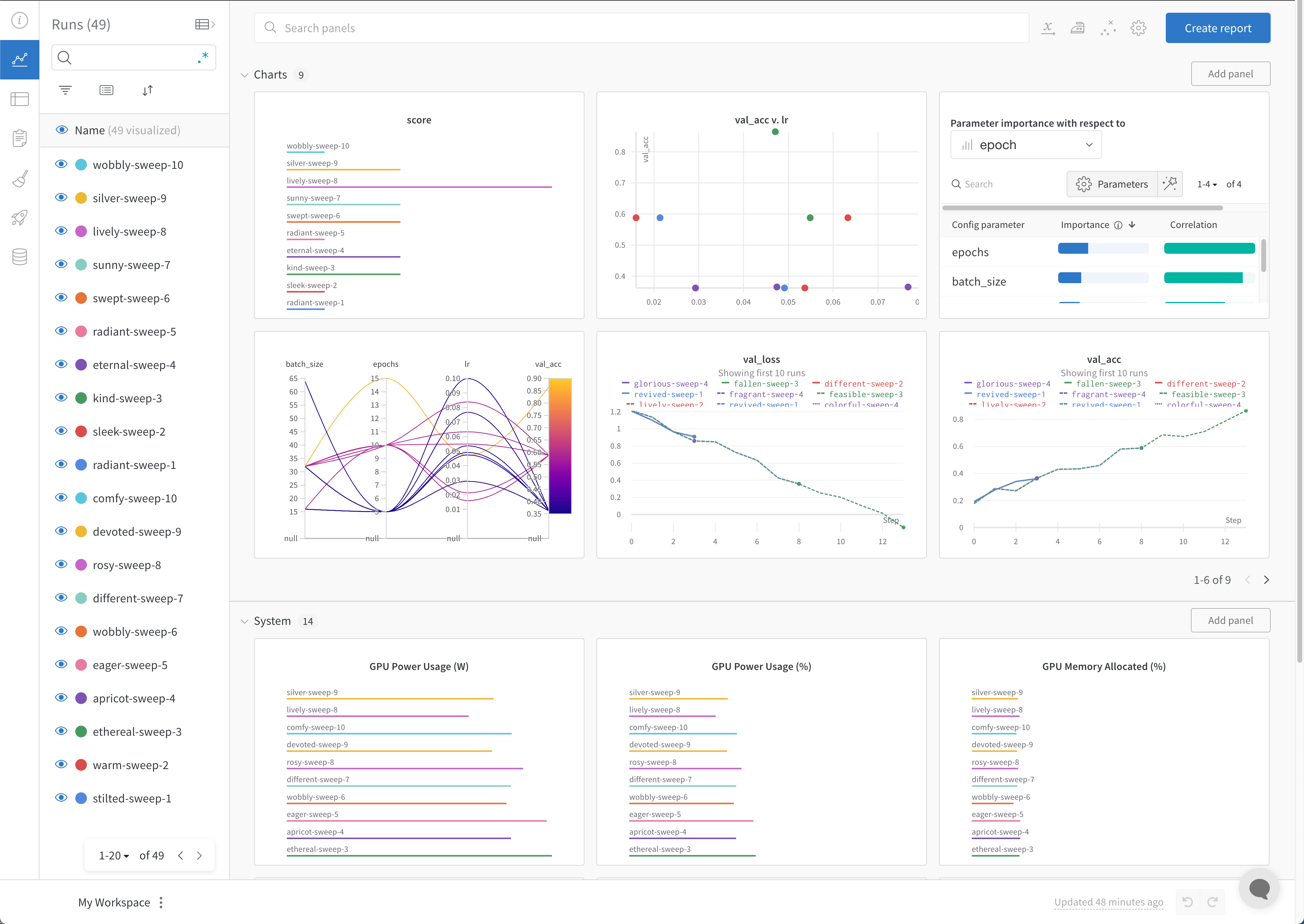 結果の可視化方法の詳細については、[sweep の結果を可視化する](./visualize-sweep-results)を参照してください。ダッシュボードの例については、このサンプルの[Sweeps プロジェクト](https://wandb.ai/anmolmann/pytorch-cnn-fashion/sweeps/pmqye6u3)を参照してください。
## エージェントを停止する (任意)
ターミナルで `Ctrl+C` を押すと、現在の run を停止できます。もう一度押すと、エージェントが終了します。