> ## Documentation Index
> Fetch the complete documentation index at: https://docs.wandb.ai/llms.txt
> Use this file to discover all available pages before exploring further.

# ローカルインスタンスで問題が発生した場合、どのファイルを確認すればよいですか？

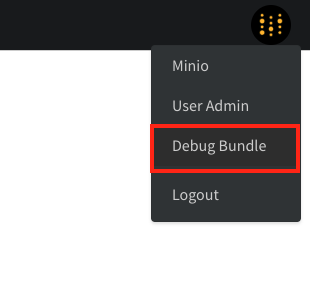
W\&B のローカルインスタンスで問題をトラブルシューティングする場合は、まず **Debug Bundle** を収集してください。このバンドルには、問題の診断に必要なログとシステム情報が含まれています。

バンドルをダウンロードするには、管理者が `/system-admin` ページを開き、画面右上の W\&B アイコンを選択してから、**Debug Bundle** を選びます。
<Frame>
  <img src="https://mintcdn.com/wb-21fd5541/6bJLb4DIApn2yeFO/images/technical_faq/debug_bundle.png?fit=max&auto=format&n=6bJLb4DIApn2yeFO&q=85&s=0ad51c530dde495b9dd3b089ab38989b" alt="Debug Bundle のダウンロード" width="310" height="302" data-path="images/technical_faq/debug_bundle.png" />
</Frame>

<Frame>
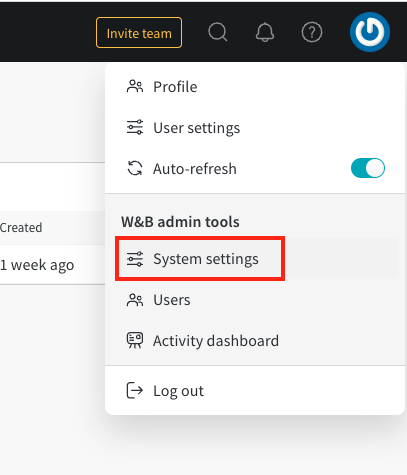
  <img src="https://mintcdn.com/wb-21fd5541/6bJLb4DIApn2yeFO/images/technical_faq/local_system_settings.png?fit=max&auto=format&n=6bJLb4DIApn2yeFO&q=85&s=041cfc896c8e8e8fb6d169caab8c1aed" alt="システム設定" width="407" height="475" data-path="images/technical_faq/local_system_settings.png" />
</Frame>

***

<Badge stroke shape="pill" color="orange" size="md">[管理者](/ja/support/models/tags/administrator)</Badge>