> ## Documentation Index
> Fetch the complete documentation index at: https://docs.wandb.ai/llms.txt
> Use this file to discover all available pages before exploring further.
# Chain Of Density
> W&B Weave を使用して、反復的なテキスト圧縮と評価のための chain-of-density 要約手法を実装します。
これはインタラクティブ ノートブックです。ローカルで実行することも、以下のリンクを使用することもできます。
* [Google Colab で開く](https://colab.research.google.com/github/wandb/docs/blob/main/weave/cookbooks/source/chain_of_density.ipynb)
* [GitHub でソースを表示](https://github.com/wandb/docs/blob/main/weave/cookbooks/source/chain_of_density.ipynb)
重要な詳細を維持したまま複雑な技術文書を要約するのは、容易ではありません。Chain of Density (CoD) 要約手法は、要約を繰り返し改善して、より簡潔で情報密度の高いものにすることで、この課題に対応します。このガイドでは、Weave を使用してアプリケーションをトラッキングおよび評価しながら、CoD を実装する方法を説明します。
## Chain of Density要約とは
[](https://arxiv.org/abs/2309.04269)
Chain of Density (CoD) は、反復的に要約を洗練しながら、より簡潔で情報密度の高い要約を生成する手法です。具体的には、次のように機能します。
1. 最初の要約から始めます
2. 重要な情報を維持したまま、要約を反復的に洗練して、より簡潔にします
3. 反復のたびに、Entities と技術的な詳細の密度を高めます
このアプローチは、詳細な情報の保持が重要な科学論文や技術文書の要約に特に適しています。
## Weave を使用する理由
このチュートリアルでは、Weave を使用して ArXiv 論文向けの Chain of Density 要約パイプラインを実装・評価します。以下の内容を学習します:
* **LLM パイプラインのトラッキング**: Weave を使用して、要約プロセスの入力、出力、および中間ステップを自動的にログします。
* **LLM 出力の評価**: Weave の組み込みツールを使用して、要約の一貫した評価を作成します。
* **コンポーザブルなオペレーションの構築**: Weave のオペレーションを要約パイプラインのさまざまな部分で組み合わせて再利用します。
* **既存コードへの統合**: 最小限のオーバーヘッドで既存の Python コードに Weave を追加します。
このチュートリアルを完了すると、モデルサービング、評価、および結果のトラッキングに Weave の機能を活用した CoD 要約パイプラインが完成します。
## 環境を設定する
まず、環境を設定し、必要なライブラリをインポートします。このステップでは、パイプラインに必要な依存関係をインストールします。これには、トラッキング用のWeave、LLM用のAnthropic、ArXivのPDFを読み込むためのPyPDF2が含まれます。
```python lines theme={null}
!pip install -qU anthropic weave pydantic requests PyPDF2 set-env-colab-kaggle-dotenv
```
パイプラインはAnthropicのClaudeモデルを呼び出すため、次のコードを実行する前にAnthropicのAPIキーが必要です。
> AnthropicのAPIキーを取得するには、次の手順に従います。
>
> 1. [https://www.anthropic.com](https://www.anthropic.com) でアカウントを作成します。
> 2. アカウント設定のAPIセクションにアクセスします。
> 3. 新しいAPIキーを生成します。
> 4. APIキーを `.env` ファイルに安全に保存します。
```python lines theme={null}
import io
import os
from datetime import datetime, timezone
import anthropic
import requests
from pydantic import BaseModel
from PyPDF2 import PdfReader
from set_env import set_env
import weave
set_env("WANDB_API_KEY")
set_env("ANTHROPIC_API_KEY")
weave.init("summarization-chain-of-density-cookbook")
anthropic_client = anthropic.Anthropic(api_key=os.getenv("ANTHROPIC_API_KEY"))
```
このコードでは、実験のトラッキングにはWeaveを使用し、テキスト生成にはAnthropicのClaudeモデルを使用します。`weave.init([PROJECT_NAME])`を呼び出すと、要約タスク用の新しいWeave projectが設定されます。
## ArxivPaper モデルを定義する
環境の準備ができたので、次のステップでは、パイプラインが扱うデータ構造を定義します。データを表現するために、`ArxivPaper` クラスを作成します。
```python lines theme={null}
# ArxivPaper モデルを定義する
class ArxivPaper(BaseModel):
entry_id: str
updated: datetime
published: datetime
title: str
authors: list[str]
summary: str
pdf_url: str
# ArxivPaper のサンプルを作成する
arxiv_paper = ArxivPaper(
entry_id="http://arxiv.org/abs/2406.04744v1",
updated=datetime(2024, 6, 7, 8, 43, 7, tzinfo=timezone.utc),
published=datetime(2024, 6, 7, 8, 43, 7, tzinfo=timezone.utc),
title="CRAG -- Comprehensive RAG Benchmark",
authors=["Xiao Yang", "Kai Sun", "Hao Xin"], # 簡略化のため省略
summary="Retrieval-Augmented Generation (RAG) has recently emerged as a promising solution...", # 省略
pdf_url="https://arxiv.org/pdf/2406.04744",
)
```
このクラスは、要約パイプラインへの入力となる ArXiv 論文のメタデータと本文をまとめて保持します。
## PDF コンテンツを読み込む
`ArxivPaper` モデルにはメタデータと PDF の URL が含まれていますが、要約パイプラインでは論文の全文が必要です。論文の全文を扱うには、PDF からテキストを読み込んで抽出する関数を追加します。
```python lines theme={null}
@weave.op()
def load_pdf(pdf_url: str) -> str:
# PDFをダウンロードする
response = requests.get(pdf_url)
pdf_file = io.BytesIO(response.content)
# PDFを読み込む
pdf_reader = PdfReader(pdf_file)
# 全ページからテキストを抽出する
text = ""
for page in pdf_reader.pages:
text += page.extract_text()
return text
```
## Chain of Density要約を実装する
次に、Weaveオペレーションを使用して、CoD要約の中核となるロジックを実装します。
 ```python lines theme={null}
# Chain of Density Summarization
@weave.op()
def summarize_current_summary(
document: str,
instruction: str,
current_summary: str = "",
iteration: int = 1,
model: str = "claude-3-sonnet-20240229",
):
prompt = f"""
Document: {document}
Current summary: {current_summary}
Instruction to focus on: {instruction}
Iteration: {iteration}
Generate an increasingly concise, entity-dense, and highly technical summary from the provided document that specifically addresses the given instruction.
"""
response = anthropic_client.messages.create(
model=model, max_tokens=4096, messages=[{"role": "user", "content": prompt}]
)
return response.content[0].text
@weave.op()
def iterative_density_summarization(
document: str,
instruction: str,
current_summary: str,
density_iterations: int,
model: str = "claude-3-sonnet-20240229",
):
iteration_summaries = []
for iteration in range(1, density_iterations + 1):
current_summary = summarize_current_summary(
document, instruction, current_summary, iteration, model
)
iteration_summaries.append(current_summary)
return current_summary, iteration_summaries
@weave.op()
def final_summary(
instruction: str, current_summary: str, model: str = "claude-3-sonnet-20240229"
):
prompt = f"""
Given this summary: {current_summary}
And this instruction to focus on: {instruction}
Create an extremely dense, final summary that captures all key technical information in the most concise form possible, while specifically addressing the given instruction.
"""
return (
anthropic_client.messages.create(
model=model, max_tokens=4096, messages=[{"role": "user", "content": prompt}]
)
.content[0]
.text
)
@weave.op()
def chain_of_density_summarization(
document: str,
instruction: str,
current_summary: str = "",
model: str = "claude-3-sonnet-20240229",
density_iterations: int = 2,
):
current_summary, iteration_summaries = iterative_density_summarization(
document, instruction, current_summary, density_iterations, model
)
final_summary_text = final_summary(instruction, current_summary, model)
return {
"final_summary": final_summary_text,
"accumulated_summary": current_summary,
"iteration_summaries": iteration_summaries,
}
```
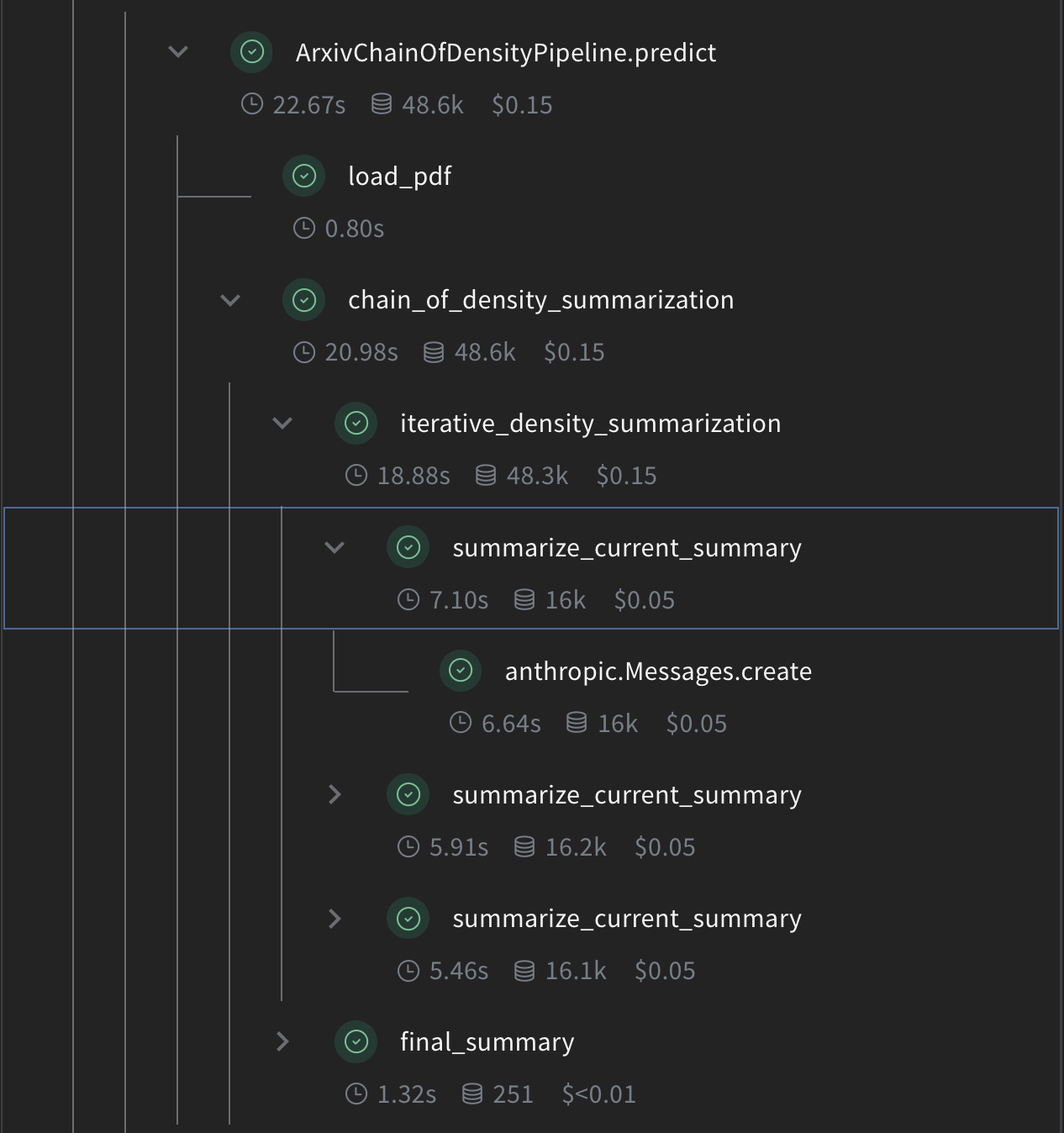
各関数の役割は次のとおりです。
* `summarize_current_summary`: 現在の状態に基づいて、要約の1回分の反復を生成します。
* `iterative_density_summarization`: `summarize_current_summary` を複数回呼び出して CoD 手法を適用します。
* `chain_of_density_summarization`: 要約プロセス全体を統括し、結果を返します。
`@weave.op()` デコレータにより、Weave はこれらの関数の入力、出力、および実行をトラッキングします。
```python lines theme={null}
# Chain of Density Summarization
@weave.op()
def summarize_current_summary(
document: str,
instruction: str,
current_summary: str = "",
iteration: int = 1,
model: str = "claude-3-sonnet-20240229",
):
prompt = f"""
Document: {document}
Current summary: {current_summary}
Instruction to focus on: {instruction}
Iteration: {iteration}
Generate an increasingly concise, entity-dense, and highly technical summary from the provided document that specifically addresses the given instruction.
"""
response = anthropic_client.messages.create(
model=model, max_tokens=4096, messages=[{"role": "user", "content": prompt}]
)
return response.content[0].text
@weave.op()
def iterative_density_summarization(
document: str,
instruction: str,
current_summary: str,
density_iterations: int,
model: str = "claude-3-sonnet-20240229",
):
iteration_summaries = []
for iteration in range(1, density_iterations + 1):
current_summary = summarize_current_summary(
document, instruction, current_summary, iteration, model
)
iteration_summaries.append(current_summary)
return current_summary, iteration_summaries
@weave.op()
def final_summary(
instruction: str, current_summary: str, model: str = "claude-3-sonnet-20240229"
):
prompt = f"""
Given this summary: {current_summary}
And this instruction to focus on: {instruction}
Create an extremely dense, final summary that captures all key technical information in the most concise form possible, while specifically addressing the given instruction.
"""
return (
anthropic_client.messages.create(
model=model, max_tokens=4096, messages=[{"role": "user", "content": prompt}]
)
.content[0]
.text
)
@weave.op()
def chain_of_density_summarization(
document: str,
instruction: str,
current_summary: str = "",
model: str = "claude-3-sonnet-20240229",
density_iterations: int = 2,
):
current_summary, iteration_summaries = iterative_density_summarization(
document, instruction, current_summary, density_iterations, model
)
final_summary_text = final_summary(instruction, current_summary, model)
return {
"final_summary": final_summary_text,
"accumulated_summary": current_summary,
"iteration_summaries": iteration_summaries,
}
```
各関数の役割は次のとおりです。
* `summarize_current_summary`: 現在の状態に基づいて、要約の1回分の反復を生成します。
* `iterative_density_summarization`: `summarize_current_summary` を複数回呼び出して CoD 手法を適用します。
* `chain_of_density_summarization`: 要約プロセス全体を統括し、結果を返します。
`@weave.op()` デコレータにより、Weave はこれらの関数の入力、出力、および実行をトラッキングします。
## Weave Model を作成する
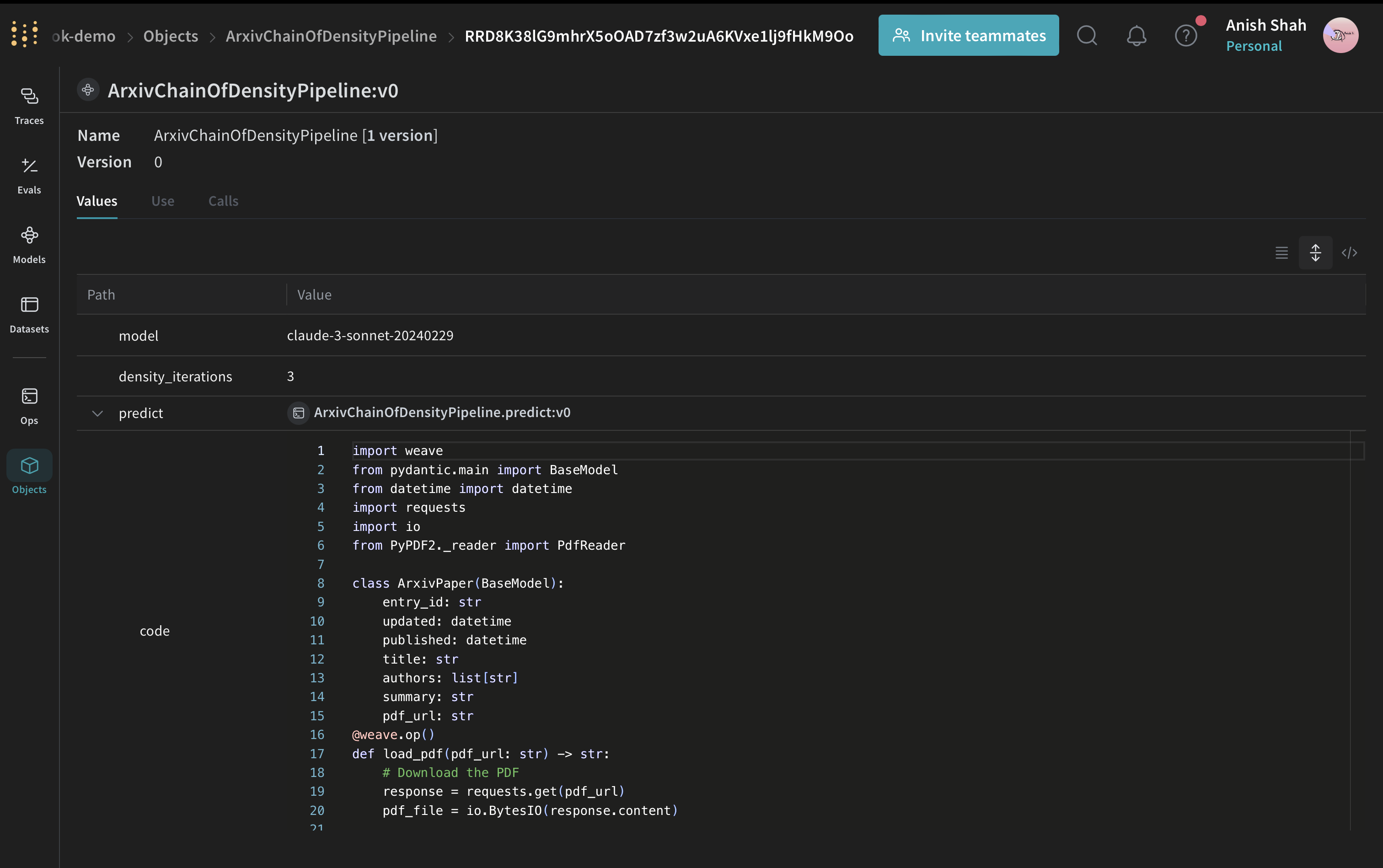
要約関数の準備ができたら、次のステップは、それらを Weave Model としてパッケージ化し、runs、parameters、versions をまとめてトラッキングできるようにすることです。それでは、要約パイプラインを Weave Model としてラップします。
 ```python lines theme={null}
# Weave Model
class ArxivChainOfDensityPipeline(weave.Model):
model: str = "claude-3-sonnet-20240229"
density_iterations: int = 3
@weave.op()
def predict(self, paper: ArxivPaper, instruction: str) -> dict:
text = load_pdf(paper.pdf_url)
result = chain_of_density_summarization(
text,
instruction,
model=self.model,
density_iterations=self.density_iterations,
)
return result
```
この `ArxivChainOfDensityPipeline` クラスは、要約ロジックを Weave Model としてカプセル化しており、次のような主な利点があります。
* 自動的な実験管理: Weave は、モデルの各 run について 入力、出力、parameters を取得します。
* バージョン管理: モデルの属性やコードへの変更は自動的にバージョン管理されるため、要約パイプラインが時間とともにどのように変化したかを明確に追跡できます。
* 再現性: バージョン管理とトラッキングにより、要約パイプラインの過去の結果や設定を再現できます。
* ハイパーパラメーター管理: モデルの属性 (`model` や `density_iterations` など) は明確に定義され、異なる Runs 間でトラッキングされるため、実験を進めやすくなります。
* Weave エコシステムとのインテグレーション: `weave.Model` を使用すると、評価やサービング機能など、他の Weave ツールと連携できます。
```python lines theme={null}
# Weave Model
class ArxivChainOfDensityPipeline(weave.Model):
model: str = "claude-3-sonnet-20240229"
density_iterations: int = 3
@weave.op()
def predict(self, paper: ArxivPaper, instruction: str) -> dict:
text = load_pdf(paper.pdf_url)
result = chain_of_density_summarization(
text,
instruction,
model=self.model,
density_iterations=self.density_iterations,
)
return result
```
この `ArxivChainOfDensityPipeline` クラスは、要約ロジックを Weave Model としてカプセル化しており、次のような主な利点があります。
* 自動的な実験管理: Weave は、モデルの各 run について 入力、出力、parameters を取得します。
* バージョン管理: モデルの属性やコードへの変更は自動的にバージョン管理されるため、要約パイプラインが時間とともにどのように変化したかを明確に追跡できます。
* 再現性: バージョン管理とトラッキングにより、要約パイプラインの過去の結果や設定を再現できます。
* ハイパーパラメーター管理: モデルの属性 (`model` や `density_iterations` など) は明確に定義され、異なる Runs 間でトラッキングされるため、実験を進めやすくなります。
* Weave エコシステムとのインテグレーション: `weave.Model` を使用すると、評価やサービング機能など、他の Weave ツールと連携できます。
## 評価メトリクスを実装する
パイプラインで要約を生成できるようになったので、その品質を体系的に測定する方法が必要です。要約の品質を評価するために、シンプルな評価メトリクスを実装します:
```python lines theme={null}
import json
@weave.op()
def evaluate_summary(
summary: str, instruction: str, model: str = "claude-3-sonnet-20240229"
) -> dict:
prompt = f"""
Summary: {summary}
Instruction: {instruction}
Evaluate the summary based on the following criteria:
1. Relevance (1-5): How well does the summary address the given instruction?
2. Conciseness (1-5): How concise is the summary while retaining key information?
3. Technical Accuracy (1-5): How accurately does the summary convey technical details?
Your response MUST be in the following JSON format:
{{
"relevance": {{
"score": ,
"explanation": ""
}},
"conciseness": {{
"score": ,
"explanation": ""
}},
"technical_accuracy": {{
"score": ,
"explanation": ""
}}
}}
Ensure that the scores are integers between 1 and 5, and that the explanations are concise.
"""
response = anthropic_client.messages.create(
model=model, max_tokens=1000, messages=[{"role": "user", "content": prompt}]
)
print(response.content[0].text)
eval_dict = json.loads(response.content[0].text)
return {
"relevance": eval_dict["relevance"]["score"],
"conciseness": eval_dict["conciseness"]["score"],
"technical_accuracy": eval_dict["technical_accuracy"]["score"],
"average_score": sum(eval_dict[k]["score"] for k in eval_dict) / 3,
"evaluation_text": response.content[0].text,
}
```
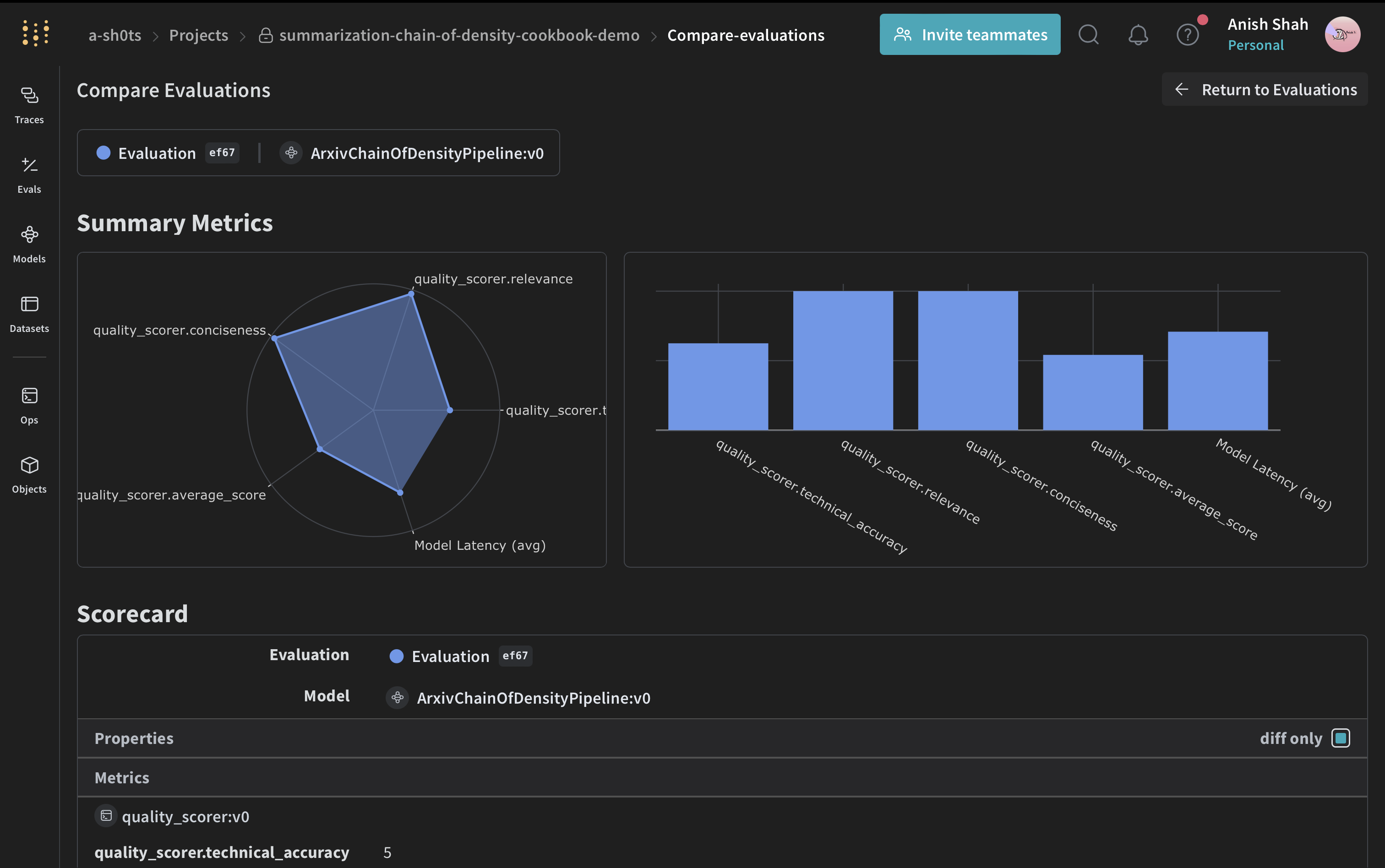
これらの評価関数では、関連性、簡潔さ、技術的な正確性の観点から生成された要約の品質を評価するために、Claude モデルを使用します。
## Weave データセットを作成して評価を実行する
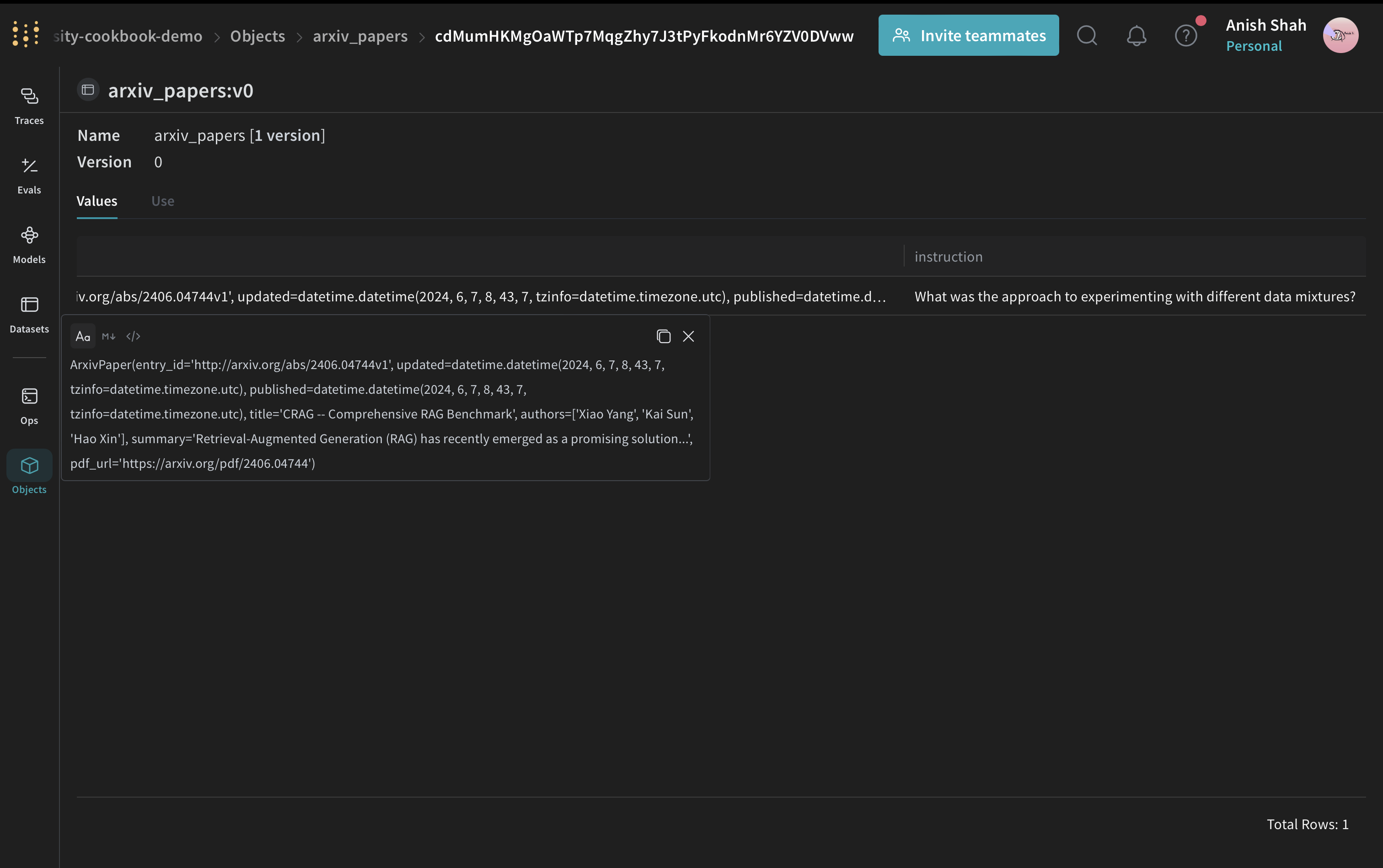
スコアリング関数が定義されたので、最後のステップはそれをサンプル入力に適用して評価を実行することです。パイプラインを評価するには、Weave データセットを作成して評価を実行します。
 ```python lines theme={null}
# Weave Datasetを作成する
dataset = weave.Dataset(
name="arxiv_papers",
rows=[
{
"paper": arxiv_paper,
"instruction": "What was the approach to experimenting with different data mixtures?",
},
],
)
weave.publish(dataset)
```
評価には、LLM-as-a-judge アプローチを使用します。この手法では、言語モデルを用いて、別のモデルまたはシステムが生成した出力の品質を評価します。LLM の理解力と推論能力を活用することで、特に従来のメトリクスでは十分に測れないタスクに対して、よりきめ細かな評価を行えます。
[](https://arxiv.org/abs/2306.05685)
```python lines theme={null}
# Scorer関数を定義する
@weave.op()
def quality_scorer(instruction: str, output: dict) -> dict:
result = evaluate_summary(output["final_summary"], instruction)
return result
```
```python lines theme={null}
# 評価を実行する
evaluation = weave.Evaluation(dataset=dataset, scorers=[quality_scorer])
arxiv_chain_of_density_pipeline = ArxivChainOfDensityPipeline()
results = await evaluation.evaluate(arxiv_chain_of_density_pipeline)
```
このコードでは、サンプルのArXiv論文を含むデータセットを作成し、品質を評価するScorerを定義して、要約パイプラインの評価を実行します。
```python lines theme={null}
# Weave Datasetを作成する
dataset = weave.Dataset(
name="arxiv_papers",
rows=[
{
"paper": arxiv_paper,
"instruction": "What was the approach to experimenting with different data mixtures?",
},
],
)
weave.publish(dataset)
```
評価には、LLM-as-a-judge アプローチを使用します。この手法では、言語モデルを用いて、別のモデルまたはシステムが生成した出力の品質を評価します。LLM の理解力と推論能力を活用することで、特に従来のメトリクスでは十分に測れないタスクに対して、よりきめ細かな評価を行えます。
[](https://arxiv.org/abs/2306.05685)
```python lines theme={null}
# Scorer関数を定義する
@weave.op()
def quality_scorer(instruction: str, output: dict) -> dict:
result = evaluate_summary(output["final_summary"], instruction)
return result
```
```python lines theme={null}
# 評価を実行する
evaluation = weave.Evaluation(dataset=dataset, scorers=[quality_scorer])
arxiv_chain_of_density_pipeline = ArxivChainOfDensityPipeline()
results = await evaluation.evaluate(arxiv_chain_of_density_pipeline)
```
このコードでは、サンプルのArXiv論文を含むデータセットを作成し、品質を評価するScorerを定義して、要約パイプラインの評価を実行します。
## 結論
この例では、Weave を使って ArXiv 論文向けの Chain of Density の要約パイプラインを実装する方法を紹介しました。以下を学びました。
* 要約プロセスの各ステップに対応する Weave オペレーションを作成する
* トラッキングと評価のために、パイプラインを Weave Model でラップする
* Weave オペレーションを使用してカスタム評価メトリクスを実装する
* データセットを作成し、パイプラインの評価を実施する
Weave は要約プロセス全体を通じて入力、出力、中間ステップをトラッキングするため、LLM アプリケーションのデバッグ、最適化、評価が容易になります。
この例は、より大規模なデータセットに対応させたり、より高度な評価メトリクスを実装したり、ほかの LLM ワークフローと統合したりするように拡張できます。
W\&B で full report を表示