> ## Documentation Index
> Fetch the complete documentation index at: https://docs.wandb.ai/llms.txt
> Use this file to discover all available pages before exploring further.
# Not Diamond カスタムルーティング
> W&B Weave で Not Diamond のカスタムルーティングを使用する方法を学びます
これはインタラクティブなノートブックです。ローカルで実行するか、次のリンクを使用できます:
* [Google Colab で開く](https://colab.research.google.com/github/wandb/docs/blob/main/weave/cookbooks/source/notdiamond_custom_routing.ipynb)
* [GitHub でソースを表示](https://github.com/wandb/docs/blob/main/weave/cookbooks/source/notdiamond_custom_routing.ipynb)
このノートブックでは、[Not Diamond のカスタムルーティング](https://docs.notdiamond.ai/docs/router-training-quickstart)と Weave を組み合わせて使用し、評価結果に基づいて LLM の prompt を最適なモデルにルーティングする方法を紹介します。これにより、コーディング向け prompt 用のカスタムルーターをトレーニングし、それを使って新しい prompt の対象モデルを選択し、そのパフォーマンスを最も優れた単一モデルと比較して評価できるようになります。
## プロンプトのルーティング
このセクションでは、複数の LLM を扱う際にカスタムルーティングが有用である理由を説明します。
複雑な LLM ワークフローを構築する際、ユーザーは精度、コスト、または call レイテンシに応じて、異なるモデルにプロンプトを振り分ける必要がある場合があります。
[Not Diamond](https://www.notdiamond.ai/) を使用して、こうしたワークフロー内のプロンプトをニーズに合った適切なモデルにルーティングできるため、モデルのコストを抑えつつ精度を最大化できます。
どのようなデータ分布であっても、1 つのモデルがすべてのクエリで他のすべてのモデルを常に上回ることは、ほとんどありません。複数のモデルを組み合わせて、各 LLM をいつ call するかを学習する「メタモデル」を作ることで、個々のモデルそれぞれを上回るパフォーマンスを実現し、さらにコストとレイテンシを削減することもできます。
## カスタムルーティング
プロンプト向けのカスタムルーターをトレーニングするには、次の入力が必須です。
1. **LLM プロンプトのセット**: プロンプトは strings である必要があり、アプリケーションで使用するプロンプトを適切に反映している必要があります。
2. **LLM の応答**: 各入力に対する候補 LLM からの応答です。候補 LLM には、サポートされる LLM と独自のカスタムモデルの両方を含めることができます。
3. **候補 LLM から各入力への応答に対する評価スコア**: スコアは数値であり、ニーズに合った任意のメトリクスを使用できます。
これらを Not Diamond API に送信することで、各ワークフローに合わせて調整されたカスタムルーターをトレーニングできます。
## トレーニングデータを設定する
このセクションでは、カスタムルーターが学習に使用するトレーニングデータとテストデータを準備します。
実際には、独自の Evaluations を使用してカスタムルーターをトレーニングします。ただし、この example ノートブック では、コーディングタスク用のカスタムルーターをトレーニングするために、[HumanEval データセット](https://github.com/openai/human-eval)に対する LLM の応答を使用します。
まず、この例用に用意されたデータセットをダウンロードし、各モデルの LLM の応答を `EvaluationResults` にパースします。このトレーニングデータとテストデータの分割は、後続のセクションでルーターのトレーニングと未知データに対するパフォーマンスの評価に使用します。
```python lines theme={null}
!curl -L "https://drive.google.com/uc?export=download&id=1q1zNZHioy9B7M-WRjsJPkfvFosfaHX38" -o humaneval.csv
python
import random
import weave
from weave.flow.dataset import Dataset
from weave.flow.eval import EvaluationResults
from weave.integrations.notdiamond.util import get_model_evals
pct_train = 0.8
pct_test = 1 - pct_train
# 実際には、データセットに対して Evaluation を構築し、
# `evaluation.get_eval_results(model)` を呼び出してください
model_evals = get_model_evals("./humaneval.csv")
model_train = {}
model_test = {}
for model, evaluation_results in model_evals.items():
n_results = len(evaluation_results.rows)
all_idxs = list(range(n_results))
train_idxs = random.sample(all_idxs, k=int(n_results * pct_train))
test_idxs = [idx for idx in all_idxs if idx not in train_idxs]
model_train[model] = EvaluationResults(
rows=weave.Table([evaluation_results.rows[idx] for idx in train_idxs])
)
model_test[model] = Dataset(
rows=weave.Table([evaluation_results.rows[idx] for idx in test_idxs])
)
print(
f"Found {len(train_idxs)} train rows and {len(test_idxs)} test rows for {model}."
)
```
## カスタムルーターをトレーニングする
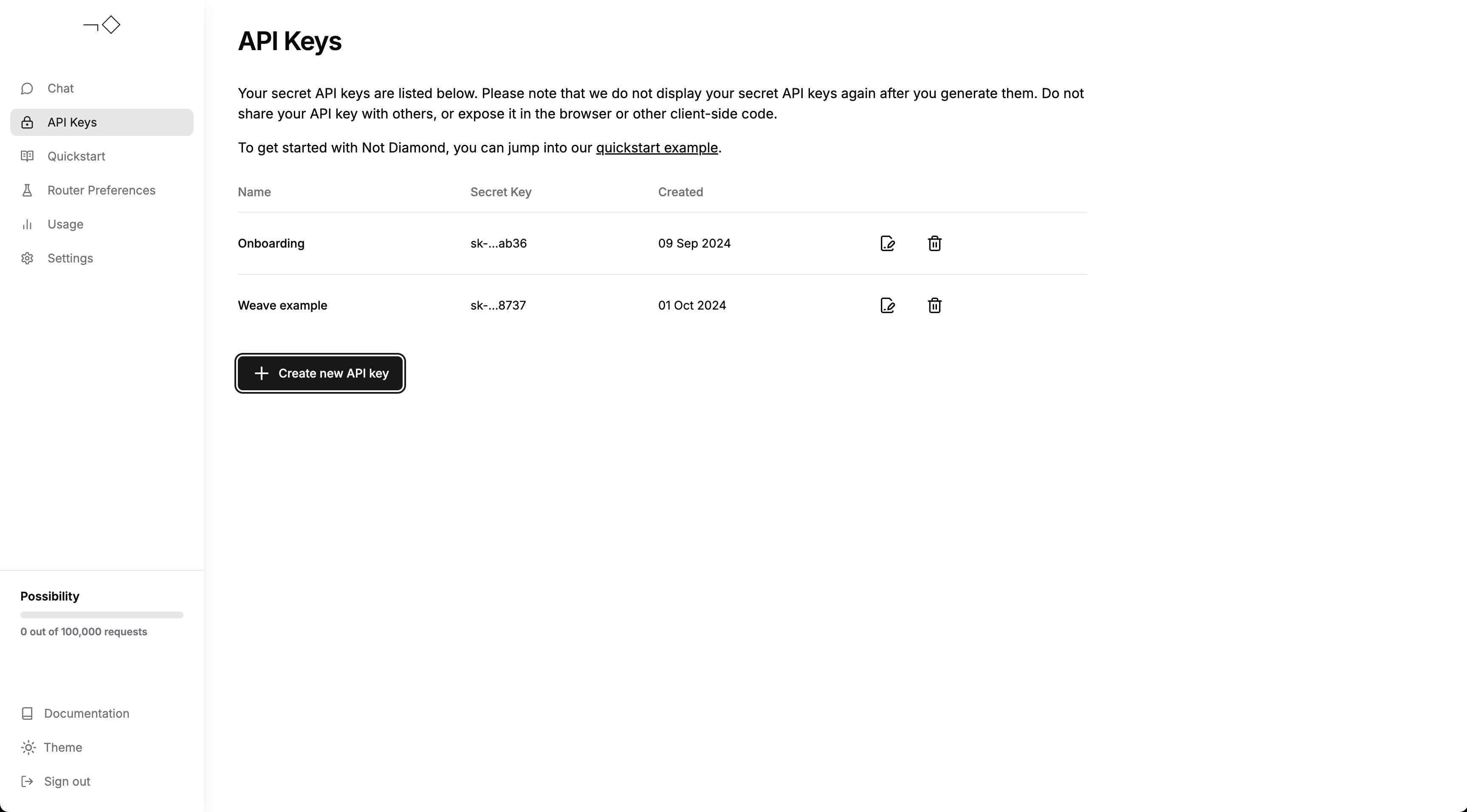
`EvaluationResults` の準備ができたら、それらを Not Diamond に送信してカスタムルーターをトレーニングできます。まず、[アカウントを作成](https://app.notdiamond.ai/keys) し、
[APIキーを生成](https://app.notdiamond.ai/keys)してから、次のコードに APIキーを入力してください。APIキーはトレーニングリクエストの認証に使用されます。
 ```python lines theme={null}
import os
from weave.integrations.notdiamond.custom_router import train_router
api_key = os.getenv("NOTDIAMOND_API_KEY", "")
preference_id = train_router(
model_evals=model_train,
prompt_column="prompt",
response_column="actual",
language="en",
maximize=True,
api_key=api_key,
# 初めてカスタムルーターをトレーニングする場合はコメントアウトのままにしてください
# カスタムルーターを再トレーニングする場合はコメントを解除してください
# preference_id=preference_id,
)
```
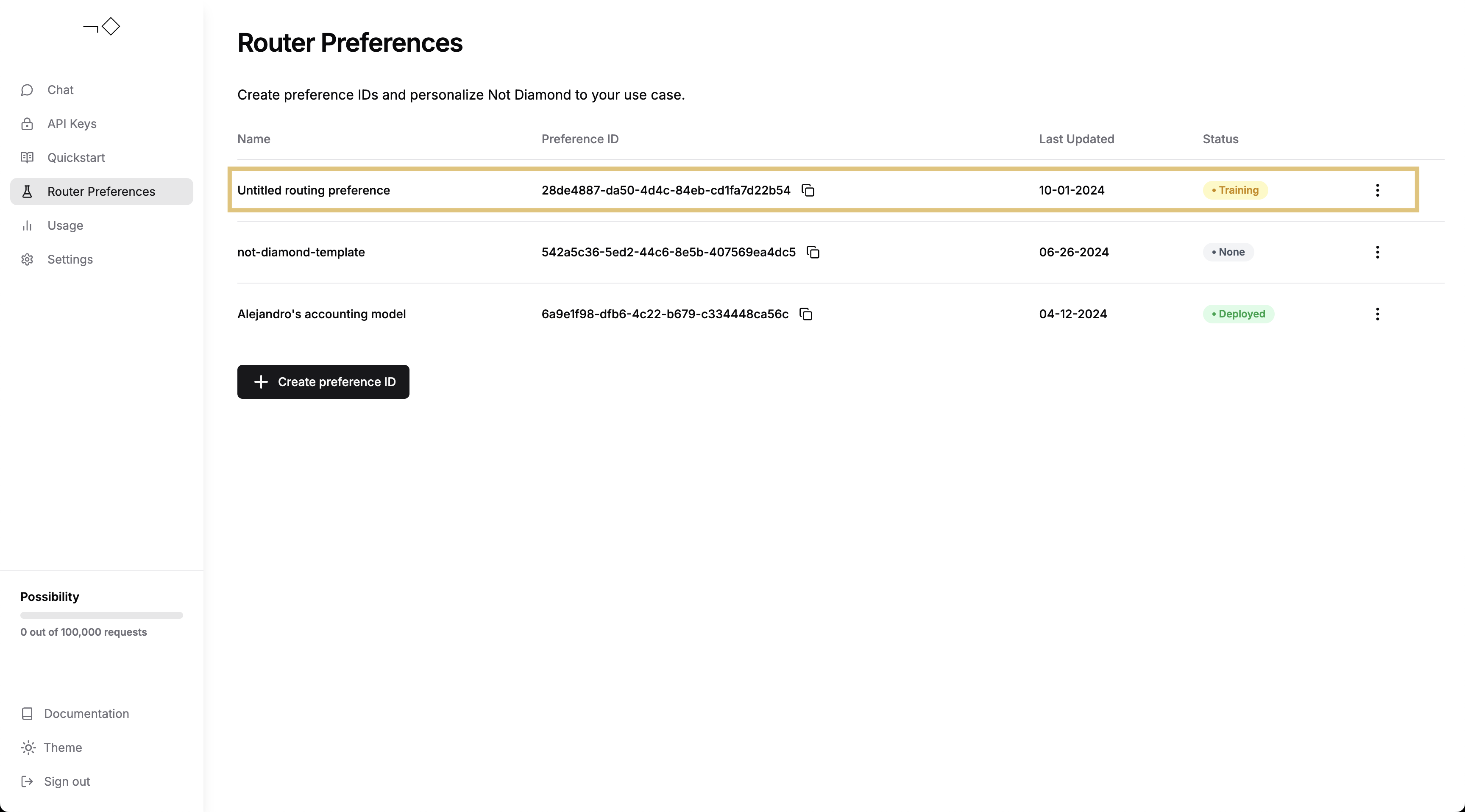
その後、Not Diamond アプリからカスタムルーターのトレーニングの進行状況を確認できます。
```python lines theme={null}
import os
from weave.integrations.notdiamond.custom_router import train_router
api_key = os.getenv("NOTDIAMOND_API_KEY", "")
preference_id = train_router(
model_evals=model_train,
prompt_column="prompt",
response_column="actual",
language="en",
maximize=True,
api_key=api_key,
# 初めてカスタムルーターをトレーニングする場合はコメントアウトのままにしてください
# カスタムルーターを再トレーニングする場合はコメントを解除してください
# preference_id=preference_id,
)
```
その後、Not Diamond アプリからカスタムルーターのトレーニングの進行状況を確認できます。
 カスタムルーターのトレーニングが完了したら、それを使用してプロンプトをルーティングできます。
```python lines theme={null}
from notdiamond import NotDiamond
import weave
weave.init("notdiamond-quickstart")
llm_configs = [
"anthropic/claude-3-5-sonnet-20240620",
"openai/gpt-4o-2024-05-13",
"google/gemini-1.5-pro-latest",
"openai/gpt-4-turbo-2024-04-09",
"anthropic/claude-3-opus-20240229",
]
client = NotDiamond(api_key=api_key, llm_configs=llm_configs)
new_prompt = (
"""
You are a helpful coding assistant. Using the provided function signature, write the implementation for the function
in Python. Write only the function. Do not include any other text.
from typing import List
def has_close_elements(numbers: List[float], threshold: float) -> bool:
"""
""" Check if in given list of numbers, are any two numbers closer to each other than
given threshold.
>>> has_close_elements([1.0, 2.0, 3.0], 0.5)
False
>>> has_close_elements([1.0, 2.8, 3.0, 4.0, 5.0, 2.0], 0.3)
True
"""
"""
"""
)
session_id, routing_target_model = client.model_select(
messages=[{"role": "user", "content": new_prompt}],
preference_id=preference_id,
)
print(f"Session ID: {session_id}")
print(f"Target Model: {routing_target_model}")
```
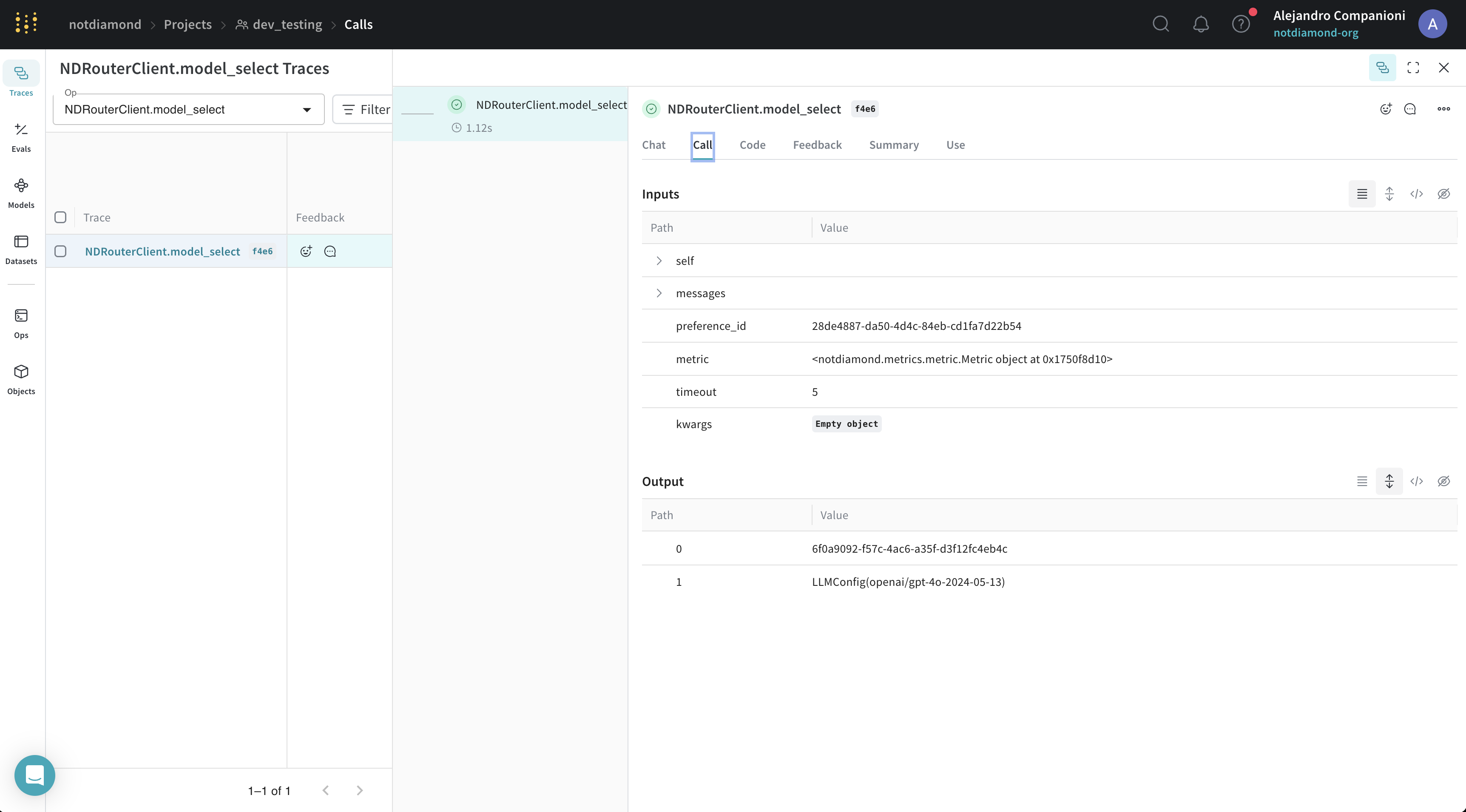
この例では、Not Diamond の Weave 自動トレースとの互換性も活用しています。結果は Weave UI で確認できます。
カスタムルーターのトレーニングが完了したら、それを使用してプロンプトをルーティングできます。
```python lines theme={null}
from notdiamond import NotDiamond
import weave
weave.init("notdiamond-quickstart")
llm_configs = [
"anthropic/claude-3-5-sonnet-20240620",
"openai/gpt-4o-2024-05-13",
"google/gemini-1.5-pro-latest",
"openai/gpt-4-turbo-2024-04-09",
"anthropic/claude-3-opus-20240229",
]
client = NotDiamond(api_key=api_key, llm_configs=llm_configs)
new_prompt = (
"""
You are a helpful coding assistant. Using the provided function signature, write the implementation for the function
in Python. Write only the function. Do not include any other text.
from typing import List
def has_close_elements(numbers: List[float], threshold: float) -> bool:
"""
""" Check if in given list of numbers, are any two numbers closer to each other than
given threshold.
>>> has_close_elements([1.0, 2.0, 3.0], 0.5)
False
>>> has_close_elements([1.0, 2.8, 3.0, 4.0, 5.0, 2.0], 0.3)
True
"""
"""
"""
)
session_id, routing_target_model = client.model_select(
messages=[{"role": "user", "content": new_prompt}],
preference_id=preference_id,
)
print(f"Session ID: {session_id}")
print(f"Target Model: {routing_target_model}")
```
この例では、Not Diamond の Weave 自動トレースとの互換性も活用しています。結果は Weave UI で確認できます。
## カスタムルーターを評価する
このセクションでは、カスタムルーターが最良の単一モデルよりも優れているかどうかを測定する方法を説明します。
カスタムルーターをトレーニングしたら、次のいずれかの方法でそのパフォーマンスを評価できます。
* トレーニング用のプロンプトを送信して、インサンプルのパフォーマンスを評価します。
* 新しいプロンプトまたはホールドアウトしたプロンプトを送信して、アウトオブサンプルのパフォーマンスを評価します。
次の例では、テストセットをカスタムルーターに送信して、そのパフォーマンスを評価します。
```python lines theme={null}
from weave.integrations.notdiamond.custom_router import evaluate_router
eval_prompt_column = "prompt"
eval_response_column = "actual"
best_provider_model, nd_model = evaluate_router(
model_datasets=model_test,
prompt_column=eval_prompt_column,
response_column=eval_response_column,
api_key=api_key,
preference_id=preference_id,
)
python
@weave.op()
def is_correct(score: int, output: dict) -> dict:
# モデルの応答がすでにあるため、スコアをそのまま利用します
return {"correct": score}
best_provider_eval = weave.Evaluation(
dataset=best_provider_model.model_results.to_dict(orient="records"),
scorers=[is_correct],
)
await best_provider_eval.evaluate(best_provider_model)
nd_eval = weave.Evaluation(
dataset=nd_model.model_results.to_dict(orient="records"), scorers=[is_correct]
)
await nd_eval.evaluate(nd_model)
```
この例では、Not Diamond の "メタモデル" がプロンプトを複数の異なるモデルに振り分けます。
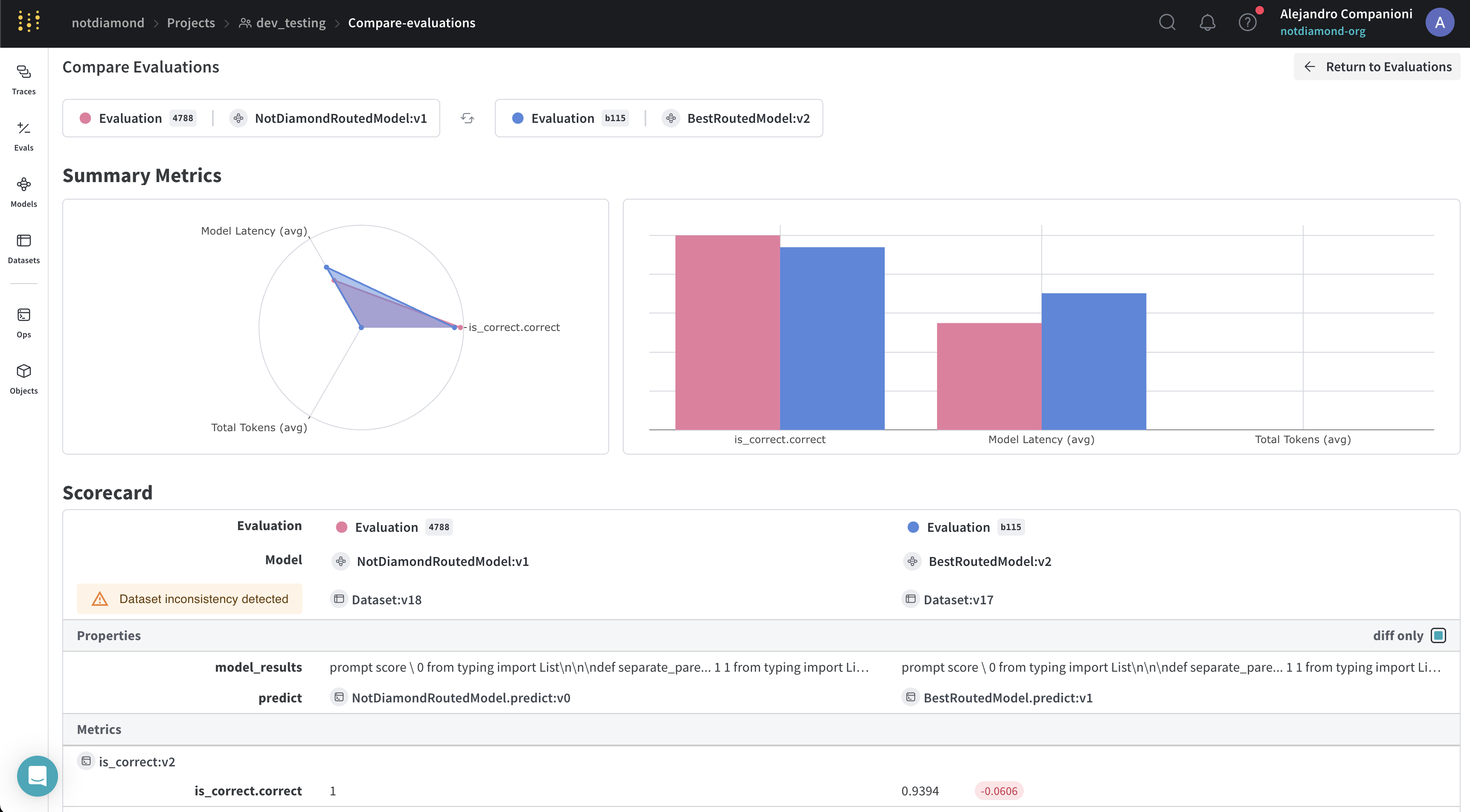
Weave でカスタムルーターをトレーニングすると、評価も実行され、結果が Weave UI にアップロードされます。カスタムルーターのプロセスが完了したら、Weave UI で結果を確認できます。
UI では、Not Diamond の "メタモデル" が、プロンプトにより正確に回答できる可能性が高い別のモデルにプロンプトを振り分けることで、最も高性能なモデルを上回っていることを確認できます。