> ## Documentation Index
> Fetch the complete documentation index at: https://docs.wandb.ai/llms.txt
> Use this file to discover all available pages before exploring further.
# Agno
> OpenTelemetry を使用して Weave で Agno のマルチエージェントシステムをトレースし、エージェントのインタラクション、ツール呼び出し、およびマルチモーダルなワークフローを取得します。
[Agno](https://docs.agno.com/) エージェントやツール呼び出しは、[OpenTelemetry (OTEL)](https://opentelemetry.io/) を使用して Weave でトレースできます。Agno は、共有メモリ、知識、推論を備えたマルチエージェントシステムを構築するための Python フレームワークです。軽量でモデル非依存であり、テキスト、画像、音声、動画処理を含むマルチモーダル機能をサポートします。
このガイドでは、OTEL を使用して Agno エージェントとツール呼び出しをトレースし、そのトレースを Weave で可視化する方法を説明します。必要な依存関係のインストール方法、Weave に OTEL トレースを送信するトレーサーの設定方法、そして Agno エージェントとツールの計装方法を学びます。
Weave における OTEL トレースの詳細については、[Send OTEL Traces to Weave](../tracking/otel) を参照してください。
## 前提条件
1. 必要な依存関係をインストールします:
```bash theme={null}
pip install agno openinference-instrumentation-agno opentelemetry-sdk opentelemetry-exporter-otlp-proto-http
```
2. OpenAI API キー (または他のモデルプロバイダー) を環境変数として設定します:
```bash theme={null}
export OPENAI_API_KEY=your_api_key_here
```
3. [Weave で OTEL トレーシングを構成する](#configure-otel-tracing-in-weave)。
### Weave で OTEL トレースを設定する
Agno から Weave にトレースを送信するには、`TracerProvider` と `OTLPSpanExporter` を使って OTEL を設定します。エクスポーターには、認証とプロジェクト識別のための [正しいエンドポイントと HTTP ヘッダー](#required-configuration) を指定します。
APIキーやプロジェクト情報などの機密性の高い環境変数は、`.env` などの環境ファイルに保存し、`os.environ` を使って読み込んでください。これにより、認証情報を安全に保ち、コードベースに含めずに済みます。
#### 必要な設定
以下の Endpoint と Headers を使用して、OTLP exporter を設定します。
* **Endpoint:** `https://trace.wandb.ai/otel/v1/traces`
* **Headers:**
* `Authorization`: W\&B APIキーを使用した Basic 認証。
* `project_id`: W\&B エンティティ / project名 (たとえば、`myteam/myproject`)。
## Agno から Weave に OTEL トレースを送信する
[前提条件](#prerequisites) を完了したら、Agno から Weave に OTEL トレースを送信できます。次のコードスニペットでは、Agno アプリケーションから Weave に OTEL トレースを送信するために、OTLP span exporter と tracer provider を構成する方法を示します。
Weave が Agno を正しくトレースできるようにするために、コード内で Agno のコンポーネントを使用する *前に* グローバル tracer provider を設定してください。
```python lines theme={null}
# tracing.py
import base64
import os
from openinference.instrumentation.agno import AgnoInstrumentor
from opentelemetry.exporter.otlp.proto.http.trace_exporter import OTLPSpanExporter
from opentelemetry.sdk import trace as trace_sdk
from opentelemetry.sdk.trace.export import SimpleSpanProcessor
from opentelemetry import trace
# 環境変数から機密情報を読み込む
WANDB_BASE_URL = "https://trace.wandb.ai"
# W&B の entity/project 名(例: "myteam/myproject")
PROJECT_ID = os.environ.get("WANDB_PROJECT_ID")
# W&B APIキーは https://wandb.ai/settings で作成してください
WANDB_API_KEY = os.environ.get("WANDB_API_KEY")
OTEL_EXPORTER_OTLP_ENDPOINT = f"{WANDB_BASE_URL}/otel/v1/traces"
AUTH = base64.b64encode(f"api:{WANDB_API_KEY}".encode()).decode()
OTEL_EXPORTER_OTLP_HEADERS = {
"Authorization": f"Basic {AUTH}",
"project_id": PROJECT_ID,
}
# エンドポイントとヘッダーを指定して OTLP span exporter を作成する
exporter = OTLPSpanExporter(
endpoint=OTEL_EXPORTER_OTLP_ENDPOINT,
headers=OTEL_EXPORTER_OTLP_HEADERS,
)
# tracer provider を作成し、exporter を追加する
tracer_provider = trace_sdk.TracerProvider()
tracer_provider.add_span_processor(SimpleSpanProcessor(exporter))
# Agno をインポート/使用する前にグローバル tracer provider を設定する
trace.set_tracer_provider(tracer_provider)
```
## OTEL で Agno エージェントをトレースする
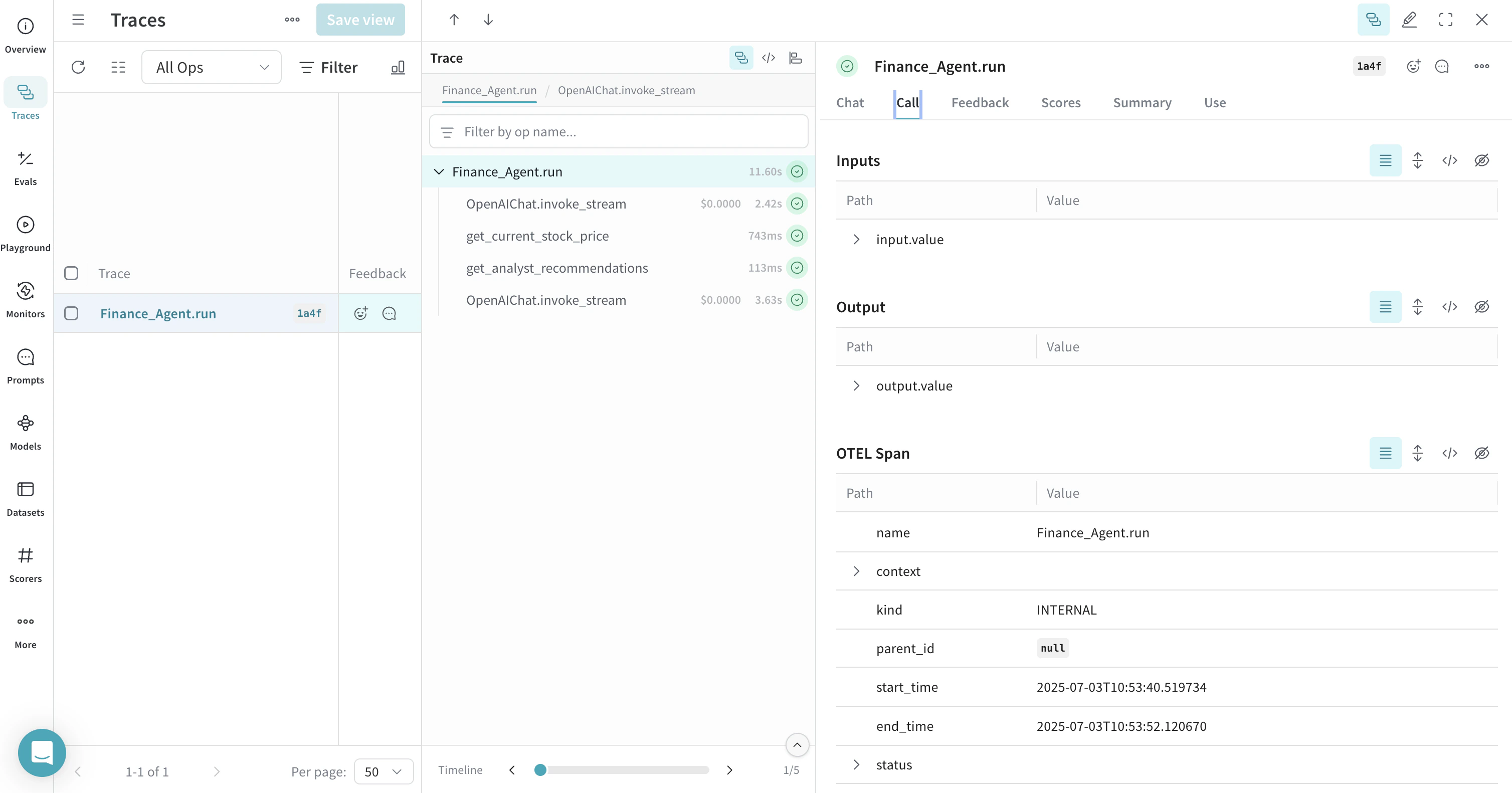
tracer provider をセットアップしたら、自動トレース付きで Agno エージェントを作成して実行できます。Weave がその後のすべてのエージェントのアクティビティを取得できるように、エージェントを作成する前に Agno をインストルメンテーションしてください。次の例は、ツールを使ったエージェントの作成方法を示しています。
```python lines theme={null}
from agno.agent import Agent
from agno.models.openai import OpenAIChat
from agno.tools.yfinance import YFinanceTools
from dotenv import load_dotenv
load_dotenv()
# Load AgnoInstrumentor from the file created above
from tracing import AgnoInstrumentor
# Start instrumenting Agno
AgnoInstrumentor().instrument()
# Create a finance agent
finance_agent = Agent(
name="Finance Agent",
model=OpenAIChat(id="gpt-4o-mini"),
tools=[
YFinanceTools(
stock_price=True,
analyst_recommendations=True,
company_info=True,
company_news=True
)
],
instructions=["Use tables to display data"],
show_tool_calls=True,
markdown=True,
)
# エージェントを使用する - Weave が自動的にこの呼び出しをトレースします
finance_agent.print_response(
"What is the current stock price of Apple and what are the latest analyst recommendations?",
stream=True
)
```
Weave はすべてのエージェント操作を自動的にトレースするため、実行フロー、モデル呼び出し、推論ステップ、ツールの呼び出しを可視化できます。
## OTEL で Agno ツールをトレースする
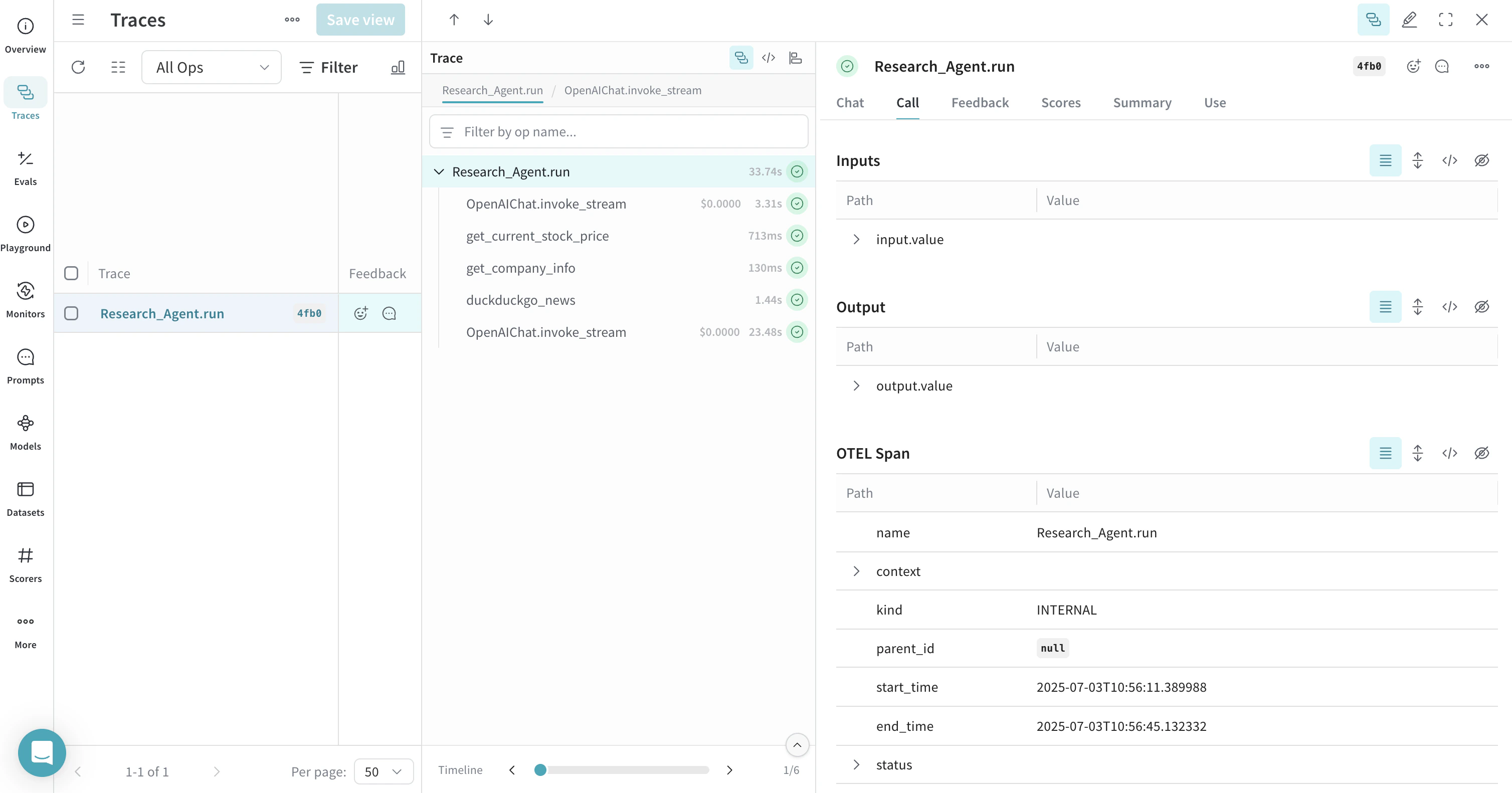
Agno でツールを定義して使用すると、トレースはこれらのツール呼び出しも取得します。OTEL インテグレーションは、エージェントの推論プロセスと個々のツール実行の両方を自動的にインストルメンテーションし、エージェントの挙動を包括的に把握できるようにします。
複数のツールを用いた例を次に示します。
```python lines theme={null}
from agno.agent import Agent
from agno.models.openai import OpenAIChat
from agno.tools.duckduckgo import DuckDuckGoTools
from agno.tools.yfinance import YFinanceTools
from dotenv import load_dotenv
load_dotenv()
# Load AgnoInstrumentor from the file created above
from tracing import AgnoInstrumentor
# Start instrumenting Agno
AgnoInstrumentor().instrument()
# Create an agent with multiple tools
research_agent = Agent(
name="Research Agent",
model=OpenAIChat(id="gpt-4o-mini"),
tools=[
DuckDuckGoTools(),
YFinanceTools(stock_price=True, company_info=True),
],
instructions=[
"Search for current information and financial data",
"Always include sources",
"Use tables to display financial data"
],
show_tool_calls=True,
markdown=True,
)
# エージェントを使用する - Weave がツール呼び出しをトレースする
research_agent.print_response(
"Research Tesla's recent performance and news. Include stock price and any recent developments.",
stream=True
)
```
## OTEL でマルチエージェント チームをトレースする
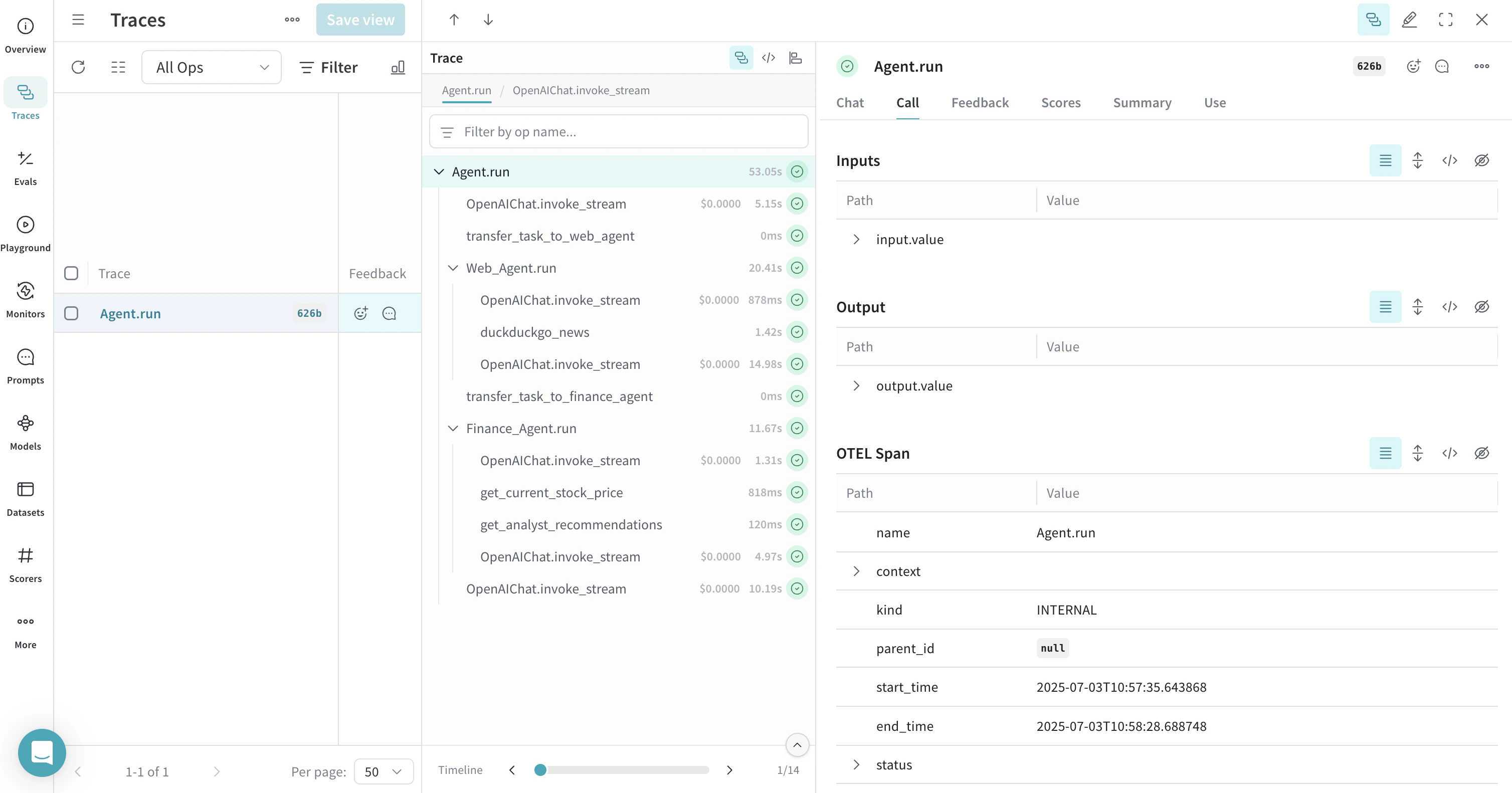
Agno のマルチエージェント アーキテクチャを使うと、連携しながらコンテキストを共有できるエージェント チームを作成できます。Weave は、こうしたチーム内のやり取りも、すべてトレースします:
```python lines theme={null}
from agno.agent import Agent
from agno.models.openai import OpenAIChat
from agno.tools.duckduckgo import DuckDuckGoTools
from agno.tools.yfinance import YFinanceTools
from dotenv import load_dotenv
load_dotenv()
# AgnoInstrumentor を tracing.py ファイルから読み込む
from tracing import AgnoInstrumentor
# Agno のインストルメンテーションを開始する
AgnoInstrumentor().instrument()
# 専用エージェントを作成する
web_agent = Agent(
name="Web Agent",
role="Search the web for information",
model=OpenAIChat(id="gpt-4o-mini"),
tools=[DuckDuckGoTools()],
instructions="Always include sources",
show_tool_calls=True,
markdown=True,
)
finance_agent = Agent(
name="Finance Agent",
role="Get financial data",
model=OpenAIChat(id="gpt-4o-mini"),
tools=[YFinanceTools(stock_price=True, analyst_recommendations=True)],
instructions="Use tables to display data",
show_tool_calls=True,
markdown=True,
)
# エージェントチームを作成する
agent_team = Agent(
team=[web_agent, finance_agent],
model=OpenAIChat(id="gpt-4o"),
instructions=["Always include sources", "Use tables to display data"],
show_tool_calls=True,
markdown=True,
)
# チームを使用する - Weave がすべてのエージェントのやり取りをトレースする
agent_team.print_response(
"What's the current market sentiment around NVIDIA? Include both news analysis and financial metrics.",
stream=True
)
```
このマルチエージェントのトレースは、Weave 内のさまざまなエージェント間の連携を示しており、タスクがエージェントチーム全体にどのように分担されて実行されるかを可視化します。
## 推論エージェントを使う
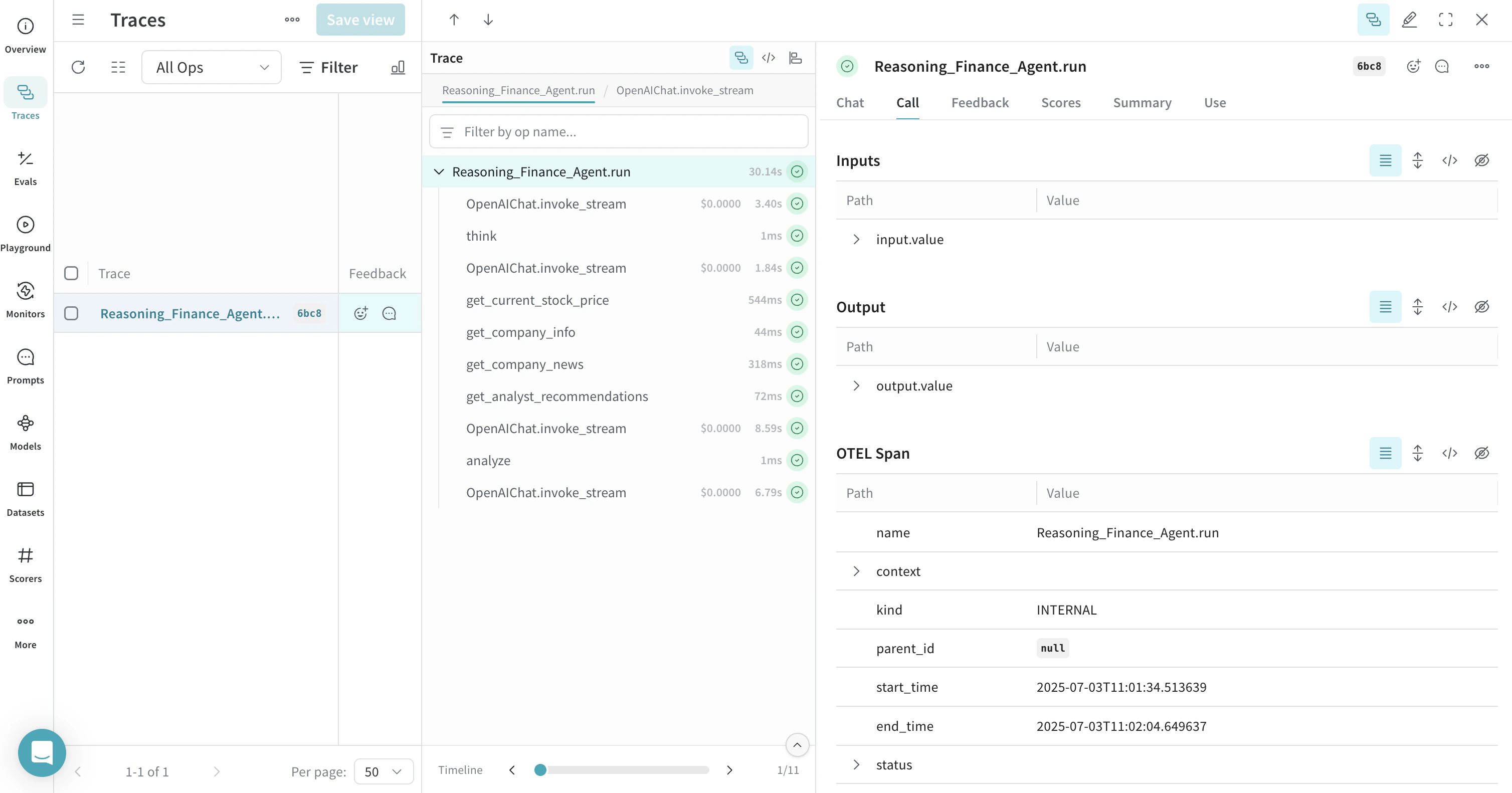
Agno には、エージェントが問題を順を追って処理できるようにする組み込みの推論機能があります。トレースもこれらの推論プロセスを取得します。
```python lines theme={null}
from agno.agent import Agent
from agno.models.openai import OpenAIChat
from agno.tools.reasoning import ReasoningTools
from agno.tools.yfinance import YFinanceTools
from dotenv import load_dotenv
load_dotenv()
# tracing.py ファイルから AgnoInstrumentor を読み込む
from tracing import AgnoInstrumentor
# Agno のインストルメンテーションを開始する
AgnoInstrumentor().instrument()
# 推論エージェントを作成する
reasoning_agent = Agent(
name="Reasoning Finance Agent",
model=OpenAIChat(id="gpt-4o"),
tools=[
ReasoningTools(add_instructions=True),
YFinanceTools(
stock_price=True,
analyst_recommendations=True,
company_info=True,
company_news=True
),
],
instructions="Use tables to display data and show your reasoning process",
show_tool_calls=True,
markdown=True,
)
# 推論エージェントを使用する
reasoning_agent.print_response(
"Should I invest in Apple stock right now? Analyze the current situation and provide a reasoned recommendation.",
stream=True
)
```
トレースには、エージェントが複雑な問題をどのように分解し、判断を下すかを示す推論のステップが表示されます。
## メモリとナレッジを扱う
Agno エージェントは、メモリを保持し、ナレッジベースにアクセスできます。これにより、エージェントはやり取りをまたいでコンテキストを保持できます。Weave はこれらの操作もトレースします。
```python lines theme={null}
from agno.agent import Agent
from agno.models.openai import OpenAIChat
from agno.memory import AgentMemory
from agno.storage.sqlite import SqliteStorage
from dotenv import load_dotenv
load_dotenv()
# AgnoInstrumentor を tracing.py ファイルから読み込む
from tracing import AgnoInstrumentor
# Agno のインストルメンテーションを開始する
AgnoInstrumentor().instrument()
# メモリを持つエージェントを作成する
memory_agent = Agent(
name="Memory Agent",
model=OpenAIChat(id="gpt-4o-mini"),
memory=AgentMemory(),
storage=SqliteStorage(
table_name="agent_sessions",
db_file="agent_memory.db"
),
instructions="Remember our conversation history",
show_tool_calls=True,
markdown=True,
)
# 1回目のインタラクション
memory_agent.print_response("My name is John and I'm interested in AI investing strategies.")
# 2回目のインタラクション - エージェントは前のコンテキストを記憶している
memory_agent.print_response("What specific AI companies would you recommend for my portfolio?")
```
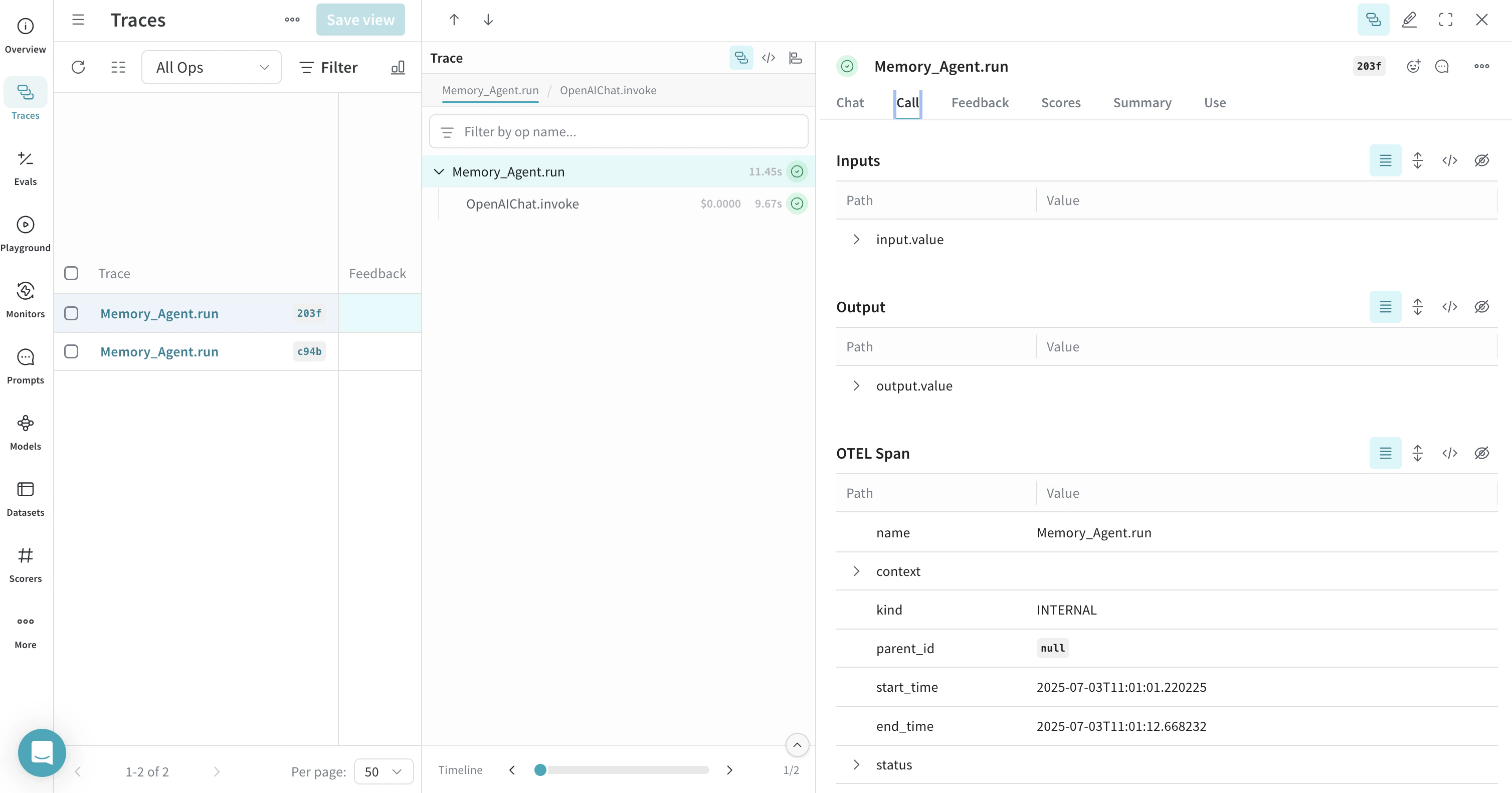 会話履歴の保存や取得を含むメモリ操作は、トレース内に表示されます。
## 詳細情報
* [Agno公式ドキュメント](https://docs.agno.com/)
* [OTEL公式ドキュメント](https://opentelemetry.io/)
* [Agno GitHubリポジトリ](https://github.com/agno-agi/agno)
* [OpenInference Agnoインストルメンテーション](https://pypi.org/project/openinference-instrumentation-agno/)