> ## Documentation Index
> Fetch the complete documentation index at: https://docs.wandb.ai/llms.txt
> Use this file to discover all available pages before exploring further.
# DSPy
> Weave を使用して、DSPy のモジュールや関数による call を自動的にトラッキングしてログする
export const GitHubLink = ({url}) =>
GitHub のソース
;
export const ColabLink = ({url}) =>
Colabで試す
;
[DSPy](https://dspy.ai) は、特にパイプライン内で LM を1回以上使用する場合に、言語モデル (LM) のプロンプトと重みをアルゴリズムによって最適化するためのフレームワークです。W\&B Weave は、DSPy のモジュールや関数を使用したcallを自動的にトラッキングしてログします。このガイドでは、DSPy プログラムで Weave のトレースを有効にする方法、カスタムモジュールと Signature をトラッキングする方法、さらに DSPy のオプティマイザーと評価からトレースを取得する方法を紹介します。これらのトレースを使用すると、DSPy アプリケーションをデバッグ、分析、改善できます。
## トレース
このセクションでは、Weave で DSPy Call の自動トレースを有効にする方法を説明します。開発時と本番環境の両方で、言語モデルアプリケーションのトレースを一元的に保存できます。これらのトレースは、デバッグや、アプリケーションの改善に役立つデータセットとして活用できます。
Weave は [DSPy](https://dspy.ai) のトレースを自動的に取得します。トラッキングを開始するには、`weave.init(project_name="[YOUR-WANDB-PROJECT-NAME]")` を呼び出し、通常どおりライブラリを使用します。`[YOUR-OPENAI-API-KEY]` はご使用の OpenAI APIキー に、`[YOUR-WANDB-PROJECT-NAME]` は プロジェクト名に置き換えてください。
```python lines theme={null}
import os
import dspy
import weave
os.environ["OPENAI_API_KEY"] = "[YOUR-OPENAI-API-KEY]"
weave.init(project_name="[YOUR-WANDB-PROJECT-NAME]")
lm = dspy.LM('openai/gpt-4o-mini')
dspy.configure(lm=lm)
classify = dspy.Predict("sentence -> sentiment")
classify(sentence="it's a charming and often affecting journey.")
```
[ ](https://wandb.ai/geekyrakshit/dspy-project/weave/calls)
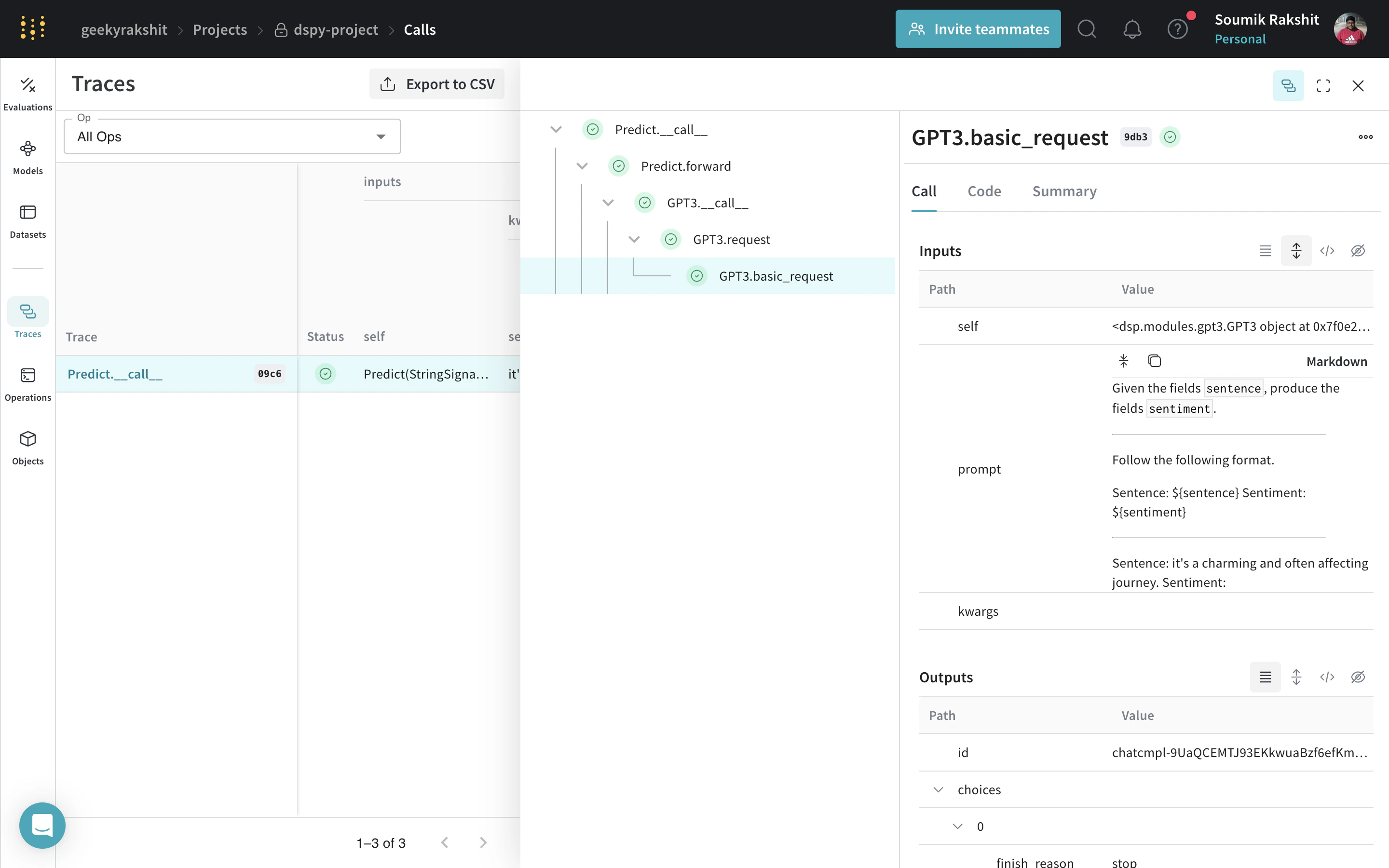
トレースを有効にすると、Weave は DSPy プログラムによるすべての LM Call を Weave プロジェクトにログするため、入力、出力、メタデータを確認できます。
](https://wandb.ai/geekyrakshit/dspy-project/weave/calls)
トレースを有効にすると、Weave は DSPy プログラムによるすべての LM Call を Weave プロジェクトにログするため、入力、出力、メタデータを確認できます。
## 独自のDSPyモジュールとシグネチャをトラッキングする
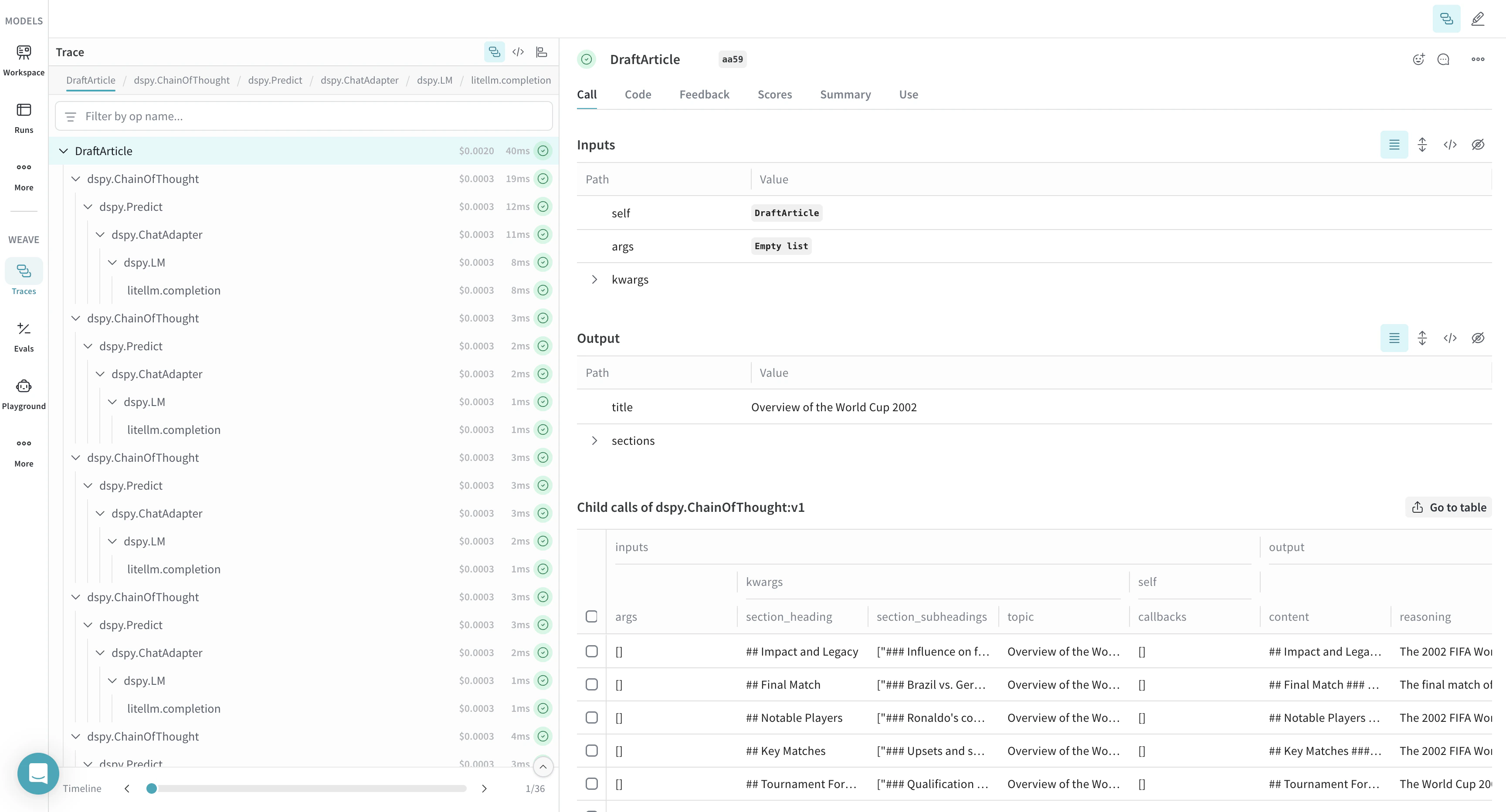
組み込みの Call に加えて、Weave は定義したカスタムモジュールとシグネチャもトレースします。`Module` は、プロンプト手法を抽象化する、学習可能なパラメーターを備えた DSPy プログラムの構成要素です。`Signature` は、DSPy `Module` の入出力の動作を宣言的に記述する仕様です。Weave は、DSPy プログラム内の組み込みおよびカスタムの `Signature` オブジェクトと `Module` オブジェクトをすべて自動的にトラッキングします。`[YOUR-OPENAI-API-KEY]` をご使用の OpenAI APIキーに、`[YOUR-WANDB-PROJECT-NAME]` をご使用の プロジェクト名に置き換えてください。
```python lines theme={null}
import os
import dspy
import weave
os.environ["OPENAI_API_KEY"] = "[YOUR-OPENAI-API-KEY]"
weave.init(project_name="[YOUR-WANDB-PROJECT-NAME]")
class Outline(dspy.Signature):
"""Outline a thorough overview of a topic."""
topic: str = dspy.InputField()
title: str = dspy.OutputField()
sections: list[str] = dspy.OutputField()
section_subheadings: dict[str, list[str]] = dspy.OutputField(
desc="mapping from section headings to subheadings"
)
class DraftSection(dspy.Signature):
"""Draft a top-level section of an article."""
topic: str = dspy.InputField()
section_heading: str = dspy.InputField()
section_subheadings: list[str] = dspy.InputField()
content: str = dspy.OutputField(desc="markdown-formatted section")
class DraftArticle(dspy.Module):
def __init__(self):
self.build_outline = dspy.ChainOfThought(Outline)
self.draft_section = dspy.ChainOfThought(DraftSection)
def forward(self, topic):
outline = self.build_outline(topic=topic)
sections = []
for heading, subheadings in outline.section_subheadings.items():
section, subheadings = (
f"## {heading}",
[f"### {subheading}" for subheading in subheadings],
)
section = self.draft_section(
topic=outline.title,
section_heading=section,
section_subheadings=subheadings,
)
sections.append(section.content)
return dspy.Prediction(title=outline.title, sections=sections)
draft_article = DraftArticle()
article = draft_article(topic="World Cup 2002")
```
[ ](https://wandb.ai/geekyrakshit/dspy-project/weave/calls)
## DSPy プログラムを最適化して評価する
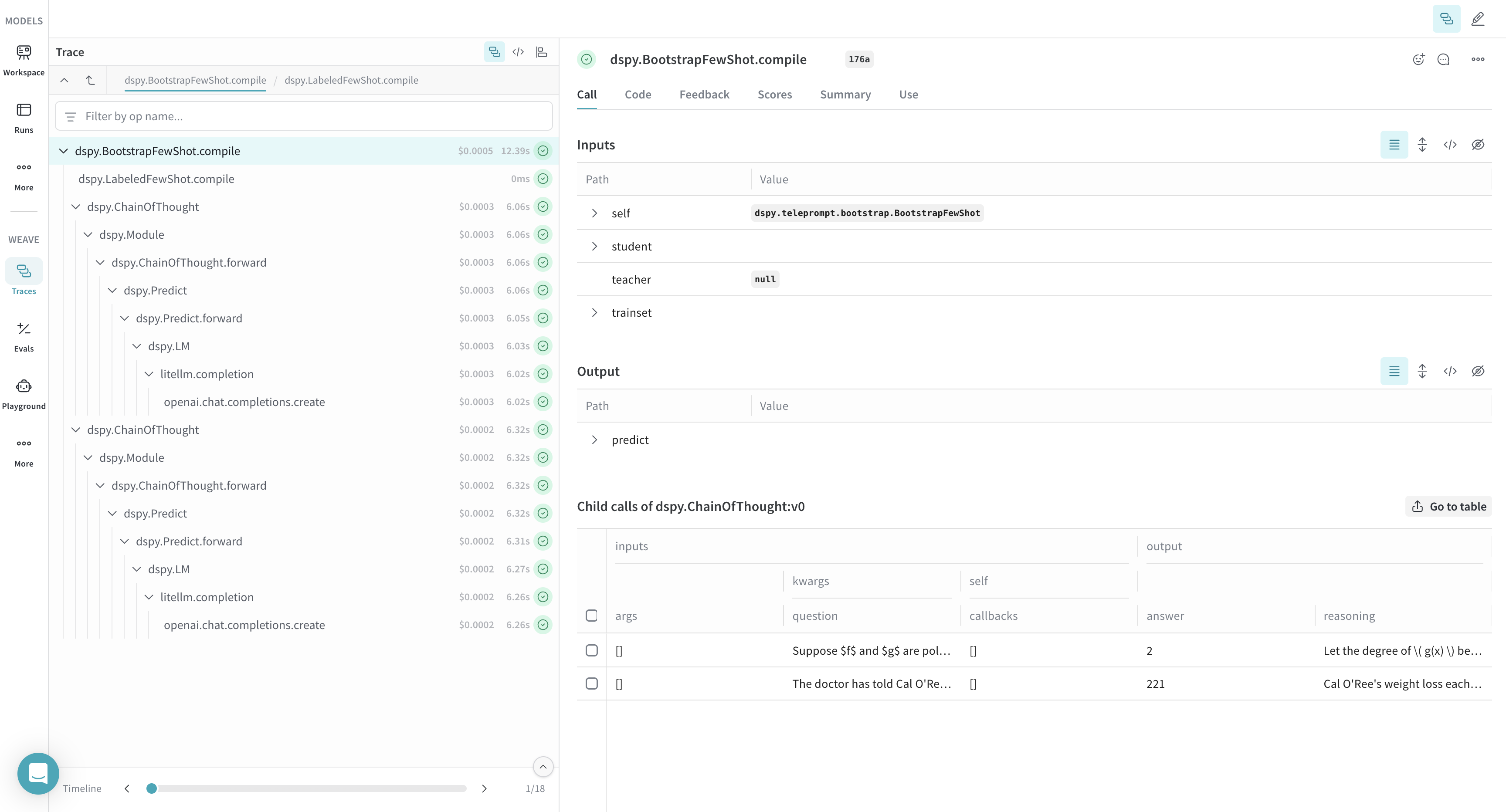
Weave は、DSPy オプティマイザと評価 call のトレースも取得します。これを使用すると、開発セットでの DSPy プログラムのパフォーマンスを改善し、評価できます。`[YOUR-OPENAI-API-KEY]` はご自身の OpenAI APIキー に、`[YOUR-WANDB-PROJECT-NAME]` はご自身の プロジェクト名 に置き換えてください。
```python lines theme={null}
import os
import dspy
import weave
os.environ["OPENAI_API_KEY"] = "[YOUR-OPENAI-API-KEY]"
weave.init(project_name="[YOUR-WANDB-PROJECT-NAME]")
def accuracy_metric(answer, output, trace=None):
predicted_answer = output["answer"].lower()
return answer["answer"].lower() == predicted_answer
module = dspy.ChainOfThought("question -> answer: str, explanation: str")
optimizer = dspy.BootstrapFewShot(metric=accuracy_metric)
optimized_module = optimizer.compile(
module, trainset=SAMPLE_EVAL_DATASET, valset=SAMPLE_EVAL_DATASET
)
```
[ ](https://wandb.ai/geekyrakshit/dspy-project/weave/calls)