> ## Documentation Index
> Fetch the complete documentation index at: https://docs.wandb.ai/llms.txt
> Use this file to discover all available pages before exploring further.
# LlamaIndex
> Weave で LlamaIndex アプリケーションをトレースしてデバッグし、LLM Call、RAG パイプライン、エージェントのステップ、評価を自動的に取得します。
このガイドでは、Weave を使用して [LlamaIndex](https://docs.llamaindex.ai/en/stable/) アプリケーションをトレース、デバッグ、評価する方法を説明します。読み進めることで、Weave が [LlamaIndex Python library](https://github.com/run-llama/llama_index) を介して行われる Call をどのように自動的に取得するかを学べます。これにより、カスタムのロギング コードを書かなくても、RAG パイプライン、エージェントのステップ、LLM Call をモニターできます。このガイドは、デバッグ、パフォーマンス分析、評価のためにワークフローの可視性を必要とする、LlamaIndex で LLM アプリケーションを構築する開発者を対象としています。
LLM を扱う際、デバッグは避けられません。モデルの Call が失敗した場合、output の形式が正しくない場合、またはネストされたモデルの Call によって混乱が生じた場合など、問題を正確に特定するのは難しいことがあります。LlamaIndex アプリケーションは複数のステップと LLM Call の呼び出しで構成されることが多く、チェーンやエージェントの内部動作を理解することが重要です。
Weave は、LlamaIndex アプリケーションのトレースを自動的に取得することで、このプロセスを効率化します。これにより、アプリケーションのパフォーマンスをモニターして分析できるため、LLM ワークフローのデバッグや最適化に役立ちます。Weave は評価ワークフローにも役立ちます。
## はじめに
まず、スクリプトの先頭で `weave.init()` を呼び出します。これにより Weave が初期化され、以降の LlamaIndex の Call のトレース収集が開始されます。`weave.init()` の引数には、トレースの整理に役立つプロジェクト名を指定します。
```python lines {5} theme={null}
import weave
from llama_index.core.chat_engine import SimpleChatEngine
# プロジェクト名を指定してWeaveを初期化する
weave.init("llamaindex_demo")
chat_engine = SimpleChatEngine.from_defaults()
response = chat_engine.chat(
"Say something profound and romantic about fourth of July"
)
print(response)
```
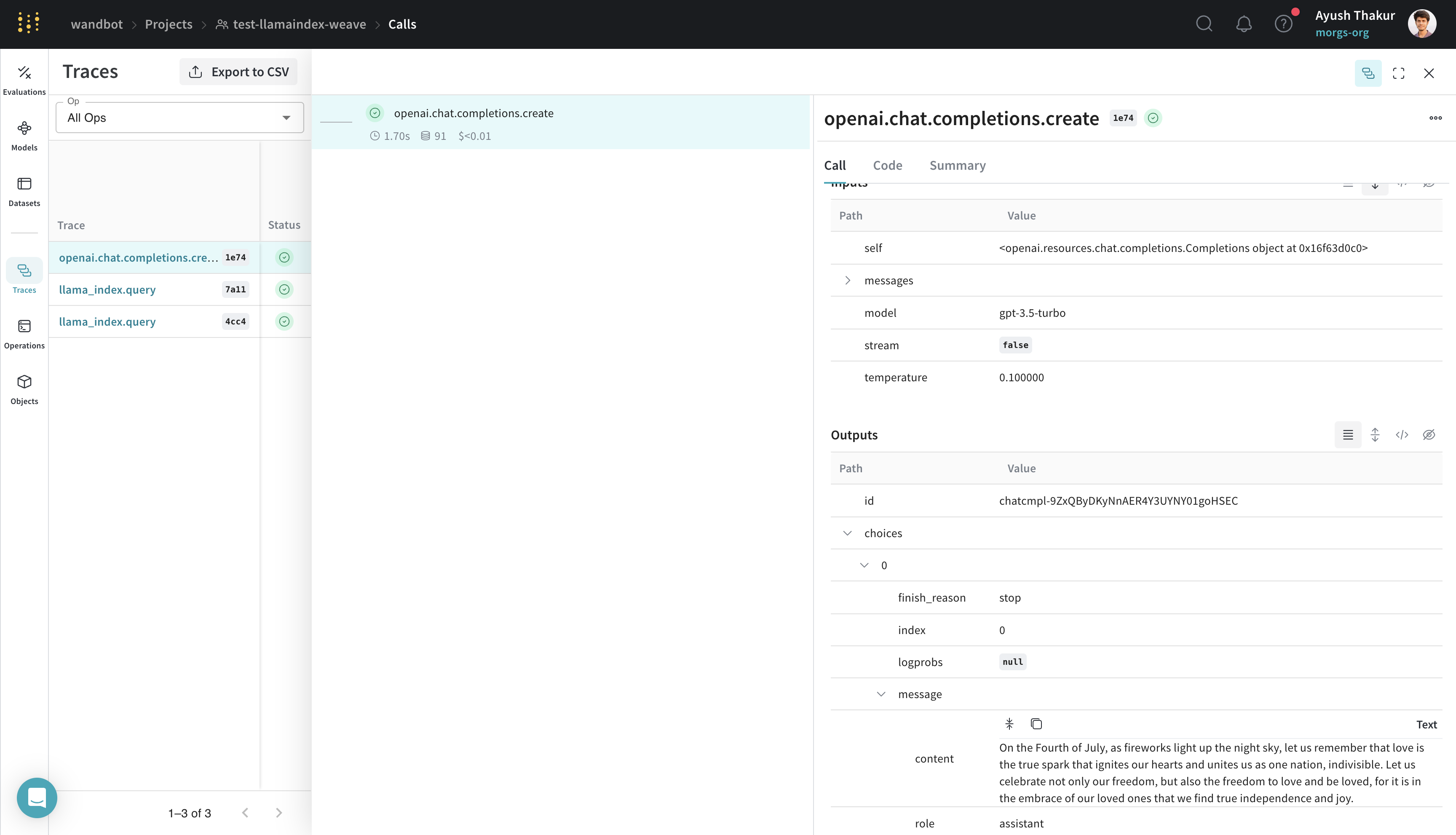
前の例では、内部で OpenAI への Call を行う基本的な LlamaIndex のチャットエンジンを作成します。このコードを実行すると、Weave がチャットエンジンの実行トレースを取得し、Weave の Web インターフェースで確認できるようになります。次のトレースを参照してください。
[ ](https://wandb.ai/wandbot/test-llamaindex-weave/weave/calls/b6b5d898-2df8-4e14-b553-66ce84661e74)
## トレース
このセクションでは、Weave が RAG パイプラインのような複数 step の LlamaIndex workflow をどのように取得するかを説明します。
LlamaIndex は、データを LLMs に簡単に接続できることで知られています。基本的な RAG application には、埋め込み step、検索 step、応答生成 step が必要です。複雑さが増すにつれて、開発時と本番環境の両方で、個々の step のトレースを中央データベースに保存することが重要になります。
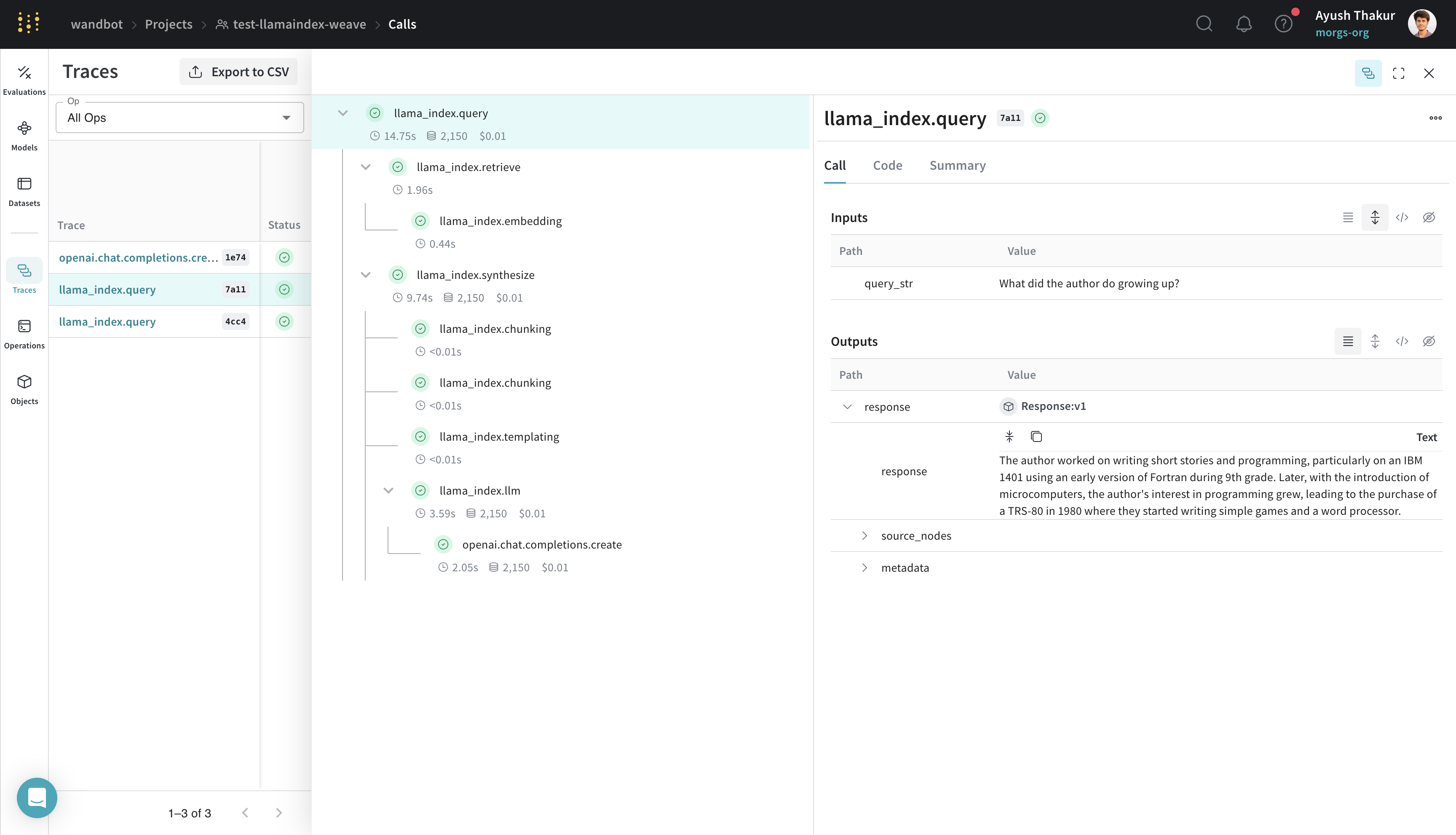
これらのトレースは、application のデバッグや改善に不可欠です。Weave は、プロンプトテンプレート、LLM Call、tool、エージェント steps を含め、LlamaIndex ライブラリを通じて行われるすべての calls を自動的にトラッキングします。トレースは Weave の Web インターフェースで確認できます。
以下の例は、LlamaIndex's [Starter Tutorial (OpenAI)](https://docs.llamaindex.ai/en/stable/getting_started/starter_example/) にある基本的な RAG パイプラインを示しています。
```python lines {5} theme={null}
import weave
from llama_index.core import VectorStoreIndex, SimpleDirectoryReader
# プロジェクト名を指定して Weave を初期化する
weave.init("llamaindex_demo")
# `data` ディレクトリに `.txt` ファイルがあることを前提とする
documents = SimpleDirectoryReader("data").load_data()
index = VectorStoreIndex.from_documents(documents)
query_engine = index.as_query_engine()
response = query_engine.query("What did the author do growing up?")
print(response)
```
トレースタイムラインは、"イベント" をキャプチャするだけでなく、該当する場合は実行時間、コスト、token 数も記録します。トレースを掘り下げると、各 step の inputs と outputs を確認できます。
[ ](https://wandb.ai/wandbot/test-llamaindex-weave/weave/calls?filter=%7B%22traceRootsOnly%22%3Atrue%7D\&peekPath=%2Fwandbot%2Ftest-llamaindex-weave%2Fcalls%2F6ac53407-1bb7-4c38-b5a3-c302bd877a11%3Ftracetree%3D1)
## ワンクリックでの可観測性
このセクションでは、Weave インテグレーションが LlamaIndex の組み込み可観測性システムにどのように組み込まれているかを説明します。そのため、ハンドラーを手動で設定する必要はありません。
LlamaIndex は、本番環境で筋の通った LLM アプリケーションを構築できるように、[ワンクリックでの可観測性](https://docs.llamaindex.ai/en/stable/module_guides/observability/)を提供しています。
Weave インテグレーションでは、LlamaIndex のこの機能を活用し、[`WeaveCallbackHandler()`](https://github.com/wandb/weave/blob/master/weave/integrations/llamaindex/llamaindex.py) を `llama_index.core.global_handler` に自動で設定します。そのため、LlamaIndex と Weave を使用するユーザーが行う必要があるのは、`weave.init([NAME_OF_PROJECT])` で Weave の run を初期化することだけです。
## より簡単に実験できるように `Model` を作成する
プロンプト、モデルの設定、推論パラメーターなど、複数のコンポーネントを含むアプリケーションで、さまざまなユースケースにわたって LLM を整理し評価するのは簡単ではありません。[`weave.Model`](/ja/weave/guides/core-types/models) を使用すると、システムプロンプトや使用するモデルといった実験の詳細を取得して整理できるため、異なるイテレーションを比較しやすくなります。
次の例では、[weave/data](https://github.com/wandb/weave/tree/master/data) フォルダー内のデータを使用して、LlamaIndex のクエリエンジンを `WeaveModel` として構築する方法を示します。
```python lines {16,52,61} theme={null}
import weave
from llama_index.core import VectorStoreIndex, SimpleDirectoryReader
from llama_index.core.node_parser import SentenceSplitter
from llama_index.llms.openai import OpenAI
from llama_index.core import PromptTemplate
PROMPT_TEMPLATE = """
You are given with relevant information about Paul Graham. Answer the user query only based on the information provided. Don't make up stuff.
User Query: {query_str}
Context: {context_str}
Answer:
"""
class SimpleRAGPipeline(weave.Model):
chat_llm: str = "gpt-4"
temperature: float = 0.1
similarity_top_k: int = 2
chunk_size: int = 256
chunk_overlap: int = 20
prompt_template: str = PROMPT_TEMPLATE
def get_llm(self):
return OpenAI(temperature=self.temperature, model=self.chat_llm)
def get_template(self):
return PromptTemplate(self.prompt_template)
def load_documents_and_chunk(self, data):
documents = SimpleDirectoryReader(data).load_data()
splitter = SentenceSplitter(
chunk_size=self.chunk_size,
chunk_overlap=self.chunk_overlap,
)
nodes = splitter.get_nodes_from_documents(documents)
return nodes
def get_query_engine(self, data):
nodes = self.load_documents_and_chunk(data)
index = VectorStoreIndex(nodes)
llm = self.get_llm()
prompt_template = self.get_template()
return index.as_query_engine(
similarity_top_k=self.similarity_top_k,
llm=llm,
text_qa_template=prompt_template,
)
@weave.op()
def predict(self, query: str):
query_engine = self.get_query_engine(
# このデータはweaveリポジトリのdata/paul_grahamフォルダ以下にあります
"data/paul_graham",
)
response = query_engine.query(query)
return {"response": response.response}
weave.init("test-llamaindex-weave")
rag_pipeline = SimpleRAGPipeline()
response = rag_pipeline.predict("What did the author do growing up?")
print(response)
```
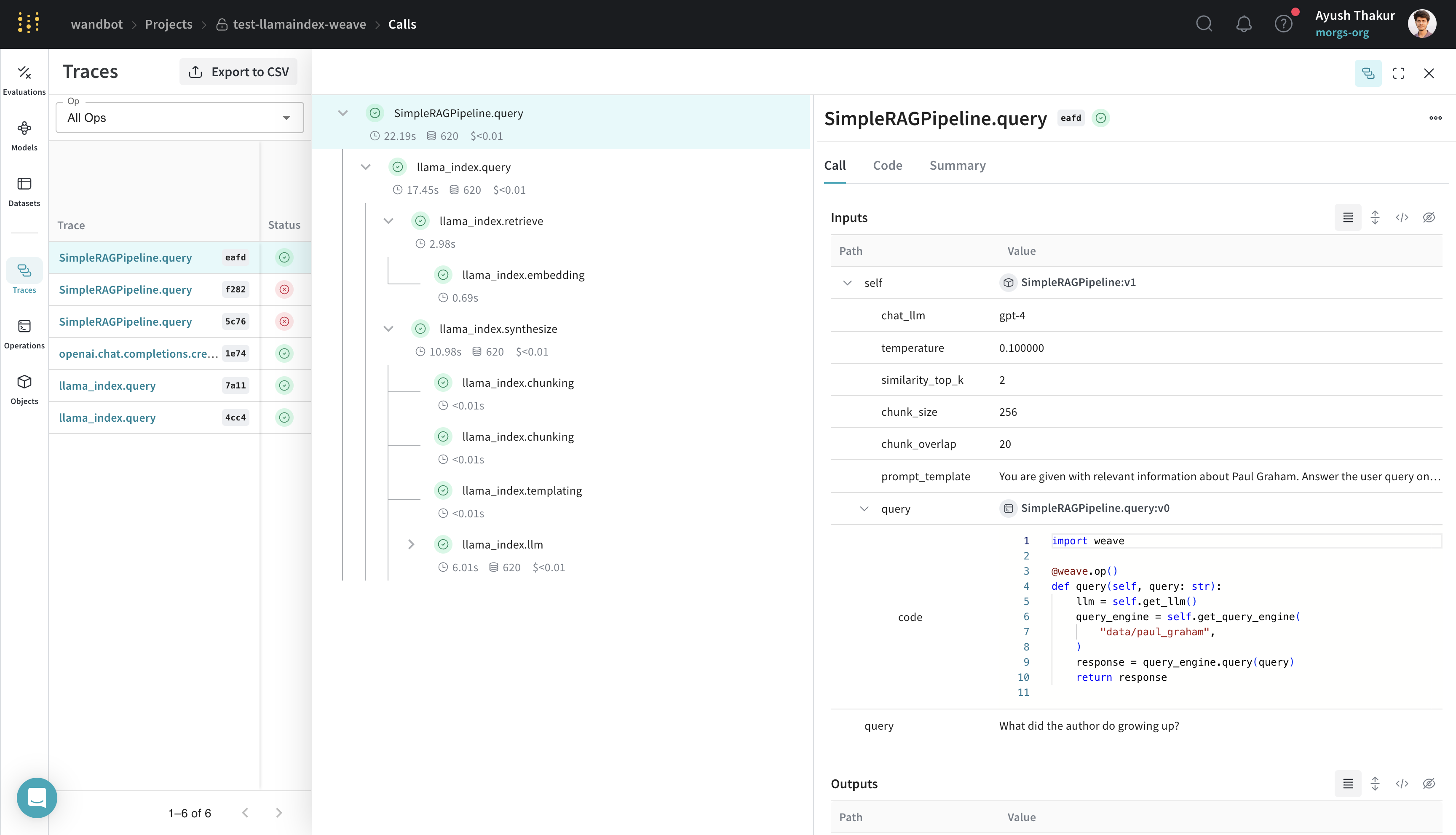
`weave.Model` を継承した `SimpleRAGPipeline` クラスは、この RAG パイプラインの重要なパラメーターをまとめています。`query` メソッドを `weave.op()` でデコレートすると、トレースが有効になります。この構造にしておくことで、Weave で RAG パイプラインのさまざまな設定をバージョン管理し、比較し、評価できるようになります。
[ ](https://wandb.ai/wandbot/test-llamaindex-weave/weave/calls?filter=%7B%22traceRootsOnly%22%3Atrue%7D\&peekPath=%2Fwandbot%2Ftest-llamaindex-weave%2Fcalls%2Fa82afbf4-29a5-43cd-8c51-603350abeafd%3Ftracetree%3D1)
## `weave.Evaluation` を使った評価
このセクションでは、固定されたデータセットに対するモデルのパフォーマンスを測定し、イテレーションを定量的に比較する方法を示します。
評価を行うと、アプリケーションのパフォーマンスを測定できます。[`weave.Evaluation`](/ja/weave/guides/core-types/evaluations) クラスを使うことで、特定のタスクやデータセットに対してモデルがどの程度うまく機能するかを把握できるため、異なるモデルやアプリケーションの各イテレーションを比較しやすくなります。次の例では、前のセクションで作成したモデルを評価する方法を示します。
```python lines {25,32,36} theme={null}
import asyncio
from llama_index.core.evaluation import CorrectnessEvaluator
eval_examples = [
{
"id": "0",
"query": "What programming language did Paul Graham learn to teach himself AI when he was in college?",
"ground_truth": "Paul Graham learned Lisp to teach himself AI when he was in college.",
},
{
"id": "1",
"query": "What was the name of the startup Paul Graham co-founded that was eventually acquired by Yahoo?",
"ground_truth": "The startup Paul Graham co-founded that was eventually acquired by Yahoo was called Viaweb.",
},
{
"id": "2",
"query": "What is the capital city of France?",
"ground_truth": "I cannot answer this question because no information was provided in the text.",
},
]
llm_judge = OpenAI(model="gpt-4", temperature=0.0)
evaluator = CorrectnessEvaluator(llm=llm_judge)
@weave.op()
def correctness_evaluator(query: str, ground_truth: str, output: dict):
result = evaluator.evaluate(
query=query, reference=ground_truth, response=output["response"]
)
return {"correctness": float(result.score)}
evaluation = weave.Evaluation(dataset=eval_examples, scorers=[correctness_evaluator])
rag_pipeline = SimpleRAGPipeline()
asyncio.run(evaluation.evaluate(rag_pipeline))
```
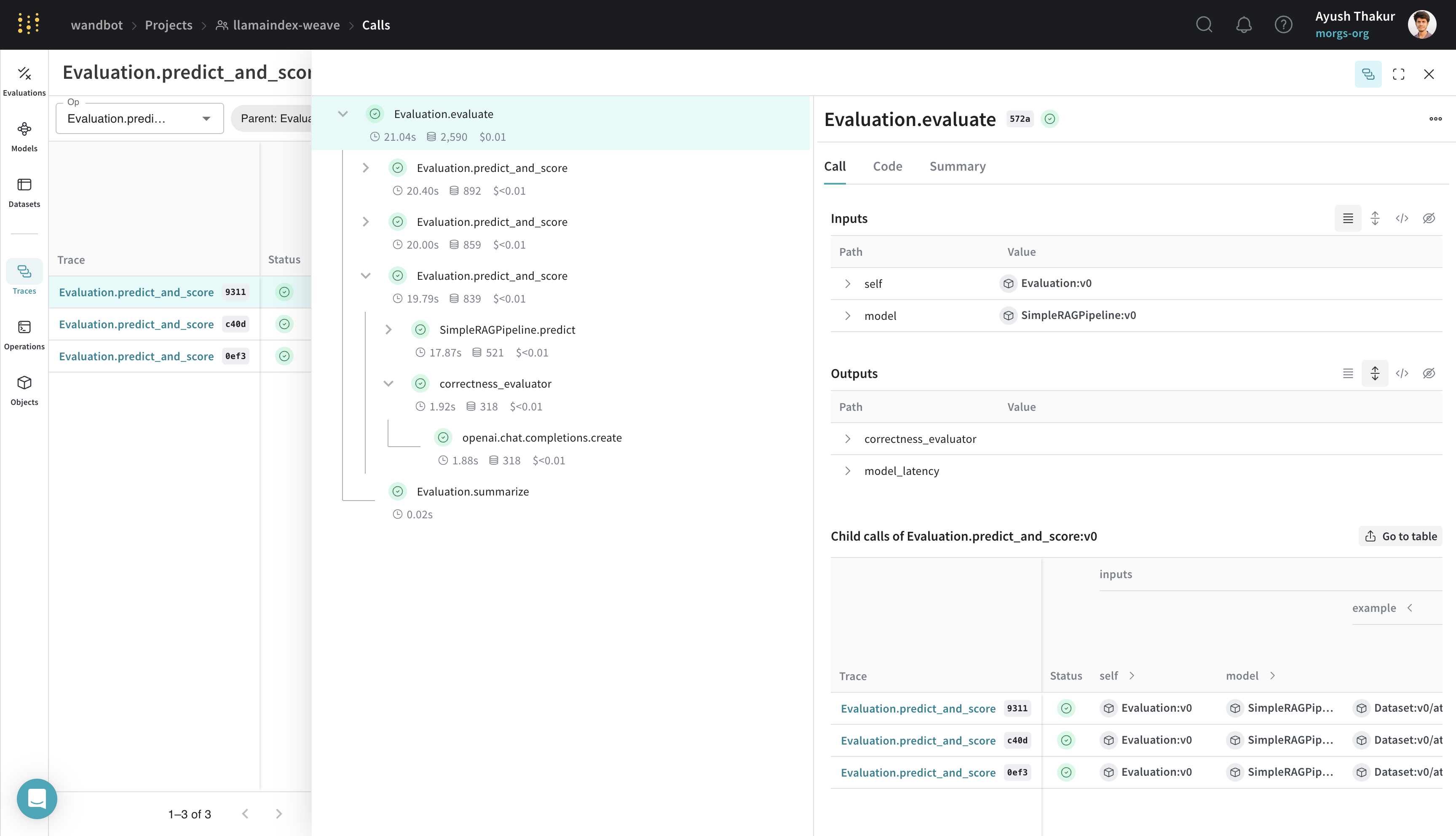
この評価は、前のセクションの例を基にしています。`weave.Evaluation` を使って評価するには、評価用データセット、scorer 関数、`weave.Model` が必要です。これらの要件は、次の3つの主要コンポーネントに適用されます。
* 評価サンプルの dict のキーは、scorer 関数の引数および `weave.Model` の `predict` method の引数と一致している必要があります。
* `weave.Model` には、`predict`、`infer`、または `forward` という名前の method が必要です。トレースのため、この method は `weave.op()` でデコレートする必要があります。
* scorer 関数は `weave.op()` でデコレートされており、`output` という名前付き引数を持つ必要があります。
[ ](https://wandb.ai/wandbot/llamaindex-weave/weave/calls?filter=%7B%22opVersionRefs%22%3A%5B%22weave%3A%2F%2F%2Fwandbot%2Fllamaindex-weave%2Fop%2FEvaluation.predict_and_score%3ANmwfShfFmgAhDGLXrF6Xn02T9MIAsCXBUcifCjyKpOM%22%5D%2C%22parentId%22%3A%2233491e66-b580-47fa-9d43-0cd6f1dc572a%22%7D\&peekPath=%2Fwandbot%2Fllamaindex-weave%2Fcalls%2F33491e66-b580-47fa-9d43-0cd6f1dc572a%3Ftracetree%3D1)
Weave を LlamaIndex とインテグレーションすることで、LLM アプリケーションの包括的なログすることとモニタリングが可能になり、評価を通じてデバッグとパフォーマンスの最適化を効率化できます。
](https://wandb.ai/wandbot/llamaindex-weave/weave/calls?filter=%7B%22opVersionRefs%22%3A%5B%22weave%3A%2F%2F%2Fwandbot%2Fllamaindex-weave%2Fop%2FEvaluation.predict_and_score%3ANmwfShfFmgAhDGLXrF6Xn02T9MIAsCXBUcifCjyKpOM%22%5D%2C%22parentId%22%3A%2233491e66-b580-47fa-9d43-0cd6f1dc572a%22%7D\&peekPath=%2Fwandbot%2Fllamaindex-weave%2Fcalls%2F33491e66-b580-47fa-9d43-0cd6f1dc572a%3Ftracetree%3D1)
Weave を LlamaIndex とインテグレーションすることで、LLM アプリケーションの包括的なログすることとモニタリングが可能になり、評価を通じてデバッグとパフォーマンスの最適化を効率化できます。