> ## Documentation Index
> Fetch the complete documentation index at: https://docs.wandb.ai/llms.txt
> Use this file to discover all available pages before exploring further.
# Calls をクエリしてエクスポートする
> Python SDK、REST API、または Weave UI を使用して Weave の call データをフィルター、並べ替え、エクスポートし、カスタム分析を行います。
このページでは、Weave の外部でトレースデータを分析できるように、Weave Calls をクエリしてエクスポートする方法を説明します。たとえば、カスタム ダッシュボードを構築したり、共同作業者と結果を共有したり、オフラインで分析したりできます。Calls は Weave UI からエクスポートすることも、Python または TypeScript SDK を使用してプログラムから取得することも、Service API を使用して直接クエリすることもできます。
## Weave UI から Calls をエクスポートする
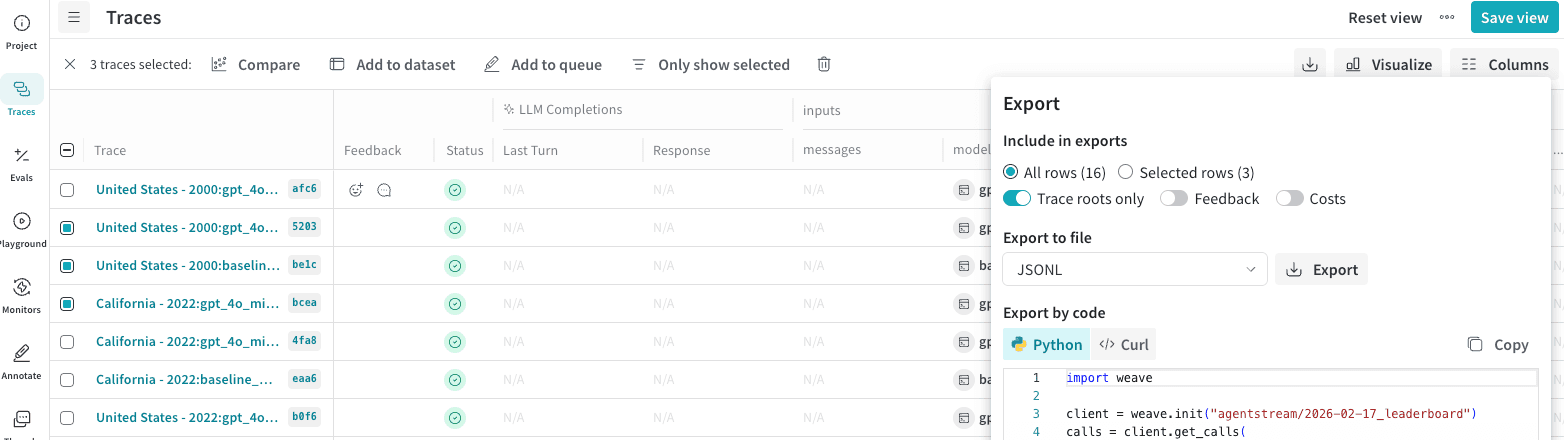
Weave UI では、データを複数の形式でエクスポートできます。また、行をプログラムでエクスポートするために使用できる Python と cURL のコードも表示されます。
Calls をエクスポートするには、次の手順に従います。
1. [wandb.ai](https://wandb.ai/) にアクセスし、プロジェクトを選択します。
2. Weave プロジェクトのサイドバーで、**Traces** をクリックします。
3. エクスポートしたい複数の Calls の行にチェックを入れて選択します。
4. **Traces** 表のツールバーで、エクスポートまたはダウンロードボタンをクリックします。
5. **Export** モーダルで、**Selected rows** または **All rows** を選択します。
6. **Export** をクリックします。
## プログラムから Calls を取得する
UI の外部で Calls をフィルター、並べ替え、または処理するには、Weave SDK または Service API のいずれかを使用して取得します。workflow に最も適したインターフェイスを選択してください。
Python API を使用して Calls を取得するには、[`client.get_calls`](/ja/weave/reference/python-sdk/trace/weave_client#method-get_calls) メソッドを使用します。
```python lines theme={null}
import weave
# クライアントを初期化します
client = weave.init("your-project-name")
# Calls を取得します
calls = client.get_calls(filter=...)
```
TypeScript API を使用して Calls を取得するには、[`client.getCalls`](/ja/weave/reference/typescript-sdk/classes/weaveclient#getcalls) メソッドを使用します。
```typescript lines theme={null}
import * as weave from 'weave'
// クライアントを初期化します
const client = await weave.init('intro-example')
// Calls を取得します
const calls = await client.getCalls(filter=...)
```
Service API は完全なクエリレイヤーを提供します。Service API を使用して Calls を取得するには、[`/calls/stream_query`](https://docs.wandb.ai/weave/reference/service-api/calls/calls-query-stream) エンドポイントにリクエストを送信します。
```bash theme={null}
curl -L 'https://trace.wandb.ai/calls/stream_query' \
-H 'Content-Type: application/json' \
-H 'Accept: application/json' \
-d '{
"project_id": "string",
"filter": {
"op_names": [
"string"
],
"input_refs": [
"string"
],
"output_refs": [
"string"
],
"parent_ids": [
"string"
],
"trace_ids": [
"string"
],
"call_ids": [
"string"
],
"trace_roots_only": true,
"wb_user_ids": [
"string"
],
"wb_run_ids": [
"string"
]
},
"limit": 100,
"offset": 0,
"sort_by": [
{
"field": "string",
"direction": "asc"
}
],
"query": {
"$expr": {}
},
"include_costs": true,
"include_feedback": true,
"columns": [
"string"
],
"expand_columns": [
"string"
]
}'
```
Call のプロパティとフィールドの詳細については、[Call スキーマリファレンス](/ja/weave/guides/tracking/call-schema-reference)を参照してください。
## Call メトリクスをエクスポートする
基になる Call レコードではなく、コストやレイテンシの傾向などの集約されたインサイトが必要な場合は、このセクションで説明する メトリクス エンドポイント を使用します。
また、Weave Service API の [POST `/calls/stats` エンドポイント](https://docs.wandb.ai/weave/reference/service-api/calls/call-stats) を使用すると、Call データ自体を取得せずに、Calls に関するメトリクスを取得できます。レイテンシやコストなどの Calls に関する情報を取得し、sum、average、minimum、maximum、count で集約できます。たとえば、次の情報を取得できます。
* token 使用量の合計
* 平均レイテンシ
* 使用された tokens の最大値
* 総コスト
* 入力 tokens の最小値
この エンドポイント には複数のフィルター オプションが用意されているため、指定した期間内に行われた Calls や、次のようなその他のプロパティで対象を絞り込めます。
* Op 名
* Trace ID
* Thread ID
* User ID
次の例は、`web_app` という名前の Op から 2 日間に生成された Calls を取得する方法を示しています。`[YOUR-TEAM-NAME/YOUR-PROJECT-NAME]` は、チーム名とプロジェクト名に置き換えてください。
```python Python lines {10-11,16-24} theme={null}
import requests
import json
import os
url = "https://trace.wandb.ai/calls/stats"
payload = {
"project_id": "[YOUR-TEAM-NAME/YOUR-PROJECT-NAME]",
"start": "2026-03-01T00:00:00Z",
# バケットのサイズを秒単位で指定します。
"granularity": 86400,
"filter": {
"trace_roots_only": True,
"op_names": ["web_app"]
},
# メトリクスとその集約関数を指定します
"usage_metrics": [
{"metric": "total_tokens", "aggregations": ["sum"]},
{"metric": "total_cost", "aggregations": ["sum"]}
],
"call_metrics": [
{"metric": "call_count", "aggregations": ["sum"]},
{"metric": "error_count", "aggregations": ["sum"]},
{"metric": "latency_ms", "aggregations": ["avg", "min", "max"], "percentiles": [50, 95, 99]}
]
}
API_KEY = os.getenv("WANDB_API_KEY")
response = requests.post(url, json=payload, auth=("api", API_KEY))
print(json.dumps(response.json(), indent=2))
```
```typescript TypeScript lines {6-7,13-20} theme={null}
const url = "https://trace.wandb.ai/calls/stats";
const payload = {
project_id: "[YOUR-TEAM-NAME/YOUR-PROJECT-NAME]",
start: "2026-03-01T00:00:00Z",
// バケットのサイズを秒単位で指定します。
granularity: 86400,
filter: {
trace_roots_only: true,
op_names: ["web_app"],
},
// メトリクスとその集約関数を指定します
usage_metrics: [
{ metric: "total_tokens", aggregations: ["sum"] },
{ metric: "total_cost", aggregations: ["sum"] },
],
call_metrics: [
{ metric: "call_count", aggregations: ["sum"] },
{ metric: "error_count", aggregations: ["sum"] },
{ metric: "latency_ms", aggregations: ["avg", "min", "max"], percentiles: [50, 95, 99] },
],
};
const API_KEY = process.env.WANDB_API_KEY!;
const response = await fetch(url, {
method: "POST",
headers: {
"Content-Type": "application/json",
Authorization: "Basic " + btoa(`api:${API_KEY}`),
},
body: JSON.stringify(payload),
});
const data = await response.json();
console.log(JSON.stringify(data, null, 2));
```
この request では、メトリクスをどのように集約するかも指定しています。メトリクスは `sum`、`count`、`avg`、`min`、`max`、`count` で集約できます。
この エンドポイント は JSON object を返します。次の response の例は、2 日分のメトリクスを示しています。各日 (bucket) は、`usage_buckets` 配列と `call_buckets` 配列内で、それぞれ個別の object として表されます。各配列では、メトリクスのグループ化方法が異なります。
* `usage_buckets`: 使用した model ごとに、各日の Call メトリクスをグループ化します。
* `call_buckets`: 使用した model に関係なく、各日の Call メトリクスをグループ化します。
bucket サイズを変更するには、request の granularity フィールド (秒単位) を設定します。
```json lines theme={null}
{
"start": "2026-03-03T00:00:00Z",
"end": "2026-03-04T21:34:39.746539Z",
"granularity": 86400,
"timezone": "UTC",
"usage_buckets": [
{
"timestamp": "2026-03-03T00:00:00",
"model": "gpt-4o-2024-08-06",
"sum_total_tokens": 498.0,
"sum_input_tokens": 219.0,
"sum_output_tokens": 279.0,
"count": 5,
"sum_total_cost": 0.0033374999156876584
},
{
"timestamp": "2026-03-03T00:00:00",
"model": "gpt-5-2025-08-07",
"sum_total_tokens": 0.0,
"sum_input_tokens": 0.0,
"sum_output_tokens": 0.0,
"count": 0,
"sum_total_cost": 0.0
},
{
"timestamp": "2026-03-04T00:00:00",
"model": "gpt-4o-2024-08-06",
"sum_total_tokens": 58.0,
"sum_input_tokens": 27.0,
"sum_output_tokens": 31.0,
"count": 1,
"sum_total_cost": 0.0003774999904635479
},
{
"timestamp": "2026-03-04T00:00:00",
"model": "gpt-5-2025-08-07",
"sum_total_tokens": 427.0,
"sum_input_tokens": 26.0,
"sum_output_tokens": 401.0,
"count": 1,
"sum_total_cost": 0.00404249989787786
}
],
"call_buckets": [
{
"timestamp": "2026-03-03T00:00:00",
"sum_call_count": 6,
"sum_error_count": 1,
"avg_latency_ms": 1505.6666666666667,
"min_latency_ms": 525,
"max_latency_ms": 2524,
"p50_latency_ms": 1534.0,
"p95_latency_ms": 2328.5,
"p99_latency_ms": 2484.9000000000005,
"count": 6
},
{
"timestamp": "2026-03-04T00:00:00",
"sum_call_count": 2,
"sum_error_count": 0,
"avg_latency_ms": 3645.0,
"min_latency_ms": 1739,
"max_latency_ms": 5551,
"p50_latency_ms": 3645.0,
"p95_latency_ms": 5360.4,
"p99_latency_ms": 5512.88,
"count": 2
}
]
}
```
メトリクスをクエリできる期間は最大31日間です。利用可能なオプションの詳細については、[Service APIリファレンス](https://docs.wandb.ai/weave/reference/service-api/calls/call-stats)を参照してください。