> ## Documentation Index
> Fetch the complete documentation index at: https://docs.wandb.ai/llms.txt
> Use this file to discover all available pages before exploring further.
# 개요
ARIA는 W\&B의 AI Research and Iteration Agent로, W\&B에서 실험을 분석하고 실행하고, 결과를 설명하고, Runs 전반의 패턴을 파악하고, 다음 step을 추천하고, 시각화와 Reports를 만들도록 도와주는 맞춤형 리서치 어시스턴트입니다.
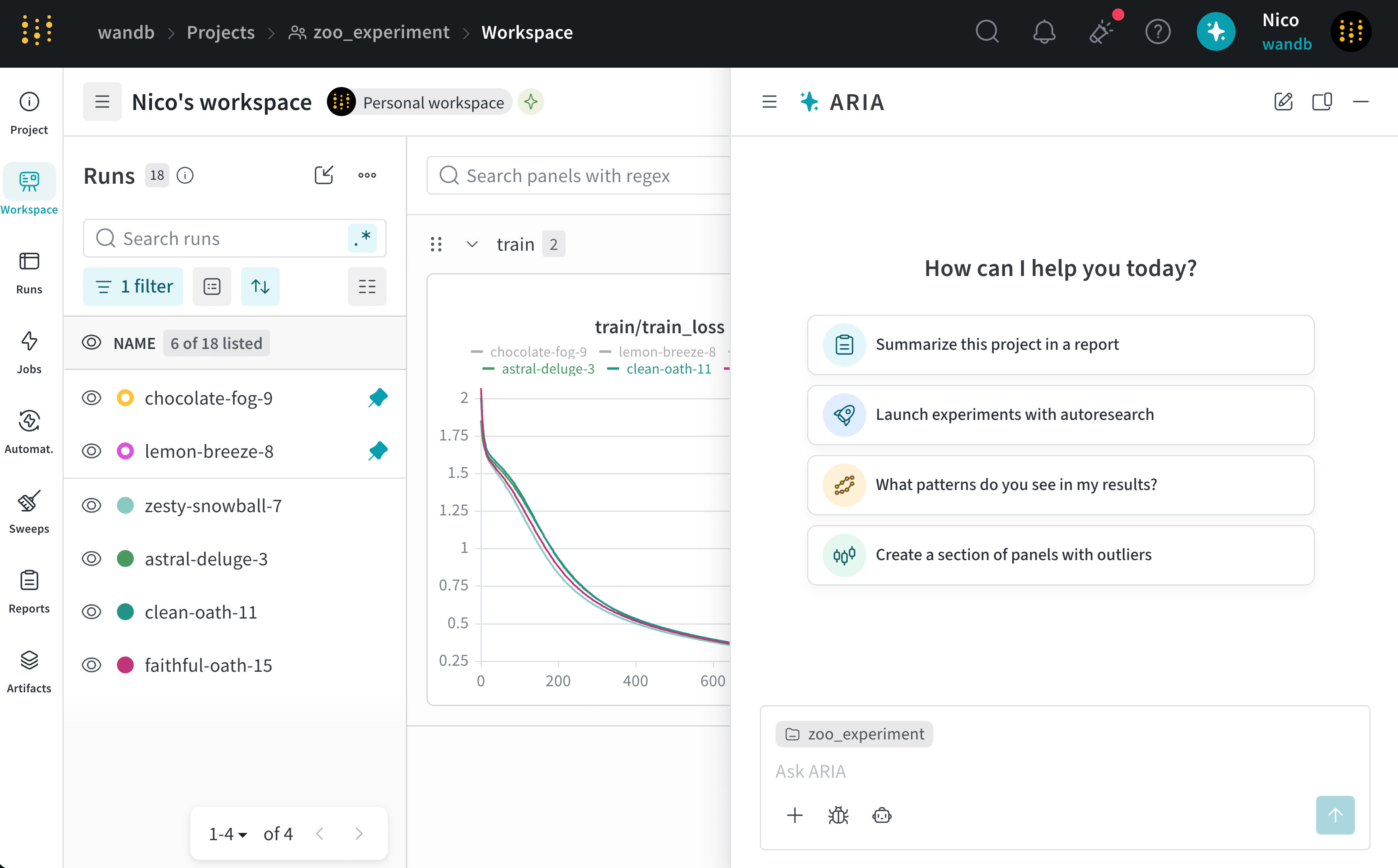 ARIA는 다음 작업을 도와드릴 수 있습니다:
* 실험을 분석해 패턴과 인사이트를 찾습니다.
* [새로운 아이디어를 테스트하기 위해 실험과 Sweeps를 실행합니다](/ko/aria/autoresearch).
* 사용해 볼 하이퍼파라미터 추천과 같은 다음 step을 제안합니다.
* 데이터를 시각화할 수 있도록 plot과 패널을 만듭니다.
* 팀과 인사이트를 공유할 수 있도록 저장된 뷰와 Reports를 만듭니다.
[ARIA와 채팅](/ko/aria/chat)하려면 다음 단계를 따르세요:
1. 아무 프로젝트에서나 페이지 오른쪽 상단의 파란색 원을 클릭합니다.
ARIA는 다음 작업을 도와드릴 수 있습니다:
* 실험을 분석해 패턴과 인사이트를 찾습니다.
* [새로운 아이디어를 테스트하기 위해 실험과 Sweeps를 실행합니다](/ko/aria/autoresearch).
* 사용해 볼 하이퍼파라미터 추천과 같은 다음 step을 제안합니다.
* 데이터를 시각화할 수 있도록 plot과 패널을 만듭니다.
* 팀과 인사이트를 공유할 수 있도록 저장된 뷰와 Reports를 만듭니다.
[ARIA와 채팅](/ko/aria/chat)하려면 다음 단계를 따르세요:
1. 아무 프로젝트에서나 페이지 오른쪽 상단의 파란색 원을 클릭합니다.
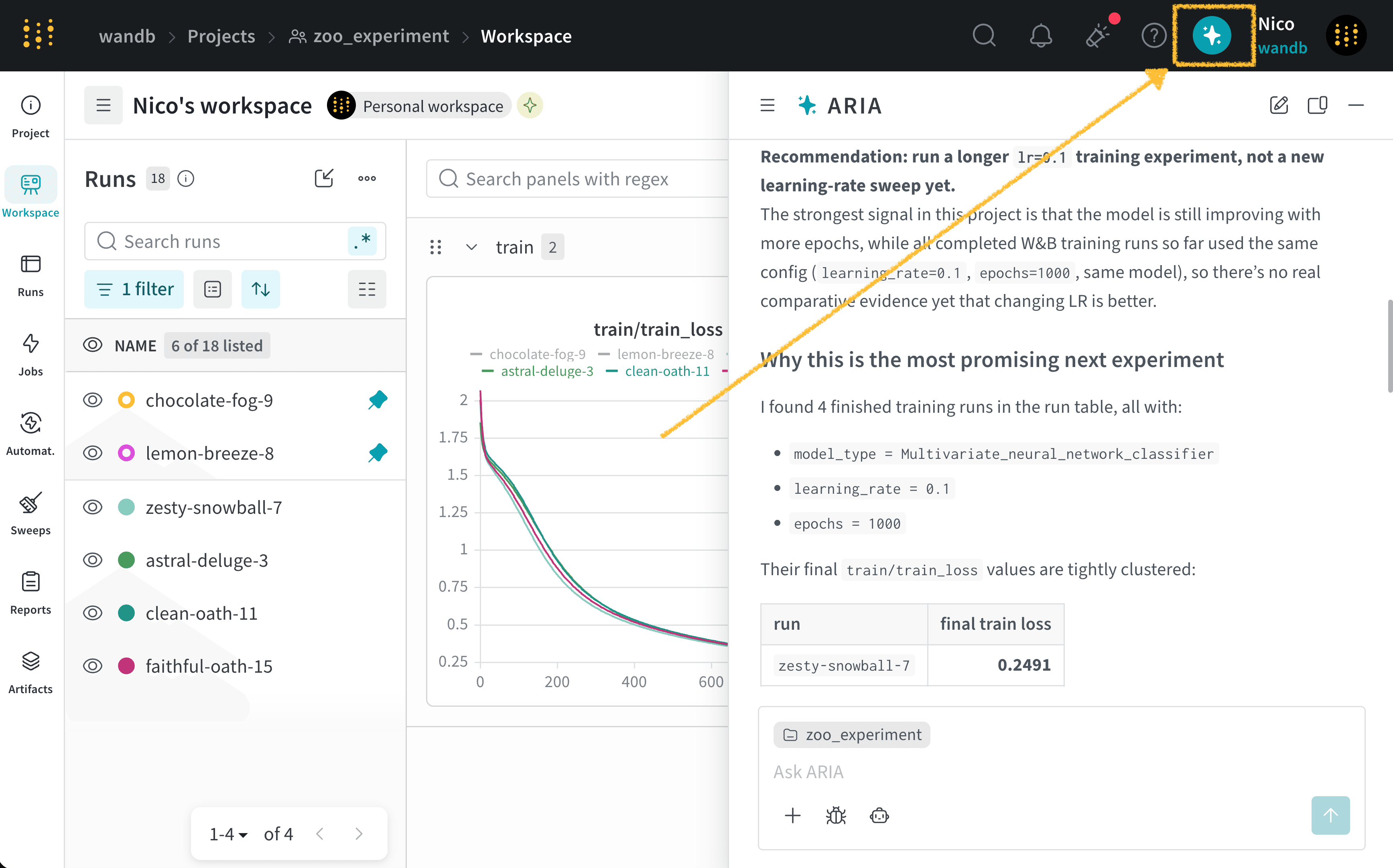 2. 채팅 창에 질문이나 요청을 입력합니다. 무엇을 물어봐야 할지 잘 모르겠다면 추천 프롬프트를 선택하세요.
3. 채팅 창 오른쪽 아래에 있는 위쪽 화살표 모양의 **Send** 버튼을 클릭합니다.
질문의 복잡도에 따라 ARIA가 응답하는 데 잠시 시간이 걸릴 수 있습니다. ARIA가 작업하는 동안 채팅 창을 닫고 나중에 다시 와서 응답을 확인할 수 있습니다. ARIA에 더 많은 정보가 필요하면 추가 설명을 요청합니다.
ARIA가 작업하는 동안 **Thinking** 및 **shell** step이 표시될 수 있습니다:
* **Thinking** step은 ARIA가 질문에 어떻게 접근하는지 요약해서 보여줍니다.
* **shell** step은 ARIA가 패널 생성, Runs 필터링, Python 스크립트 생성 및 실행 등의 액션을 수행할 때 표시됩니다.
**Thinking** step 또는 **shell** step을 클릭하면 ARIA의 추론이나 수행한 액션에 대한 자세한 내용을 펼쳐서 볼 수 있습니다.
실제 예시는 [Example chats](/ko/aria/overview#example-chats)를 참조하세요. 채팅 관리에 대한 자세한 내용은 [Chat with ARIA](/ko/aria/chat)를 참조하세요.
2. 채팅 창에 질문이나 요청을 입력합니다. 무엇을 물어봐야 할지 잘 모르겠다면 추천 프롬프트를 선택하세요.
3. 채팅 창 오른쪽 아래에 있는 위쪽 화살표 모양의 **Send** 버튼을 클릭합니다.
질문의 복잡도에 따라 ARIA가 응답하는 데 잠시 시간이 걸릴 수 있습니다. ARIA가 작업하는 동안 채팅 창을 닫고 나중에 다시 와서 응답을 확인할 수 있습니다. ARIA에 더 많은 정보가 필요하면 추가 설명을 요청합니다.
ARIA가 작업하는 동안 **Thinking** 및 **shell** step이 표시될 수 있습니다:
* **Thinking** step은 ARIA가 질문에 어떻게 접근하는지 요약해서 보여줍니다.
* **shell** step은 ARIA가 패널 생성, Runs 필터링, Python 스크립트 생성 및 실행 등의 액션을 수행할 때 표시됩니다.
**Thinking** step 또는 **shell** step을 클릭하면 ARIA의 추론이나 수행한 액션에 대한 자세한 내용을 펼쳐서 볼 수 있습니다.
실제 예시는 [Example chats](/ko/aria/overview#example-chats)를 참조하세요. 채팅 관리에 대한 자세한 내용은 [Chat with ARIA](/ko/aria/chat)를 참조하세요.
## 예시 채팅
다음은 ARIA와 실제로 나눈 채팅 예시로, ARIA와 어떻게 상호작용할 수 있는지와 어떤 응답을 기대할 수 있는지 보여줍니다.
방금 일련의 실험을 마친 ML 엔지니어라고 가정해 보겠습니다. 모델 성능을 개선하려면 다음에 무엇을 해야 하는지 파악하고 싶습니다.
이를 위해 Runs를 로깅한 프로젝트로 이동합니다. ARIA를 열고 다음과 같이 질문합니다.
```text title="사용자 프롬프트" theme={null}
/recommend-next-experiment
```
다음은 ARIA가 이 질문에 응답한 예시입니다. 먼저 ARIA는 질문에 어떻게 접근할지 판단하기 위해 추론 step을 수행합니다. 간결하게 보여주기 위해 아래에는 ARIA의 추론 중 일부만 표시했습니다.
```text title="ARIA 추론 step" theme={null}
Recommendation: run one “longer-training + held-out-eval” experiment
before changing model architecture or sweeping LR.
Use the current best setup, but train longer:
hyperparameter_config = {
"learning_rate": 0.1, # 그대로 유지
"epochs": 2000, # 이전 값은 1000
"model_type": "Multivariate_neural_network_classifier",
"torch_seed": 0, # 재현성을 위해 추가
}
Also add logging for the existing held-out split every epoch or
every 10–50 epochs:
train/train_loss
train/train_acc
test/test_loss
test/test_acc
and save the best checkpoint by test/test_loss, not only
by training loss.
Why this is the most promising next experiment
The project has 16 finished runs, but only 4 are actual training runs;
all four used the same training config:
learning_rate = 0.1
epochs = 1000
same model: Multivariate_neural_network_classifier
So there is no real hyperparameter comparison yet. The
strongest signal is from the learning curves: all four
training losses are still improving at the final epoch, and
the minimum training loss occurs at epoch 1000 in every run.
I’d run:
learning_rate: 0.1
epochs: 2000
model_type: unchanged
random_state: keep existing dataset split, 42
add torch.manual_seed(0) and log it as torch_seed
evaluate on X_test, y_test each epoch or every 10 epochs
checkpoint on lowest test/test_loss
```
ARIA의 권장 사항에 동의한 후, ARIA에게 대신 실험을 실행해 달라고 요청합니다.
```text title="사용자 프롬프트" theme={null}
Run that experiment for me.
```
ARIA는 W\&B Launch를 사용해 샌드박스 환경에서 실험을 실행합니다. 다음 이미지는 실험 실행이 완료된 후 ARIA의 응답을 보여줍니다.
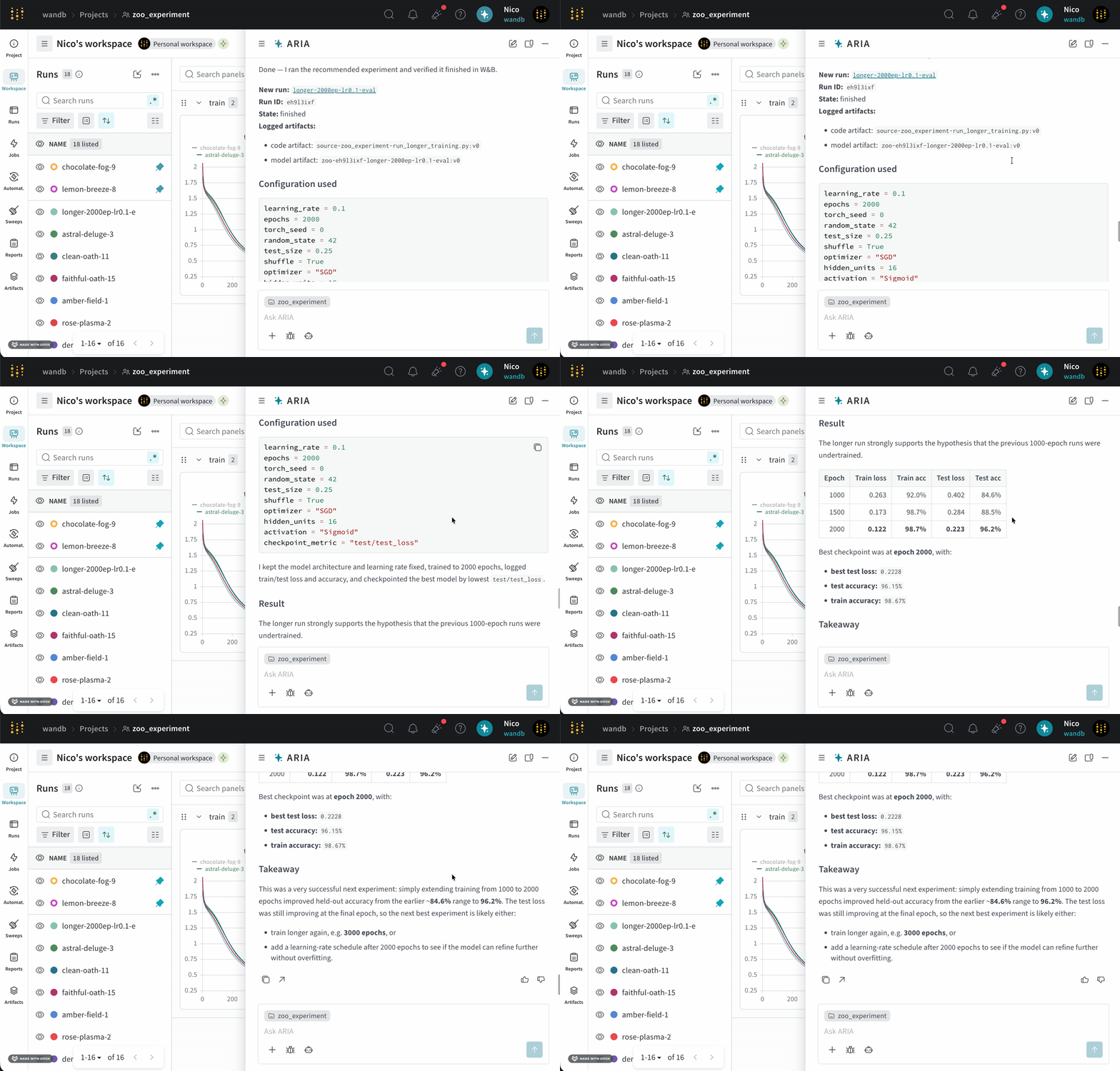 ARIA는 W\&B Launch를 사용해 샌드박스 환경에서 실험을 실행합니다. 자세한 내용은 [ARIA가 실험을 실행하도록 설정](/ko/aria/autoresearch#run-experiments-with-w\&b-launch)을 참조하세요.
새 모델에 대해 일련의 Runs를 막 완료한 ML 엔지니어라고 가정해 보겠습니다. 모델 성능이 어땠는지 이해하고, 잠재적인 문제를 파악하고, 다음 단계를 결정하고 싶습니다.
이를 위해 Runs를 로깅한 프로젝트로 이동합니다. ARIA를 열고 다음과 같이 묻습니다.
```text title="사용자 프롬프트" theme={null}
What patterns do you see across my runs?
```
다음은 이 질문에 대해 ARIA가 응답할 수 있는 예시입니다. 먼저 ARIA는 질문에 어떻게 접근할지 결정하기 위해 추론 step을 수행합니다.
```text title="ARIA 추론 step" theme={null}
I’m considering running a state breakdown scan with counts by state using
specific server filters. I’ll look at the array of states: ['finished',
'running', 'crashed', 'failed', 'killed', 'pending', 'preempting'] and
determine the length of each. Summing these metrics could provide
useful insights. I should also focus on identifying objective metrics
from sample keys while excluding those that start with "_" or "system/".
It’s important to compute the best min/max for numeric summary metrics too.
```
ARIA는 질문에 답하기 위해 Runs 전반의 데이터를 분석해야 한다고 파악합니다. 이를 위해 ARIA는 W\&B Python SDK를 사용해 이전에 로깅된 Runs를 쿼리하고 데이터의 패턴을 파악하는 Python 스크립트(`analyze_patterns.py`)를 생성합니다. 스크립트가 생성되면 ARIA는 이를 샌드박스 환경에서 실행합니다.
ARIA는 W\&B Launch를 사용해 샌드박스 환경에서 실험을 실행합니다. 자세한 내용은 [ARIA가 실험을 실행하도록 설정](/ko/aria/autoresearch#run-experiments-with-w\&b-launch)을 참조하세요.
새 모델에 대해 일련의 Runs를 막 완료한 ML 엔지니어라고 가정해 보겠습니다. 모델 성능이 어땠는지 이해하고, 잠재적인 문제를 파악하고, 다음 단계를 결정하고 싶습니다.
이를 위해 Runs를 로깅한 프로젝트로 이동합니다. ARIA를 열고 다음과 같이 묻습니다.
```text title="사용자 프롬프트" theme={null}
What patterns do you see across my runs?
```
다음은 이 질문에 대해 ARIA가 응답할 수 있는 예시입니다. 먼저 ARIA는 질문에 어떻게 접근할지 결정하기 위해 추론 step을 수행합니다.
```text title="ARIA 추론 step" theme={null}
I’m considering running a state breakdown scan with counts by state using
specific server filters. I’ll look at the array of states: ['finished',
'running', 'crashed', 'failed', 'killed', 'pending', 'preempting'] and
determine the length of each. Summing these metrics could provide
useful insights. I should also focus on identifying objective metrics
from sample keys while excluding those that start with "_" or "system/".
It’s important to compute the best min/max for numeric summary metrics too.
```
ARIA는 질문에 답하기 위해 Runs 전반의 데이터를 분석해야 한다고 파악합니다. 이를 위해 ARIA는 W\&B Python SDK를 사용해 이전에 로깅된 Runs를 쿼리하고 데이터의 패턴을 파악하는 Python 스크립트(`analyze_patterns.py`)를 생성합니다. 스크립트가 생성되면 ARIA는 이를 샌드박스 환경에서 실행합니다.
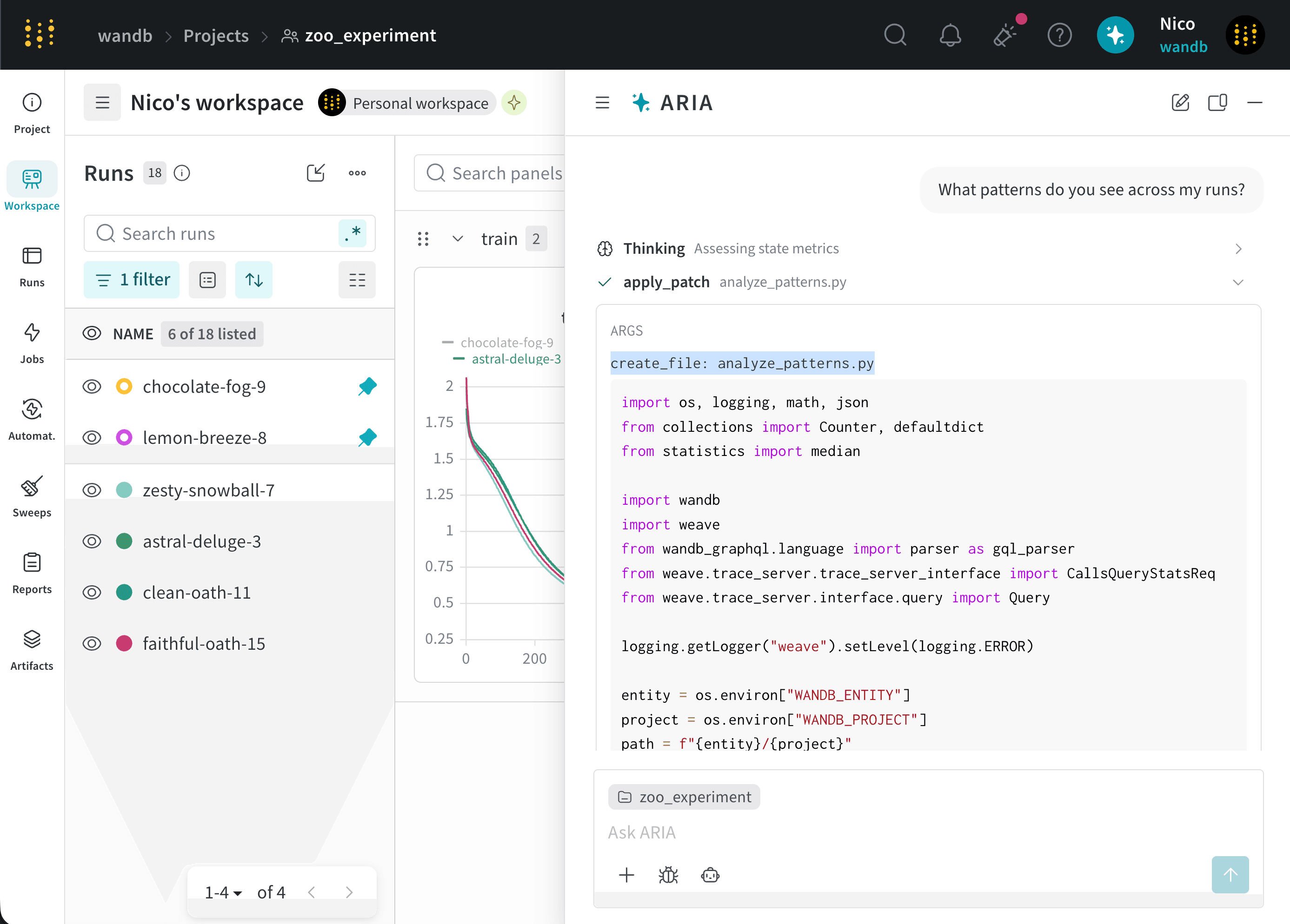 다음으로 ARIA는 이 출력을 사용해 Runs 전반에서 발견한 패턴을 요약하고, 이를 채팅에서 공유합니다.
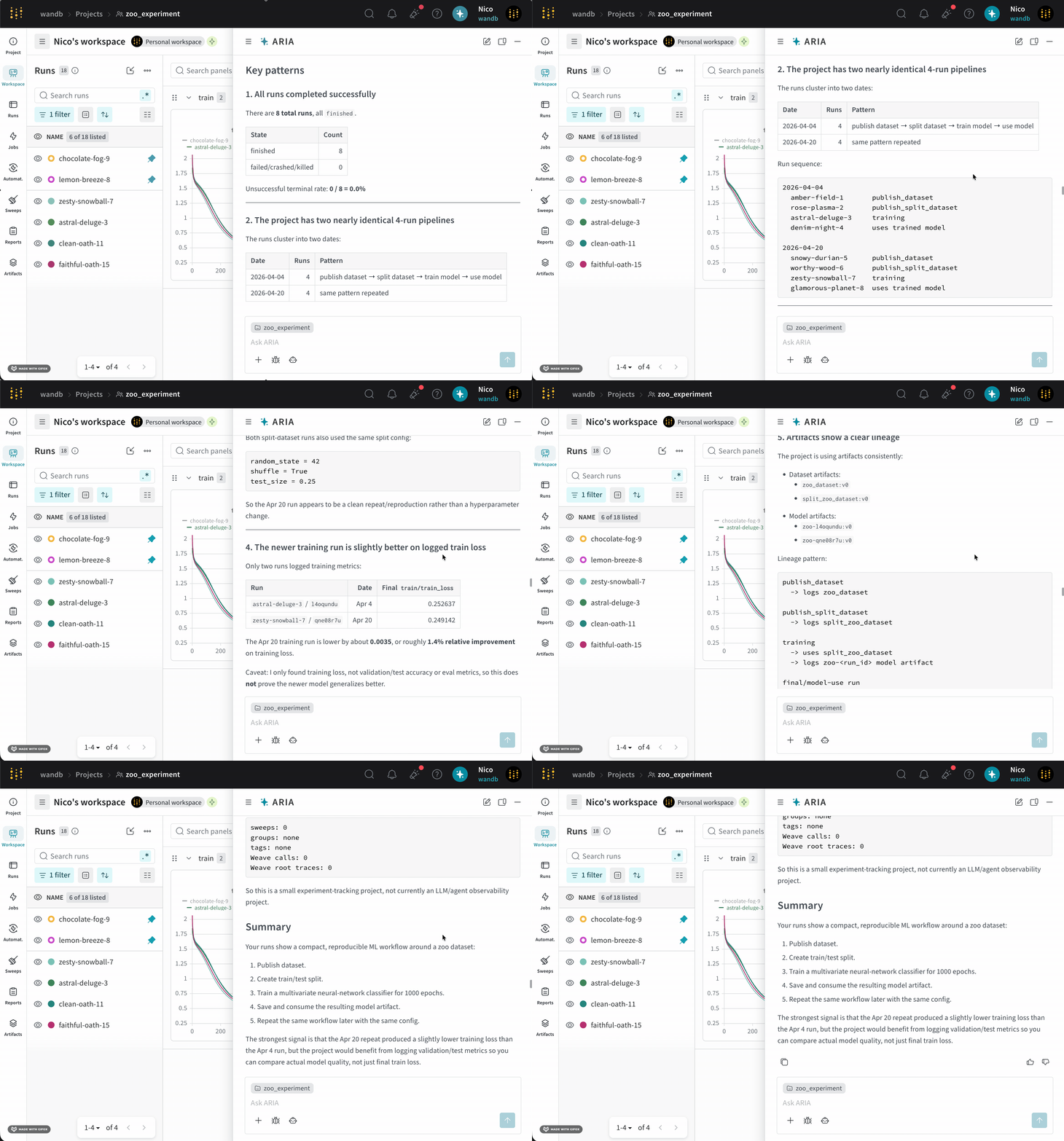 ARIA는 현재 실험에서 `validation/test` 메트릭이 로깅되지 않는다는 점을 파악했고, 모델 성능을 더 잘 이해하기 위해 향후 Runs에서 해당 메트릭을 로깅할 것을 권장했습니다.
다음 단계로, 검증 메트릭이 로깅되도록 실험을 설정하는 데 ARIA의 도움을 요청할 수 있습니다. 예를 들어, ARIA에 다음과 같이 물을 수 있습니다.
```text title="사용자 프롬프트" theme={null}
Can you help me update my Python script to also log validation metrics?
```
그러면 ARIA는 트레이닝 스크립트에서 검증 메트릭을 로깅하는 코드를 생성해 주며, 이를 복사해 코드베이스에 붙여 넣을 수 있습니다.
새 모델에 대해 일련의 Runs를 막 완료한 ML 엔지니어라고 가정해 보겠습니다. 모델 성능이 어땠는지 이해하고, 향후 Runs에서 모델 성능을 개선할 방법에 대한 추천도 받고 싶습니다. 그래서 ARIA에 하이퍼파라미터 튜닝에 대한 추천을 요청하기로 합니다.
다음과 같이 ARIA에 물을 수 있습니다.
```text title="사용자 프롬프트" theme={null}
I want to conduct a sweep to improve lower my training model's loss. Do you have suggestions on what hyperparameters I should try?
```
ARIA는 다음과 같은 추론 step으로 응답할 수 있습니다.
```text title="ARIA 추론 step" theme={null}
The user is looking for insights to improve training loss, so I
should suggest ranges for learning rate, optimizer, batch size,
weight decay, and other relevant parameters.
Since the user wants to conduct a sweep, I need to show the code or
instrumentation with a clear yet concise YAML or Python configuration.
I might also suggest using random or Bayesian techniques for more
effective hyperparameter selection.
```
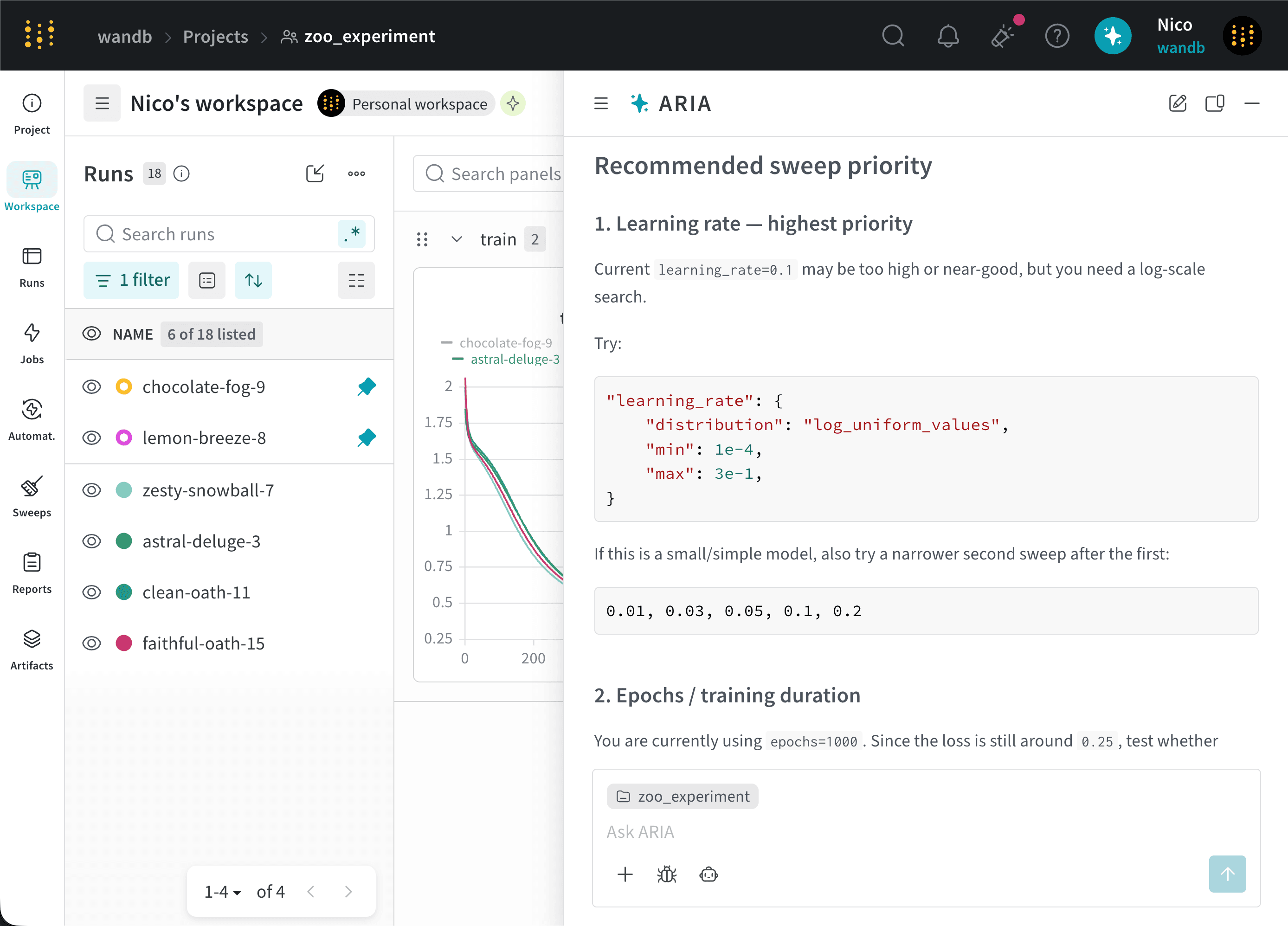
ARIA는 하이퍼파라미터 튜닝에 대한 추천을 제공하기 위해 이전 Runs에서 사용된 하이퍼파라미터와 트레이닝 loss의 관계를 분석해야 한다고 파악합니다.
ARIA는 주어진 프로젝트의 모든 Runs에서 학습률 `0.01`이 사용되었다는 점을 파악합니다. 이러한 인사이트를 바탕으로, 모델 성능 개선에 도움이 되는지 확인하기 위해 향후 Runs에서 `0.001`과 같이 더 낮은 학습률을 시도해 볼 것을 권장합니다.
ARIA는 또한 SGD optimizer를 사용하는 Runs도 파악합니다. 이러한 인사이트를 바탕으로, 모델 성능 개선에 도움이 되는지 확인하기 위해 향후 Runs에서 Adam(Adaptive Moment Estimation)과 같은 다른 optimizer를 시도해 볼 것을 권장합니다.
다음 이미지는 하이퍼파라미터 튜닝에 대한 추천이 포함된 ARIA 응답의 일부를 보여줍니다.
ARIA는 현재 실험에서 `validation/test` 메트릭이 로깅되지 않는다는 점을 파악했고, 모델 성능을 더 잘 이해하기 위해 향후 Runs에서 해당 메트릭을 로깅할 것을 권장했습니다.
다음 단계로, 검증 메트릭이 로깅되도록 실험을 설정하는 데 ARIA의 도움을 요청할 수 있습니다. 예를 들어, ARIA에 다음과 같이 물을 수 있습니다.
```text title="사용자 프롬프트" theme={null}
Can you help me update my Python script to also log validation metrics?
```
그러면 ARIA는 트레이닝 스크립트에서 검증 메트릭을 로깅하는 코드를 생성해 주며, 이를 복사해 코드베이스에 붙여 넣을 수 있습니다.
새 모델에 대해 일련의 Runs를 막 완료한 ML 엔지니어라고 가정해 보겠습니다. 모델 성능이 어땠는지 이해하고, 향후 Runs에서 모델 성능을 개선할 방법에 대한 추천도 받고 싶습니다. 그래서 ARIA에 하이퍼파라미터 튜닝에 대한 추천을 요청하기로 합니다.
다음과 같이 ARIA에 물을 수 있습니다.
```text title="사용자 프롬프트" theme={null}
I want to conduct a sweep to improve lower my training model's loss. Do you have suggestions on what hyperparameters I should try?
```
ARIA는 다음과 같은 추론 step으로 응답할 수 있습니다.
```text title="ARIA 추론 step" theme={null}
The user is looking for insights to improve training loss, so I
should suggest ranges for learning rate, optimizer, batch size,
weight decay, and other relevant parameters.
Since the user wants to conduct a sweep, I need to show the code or
instrumentation with a clear yet concise YAML or Python configuration.
I might also suggest using random or Bayesian techniques for more
effective hyperparameter selection.
```
ARIA는 하이퍼파라미터 튜닝에 대한 추천을 제공하기 위해 이전 Runs에서 사용된 하이퍼파라미터와 트레이닝 loss의 관계를 분석해야 한다고 파악합니다.
ARIA는 주어진 프로젝트의 모든 Runs에서 학습률 `0.01`이 사용되었다는 점을 파악합니다. 이러한 인사이트를 바탕으로, 모델 성능 개선에 도움이 되는지 확인하기 위해 향후 Runs에서 `0.001`과 같이 더 낮은 학습률을 시도해 볼 것을 권장합니다.
ARIA는 또한 SGD optimizer를 사용하는 Runs도 파악합니다. 이러한 인사이트를 바탕으로, 모델 성능 개선에 도움이 되는지 확인하기 위해 향후 Runs에서 Adam(Adaptive Moment Estimation)과 같은 다른 optimizer를 시도해 볼 것을 권장합니다.
다음 이미지는 하이퍼파라미터 튜닝에 대한 추천이 포함된 ARIA 응답의 일부를 보여줍니다.
 프로젝트의 Runs를 분석하다가 데이터에서 흥미로운 패턴을 발견한 데이터 사이언티스트라고 가정해 보세요. 이러한 인사이트를 팀과 쉽게 이해할 수 있는 형식으로 공유하고 싶습니다. 그래서 ARIA에게 [W\&B Report](/ko/models/reports) 작성을 도와달라고 요청하기로 합니다.
이를 위해 ARIA를 열고 다음과 같이 요청합니다:
```text title="사용자 프롬프트" theme={null}
발견한 내용을 팀과 공유할 수 있는 보고서를 만들어 주세요.
```
ARIA는 다음과 같은 추론 step을 응답할 수 있습니다:
```text title="ARIA 추론 step" theme={null}
최근 50개의 Runs를 쿼리하고, 핵심 빈도와 개수를 요약하기 위해
api.runs를 사용해 범위를 좁히려고 합니다. 지연 평가로
길이를 계산하고, 적절한 보고서를 만들 수 있도록 통계를 종합할 것입니다.
설명을 포함해야 하므로
여러 보고서 라이브러리를 임포트해야 할 수도 있습니다.
```
ARIA는 데이터에서 찾은 인사이트를 요약하는 W\&B Report를 만들어야 한다고 판단합니다. 추론 과정의 일부로, 관련 데이터와 인사이트가 포함된 보고서를 만들기 위해 W\&B SDK를 사용하는 Python 스크립트를 생성합니다. ARIA는 이 스크립트를 샌드박스 환경에서 실행하고, 그 결과 프로젝트에 W\&B Report가 생성됩니다.
다음 이미지는 ARIA가 샌드박스 환경에서 W\&B Report를 만든 뒤 채팅에 보고서 링크를 반환하는 과정을 보여줍니다:
프로젝트의 Runs를 분석하다가 데이터에서 흥미로운 패턴을 발견한 데이터 사이언티스트라고 가정해 보세요. 이러한 인사이트를 팀과 쉽게 이해할 수 있는 형식으로 공유하고 싶습니다. 그래서 ARIA에게 [W\&B Report](/ko/models/reports) 작성을 도와달라고 요청하기로 합니다.
이를 위해 ARIA를 열고 다음과 같이 요청합니다:
```text title="사용자 프롬프트" theme={null}
발견한 내용을 팀과 공유할 수 있는 보고서를 만들어 주세요.
```
ARIA는 다음과 같은 추론 step을 응답할 수 있습니다:
```text title="ARIA 추론 step" theme={null}
최근 50개의 Runs를 쿼리하고, 핵심 빈도와 개수를 요약하기 위해
api.runs를 사용해 범위를 좁히려고 합니다. 지연 평가로
길이를 계산하고, 적절한 보고서를 만들 수 있도록 통계를 종합할 것입니다.
설명을 포함해야 하므로
여러 보고서 라이브러리를 임포트해야 할 수도 있습니다.
```
ARIA는 데이터에서 찾은 인사이트를 요약하는 W\&B Report를 만들어야 한다고 판단합니다. 추론 과정의 일부로, 관련 데이터와 인사이트가 포함된 보고서를 만들기 위해 W\&B SDK를 사용하는 Python 스크립트를 생성합니다. ARIA는 이 스크립트를 샌드박스 환경에서 실행하고, 그 결과 프로젝트에 W\&B Report가 생성됩니다.
다음 이미지는 ARIA가 샌드박스 환경에서 W\&B Report를 만든 뒤 채팅에 보고서 링크를 반환하는 과정을 보여줍니다:
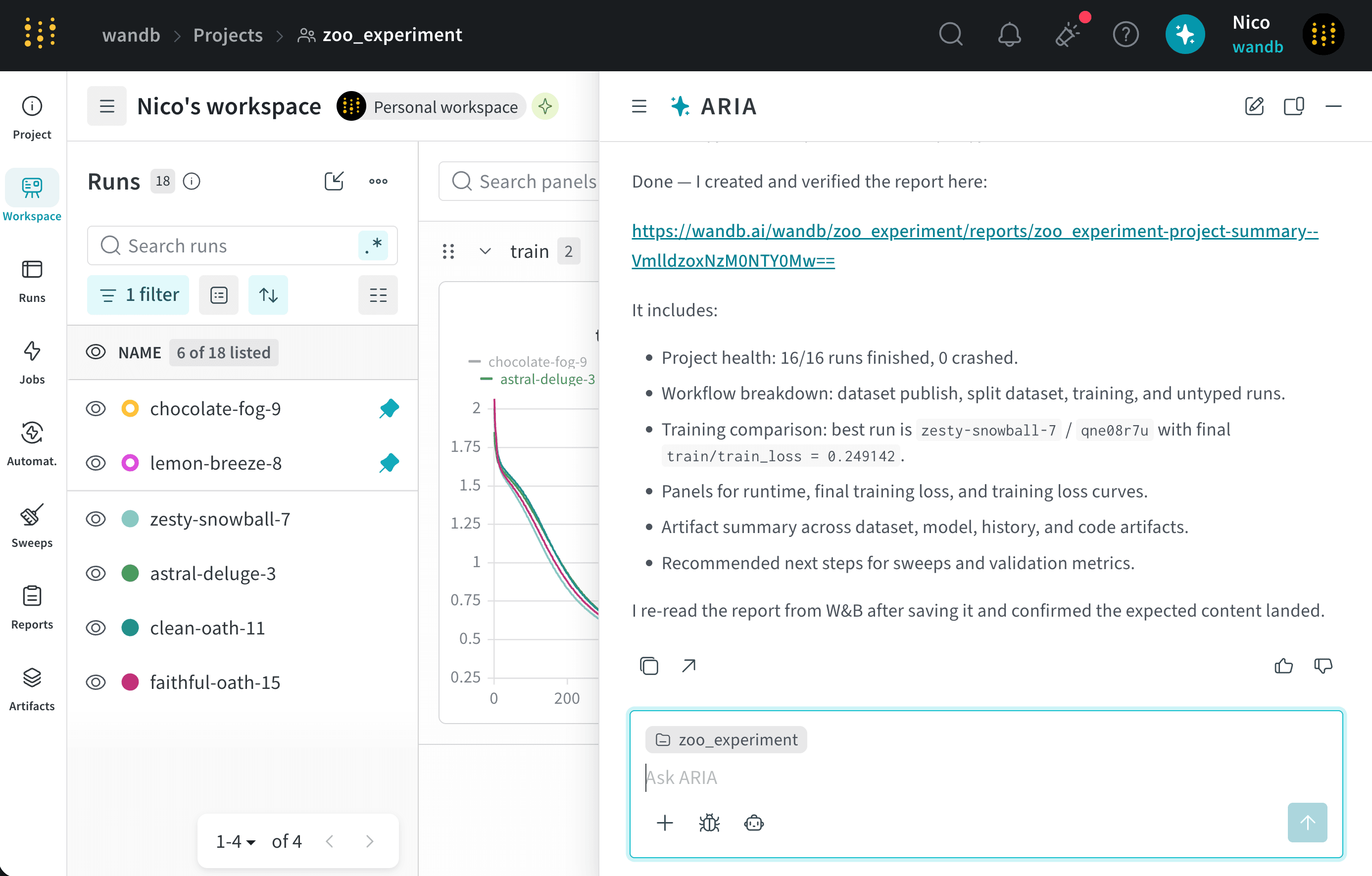 내부적으로 ARIA는 Workspaces and Reports API를 사용해 W\&B Report를 생성합니다.