> ## Documentation Index
> Fetch the complete documentation index at: https://docs.wandb.ai/llms.txt
> Use this file to discover all available pages before exploring further.
# DSPy
> Weave를 사용해 DSPy 모듈과 함수로 수행되는 call을 자동으로 추적하고 로깅합니다
export const GitHubLink = ({url}) =>
GitHub 소스 코드
;
export const ColabLink = ({url}) =>
Colab에서 사용해 보기
;
[DSPy](https://dspy.ai)는 특히 파이프라인 내에서 LM을 한 번 이상 사용할 때 언어 모델(LM) 프롬프트와 가중치를 알고리즘적으로 최적화하는 프레임워크입니다. W\&B Weave는 DSPy 모듈과 함수를 사용해 발생한 call을 자동으로 추적하고 로깅합니다. 이 가이드에서는 DSPy 프로그램에 Weave 트레이싱을 활성화하고, 맞춤형 모듈과 시그니처를 추적하며, DSPy 옵티마이저와 evaluations에서 트레이스를 캡처하는 방법을 설명합니다. 이러한 트레이스를 사용하면 DSPy 애플리케이션을 디버그하고, 분석하고, 개선할 수 있습니다.
## 트레이스
이 섹션에서는 Weave에서 DSPy Call에 대한 자동 트레이싱을 활성화하는 방법을 설명합니다. 개발 중은 물론 프로덕션 환경에서도 언어 모델 애플리케이션의 트레이스를 중앙에서 저장하세요. 이러한 트레이스는 디버깅에 유용할 뿐 아니라, 애플리케이션 개선에 도움이 되는 데이터셋으로도 활용할 수 있습니다.
Weave는 [DSPy](https://dspy.ai)의 트레이스를 자동으로 캡처합니다. 추적을 시작하려면 `weave.init(project_name="[YOUR-WANDB-PROJECT-NAME]")`를 호출한 다음 평소처럼 라이브러리를 사용하세요. `[YOUR-OPENAI-API-KEY]`는 OpenAI API 키로, `[YOUR-WANDB-PROJECT-NAME]`는 W\&B 프로젝트 이름으로 바꾸세요.
```python lines theme={null}
import os
import dspy
import weave
os.environ["OPENAI_API_KEY"] = "[YOUR-OPENAI-API-KEY]"
weave.init(project_name="[YOUR-WANDB-PROJECT-NAME]")
lm = dspy.LM('openai/gpt-4o-mini')
dspy.configure(lm=lm)
classify = dspy.Predict("sentence -> sentiment")
classify(sentence="it's a charming and often affecting journey.")
```
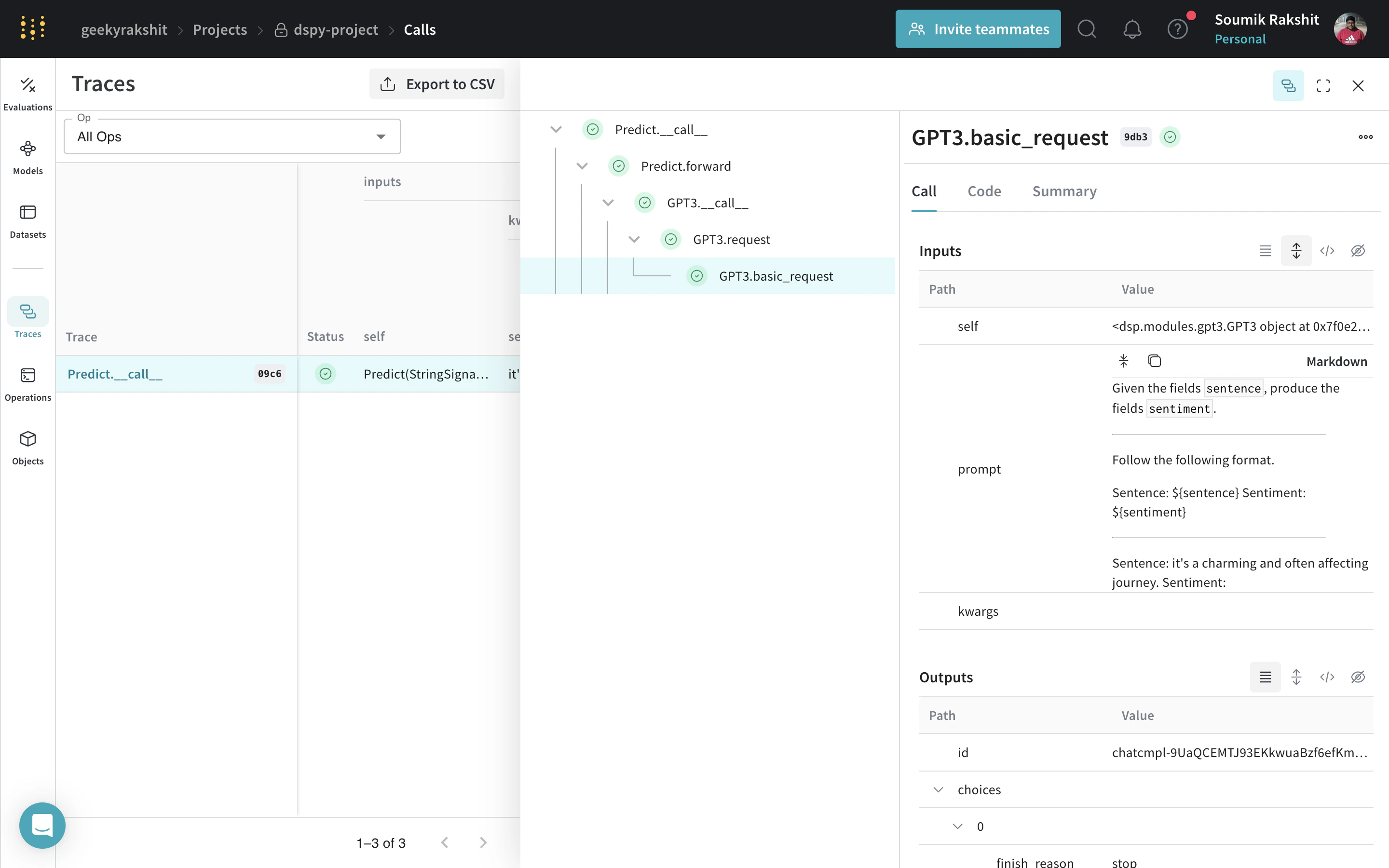
[](https://wandb.ai/geekyrakshit/dspy-project/weave/calls)
Tracing을 활성화하면 Weave는 DSPy 프로그램이 수행하는 모든 LM Call을 Weave 프로젝트에 기록하며, 여기에서 입력, 출력 및 메타데이터를 확인할 수 있습니다.
## 사용자 정의 DSPy 모듈과 시그니처 추적하기
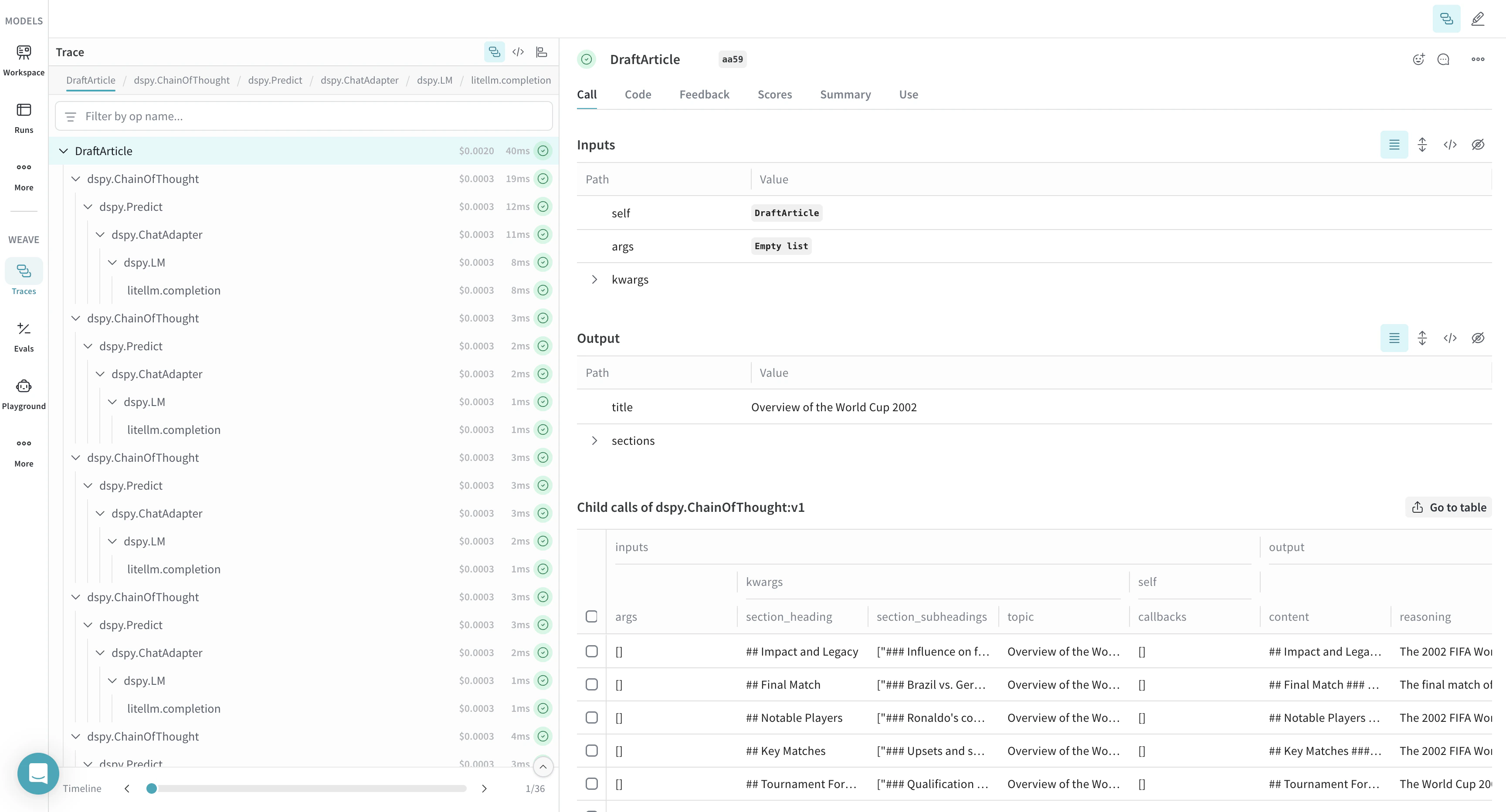
내장 Call 외에도, Weave는 사용자가 정의한 맞춤형 모듈과 시그니처도 트레이스합니다. `Module`은 프롬프팅 기법을 추상화하는, 학습 가능한 매개변수를 갖춘 DSPy 프로그램의 기본 구성 요소입니다. `시그니처`는 DSPy `Module`의 입력/출력 동작을 선언적으로 정의하는 사양입니다. Weave는 DSPy 프로그램의 모든 내장 및 사용자 정의 `Signature`와 `Module` 객체를 자동으로 추적합니다. `[YOUR-OPENAI-API-KEY]`를 OpenAI API 키로 바꾸고 `[YOUR-WANDB-PROJECT-NAME]`을 W\&B 프로젝트 이름으로 바꾸세요.
```python lines theme={null}
import os
import dspy
import weave
os.environ["OPENAI_API_KEY"] = "[YOUR-OPENAI-API-KEY]"
weave.init(project_name="[YOUR-WANDB-PROJECT-NAME]")
class Outline(dspy.Signature):
"""Outline a thorough overview of a topic."""
topic: str = dspy.InputField()
title: str = dspy.OutputField()
sections: list[str] = dspy.OutputField()
section_subheadings: dict[str, list[str]] = dspy.OutputField(
desc="mapping from section headings to subheadings"
)
class DraftSection(dspy.Signature):
"""Draft a top-level section of an article."""
topic: str = dspy.InputField()
section_heading: str = dspy.InputField()
section_subheadings: list[str] = dspy.InputField()
content: str = dspy.OutputField(desc="markdown-formatted section")
class DraftArticle(dspy.Module):
def __init__(self):
self.build_outline = dspy.ChainOfThought(Outline)
self.draft_section = dspy.ChainOfThought(DraftSection)
def forward(self, topic):
outline = self.build_outline(topic=topic)
sections = []
for heading, subheadings in outline.section_subheadings.items():
section, subheadings = (
f"## {heading}",
[f"### {subheading}" for subheading in subheadings],
)
section = self.draft_section(
topic=outline.title,
section_heading=section,
section_subheadings=subheadings,
)
sections.append(section.content)
return dspy.Prediction(title=outline.title, sections=sections)
draft_article = DraftArticle()
article = draft_article(topic="World Cup 2002")
```
[](https://wandb.ai/geekyrakshit/dspy-project/weave/calls)
## DSPy 프로그램을 최적화하고 평가하세요
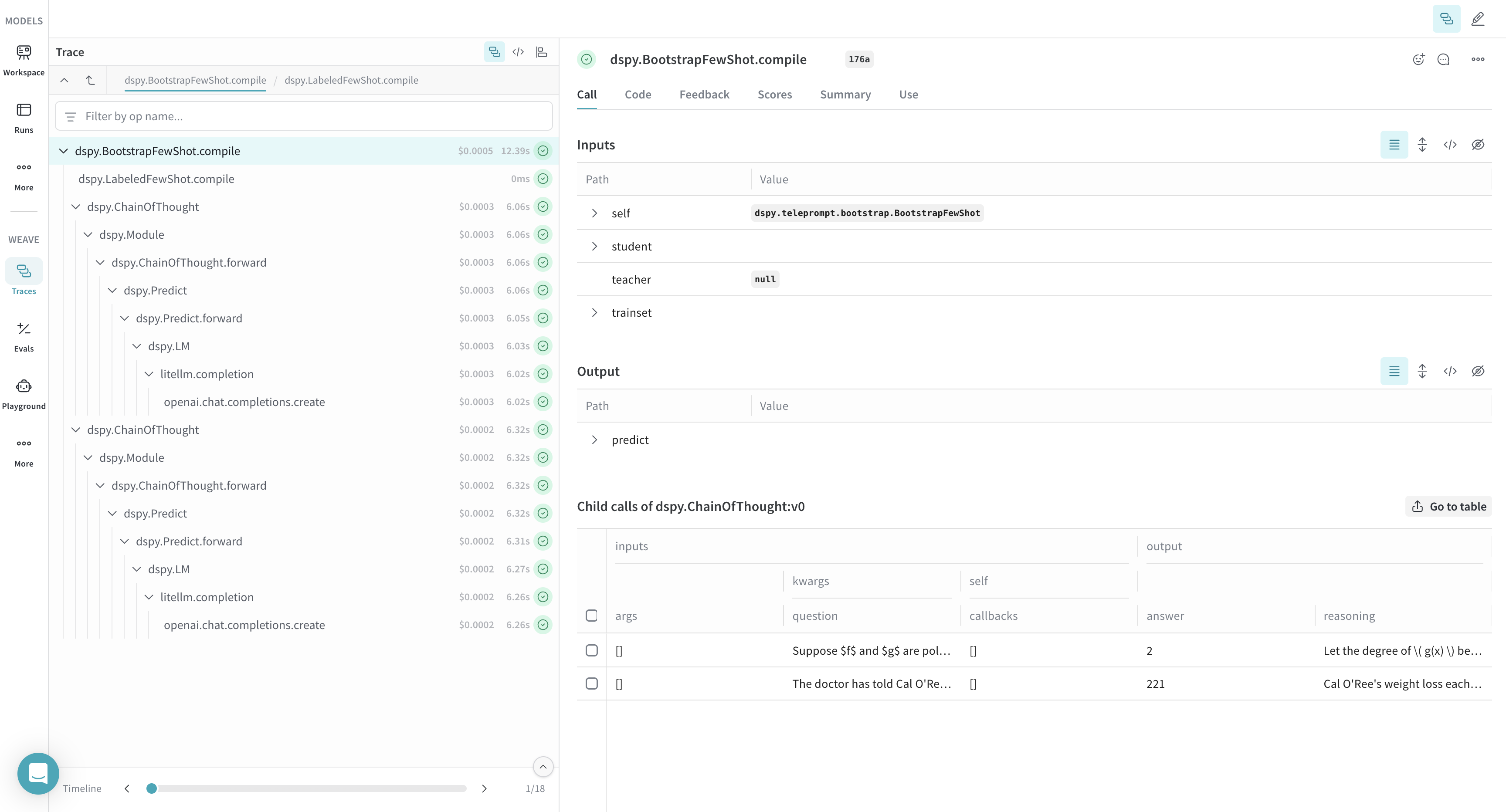
Weave는 DSPy 최적화기와 Evaluation call의 트레이스도 수집하므로, 이를 활용해 개발 세트에서 DSPy 프로그램의 성능을 개선하고 평가할 수 있습니다. `[YOUR-OPENAI-API-KEY]`를 OpenAI API 키로 바꾸고 `[YOUR-WANDB-PROJECT-NAME]`을 W\&B 프로젝트 이름으로 바꾸세요.
```python lines theme={null}
import os
import dspy
import weave
os.environ["OPENAI_API_KEY"] = "[YOUR-OPENAI-API-KEY]"
weave.init(project_name="[YOUR-WANDB-PROJECT-NAME]")
def accuracy_metric(answer, output, trace=None):
predicted_answer = output["answer"].lower()
return answer["answer"].lower() == predicted_answer
module = dspy.ChainOfThought("question -> answer: str, explanation: str")
optimizer = dspy.BootstrapFewShot(metric=accuracy_metric)
optimized_module = optimizer.compile(
module, trainset=SAMPLE_EVAL_DATASET, valset=SAMPLE_EVAL_DATASET
)
```
[](https://wandb.ai/geekyrakshit/dspy-project/weave/calls)
 ](https://wandb.ai/geekyrakshit/dspy-project/weave/calls)
Tracing을 활성화하면 Weave는 DSPy 프로그램이 수행하는 모든 LM Call을 Weave 프로젝트에 기록하며, 여기에서 입력, 출력 및 메타데이터를 확인할 수 있습니다.
](https://wandb.ai/geekyrakshit/dspy-project/weave/calls)
Tracing을 활성화하면 Weave는 DSPy 프로그램이 수행하는 모든 LM Call을 Weave 프로젝트에 기록하며, 여기에서 입력, 출력 및 메타데이터를 확인할 수 있습니다.
 ](https://wandb.ai/geekyrakshit/dspy-project/weave/calls)
 ](https://wandb.ai/geekyrakshit/dspy-project/weave/calls)