> ## Documentation Index
> Fetch the complete documentation index at: https://docs.wandb.ai/llms.txt
> Use this file to discover all available pages before exploring further.
# LlamaIndex
> Weave로 LlamaIndex 애플리케이션을 트레이스하고 디버그하세요. LLM Call, RAG 파이프라인, 에이전트 step, 평가를 자동으로 캡처합니다.
이 가이드에서는 Weave를 사용해 [LlamaIndex](https://docs.llamaindex.ai/en/stable/) 애플리케이션을 트레이스하고, 디버그하고, 평가하는 방법을 설명합니다. 이 가이드를 따라 하면 Weave가 [LlamaIndex Python library](https://github.com/run-llama/llama_index)를 통해 이루어지는 Call을 자동으로 캡처하는 방식을 익힐 수 있어, 맞춤형 로깅 코드를 작성하지 않고도 RAG 파이프라인, 에이전트 step, LLM Call을 모니터링할 수 있습니다. 이 가이드는 디버깅, 성능 분석, 평가를 위해 워크플로의 가시성을 확보하려는 LlamaIndex 기반 LLM 애플리케이션 개발자를 위한 것입니다.
LLM을 사용할 때 디버깅은 피할 수 없습니다. 모델 Call이 실패하거나, 출력 형식이 잘못되거나, 중첩된 모델 Call 때문에 혼란이 생기는 등 문제의 정확한 원인을 찾아내는 일은 쉽지 않을 수 있습니다. LlamaIndex 애플리케이션은 여러 step과 LLM Call 호출로 이루어지는 경우가 많기 때문에, 체인과 에이전트의 내부 동작을 이해하는 것이 매우 중요합니다.
Weave는 LlamaIndex 애플리케이션의 트레이스를 자동으로 캡처해 이 과정을 간소화합니다. 이를 통해 애플리케이션의 성능을 모니터링하고 분석할 수 있으므로, LLM 워크플로를 디버그하고 최적화하는 데 도움이 됩니다. Weave는 평가 워크플로에도 도움이 됩니다.
## 시작하기
시작하려면 스크립트 맨 앞에서 `weave.init()`을 호출하세요. 그러면 Weave가 초기화되고, 이후의 모든 LlamaIndex 호출에 대한 트레이스 수집이 시작됩니다. `weave.init()`의 인수는 프로젝트 이름으로, 트레이스를 체계적으로 정리하는 데 도움이 됩니다.
```python lines {5} theme={null}
import weave
from llama_index.core.chat_engine import SimpleChatEngine
# 프로젝트 이름으로 Weave 초기화
weave.init("llamaindex_demo")
chat_engine = SimpleChatEngine.from_defaults()
response = chat_engine.chat(
"Say something profound and romantic about fourth of July"
)
print(response)
```
이전 예시에서는 내부적으로 OpenAI Call을 수행하는 기본 LlamaIndex 채팅 엔진을 생성합니다. 이 코드를 실행하면 Weave가 채팅 엔진 실행 트레이스를 캡처하고, 이를 Weave 웹 인터페이스에서 확인할 수 있습니다. 다음 트레이스를 참조하세요:
[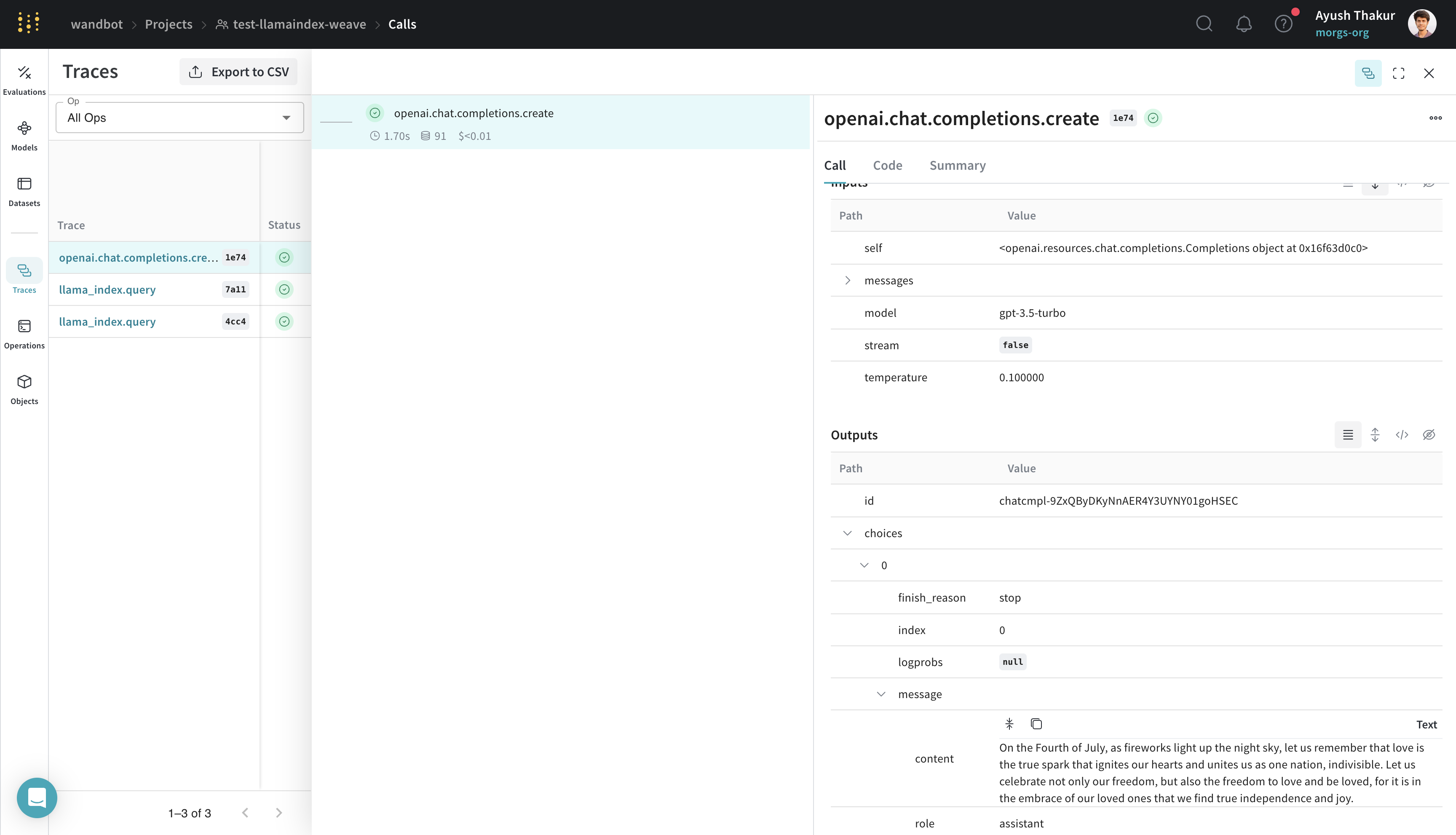 ](https://wandb.ai/wandbot/test-llamaindex-weave/weave/calls/b6b5d898-2df8-4e14-b553-66ce84661e74)
## 트레이스
이 섹션에서는 Weave가 RAG 파이프라인과 같은 여러 step으로 이루어진 LlamaIndex 워크플로의 트레이스를 어떻게 캡처하는지 설명합니다.
LlamaIndex는 데이터를 LLM에 쉽게 연결할 수 있어 잘 알려져 있습니다. 기본 RAG 애플리케이션에는 임베딩 step, 검색 step, 응답 합성 step이 필요합니다. 복잡성이 커질수록 개발 및 프로덕션 환경 모두에서 개별 step의 트레이스를 중앙 데이터베이스에 저장하는 것이 중요해집니다.
이러한 트레이스는 애플리케이션을 디버깅하고 개선하는 데 필수적입니다. Weave는 프롬프트 템플릿, LLM call, 도구, 에이전트 step을 포함해 LlamaIndex 라이브러리를 통해 수행되는 모든 call을 자동으로 추적합니다. Weave 웹 인터페이스에서 이러한 트레이스를 확인할 수 있습니다.
다음 예시는 LlamaIndex's [Starter Tutorial (OpenAI)](https://docs.llamaindex.ai/en/stable/getting_started/starter_example/)의 기본 RAG 파이프라인을 보여줍니다:
```python lines {5} theme={null}
import weave
from llama_index.core import VectorStoreIndex, SimpleDirectoryReader
# 프로젝트 이름으로 Weave 초기화
weave.init("llamaindex_demo")
# `data` 디렉토리에 `.txt` 파일이 있다고 가정
documents = SimpleDirectoryReader("data").load_data()
index = VectorStoreIndex.from_documents(documents)
query_engine = index.as_query_engine()
response = query_engine.query("What did the author do growing up?")
print(response)
```
트레이스 타임라인은 "events"를 캡처할 뿐만 아니라, 해당하는 경우 실행 시간, 비용, 토큰 수까지 함께 캡처합니다. 트레이스를 더 자세히 살펴보면 각 step의 입력과 출력을 확인할 수 있습니다.
[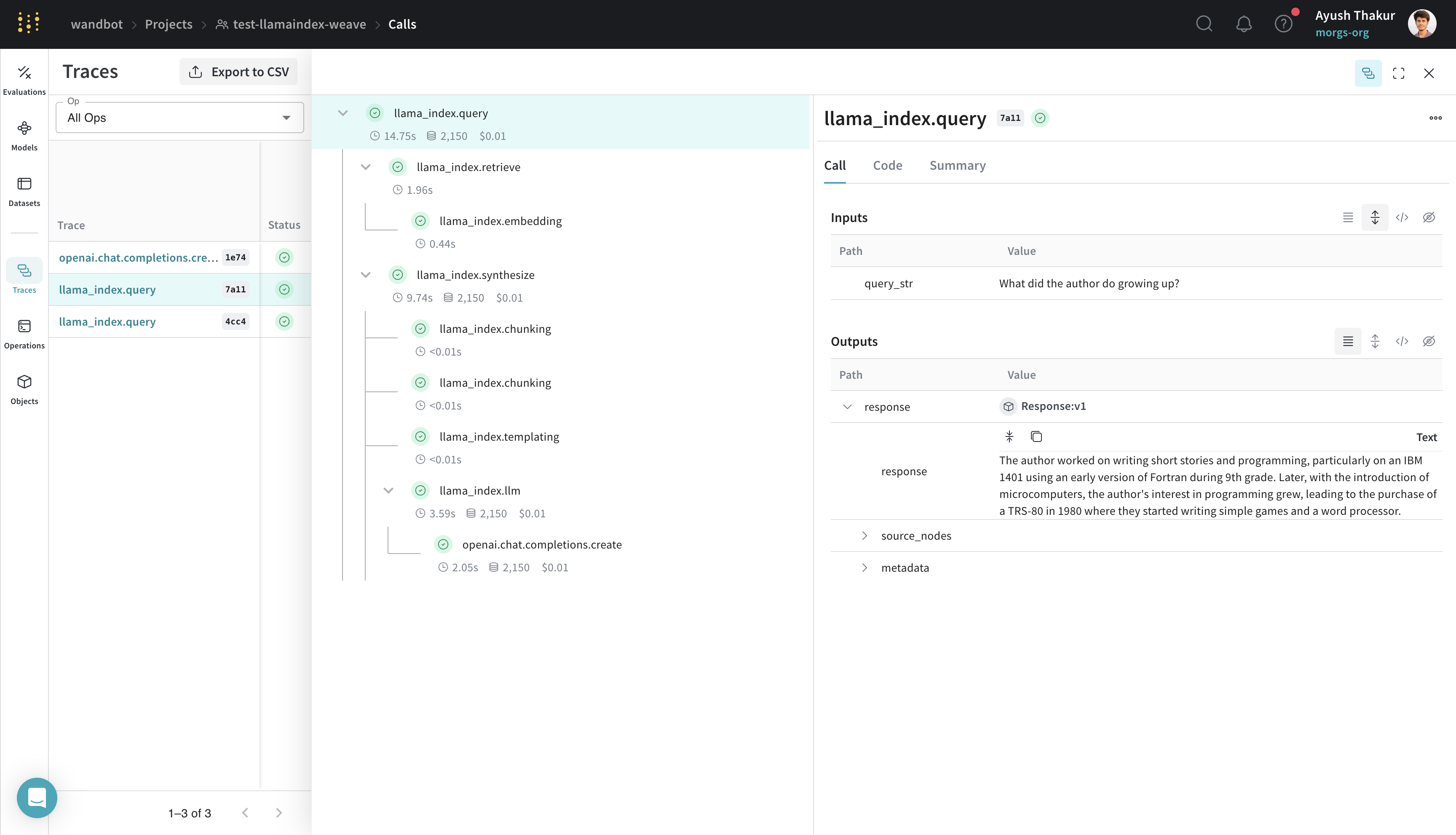 ](https://wandb.ai/wandbot/test-llamaindex-weave/weave/calls?filter=%7B%22traceRootsOnly%22%3Atrue%7D\&peekPath=%2Fwandbot%2Ftest-llamaindex-weave%2Fcalls%2F6ac53407-1bb7-4c38-b5a3-c302bd877a11%3Ftracetree%3D1)
## 원클릭 관측성
이 섹션에서는 Weave 인테그레이션이 LlamaIndex의 기본 제공 관측성 시스템에 어떻게 연결되는지 설명하므로, 핸들러를 수동으로 설정할 필요가 없습니다.
LlamaIndex는 프로덕션 환경에서 원칙에 기반한 LLM 애플리케이션을 구축할 수 있도록 [원클릭 관측성](https://docs.llamaindex.ai/en/stable/module_guides/observability/)를 제공합니다.
이 인테그레이션은 LlamaIndex의 이 기능을 활용해 [`WeaveCallbackHandler()`](https://github.com/wandb/weave/blob/master/weave/integrations/llamaindex/llamaindex.py)를 `llama_index.core.global_handler`로 자동 설정합니다. 따라서 LlamaIndex와 Weave 사용자라면 `weave.init([NAME_OF_PROJECT])`로 Weave run만 초기화하면 됩니다.
## 더 쉬운 실험을 위한 `Model` 만들기
프롬프트, 모델 설정, 추론 파라미터처럼 여러 컴포넌트가 있으면 다양한 사용 사례의 애플리케이션에서 LLM을 구성하고 평가하기가 쉽지 않습니다. [`weave.Model`](/ko/weave/guides/core-types/models)을 사용하면 system 프롬프트나 사용하는 모델 같은 실험 세부 정보를 캡처하고 정리할 수 있어, 여러 반복 버전을 비교하는 데 도움이 됩니다.
다음 예시에서는 [weave/data](https://github.com/wandb/weave/tree/master/data) 폴더에서 찾을 수 있는 데이터를 사용해 `WeaveModel`에서 LlamaIndex 쿼리 엔진을 구축하는 방법을 보여줍니다:
```python lines {16,52,61} theme={null}
import weave
from llama_index.core import VectorStoreIndex, SimpleDirectoryReader
from llama_index.core.node_parser import SentenceSplitter
from llama_index.llms.openai import OpenAI
from llama_index.core import PromptTemplate
PROMPT_TEMPLATE = """
You are given with relevant information about Paul Graham. Answer the user query only based on the information provided. Don't make up stuff.
User Query: {query_str}
Context: {context_str}
Answer:
"""
class SimpleRAGPipeline(weave.Model):
chat_llm: str = "gpt-4"
temperature: float = 0.1
similarity_top_k: int = 2
chunk_size: int = 256
chunk_overlap: int = 20
prompt_template: str = PROMPT_TEMPLATE
def get_llm(self):
return OpenAI(temperature=self.temperature, model=self.chat_llm)
def get_template(self):
return PromptTemplate(self.prompt_template)
def load_documents_and_chunk(self, data):
documents = SimpleDirectoryReader(data).load_data()
splitter = SentenceSplitter(
chunk_size=self.chunk_size,
chunk_overlap=self.chunk_overlap,
)
nodes = splitter.get_nodes_from_documents(documents)
return nodes
def get_query_engine(self, data):
nodes = self.load_documents_and_chunk(data)
index = VectorStoreIndex(nodes)
llm = self.get_llm()
prompt_template = self.get_template()
return index.as_query_engine(
similarity_top_k=self.similarity_top_k,
llm=llm,
text_qa_template=prompt_template,
)
@weave.op()
def predict(self, query: str):
query_engine = self.get_query_engine(
# 이 데이터는 weave 저장소의 data/paul_graham 경로에서 확인할 수 있습니다
"data/paul_graham",
)
response = query_engine.query(query)
return {"response": response.response}
weave.init("test-llamaindex-weave")
rag_pipeline = SimpleRAGPipeline()
response = rag_pipeline.predict("What did the author do growing up?")
print(response)
```
`weave.Model`을 상속한 `SimpleRAGPipeline` 클래스는 이 RAG 파이프라인의 핵심 파라미터를 정리합니다. `query` 방법을 `weave.op()`으로 데코레이팅하면 트레이싱을 사용할 수 있습니다. 이 구조를 갖추면 이제 Weave에서 RAG 파이프라인의 다양한 설정을 버전 관리하고, 비교하고, 평가할 수 있습니다.
[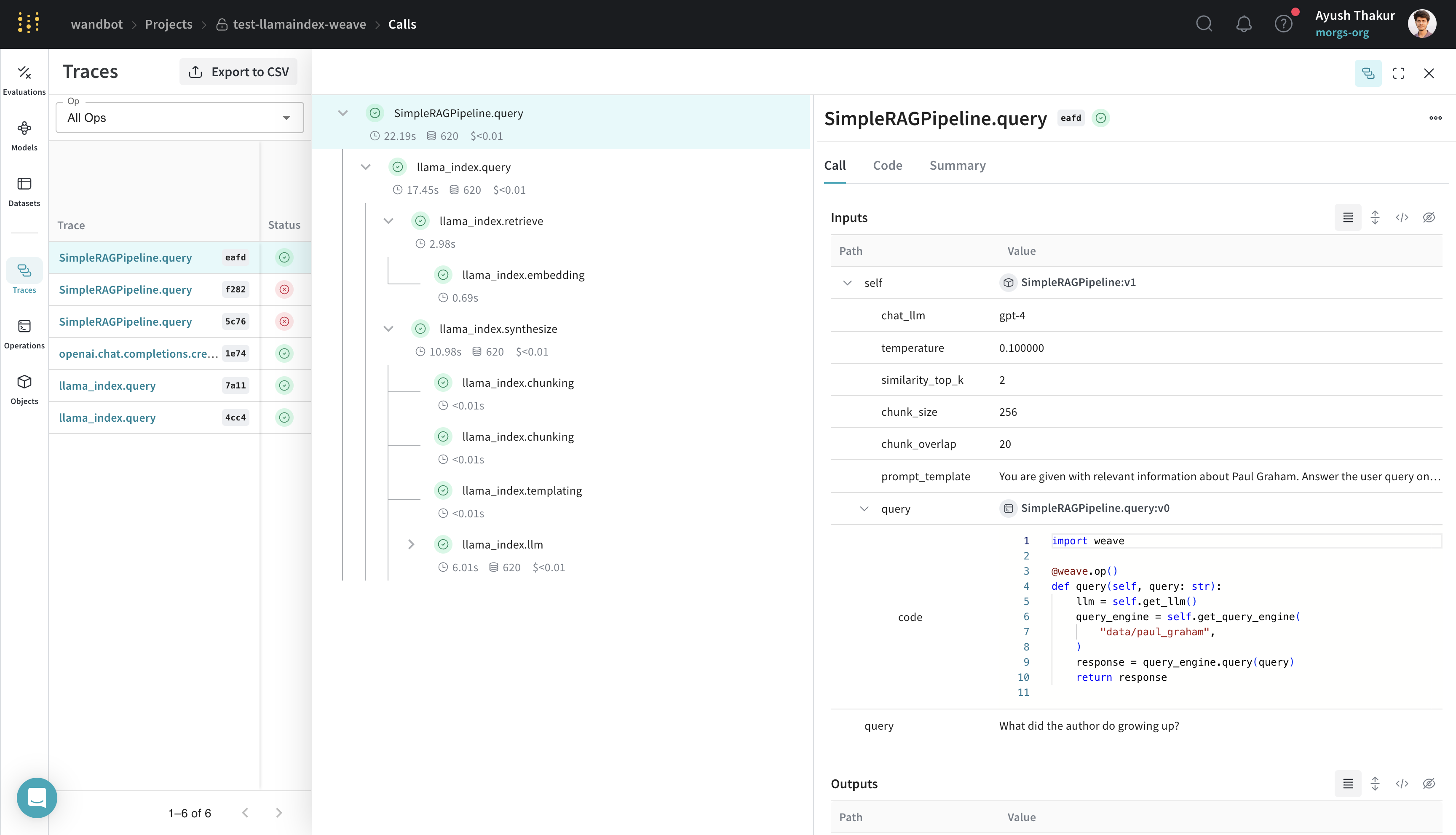 ](https://wandb.ai/wandbot/test-llamaindex-weave/weave/calls?filter=%7B%22traceRootsOnly%22%3Atrue%7D\&peekPath=%2Fwandbot%2Ftest-llamaindex-weave%2Fcalls%2Fa82afbf4-29a5-43cd-8c51-603350abeafd%3Ftracetree%3D1)
## `weave.Evaluation`으로 평가하기
이 섹션에서는 고정된 데이터셋에서 모델의 성능을 측정해 반복 버전을 정량적으로 비교하는 방법을 보여줍니다.
평가는 애플리케이션의 성능을 측정하는 데 도움이 됩니다. [`weave.Evaluation`](/ko/weave/guides/core-types/evaluations) 클래스를 사용하면 특정 작업이나 데이터셋에서 모델이 얼마나 잘 수행되는지 파악할 수 있으며, 이를 통해 서로 다른 모델과 애플리케이션의 여러 반복 버전을 비교할 수 있습니다. 다음 예제는 이전 섹션에서 만든 모델을 평가하는 방법을 보여줍니다:
```python lines {25,32,36} theme={null}
import asyncio
from llama_index.core.evaluation import CorrectnessEvaluator
eval_examples = [
{
"id": "0",
"query": "What programming language did Paul Graham learn to teach himself AI when he was in college?",
"ground_truth": "Paul Graham learned Lisp to teach himself AI when he was in college.",
},
{
"id": "1",
"query": "What was the name of the startup Paul Graham co-founded that was eventually acquired by Yahoo?",
"ground_truth": "The startup Paul Graham co-founded that was eventually acquired by Yahoo was called Viaweb.",
},
{
"id": "2",
"query": "What is the capital city of France?",
"ground_truth": "I cannot answer this question because no information was provided in the text.",
},
]
llm_judge = OpenAI(model="gpt-4", temperature=0.0)
evaluator = CorrectnessEvaluator(llm=llm_judge)
@weave.op()
def correctness_evaluator(query: str, ground_truth: str, output: dict):
result = evaluator.evaluate(
query=query, reference=ground_truth, response=output["response"]
)
return {"correctness": float(result.score)}
evaluation = weave.Evaluation(dataset=eval_examples, scorers=[correctness_evaluator])
rag_pipeline = SimpleRAGPipeline()
asyncio.run(evaluation.evaluate(rag_pipeline))
```
이 평가는 앞선 섹션의 예제를 바탕으로 합니다. `weave.Evaluation`을 사용해 평가하려면 평가 데이터셋, 스코어러 함수, 그리고 `weave.Model`이 필요합니다. 이러한 요구 사항은 세 가지 핵심 컴포넌트에 적용됩니다:
* 평가 샘플 dict의 키는 스코어러 함수의 인자와 `weave.Model`의 `predict` 방법의 인자와 일치해야 합니다.
* `weave.Model`에는 `predict`, `infer`, 또는 `forward`라는 이름의 방법이 있어야 합니다. 트레이싱을 위해 이 방법에 `weave.op()`를 데코레이션해야 합니다.
* 스코어러 함수는 `weave.op()`로 데코레이션되어 있어야 하며, `output`이라는 명명된 인자를 가져야 합니다.
[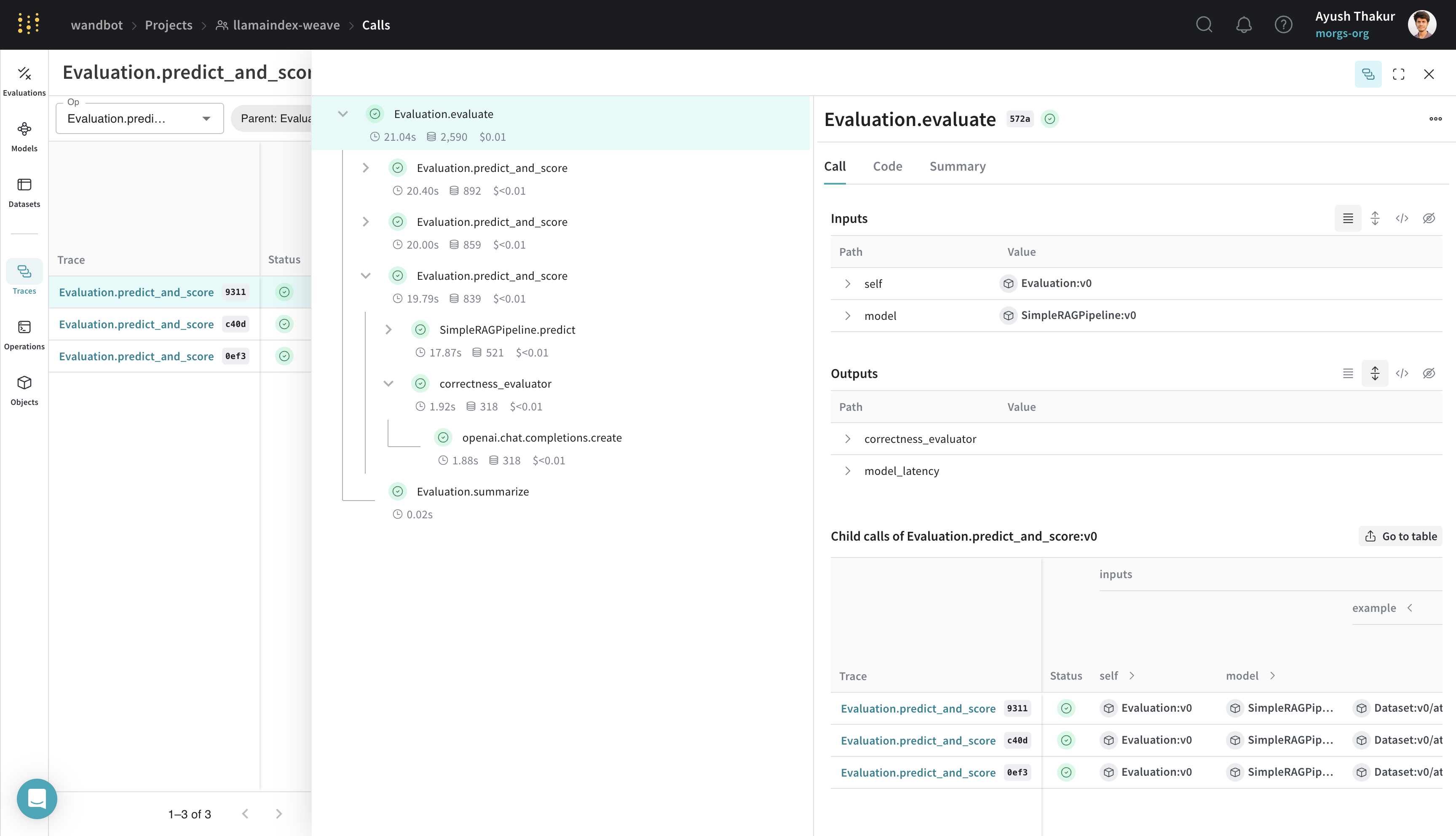 ](https://wandb.ai/wandbot/llamaindex-weave/weave/calls?filter=%7B%22opVersionRefs%22%3A%5B%22weave%3A%2F%2F%2Fwandbot%2Fllamaindex-weave%2Fop%2FEvaluation.predict_and_score%3ANmwfShfFmgAhDGLXrF6Xn02T9MIAsCXBUcifCjyKpOM%22%5D%2C%22parentId%22%3A%2233491e66-b580-47fa-9d43-0cd6f1dc572a%22%7D\&peekPath=%2Fwandbot%2Fllamaindex-weave%2Fcalls%2F33491e66-b580-47fa-9d43-0cd6f1dc572a%3Ftracetree%3D1)
Weave를 LlamaIndex와 인테그레이션하면 LLM 애플리케이션에 대해 포괄적인 로깅과 모니터링을 수행할 수 있으며, 이를 통해 평가를 통한 디버깅과 성능 최적화가 간소화됩니다.
](https://wandb.ai/wandbot/llamaindex-weave/weave/calls?filter=%7B%22opVersionRefs%22%3A%5B%22weave%3A%2F%2F%2Fwandbot%2Fllamaindex-weave%2Fop%2FEvaluation.predict_and_score%3ANmwfShfFmgAhDGLXrF6Xn02T9MIAsCXBUcifCjyKpOM%22%5D%2C%22parentId%22%3A%2233491e66-b580-47fa-9d43-0cd6f1dc572a%22%7D\&peekPath=%2Fwandbot%2Fllamaindex-weave%2Fcalls%2F33491e66-b580-47fa-9d43-0cd6f1dc572a%3Ftracetree%3D1)
Weave를 LlamaIndex와 인테그레이션하면 LLM 애플리케이션에 대해 포괄적인 로깅과 모니터링을 수행할 수 있으며, 이를 통해 평가를 통한 디버깅과 성능 최적화가 간소화됩니다.