> ## Documentation Index
> Fetch the complete documentation index at: https://docs.wandb.ai/llms.txt
> Use this file to discover all available pages before exploring further.
# Smolagents
> Weave의 자동 트레이싱으로 Smolagents 애플리케이션을 추적하고, 도구 call, 모델 추론, 여러 step의 에이전트 워크플로를 캡처하세요.
이 페이지의 모든 코드 샘플은 Python으로 작성되었습니다.
이 페이지에서는 [Smolagents](https://huggingface.co/docs/smolagents/en/index)를 W\&B Weave와 통합해 에이전트형 애플리케이션을 추적하고 분석하는 방법을 설명합니다. 이 문서는 모델 및 도구 call에 대한 가시성이 필요한 에이전트형 워크플로를 구축하는 개발자를 위한 내용입니다. Weave의 트레이싱 및 versioning 기능을 사용해 모델 추론을 로깅하고, 함수 call을 모니터링하고, Experiments를 구성하는 방법을 알아봅니다. 제공된 예제를 따라 하면 유용한 인사이트를 확보하고, 애플리케이션의 bug를 효율적으로 디버깅하며, 서로 다른 모델 설정을 비교할 수 있습니다(이 모든 작업은 Weave 웹 인터페이스에서 수행할 수 있습니다).
## Overview
Smolagents는 에이전트형 애플리케이션을 구축할 수 있도록 최소한의 추상화만 제공하는 프레임워크입니다. OpenAI, Hugging Face Transformers, Anthropic 등 여러 LLM 제공자를 지원합니다.
Weave는 [Smolagents](https://huggingface.co/docs/smolagents/en/index)의 트레이스를 자동으로 캡처합니다. 추적을 시작하려면 `weave.init()`을 호출한 다음 평소처럼 라이브러리를 사용하세요.
## 사전 요구 사항
시작하기 전에 필수 라이브러리를 설치하고, 선택한 LLM 공급자에 대한 액세스를 구성해야 합니다.
1. Smolagents를 Weave와 함께 사용하려면 먼저 필수 라이브러리를 설치하거나 최신 버전으로 업그레이드하세요. 다음 명령어는 `smolagents`, `openai`, `weave`를 설치하거나 업그레이드하며, 출력을 숨깁니다:
```bash theme={null}
pip install -U smolagents openai weave -qqq
```
2. Smolagents는 OpenAI, Hugging Face Transformers, Anthropic 등 여러 LLM 제공자를 지원합니다. Smolagents가 모델을 호출할 때 인증할 수 있도록 선택한 제공자의 API 키를 설정하세요. 해당 환경 변수를 설정하세요:
```python lines theme={null}
import os
import getpass
os.environ["OPENAI_API_KEY"] = getpass.getpass("Enter your OpenAI API key: ")
```
## 기본 트레이싱
이 섹션에서는 기본 Smolagents 워크플로의 트레이스를 Weave가 자동으로 캡처하는 방법을 보여줍니다.
언어 모델 애플리케이션의 트레이스를 한곳에 저장하는 것은 개발 및 프로덕션 환경 모두에서 중요합니다. 이러한 트레이스는 디버깅에 도움이 되며, 애플리케이션을 개선하는 데 유용한 데이터셋으로도 활용할 수 있습니다.
Weave는 [Smolagents](https://huggingface.co/docs/smolagents/en/index)의 트레이스를 자동으로 캡처합니다. 추적을 시작하려면 `weave.init()`를 호출해 Weave를 초기화한 다음, 평소처럼 라이브러리를 사용하세요.
다음 예제는 Weave로 도구를 사용하는 LLM 에이전트의 추론 call을 로깅하는 방법을 보여줍니다. 이 시나리오에서는 다음을 수행합니다.
* Smolagents의 `OpenAIServerModel`을 사용해 언어 모델(OpenAI의 `gpt-4o`)을 정의합니다.
* 필요할 때 에이전트가 호출할 수 있는 검색 도구(`DuckDuckGoSearchTool`)를 설정합니다.
* 도구와 모델을 전달하여 `ToolCallingAgent`를 구성합니다.
* 검색 도구를 트리거하는 쿼리를 에이전트를 통해 실행합니다.
* Weave는 각 함수와 모델 호출을 로깅하고, 웹 인터페이스에서 이를 확인할 수 있도록 합니다.
```python lines theme={null}
import weave
from smolagents import DuckDuckGoSearchTool, OpenAIServerModel, ToolCallingAgent
# Weave 초기화
weave.init(project_name="smolagents")
# Smolagents에서 지원하는 LLM 공급자 정의
model = OpenAIServerModel(model_id="gpt-4o")
# 쿼리에 따른 DuckDuckGo 웹 검색 도구 정의
search_tool = DuckDuckGoSearchTool()
# 도구 호출 에이전트 정의
agent = ToolCallingAgent(tools=[search_tool], model=model)
answer = agent.run(
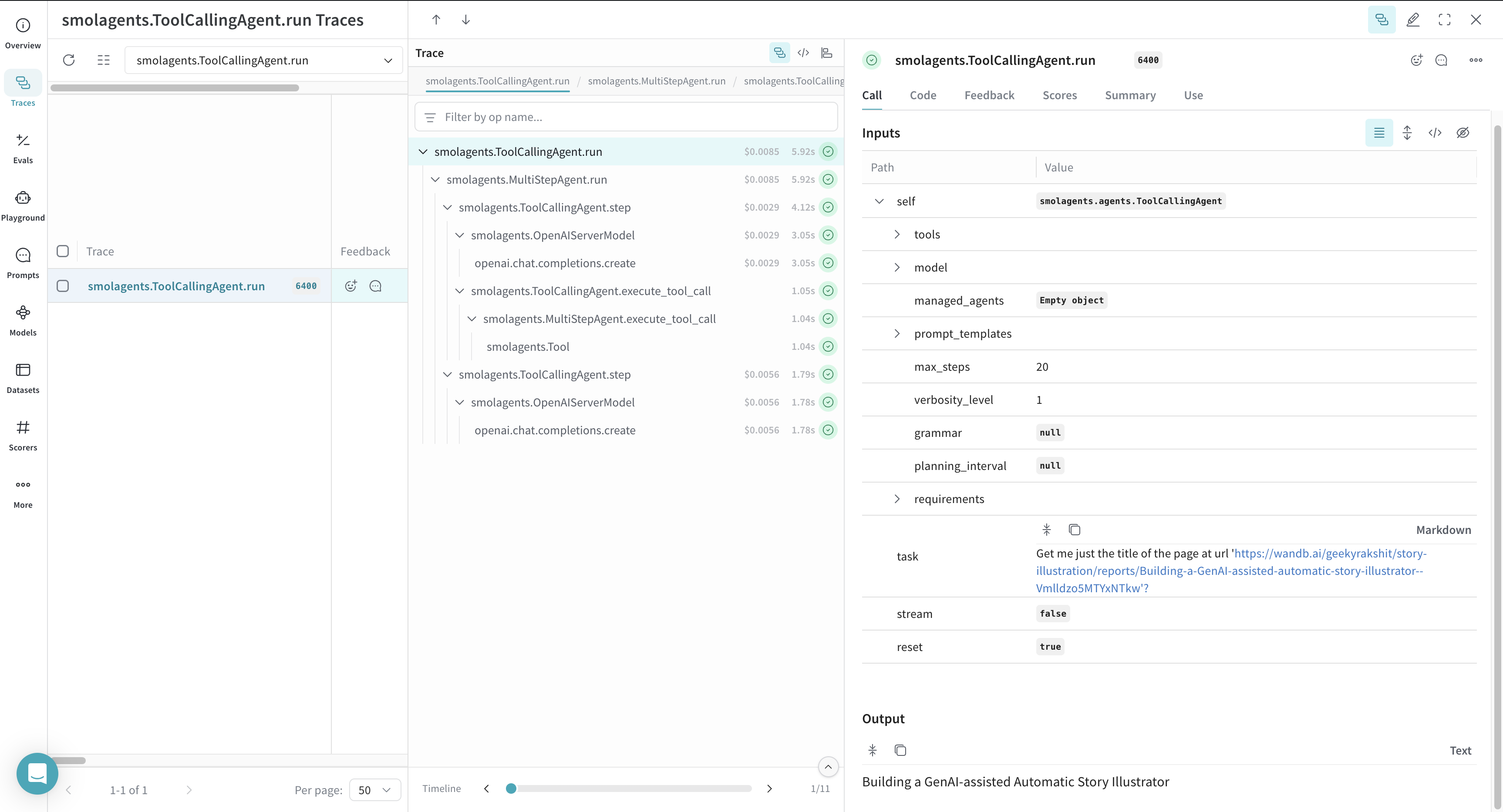
"Get me just the title of the page at url 'https://wandb.ai/geekyrakshit/story-illustration/reports/Building-a-GenAI-assisted-automatic-story-illustrator--Vmlldzo5MTYxNTkw'?"
)
```
코드 샘플을 실행한 후 Weave 프로젝트 대시보드로 이동해 트레이스를 확인하세요.
## 맞춤형 도구 트레이싱
기본 제공 도구 외에도 맞춤형 도구로 에이전트를 확장하고, 해당 도구 Call도 Weave에서 트레이스할 수 있습니다.
`smolagents`의 `@tool`로 함수를 데코레이팅하거나 `smolagents.Tool` 클래스를 상속하여 에이전트 워크플로용 맞춤형 도구를 선언할 수 있습니다.
Weave는 Smolagents 워크플로의 맞춤형 도구 Call을 자동으로 추적합니다. 다음 예시는 Weave로 맞춤형 Smolagents 도구 Call을 로깅하는 방법을 보여줍니다.
* 맞춤형 `get_weather` 함수를 정의하고 Smolagents의 `@tool`로 데코레이팅하여 에이전트가 추론 과정의 일부로 이를 호출할 수 있게 합니다.
* 이 함수는 위치와 섭씨 출력 여부를 지정하는 선택 플래그를 인수로 받습니다.
* `OpenAIServerModel`을 사용해 언어 모델을 인스턴스화합니다.
* 맞춤형 도구와 모델을 사용해 `ToolCallingAgent`를 생성합니다.
* 에이전트가 쿼리를 실행하면 `get_weather` 도구를 선택해 호출합니다.
* Weave는 인수와 반환 값을 포함해 모델 추론과 맞춤형 도구 호출을 모두 로깅합니다.
```python lines theme={null}
from typing import Optional
import weave
from smolagents import OpenAIServerModel, ToolCallingAgent, tool
weave.init(project_name="smolagents")
@tool
def get_weather(location: str, celsius: Optional[bool] = False) -> str:
"""
Get the weather in the next few days for a given location.
Args:
location: The location.
celsius: Whether to use Celsius for temperature.
"""
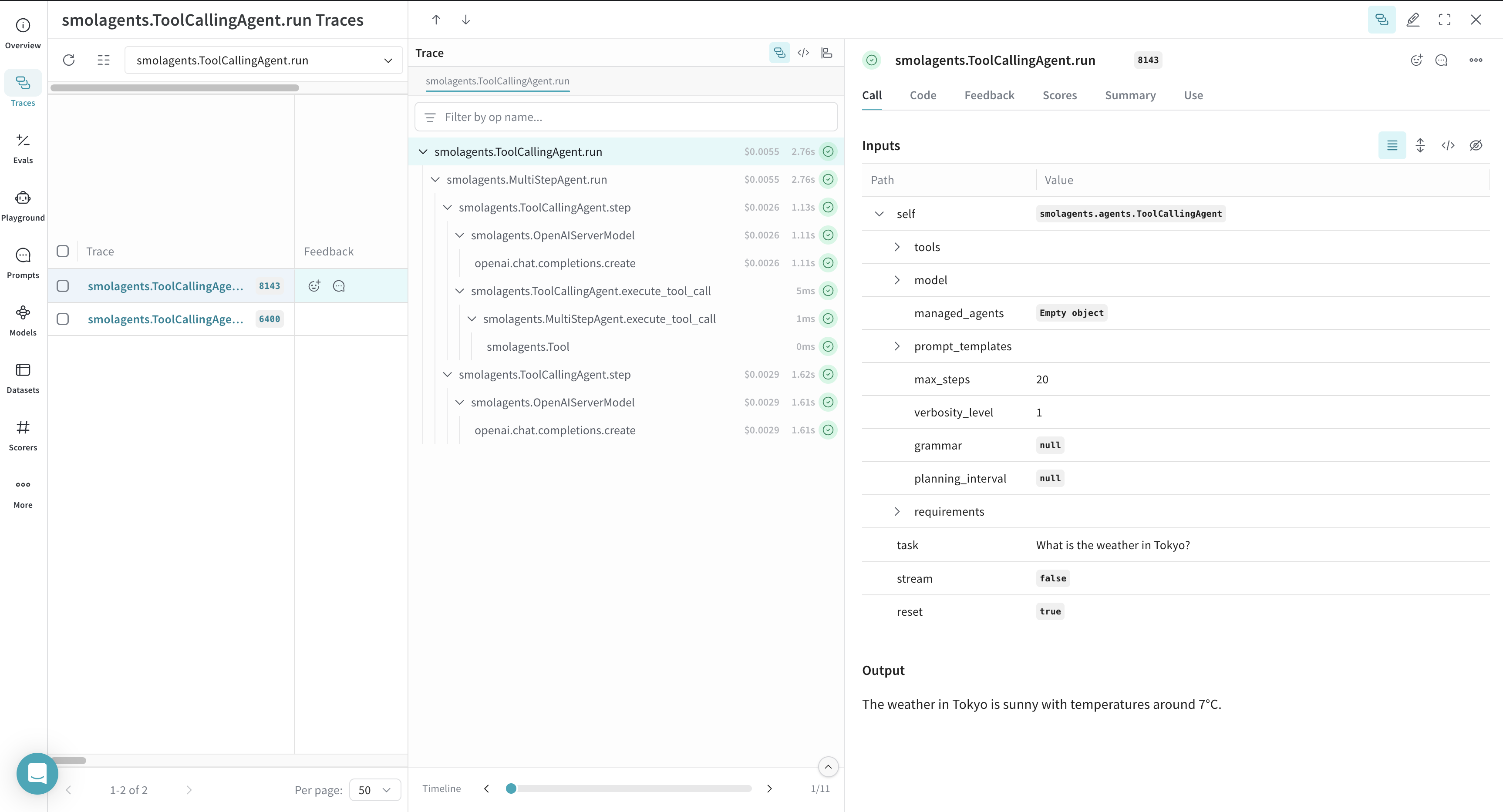
return f"The weather in {location} is sunny with temperatures around 7°C."
model = OpenAIServerModel(model_id="gpt-4o")
agent = ToolCallingAgent(tools=[get_weather], model=model)
answer = agent.run("What is the weather in Tokyo?")
```
코드 샘플을 실행한 후 트레이스를 확인하려면 Weave 프로젝트 대시보드로 이동하세요.