> ## Documentation Index
> Fetch the complete documentation index at: https://docs.wandb.ai/llms.txt
> Use this file to discover all available pages before exploring further.
# Ops 사용자 지정
> 가시성을 높이기 위해 Ops에 색상을 지정하는 방법, 로깅되는 내용을 수정하는 방법, 샘플링 비율을 제어하는 방법을 알아보세요
Weave Op는 모든 Call을 자동으로 로깅하는 버전 관리 함수입니다. 이 가이드는 Weave를 사용해 코드에 계측을 추가하는 개발자를 위한 것으로, Op를 생성하는 방법, Weave UI에서 표시 방식을 사용자 지정하는 방법, Weave가 로깅하는 데이터를 제어하는 방법, 그리고 샘플링과 삭제를 관리하는 방법을 설명합니다.
Op를 생성하려면 Python 함수를 `weave.op()`으로 데코레이션하세요.
```python lines theme={null}
import weave
@weave.op()
def track_me(v):
return v + 5
weave.init('intro-example')
track_me(15)
```
Op를 호출하면 마지막 Call 이후 코드가 변경된 경우 새 Op 버전이 생성되고, 함수의 입력과 출력을 로깅합니다.
`@weave.op()`으로 데코레이션한 함수는 호출 전에 `weave.init('your-project-name')`을 실행하지 않으면 코드 버전 관리 및 추적 없이 일반 함수처럼 동작합니다.
Weave toolbelt를 사용해 Ops를 [서빙](/ko/weave/guides/tools/serve)하거나 [배포](/ko/weave/guides/tools/deploy)할 수 있습니다.
Op를 생성하려면 TypeScript 함수를 `weave.op`으로 래핑하세요.
```typescript twoslash lines theme={null}
// @noErrors
import * as weave from 'weave'
function trackMe(v: number) {
return v + 5
}
const trackMeOp = weave.op(trackMe)
trackMeOp(15)
// You can also do this inline, which may be more convenient
const trackMeInline = weave.op((v: number) => v + 5)
trackMeInline(15)
```
## 표시 이름 사용자 지정
맞춤형 표시 이름을 사용하면 Weave UI에서 Op를 더 쉽게 파악할 수 있으며, 특히 함수 이름이 일반적이거나 자동 생성된 경우에 유용합니다.
`@weave.op` 데코레이터의 `name` 매개변수를 설정해 Op의 표시 이름을 사용자 지정할 수 있습니다:
```python lines theme={null}
@weave.op(name="custom_name")
def func():
...
```
```text theme={null}
이 기능은 아직 TypeScript에서 사용할 수 없습니다.
```
## kind 및 색상 적용
Weave UI에서 Ops를 더 잘 구성하려면 코드의 `@weave.op` 데코레이터에 `kind` 및 `color` 인수를 추가해 사용자 지정 kind와 색상을 적용할 수 있습니다. 예를 들어, 다음 코드는 상위 함수에 `LLM` `kind`와 `blue` `color`를 적용하고, 중첩 함수에 `tool` `kind`와 `red` `color`를 적용합니다.
```python lines theme={null}
import weave
weave.init("[YOUR-TEAM-NAME]/[YOUR-PROJECT-NAME]")
@weave.op(kind="LLM", color="blue")
def llm_func():
@weave.op(kind="tool", color="red")
def tool_func():
return "tool result"
tool_result = tool_func()
return f"llm result with {tool_result}"
llm_func()
```
```text theme={null}
이 기능은 아직 TypeScript에서 사용할 수 없습니다.
```
이렇게 하면 Weave UI의 Ops에 다음과 같이 색상과 kind가 적용됩니다.
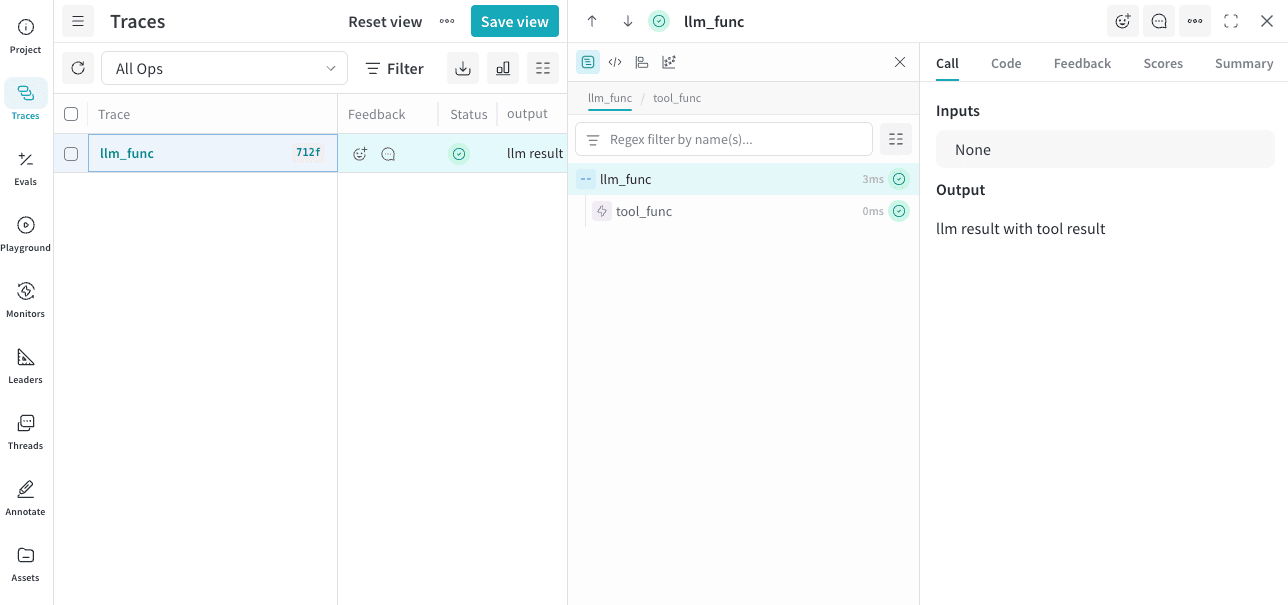 사용 가능한 `kind` 값은 다음과 같습니다.
* `agent`
* `llm`
* `tool`
* `search`
사용 가능한 `color` 값은 다음과 같습니다.
* `red`
* `orange`
* `yellow`
* `green`
* `blue`
* `purple`
사용 가능한 `kind` 값은 다음과 같습니다.
* `agent`
* `llm`
* `tool`
* `search`
사용 가능한 `color` 값은 다음과 같습니다.
* `red`
* `orange`
* `yellow`
* `green`
* `blue`
* `purple`
## 로깅된 입력과 출력을 사용자 지정하기
원래 함수를 수정하지 않고 Weave가 로깅하는 데이터를 변경하려면(예: 민감한 데이터를 숨기기 위해) Op 데코레이터에 `postprocess_inputs`와 `postprocess_output`을 전달하세요.
`postprocess_inputs`는 키가 인수 이름이고 값이 인수 값인 dict를 받아, 변환된 입력이 담긴 dict를 반환합니다.
`postprocess_output`은 함수가 일반적으로 반환하는 임의의 값을 받아, 변환된 출력을 반환합니다.
```python lines theme={null}
from dataclasses import dataclass
from typing import Any
import weave
@dataclass
class CustomObject:
x: int
secret_password: str
def postprocess_inputs(inputs: dict[str, Any]) -> dict[str, Any]:
return {k:v for k,v in inputs.items() if k != "hide_me"}
def postprocess_output(output: CustomObject) -> CustomObject:
return CustomObject(x=output.x, secret_password="REDACTED")
@weave.op(
postprocess_inputs=postprocess_inputs,
postprocess_output=postprocess_output,
)
def func(a: int, hide_me: str) -> CustomObject:
return CustomObject(x=a, secret_password=hide_me)
weave.init('hide-data-example')
func(a=1, hide_me="password123")
```
```text theme={null}
이 기능은 아직 TypeScript에서 사용할 수 없습니다.
```
## 샘플링 비율 제어
Weave가 Op의 호출을 얼마나 자주 트레이스할지 제어하려면 `@weave.op` 데코레이터에서 `tracing_sample_rate` 매개변수를 설정하세요. 호출 빈도가 높은 Op에서 일부 호출만 트레이스하면 되는 경우에 사용하세요.
에이전트를 개발하는 동안에는 모든 트레이스를 수집해 동작을 설계하고 이해하는 데 활용하세요. 프로덕션에서는 에이전트 동작에 대한 관측성을 유지하면서 비용을 줄일 수 있도록 트레이스 샘플링을 구성하세요.
Weave는 최상위 Op에만 샘플링 비율을 적용합니다. 중첩된 Op에 샘플링 비율이 설정되어 있어도 부모 Op가 먼저 이를 호출하면, Weave는 중첩된 Op의 샘플링 비율을 무시합니다.
```python lines theme={null}
@weave.op(tracing_sample_rate=0.1) # 호출의 약 10%만 트레이스
def high_frequency_op(x: int) -> int:
return x + 1
@weave.op(tracing_sample_rate=1.0) # 항상 트레이스(기본값)
def always_traced_op(x: int) -> int:
return x + 1
```
Weave가 Op의 호출을 샘플링하지 않는 경우:
* 함수는 정상적으로 실행됩니다.
* Weave는 트레이스 데이터를 수집하지 않습니다.
* Weave는 해당 호출에 대해 하위 Op를 트레이스하지 않습니다.
샘플링 비율은 0.0 이상 1.0 이하여야 합니다.
```text theme={null}
이 기능은 아직 TypeScript에서 사용할 수 없습니다.
```
## Call 링크 출력 제어
기본적으로 Weave는 Call을 로깅할 때 각 Call의 링크를 출력합니다. 로깅하는 중에 Call 링크가 출력되지 않게 하려면 `WEAVE_PRINT_CALL_LINK` 환경 변수를 `false`로 설정하면 됩니다. 이렇게 하면 출력의 장황함을 줄이고 로그를 덜 복잡하게 만들 수 있습니다.
```bash lines theme={null}
export WEAVE_PRINT_CALL_LINK=false
```
## Op 삭제하기
Op 버전을 삭제하면 프로젝트에서 제거됩니다. 오래되었거나 더 이상 필요하지 않은 버전을 정리할 때 사용하세요.
Op 버전을 삭제하려면 Op ref에서 `.delete()`를 호출하세요.
```python lines theme={null}
weave.init('intro-example')
my_op_ref = weave.ref('track_me:v1')
my_op_ref.delete()
```
삭제된 Op에 접근하면 오류가 발생합니다.
```text theme={null}
이 기능은 아직 TypeScript에서 사용할 수 없습니다.
```