> ## Documentation Index
> Fetch the complete documentation index at: https://docs.wandb.ai/llms.txt
> Use this file to discover all available pages before exploring further.
> Compare results across machine learning experiments
# Parallel coordinates
Parallel coordinates charts summarize the relationship between large numbers of hyperparameters and model metrics at a glance.
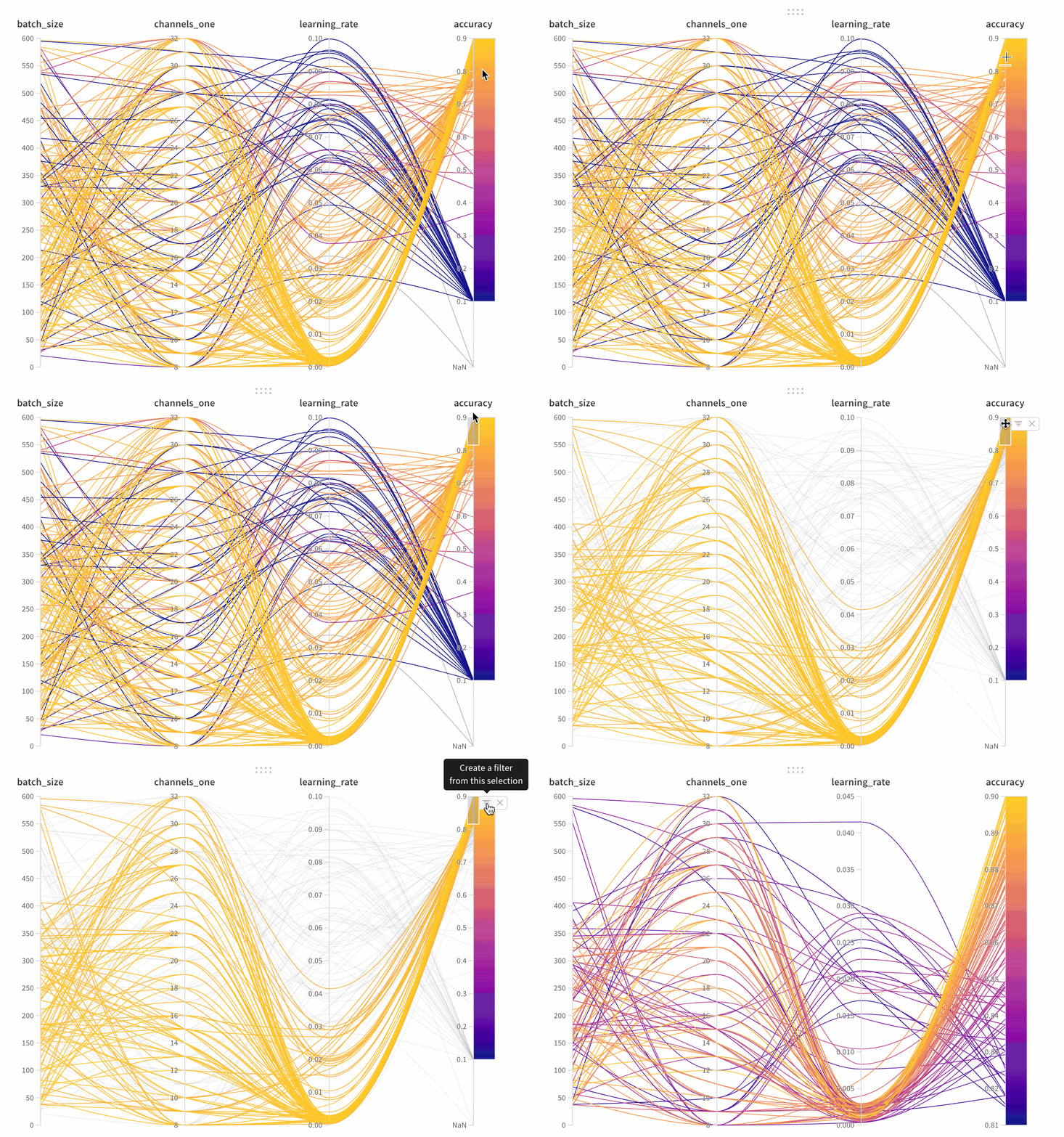 A parallel coordinates panel has the following components:
* **Axes**: Hyperparameters from [`wandb.Run.config`](/models/tables/evaluate-models) and metrics from [`wandb.Run.log()`](/models/tables/evaluate-models).
* **Lines**: Each line represents a single run. Hover over a line to see a tooltip with details about the run. All lines matching the current filters appear. If you turn off the eye icon for a run, its line is dimmed.
## Create a parallel coordinates panel
To add a parallel coordinates panel to your workspace:
1. Navigate to the landing page for your workspace.
2. Click **Add Panels**.
3. Select **Parallel coordinates**.
## Panel settings
To configure the panel, click the edit button in the upper-right corner of the panel.
You can adjust the following settings:
* **Tooltip**: On hover, a legend appears with information about each run.
* **Titles**: Edit the axis titles to make them more readable.
* **Gradient**: Customize the gradient to any color range.
* **Log scale**: Set each axis to use a log scale independently.
* **Flip axis**: Switch the axis direction. This is useful when you have both accuracy and loss as columns.
For an interactive example, see [a live parallel coordinates panel](https://app.wandb.ai/example-team/sweep-demo/reports/Zoom-in-on-Parallel-Coordinates-Charts--Vmlldzo5MTQ4Nw).
A parallel coordinates panel has the following components:
* **Axes**: Hyperparameters from [`wandb.Run.config`](/models/tables/evaluate-models) and metrics from [`wandb.Run.log()`](/models/tables/evaluate-models).
* **Lines**: Each line represents a single run. Hover over a line to see a tooltip with details about the run. All lines matching the current filters appear. If you turn off the eye icon for a run, its line is dimmed.
## Create a parallel coordinates panel
To add a parallel coordinates panel to your workspace:
1. Navigate to the landing page for your workspace.
2. Click **Add Panels**.
3. Select **Parallel coordinates**.
## Panel settings
To configure the panel, click the edit button in the upper-right corner of the panel.
You can adjust the following settings:
* **Tooltip**: On hover, a legend appears with information about each run.
* **Titles**: Edit the axis titles to make them more readable.
* **Gradient**: Customize the gradient to any color range.
* **Log scale**: Set each axis to use a log scale independently.
* **Flip axis**: Switch the axis direction. This is useful when you have both accuracy and loss as columns.
For an interactive example, see [a live parallel coordinates panel](https://app.wandb.ai/example-team/sweep-demo/reports/Zoom-in-on-Parallel-Coordinates-Charts--Vmlldzo5MTQ4Nw).