> ## Documentation Index
> Fetch the complete documentation index at: https://docs.wandb.ai/llms.txt
> Use this file to discover all available pages before exploring further.
> Overview of W&B Artifacts, how they work, and how to get started using them.
# Artifacts overview
export const TryProductLink = ({url}) =>
Try in W&B
;
export const ColabLink = ({url}) =>
Try in Colab
;
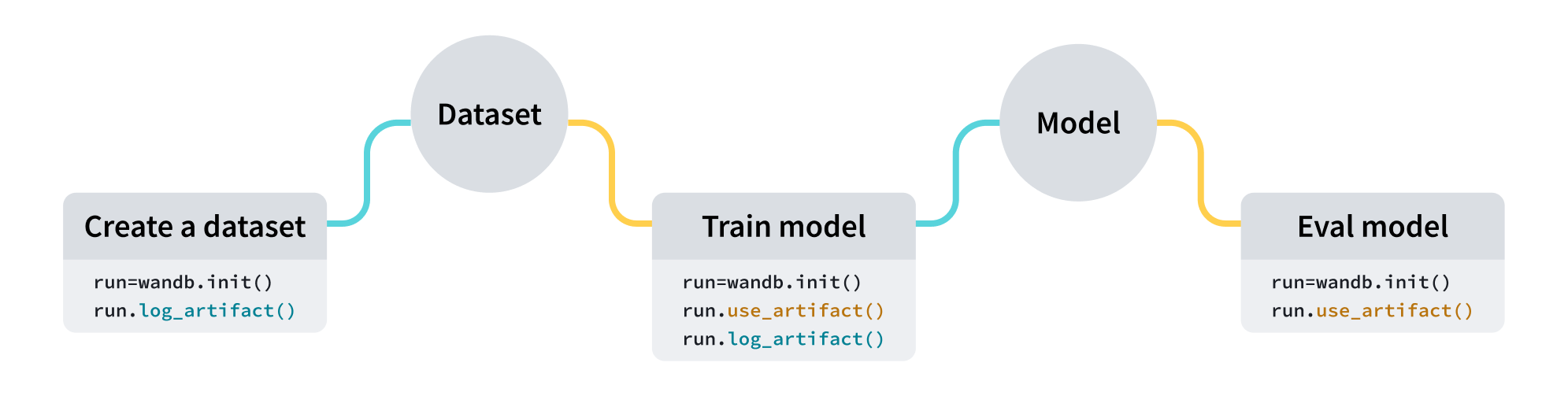
Use W\&B Artifacts to track and version data as the inputs and outputs of your [W\&B Runs](/models/runs). For example, a model training run might take in a dataset as input and produce a trained model as output. You can log hyperparameters, metadata, and metrics to a run, and you can use an artifact to log, track, and version the dataset used to train the model as input and another artifact for the resulting model checkpoints as output.
## Use cases
You can use artifacts throughout your entire ML workflow as inputs and outputs of [runs](/models/runs). You can use datasets, models, or even other artifacts as inputs for processing.
| Use Case | Input | Output |
| ---------------------- | -------------------------------------- | ---------------------------- |
| Model Training | Dataset (training and validation data) | Trained Model |
| Dataset Pre-Processing | Dataset (raw data) | Dataset (pre-processed data) |
| Model Evaluation | Model + Dataset (test data) | [W\&B Table](/models/tables) |
| Model Optimization | Model | Optimized Model |
The following code snippets are meant to be run in order.
## Create an artifact
Create an artifact with four lines of code:
1. Create a [W\&B run](/models/runs).
2. Create an artifact object with [`wandb.Artifact`](/models/ref/python/experiments/artifact).
3. Add one or more files, such as a model file or dataset, to the artifact object with `wandb.Artifact.add_file()`.
4. Log your artifact to W\&B with `wandb.Run.log_artifact()`.
For example, the following code snippet shows how to log a file called `dataset.h5` to an artifact called `example_artifact`:
```python theme={null}
import wandb
with wandb.init(project="artifacts-example", job_type="add-dataset") as run:
artifact = wandb.Artifact(name="example_artifact", type="dataset")
artifact.add_file(local_path="./dataset.h5", name="training_dataset")
run.log_artifact(artifact)
```
* The `type` of the artifact affects how it appears in the W\&B platform. If you do not specify a `type`, it defaults to `unspecified`.
* Each label of the dropdown represents a different `type` parameter value. In the above code snippet, the artifact's `type` is `dataset`.
See the [track external files](/models/artifacts/track-external-files) page for information on how to add references to files or directories stored in external object storage, like an Amazon S3 bucket.
## Download an artifact
Indicate the artifact you want to mark as input to your run with the [`wandb.Run.use_artifact()`](/models/ref/python/experiments/run#use_artifact) method.
Continuing from the previous code snippet, the following code example shows how to use the artifact called `example_artifact` that was created earlier:
```python theme={null}
with wandb.init(project="artifacts-example", job_type="add-dataset") as run:
artifact = run.use_artifact("training_dataset:latest") # returns a run object using the "my_data" artifact
```
This returns an artifact object.
Next, use the returned object to download all contents of the artifact:
```python theme={null}
datadir = artifact.download() # downloads the full `my_data` artifact to the default directory.
```
You can pass a custom path into the `root` [parameter](/models/ref/python/experiments/artifact) to download an artifact to a specific directory. For alternate ways to download artifacts and to see additional parameters, see the guide on [downloading and using artifacts](/models/artifacts/download-and-use-an-artifact).
## Next steps
* Learn how to [version](/models/artifacts/create-a-new-artifact-version) and [update](/models/artifacts/update-an-artifact) artifacts.
* Learn how to trigger downstream workflows or notify a Slack channel in response to changes to your artifacts with [automations](/models/automations).
* Learn about the [registry](/models/registry), a space that houses trained models.
* Explore the [Python SDK](/models/ref/python/experiments/artifact) and [CLI](/models/ref/cli/wandb-artifact) reference guides.
 | Use Case | Input | Output |
| ---------------------- | -------------------------------------- | ---------------------------- |
| Model Training | Dataset (training and validation data) | Trained Model |
| Dataset Pre-Processing | Dataset (raw data) | Dataset (pre-processed data) |
| Model Evaluation | Model + Dataset (test data) | [W\&B Table](/models/tables) |
| Model Optimization | Model | Optimized Model |
| Use Case | Input | Output |
| ---------------------- | -------------------------------------- | ---------------------------- |
| Model Training | Dataset (training and validation data) | Trained Model |
| Dataset Pre-Processing | Dataset (raw data) | Dataset (pre-processed data) |
| Model Evaluation | Model + Dataset (test data) | [W\&B Table](/models/tables) |
| Model Optimization | Model | Optimized Model |