> ## Documentation Index
> Fetch the complete documentation index at: https://docs.wandb.ai/llms.txt
> Use this file to discover all available pages before exploring further.
# Add W&B to a Python library
> Best practices for integrating Weights & Biases into your Python library for experiment tracking, system monitoring, and model management.
This guide explains how to integrate Weights & Biases (W\&B) into a Python library.
Follow these recommendations if you are integrating W\&B into a complex codebase—such as a training framework, SDK, or reusable library.
If you are new to W\&B, review the core guides (for example, [Experiment Tracking](/models/track/)) before continuing.
Below we cover best tips and best practices when the codebase you are working on is more complicated than a single Python training script or Jupyter notebook.
## Decide how users install W\&B
Before you start, decide whether W\&B should be a required dependency or an optional feature of your library.
### Require W\&B as a dependency
If W\&B is central to your library’s functionality, add the W\&B Python SDK (`wandb`) to your dependencies:
```txt theme={null}
torch==1.8.0
...
wandb==0.13.*
```
### Make W\&B optional on installation
If W\&B is an optional feature, allow your library to run without it installed.
You can either import `wandb` conditionally in Python or declare it as an optional dependency in `pyproject.toml`.
Detect whether `wandb` is available and raise a clear error if a user enables W\&B features without installing it:
```python theme={null}
try:
import wandb
_WANDB_AVAILABLE = True
except ImportError:
_WANDB_AVAILABLE = False
```
Declare `wandb` as an optional dependency to your `pyproject.toml` file:
```toml theme={null}
[project]
name = "my_awesome_lib"
version = "0.1.0"
dependencies = [
"torch",
"sklearn"
]
[project.optional-dependencies]
dev = [
"wandb"
]
```
## Authenticate users
W\&B uses API keys to authenticate users and machines.
### Create an API key
An API key authenticates a client or machine to W\&B. You can generate an API key from your user profile.
For a more streamlined approach, create an API key by going directly to [User Settings](https://wandb.ai/settings). Copy the newly created API key immediately and save it in a secure location such as a password manager.
1. Click your user profile icon in the upper right corner.
2. Select **User Settings**, then scroll to the **API Keys** section.
### Install and log in to W\&B
To install the `wandb` library locally and log in:
1. Set the `WANDB_API_KEY` [environment variable](/models/track/environment-variables/) to your API key:
```bash theme={null}
export WANDB_API_KEY=
```
2. Install the `wandb` library and log in:
```bash theme={null}
pip install wandb
wandb login
```
1. Navigate to your terminal and install the Python SDK.
```bash theme={null}
pip install wandb
```
2. Log in to W\&B from your Python script or notebook. This will prompt you to enter
your API key.
```python theme={null}
import wandb
wandb.login()
```
Copy and paste the following code snippet into a cell in your Jupyter notebook and run it. This will prompt you to enter your API key.
```notebook theme={null}
!pip install wandb
import wandb
wandb.login()
```
## Start a run
A *run* represents a single unit of computation, such as a training experiment. Most libraries create one run per training job. For more information about runs, see [W\&B Runs](/models/runs/).
Initialize a run with [`wandb.init()`](/models/ref/python/functions/init) and specify a name for your project and your team entity (team name). If you do not specify a project, W\&B stores your run in a default project called "uncategorized".:
```python theme={null}
with wandb.init(project="", entity="") as run:
...
```
W\&B recommends that you use a context manager to ensure that your run is properly closed, even if an error occurs. If you do not use a context manager, you must call `run.finish()` to close the run and log all the data to W\&B.
**When to call `wandb.init()`**
Call `wandb.init()` as early as possible. W\&B captures stdout, stderr, and error messages, which makes debugging easier.
Wrap your entire training loop in a `wandb.init()` context manager to ensure that all relevant information is captured in the run. This includes any error messages, which can be crucial for debugging.
### Set `wandb` as an optional dependency
If you want to make `wandb` optional when your users use your library, you can either:
* Define a `wandb` flag such as:
```python theme={null}
trainer = my_trainer(..., use_wandb=True)
```
```bash theme={null}
python train.py ... --use-wandb
```
* Or, set `wandb` to be `disabled` in `wandb.init()`:
```python theme={null}
wandb.init(mode="disabled")
```
```bash theme={null}
export WANDB_MODE=disabled
```
or
```bash theme={null}
wandb disabled
```
* Or, set `wandb` to be offline - note this will still run `wandb`, it just won't try and communicate back to W\&B over the internet:
```bash theme={null}
export WANDB_MODE=offline
```
or
```python theme={null}
os.environ['WANDB_MODE'] = 'offline'
```
```bash theme={null}
wandb offline
```
## Define a run config
Provide a configuration dictionary when you initialize your run to log hyperparameters and other metadata to W\&B.
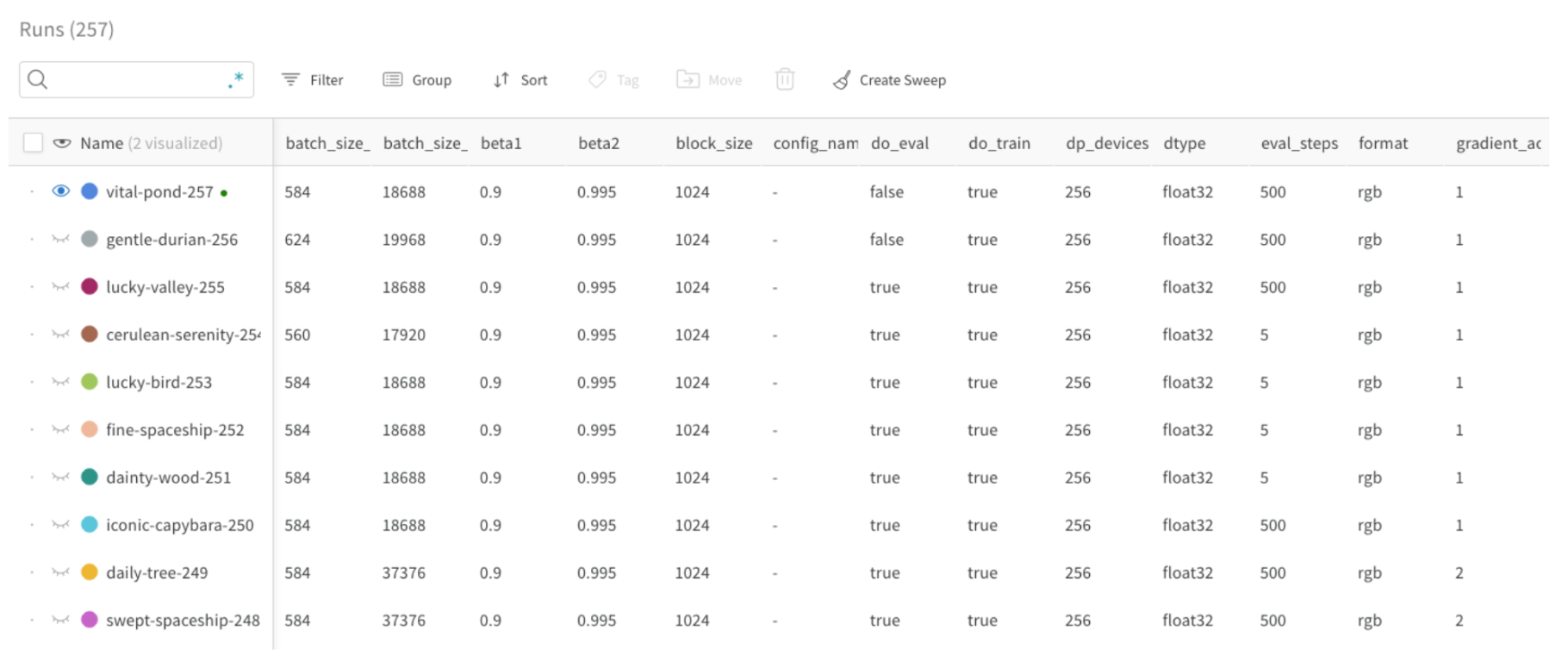
Use the W\&B App to compare runs based on their config parameters and filter them in the Runs table. You can also use these parameters to group runs together in the W\&B App.
For example, in the following image, the batch size (bathch\_size) was defined as a config parameter and is visible(see first column) in the Runs table. This allows users to filter and compare runs based on their batch size:
 Typical config parameters values include:
* Model name, version, architecture parameters, and hyperparameters.
* Dataset name, version, number of training or validation examples.
* Training parameters such as learning rate, batch size, and optimizer.
The following code snippet shows how to log a config:
```python theme={null}
config = {"batch_size": 32, ...}
with wandb.init(..., config=config) as run:
...
```
### Update the run config
If values are not available at initialization time, update the config later with `wandb.Run.config.update`. For example, you might want to add a model’s parameters after the model is instantiated:
```python theme={null}
with wandb.init(...) as run:
model = MyModel(...)
run.config.update({"model_parameters": 3500})
```
For details, see [Configure experiments](/models/track/config/).
## Log metrics and data
### Log metrics
Create a dictionary where the key value is the name of the metric. Pass this dictionary object to [`wandb.Run.log()`](/models/ref/python/experiments/run#method-run-log) to log it to W\&B:
```python theme={null}
NUM_EPOCHS = 10
for epoch in range(NUM_EPOCHS):
for input, ground_truth in data:
prediction = model(input)
loss = loss_fn(prediction, ground_truth)
metrics = { "loss": loss }
run.log(metrics)
```
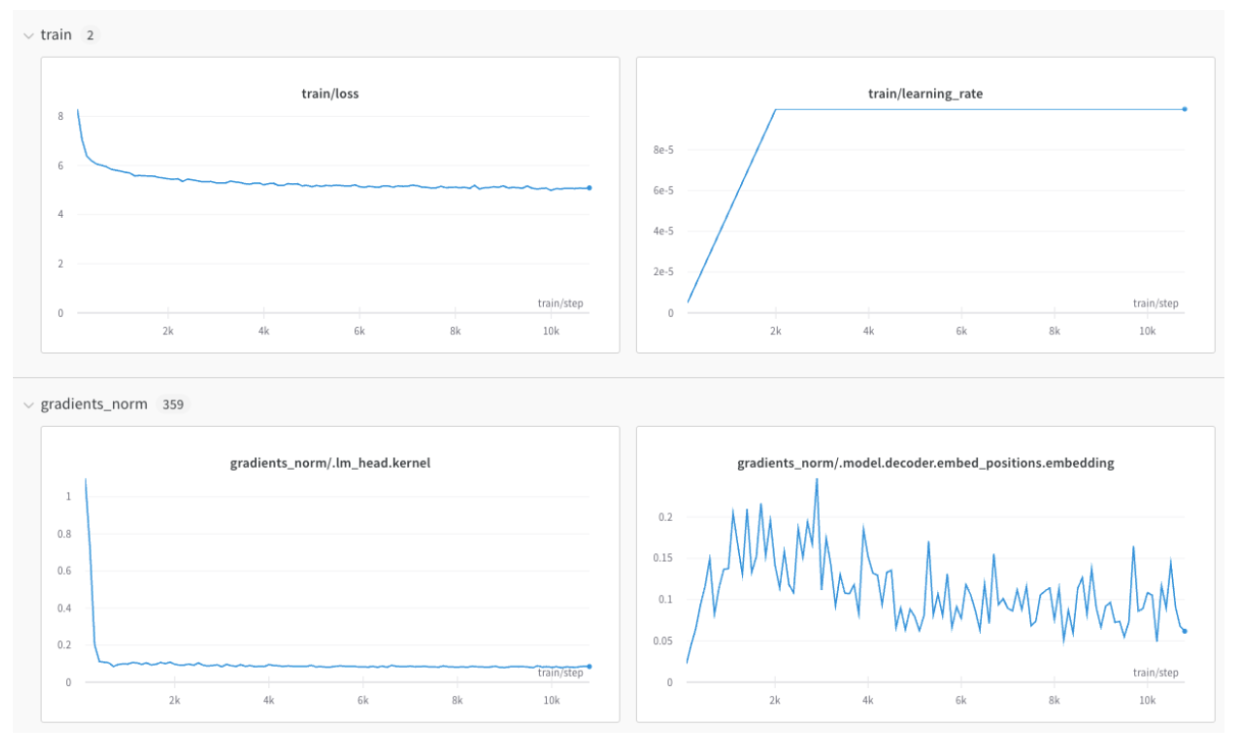
Use metric name prefixes to group related metrics in the W\&B App. Common prefixes include `train/` and `val/` for training and validation metrics, respectively, but you can use any prefix that makes sense for your use case.
This will create separate sections in your project's workspace for your training and validation metrics, or other metric types you'd like to separate:
```python theme={null}
with wandb.init(...) as run:
metrics = {
"train/loss": 0.4,
"train/learning_rate": 0.4,
"val/loss": 0.5,
"val/accuracy": 0.7
}
run.log(metrics)
```
Typical config parameters values include:
* Model name, version, architecture parameters, and hyperparameters.
* Dataset name, version, number of training or validation examples.
* Training parameters such as learning rate, batch size, and optimizer.
The following code snippet shows how to log a config:
```python theme={null}
config = {"batch_size": 32, ...}
with wandb.init(..., config=config) as run:
...
```
### Update the run config
If values are not available at initialization time, update the config later with `wandb.Run.config.update`. For example, you might want to add a model’s parameters after the model is instantiated:
```python theme={null}
with wandb.init(...) as run:
model = MyModel(...)
run.config.update({"model_parameters": 3500})
```
For details, see [Configure experiments](/models/track/config/).
## Log metrics and data
### Log metrics
Create a dictionary where the key value is the name of the metric. Pass this dictionary object to [`wandb.Run.log()`](/models/ref/python/experiments/run#method-run-log) to log it to W\&B:
```python theme={null}
NUM_EPOCHS = 10
for epoch in range(NUM_EPOCHS):
for input, ground_truth in data:
prediction = model(input)
loss = loss_fn(prediction, ground_truth)
metrics = { "loss": loss }
run.log(metrics)
```
Use metric name prefixes to group related metrics in the W\&B App. Common prefixes include `train/` and `val/` for training and validation metrics, respectively, but you can use any prefix that makes sense for your use case.
This will create separate sections in your project's workspace for your training and validation metrics, or other metric types you'd like to separate:
```python theme={null}
with wandb.init(...) as run:
metrics = {
"train/loss": 0.4,
"train/learning_rate": 0.4,
"val/loss": 0.5,
"val/accuracy": 0.7
}
run.log(metrics)
```
 See [`wandb.Run.log()`](/models/ref/python/experiments/run#method-run-log) for more details.
### Control the x-axis
If you perform multiple calls to `wandb.Run.log()` for the same training step, the wandb SDK increments an internal step counter for each call to `wandb.Run.log()`. This counter may not align with the training step in your training loop.
To avoid this situation, define your x-axis step explicitly with `wandb.Run.define_metric()`, one time, immediately after you call `wandb.init()`:
```python theme={null}
with wandb.init(...) as run:
run.define_metric("*", step_metric="global_step")
```
The glob pattern, `*`, means that every metric will use `global_step` as the x-axis in your charts. If you only want certain metrics to be logged against `global_step`, you can specify them instead:
```python theme={null}
run.define_metric("train/loss", step_metric="global_step")
```
Now, log your metrics, your `step` metric, and your `global_step` each time you call `wandb.Run.log()`:
```python theme={null}
for step, (input, ground_truth) in enumerate(data):
...
run.log({"global_step": step, "train/loss": 0.1})
run.log({"global_step": step, "eval/loss": 0.2})
```
If you do not have access to the independent step variable, for example "global\_step" is not available during your validation loop, the previously logged value for "global\_step" is automatically used by wandb. In this case, ensure you log an initial value for the metric so it has been defined when it’s needed.
### Log media and structured data
In addition to scalars, you can log images, tables, text, audio, video, and more.
Some considerations when logging data include:
* How often should the metric be logged? Should it be optional?
* What type of data could be helpful in visualizing?
* For images, you can log sample predictions, segmentation masks, etc., to see the evolution over time.
* For text, you can log tables of sample predictions for later exploration.
See the [Log objects and media](/models/track/log) for examples.
## Support distributed training
For frameworks supporting distributed environments, you can adapt any of the following workflows:
* Log only from the main process (recommended).
* Log from every process and group runs using a shared `group` name.
See [Log Distributed Training Experiments](/models/track/log/distributed-training/) for more details.
## Track models and datasets with artifacts
Use [W\&B Artifacts](/models/artifacts/) to track and version models and datasets. Artifacts provide storage and versioning for machine learning assets, and they automatically track lineage to show how data and models are related.
See [`wandb.Run.log()`](/models/ref/python/experiments/run#method-run-log) for more details.
### Control the x-axis
If you perform multiple calls to `wandb.Run.log()` for the same training step, the wandb SDK increments an internal step counter for each call to `wandb.Run.log()`. This counter may not align with the training step in your training loop.
To avoid this situation, define your x-axis step explicitly with `wandb.Run.define_metric()`, one time, immediately after you call `wandb.init()`:
```python theme={null}
with wandb.init(...) as run:
run.define_metric("*", step_metric="global_step")
```
The glob pattern, `*`, means that every metric will use `global_step` as the x-axis in your charts. If you only want certain metrics to be logged against `global_step`, you can specify them instead:
```python theme={null}
run.define_metric("train/loss", step_metric="global_step")
```
Now, log your metrics, your `step` metric, and your `global_step` each time you call `wandb.Run.log()`:
```python theme={null}
for step, (input, ground_truth) in enumerate(data):
...
run.log({"global_step": step, "train/loss": 0.1})
run.log({"global_step": step, "eval/loss": 0.2})
```
If you do not have access to the independent step variable, for example "global\_step" is not available during your validation loop, the previously logged value for "global\_step" is automatically used by wandb. In this case, ensure you log an initial value for the metric so it has been defined when it’s needed.
### Log media and structured data
In addition to scalars, you can log images, tables, text, audio, video, and more.
Some considerations when logging data include:
* How often should the metric be logged? Should it be optional?
* What type of data could be helpful in visualizing?
* For images, you can log sample predictions, segmentation masks, etc., to see the evolution over time.
* For text, you can log tables of sample predictions for later exploration.
See the [Log objects and media](/models/track/log) for examples.
## Support distributed training
For frameworks supporting distributed environments, you can adapt any of the following workflows:
* Log only from the main process (recommended).
* Log from every process and group runs using a shared `group` name.
See [Log Distributed Training Experiments](/models/track/log/distributed-training/) for more details.
## Track models and datasets with artifacts
Use [W\&B Artifacts](/models/artifacts/) to track and version models and datasets. Artifacts provide storage and versioning for machine learning assets, and they automatically track lineage to show how data and models are related.
 Consider the following when integrating artifacts into your library:
* Whether to log model checkpoints or datasets as artifacts (in case you want to make it optional).
* Artifact input references (for example, `entity/project/artifact`).
* Logging frequency of model checkpoints or datasets. For example, every epoch, every 500 steps, and so on.
### Log model checkpoints
Log model checkpoints to W\&B. A common approach is to log checkpoints as artifacts using the unique run ID generated by W\&B as part of the artifact name.
```python theme={null}
metadata = {"eval/accuracy": 0.8, "train/steps": 800}
artifact = wandb.Artifact(
name=f"model-{run.id}",
metadata=metadata,
type="model"
)
artifact.add_dir("output_model") # local directory where the model weights are stored
aliases = ["best", "epoch_10"]
run.log_artifact(artifact, aliases=aliases)
```
The previous code snippet demonstrates how to log a model checkpoint as an artifact and add metadata such as evaluation accuracy and training steps. The artifact is given a name that includes the unique run ID, and it is tagged with [custom aliases](/models/artifacts/create-a-custom-alias/) for easy reference.
### Log input artifacts
Log datasets or pretrained models used as inputs:
```python theme={null}
dataset = wandb.Artifact(name="flowers", type="dataset")
dataset.add_file("flowers.npy")
run.use_artifact(dataset)
```
The previous code snippet creates an artifact for a dataset called "flowers" and adds a file to it. The artifact is then associated with the current run using `run.use_artifact()`, which allows W\&B to track the lineage of the dataset used in the run.
### Download artifacts
Download previously logged artifacts from W\&B to use in your training or inference code.
If you have a run context, use [`wandb.Run.use_artifact()`](/models/ref/python/experiments/run) to reference an artifact in W\&B and then call [`wandb.Artifact.download()`](/models/ref/python/experiments/artifact) to download it to a local directory.
```python theme={null}
with wandb.init(...) as run:
artifact = run.use_artifact("user/project/artifact:latest")
local_path = artifact.download()
```
Use the [W\&B Public API](/models/ref/python/public-api/) to reference and download an artifact without initializing a run. This is useful in scenarios such as distributed environments or when performing inference, where you may not want to create a new run.
```python theme={null}
import wandb
artifact = wandb.Api().artifact("user/project/artifact:latest")
local_path = artifact.download()
```
See [Download and use artifacts](/models/artifacts/download-and-use-an-artifact/) for more information.
## Tune hyper-parameters
If your library supports hyperparameter tuning, you can integrate [W\&B Sweeps](/models/sweeps/) to manage and visualize experiments.
Consider the following when integrating artifacts into your library:
* Whether to log model checkpoints or datasets as artifacts (in case you want to make it optional).
* Artifact input references (for example, `entity/project/artifact`).
* Logging frequency of model checkpoints or datasets. For example, every epoch, every 500 steps, and so on.
### Log model checkpoints
Log model checkpoints to W\&B. A common approach is to log checkpoints as artifacts using the unique run ID generated by W\&B as part of the artifact name.
```python theme={null}
metadata = {"eval/accuracy": 0.8, "train/steps": 800}
artifact = wandb.Artifact(
name=f"model-{run.id}",
metadata=metadata,
type="model"
)
artifact.add_dir("output_model") # local directory where the model weights are stored
aliases = ["best", "epoch_10"]
run.log_artifact(artifact, aliases=aliases)
```
The previous code snippet demonstrates how to log a model checkpoint as an artifact and add metadata such as evaluation accuracy and training steps. The artifact is given a name that includes the unique run ID, and it is tagged with [custom aliases](/models/artifacts/create-a-custom-alias/) for easy reference.
### Log input artifacts
Log datasets or pretrained models used as inputs:
```python theme={null}
dataset = wandb.Artifact(name="flowers", type="dataset")
dataset.add_file("flowers.npy")
run.use_artifact(dataset)
```
The previous code snippet creates an artifact for a dataset called "flowers" and adds a file to it. The artifact is then associated with the current run using `run.use_artifact()`, which allows W\&B to track the lineage of the dataset used in the run.
### Download artifacts
Download previously logged artifacts from W\&B to use in your training or inference code.
If you have a run context, use [`wandb.Run.use_artifact()`](/models/ref/python/experiments/run) to reference an artifact in W\&B and then call [`wandb.Artifact.download()`](/models/ref/python/experiments/artifact) to download it to a local directory.
```python theme={null}
with wandb.init(...) as run:
artifact = run.use_artifact("user/project/artifact:latest")
local_path = artifact.download()
```
Use the [W\&B Public API](/models/ref/python/public-api/) to reference and download an artifact without initializing a run. This is useful in scenarios such as distributed environments or when performing inference, where you may not want to create a new run.
```python theme={null}
import wandb
artifact = wandb.Api().artifact("user/project/artifact:latest")
local_path = artifact.download()
```
See [Download and use artifacts](/models/artifacts/download-and-use-an-artifact/) for more information.
## Tune hyper-parameters
If your library supports hyperparameter tuning, you can integrate [W\&B Sweeps](/models/sweeps/) to manage and visualize experiments.