> ## Documentation Index
> Fetch the complete documentation index at: https://docs.wandb.ai/llms.txt
> Use this file to discover all available pages before exploring further.
# Hugging Face Diffusers
> Use W&B autolog with Hugging Face Diffusers to track prompts, generated media, configs, and pipeline architecture.
export const ColabLink = ({url}) =>
Try in Colab
;
[Hugging Face Diffusers](https://huggingface.co/docs/diffusers/index) is the go-to library for state-of-the-art pre-trained diffusion models for generating images, audio, and even 3D structures of molecules. The W\&B integration adds rich, flexible experiment tracking, media visualization, pipeline architecture, and configuration management to interactive centralized dashboards without compromising that ease of use.
## Next-level logging in just two lines
Log all the prompts, negative prompts, generated media, and configs associated with your experiment by simply including 2 lines of code. Here are the 2 lines of code to begin logging:
```python theme={null}
# import the autolog function
from wandb.integration.diffusers import autolog
# call the autolog before calling the pipeline
autolog(init=dict(project="diffusers_logging"))
```
## Get started
1. Install `diffusers`, `transformers`, `accelerate`, and `wandb`.
* Command line:
```shell theme={null}
pip install --upgrade diffusers transformers accelerate wandb
```
* Notebook:
```bash theme={null}
!pip install --upgrade diffusers transformers accelerate wandb
```
2. Use `autolog` to initialize a W\&B Run and automatically track the inputs and the outputs from [all supported pipeline calls](https://github.com/wandb/wandb/blob/main/wandb/integration/diffusers/autologger.py#L12-L72).
You can call the `autolog()` function with the `init` parameter, which accepts a dictionary of parameters required by [`wandb.init()`](/models/ref/python/functions/init).
When you call `autolog()`, it initializes a W\&B Run and automatically tracks the inputs and the outputs from [all supported pipeline calls](https://github.com/wandb/wandb/blob/main/wandb/integration/diffusers/autologger.py#L12-L72).
* Each pipeline call is tracked into its own [table](/models/tables/) in the workspace, and the configs associated with the pipeline call is appended to the list of workflows in the configs for that run.
* The prompts, negative prompts, and the generated media are logged in a [`wandb.Table`](/models/tables/).
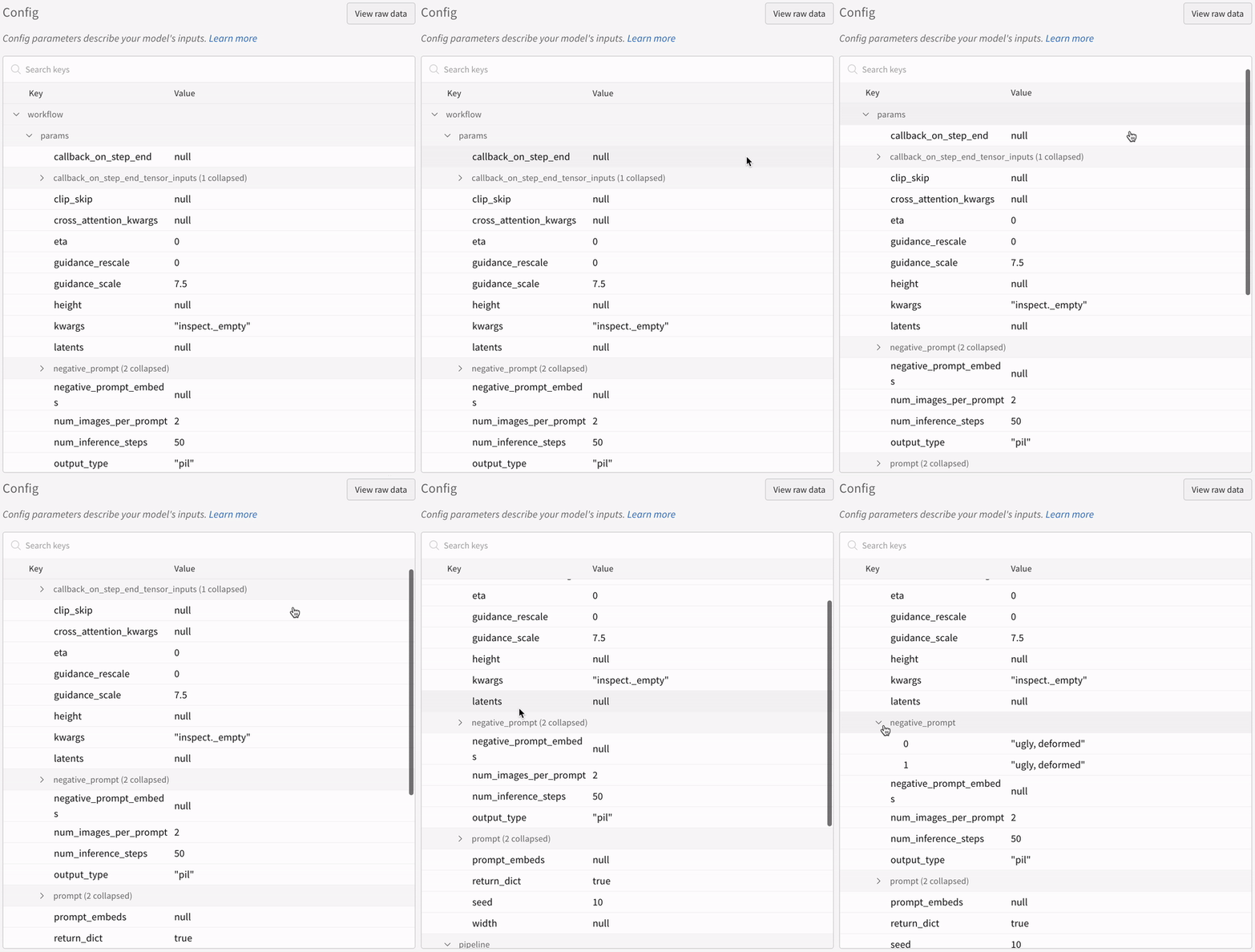
* All other configs associated with the experiment including seed and the pipeline architecture are stored in the config section for the run.
* The generated media for each pipeline call are also logged in [media panels](/models/track/log/media/) in the run.
You can find a [list of supported pipeline calls](https://github.com/wandb/wandb/blob/main/wandb/integration/diffusers/autologger.py#L12-L72). In case, you want to request a new feature of this integration or report a bug associated with it, open an issue on the [W\&B GitHub issues page](https://github.com/wandb/wandb/issues).
## Examples
### Autologging
Here is a brief end-to-end example of the autolog in action:
```python theme={null}
import torch
from diffusers import DiffusionPipeline
# import the autolog function
from wandb.integration.diffusers import autolog
# call the autolog before calling the pipeline
autolog(init=dict(project="diffusers_logging"))
# Initialize the diffusion pipeline
pipeline = DiffusionPipeline.from_pretrained(
"stabilityai/stable-diffusion-2-1", torch_dtype=torch.float16
).to("cuda")
# Define the prompts, negative prompts, and seed.
prompt = ["a photograph of an astronaut riding a horse", "a photograph of a dragon"]
negative_prompt = ["ugly, deformed", "ugly, deformed"]
generator = torch.Generator(device="cpu").manual_seed(10)
# call the pipeline to generate the images
images = pipeline(
prompt,
negative_prompt=negative_prompt,
num_images_per_prompt=2,
generator=generator,
)
```
```python theme={null}
import torch
from diffusers import DiffusionPipeline
import wandb
# import the autolog function
from wandb.integration.diffusers import autolog
run = wandb.init()
# call the autolog before calling the pipeline
autolog(init=dict(project="diffusers_logging"))
# Initialize the diffusion pipeline
pipeline = DiffusionPipeline.from_pretrained(
"stabilityai/stable-diffusion-2-1", torch_dtype=torch.float16
).to("cuda")
# Define the prompts, negative prompts, and seed.
prompt = ["a photograph of an astronaut riding a horse", "a photograph of a dragon"]
negative_prompt = ["ugly, deformed", "ugly, deformed"]
generator = torch.Generator(device="cpu").manual_seed(10)
# call the pipeline to generate the images
images = pipeline(
prompt,
negative_prompt=negative_prompt,
num_images_per_prompt=2,
generator=generator,
)
# Finish the experiment
run.finish()
```
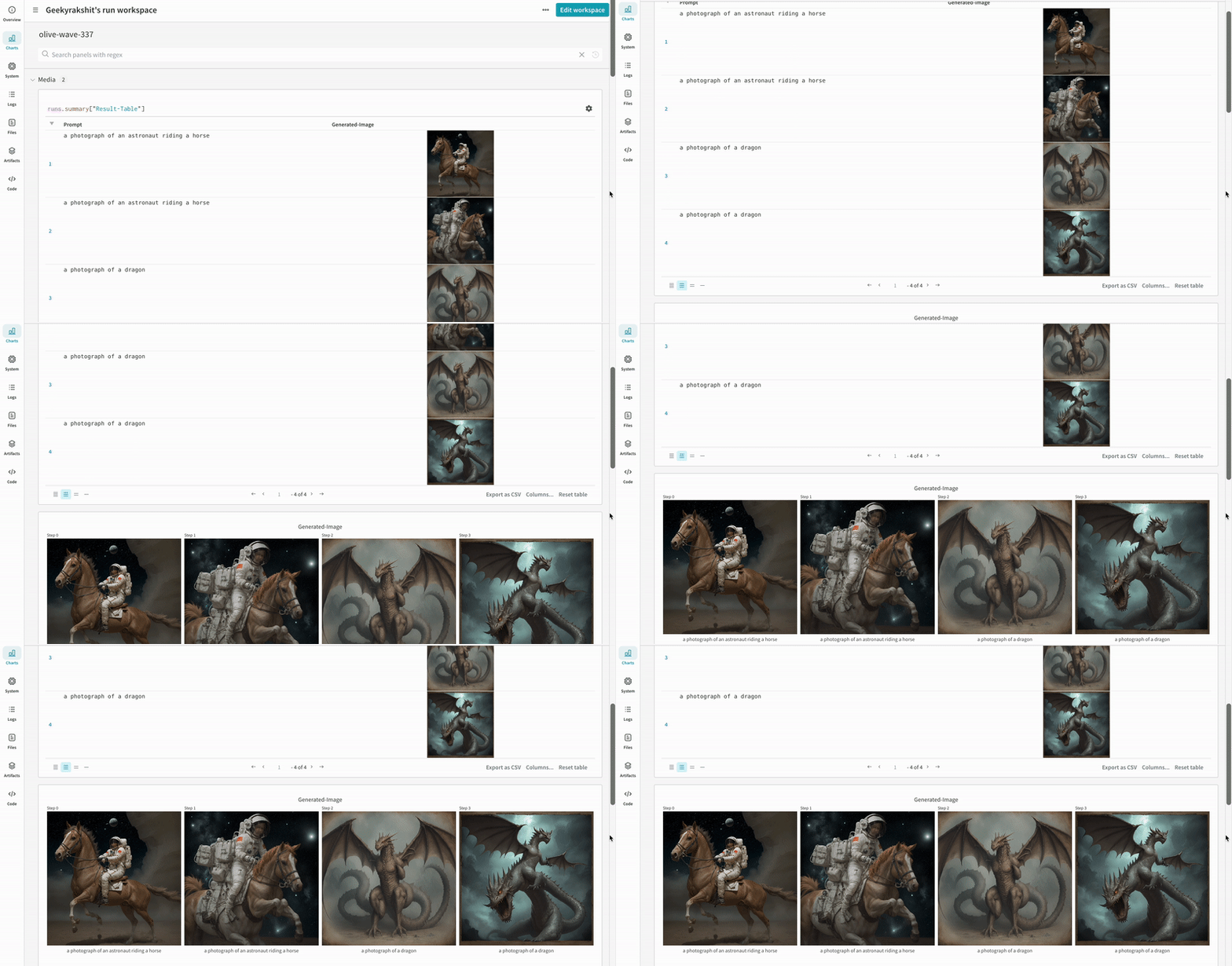
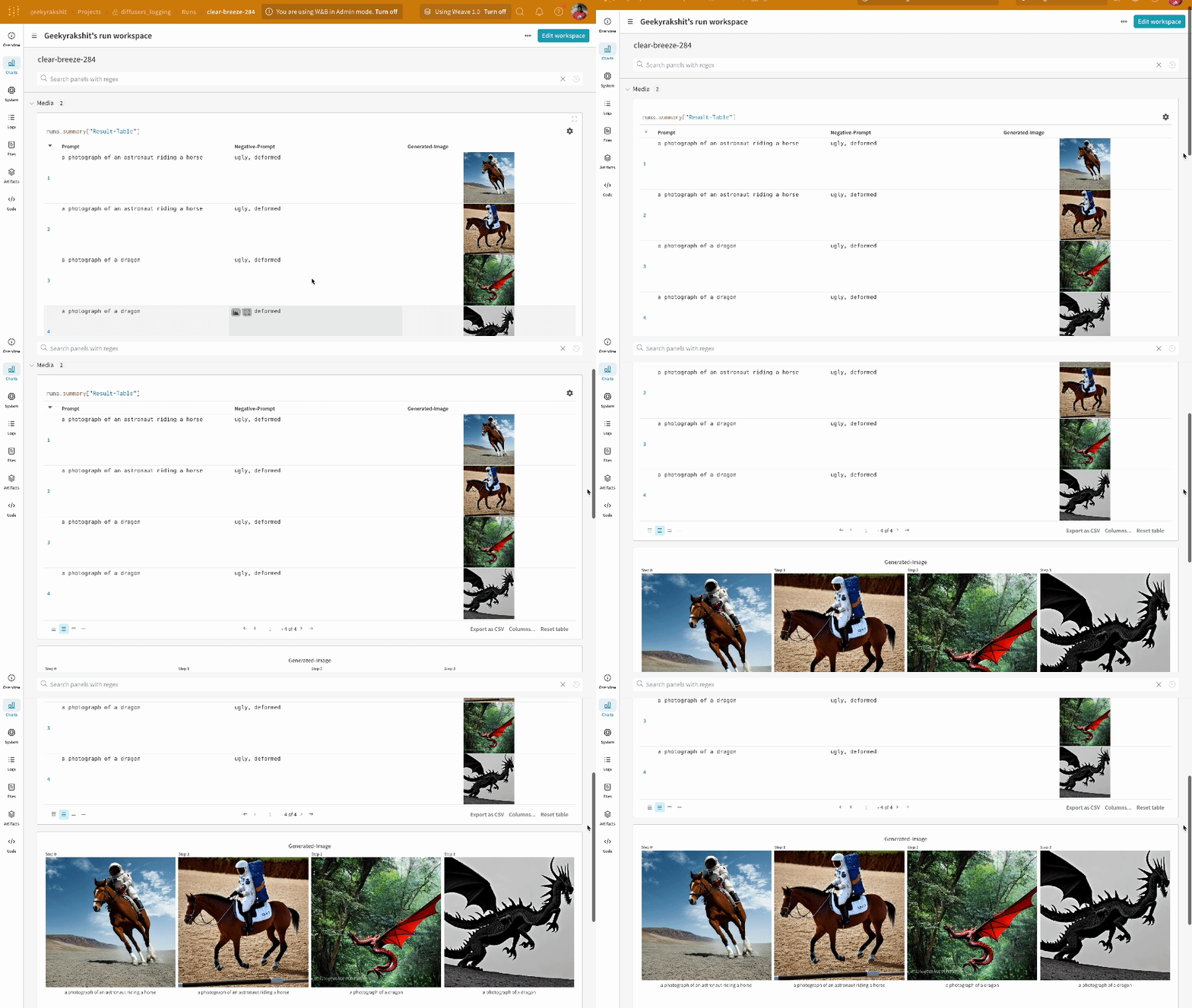
* The results of a single experiment:
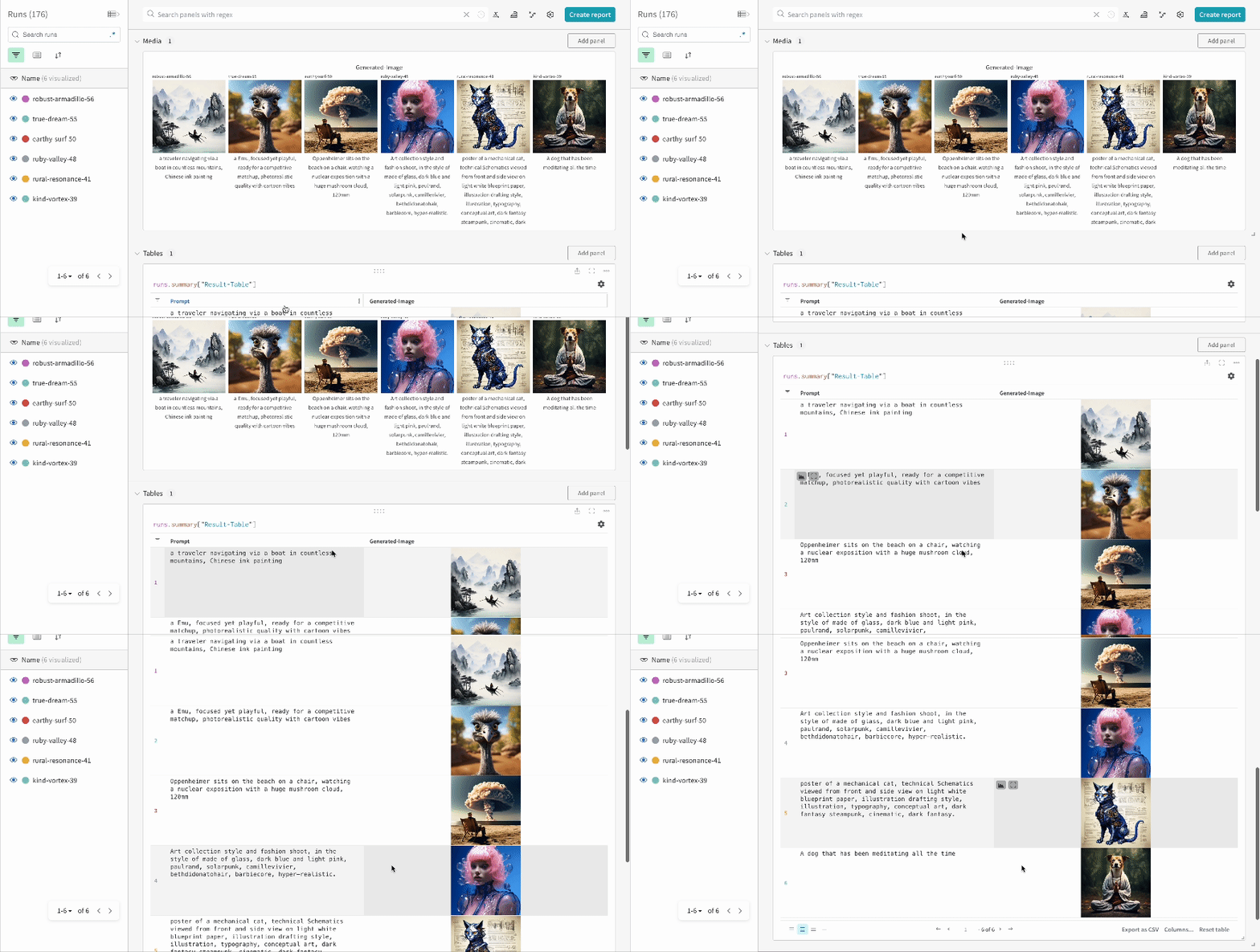
* The results of multiple experiments:
* The config of an experiment:
You need to explicitly call [`wandb.Run.finish()`](/models/ref/python/functions/finish) when executing the code in IPython notebook environments after calling the pipeline. This is not necessary when executing python scripts.
### Tracking multi-pipeline workflows
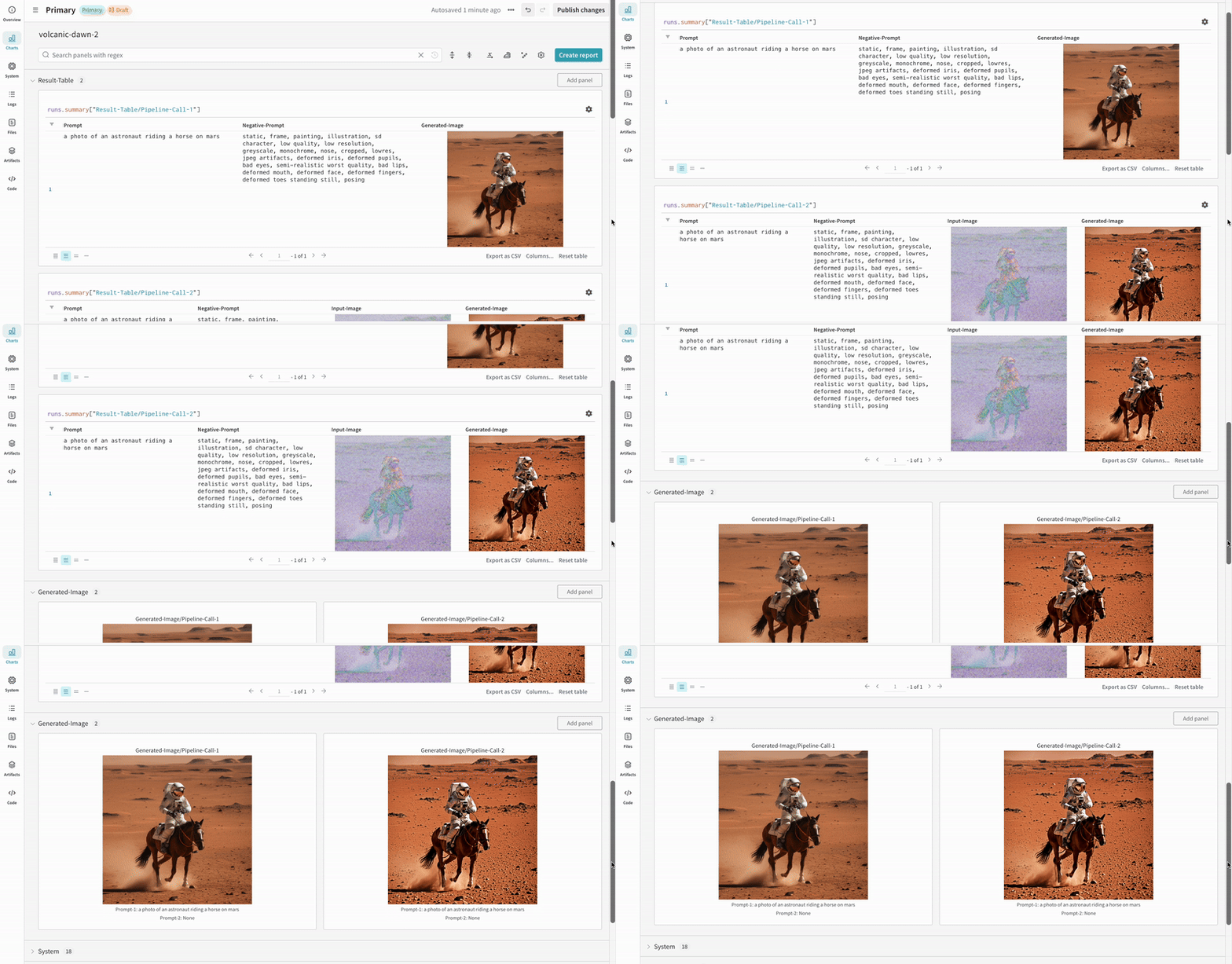
This section demonstrates the autolog with a typical [Stable Diffusion XL + Refiner](https://huggingface.co/docs/diffusers/using-diffusers/sdxl#base-to-refiner-model) workflow, in which the latents generated by the [`StableDiffusionXLPipeline`](https://huggingface.co/docs/diffusers/api/pipelines/stable_diffusion/stable_diffusion_xl) is refined by the corresponding refiner.
```python theme={null}
import torch
from diffusers import StableDiffusionXLImg2ImgPipeline, StableDiffusionXLPipeline
from wandb.integration.diffusers import autolog
# initialize the SDXL base pipeline
base_pipeline = StableDiffusionXLPipeline.from_pretrained(
"stabilityai/stable-diffusion-xl-base-1.0",
torch_dtype=torch.float16,
variant="fp16",
use_safetensors=True,
)
base_pipeline.enable_model_cpu_offload()
# initialize the SDXL refiner pipeline
refiner_pipeline = StableDiffusionXLImg2ImgPipeline.from_pretrained(
"stabilityai/stable-diffusion-xl-refiner-1.0",
text_encoder_2=base_pipeline.text_encoder_2,
vae=base_pipeline.vae,
torch_dtype=torch.float16,
use_safetensors=True,
variant="fp16",
)
refiner_pipeline.enable_model_cpu_offload()
prompt = "a photo of an astronaut riding a horse on mars"
negative_prompt = "static, frame, painting, illustration, sd character, low quality, low resolution, greyscale, monochrome, nose, cropped, lowres, jpeg artifacts, deformed iris, deformed pupils, bad eyes, semi-realistic worst quality, bad lips, deformed mouth, deformed face, deformed fingers, deformed toes standing still, posing"
# Make the experiment reproducible by controlling randomness.
# The seed would be automatically logged to WandB.
seed = 42
generator_base = torch.Generator(device="cuda").manual_seed(seed)
generator_refiner = torch.Generator(device="cuda").manual_seed(seed)
# Call WandB Autolog for Diffusers. This would automatically log
# the prompts, generated images, pipeline architecture and all
# associated experiment configs to W&B, thus making your
# image generation experiments easy to reproduce, share and analyze.
autolog(init=dict(project="sdxl"))
# Call the base pipeline to generate the latents
image = base_pipeline(
prompt=prompt,
negative_prompt=negative_prompt,
output_type="latent",
generator=generator_base,
).images[0]
# Call the refiner pipeline to generate the refined image
image = refiner_pipeline(
prompt=prompt,
negative_prompt=negative_prompt,
image=image[None, :],
generator=generator_refiner,
).images[0]
```
```python theme={null}
import torch
from diffusers import StableDiffusionXLImg2ImgPipeline, StableDiffusionXLPipeline
import wandb
from wandb.integration.diffusers import autolog
run = wandb.init()
# initialize the SDXL base pipeline
base_pipeline = StableDiffusionXLPipeline.from_pretrained(
"stabilityai/stable-diffusion-xl-base-1.0",
torch_dtype=torch.float16,
variant="fp16",
use_safetensors=True,
)
base_pipeline.enable_model_cpu_offload()
# initialize the SDXL refiner pipeline
refiner_pipeline = StableDiffusionXLImg2ImgPipeline.from_pretrained(
"stabilityai/stable-diffusion-xl-refiner-1.0",
text_encoder_2=base_pipeline.text_encoder_2,
vae=base_pipeline.vae,
torch_dtype=torch.float16,
use_safetensors=True,
variant="fp16",
)
refiner_pipeline.enable_model_cpu_offload()
prompt = "a photo of an astronaut riding a horse on mars"
negative_prompt = "static, frame, painting, illustration, sd character, low quality, low resolution, greyscale, monochrome, nose, cropped, lowres, jpeg artifacts, deformed iris, deformed pupils, bad eyes, semi-realistic worst quality, bad lips, deformed mouth, deformed face, deformed fingers, deformed toes standing still, posing"
# Make the experiment reproducible by controlling randomness.
# The seed would be automatically logged to WandB.
seed = 42
generator_base = torch.Generator(device="cuda").manual_seed(seed)
generator_refiner = torch.Generator(device="cuda").manual_seed(seed)
# Call WandB Autolog for Diffusers. This would automatically log
# the prompts, generated images, pipeline architecture and all
# associated experiment configs to W&B, thus making your
# image generation experiments easy to reproduce, share and analyze.
autolog(init=dict(project="sdxl"))
# Call the base pipeline to generate the latents
image = base_pipeline(
prompt=prompt,
negative_prompt=negative_prompt,
output_type="latent",
generator=generator_base,
).images[0]
# Call the refiner pipeline to generate the refined image
image = refiner_pipeline(
prompt=prompt,
negative_prompt=negative_prompt,
image=image[None, :],
generator=generator_refiner,
).images[0]
# Finish the experiment
run.finish()
```
* Example of a Stable Diffisuion XL + Refiner experiment:
## More resources
* [A Guide to Prompt Engineering for Stable Diffusion](https://wandb.ai/geekyrakshit/diffusers-prompt-engineering/reports/A-Guide-to-Prompt-Engineering-for-Stable-Diffusion--Vmlldzo1NzY4NzQ3)
* [PIXART-α: A Diffusion Transformer Model for Text-to-Image Generation](https://wandb.ai/geekyrakshit/pixart-alpha/reports/PIXART-A-Diffusion-Transformer-Model-for-Text-to-Image-Generation--Vmlldzo2MTE1NzM3)
 ## Get started
1. Install `diffusers`, `transformers`, `accelerate`, and `wandb`.
* Command line:
```shell theme={null}
pip install --upgrade diffusers transformers accelerate wandb
```
* Notebook:
```bash theme={null}
!pip install --upgrade diffusers transformers accelerate wandb
```
2. Use `autolog` to initialize a W\&B Run and automatically track the inputs and the outputs from [all supported pipeline calls](https://github.com/wandb/wandb/blob/main/wandb/integration/diffusers/autologger.py#L12-L72).
You can call the `autolog()` function with the `init` parameter, which accepts a dictionary of parameters required by [`wandb.init()`](/models/ref/python/functions/init).
When you call `autolog()`, it initializes a W\&B Run and automatically tracks the inputs and the outputs from [all supported pipeline calls](https://github.com/wandb/wandb/blob/main/wandb/integration/diffusers/autologger.py#L12-L72).
* Each pipeline call is tracked into its own [table](/models/tables/) in the workspace, and the configs associated with the pipeline call is appended to the list of workflows in the configs for that run.
* The prompts, negative prompts, and the generated media are logged in a [`wandb.Table`](/models/tables/).
* All other configs associated with the experiment including seed and the pipeline architecture are stored in the config section for the run.
* The generated media for each pipeline call are also logged in [media panels](/models/track/log/media/) in the run.
## Get started
1. Install `diffusers`, `transformers`, `accelerate`, and `wandb`.
* Command line:
```shell theme={null}
pip install --upgrade diffusers transformers accelerate wandb
```
* Notebook:
```bash theme={null}
!pip install --upgrade diffusers transformers accelerate wandb
```
2. Use `autolog` to initialize a W\&B Run and automatically track the inputs and the outputs from [all supported pipeline calls](https://github.com/wandb/wandb/blob/main/wandb/integration/diffusers/autologger.py#L12-L72).
You can call the `autolog()` function with the `init` parameter, which accepts a dictionary of parameters required by [`wandb.init()`](/models/ref/python/functions/init).
When you call `autolog()`, it initializes a W\&B Run and automatically tracks the inputs and the outputs from [all supported pipeline calls](https://github.com/wandb/wandb/blob/main/wandb/integration/diffusers/autologger.py#L12-L72).
* Each pipeline call is tracked into its own [table](/models/tables/) in the workspace, and the configs associated with the pipeline call is appended to the list of workflows in the configs for that run.
* The prompts, negative prompts, and the generated media are logged in a [`wandb.Table`](/models/tables/).
* All other configs associated with the experiment including seed and the pipeline architecture are stored in the config section for the run.
* The generated media for each pipeline call are also logged in [media panels](/models/track/log/media/) in the run.
 * The results of multiple experiments:
 * The config of an experiment:
 ## More resources
* [A Guide to Prompt Engineering for Stable Diffusion](https://wandb.ai/geekyrakshit/diffusers-prompt-engineering/reports/A-Guide-to-Prompt-Engineering-for-Stable-Diffusion--Vmlldzo1NzY4NzQ3)
* [PIXART-α: A Diffusion Transformer Model for Text-to-Image Generation](https://wandb.ai/geekyrakshit/pixart-alpha/reports/PIXART-A-Diffusion-Transformer-Model-for-Text-to-Image-Generation--Vmlldzo2MTE1NzM3)
## More resources
* [A Guide to Prompt Engineering for Stable Diffusion](https://wandb.ai/geekyrakshit/diffusers-prompt-engineering/reports/A-Guide-to-Prompt-Engineering-for-Stable-Diffusion--Vmlldzo1NzY4NzQ3)
* [PIXART-α: A Diffusion Transformer Model for Text-to-Image Generation](https://wandb.ai/geekyrakshit/pixart-alpha/reports/PIXART-A-Diffusion-Transformer-Model-for-Text-to-Image-Generation--Vmlldzo2MTE1NzM3)