> ## Documentation Index
> Fetch the complete documentation index at: https://docs.wandb.ai/llms.txt
> Use this file to discover all available pages before exploring further.
# Hugging Face
> Visualize and track Hugging Face model performance with W&B, logging hyperparameters, metrics, and GPU utilization.
export const ColabLink = ({url}) =>
Try in Colab
;
Visualize your [Hugging Face](https://github.com/huggingface/transformers) model's performance quickly with a seamless [W\&B](https://wandb.ai/site) integration.
Compare hyperparameters, output metrics, and system stats like GPU utilization across your models.
## Why should I use W\&B?
* **Unified dashboard**: Central repository for all your model metrics and predictions
* **Lightweight**: No code changes required to integrate with Hugging Face
* **Accessible**: Free for individuals and academic teams
* **Secure**: All projects are private by default
* **Trusted**: Used by machine learning teams at OpenAI, Toyota, Lyft and more
Think of W\&B like GitHub for machine learning models— save machine learning experiments to your private, hosted dashboard. Experiment quickly with the confidence that all the versions of your models are saved for you, no matter where you're running your scripts.
W\&B lightweight integrations works with any Python script, and all you need to do is sign up for a free W\&B account to start tracking and visualizing your models.
In the Hugging Face Transformers repo, we've instrumented the Trainer to automatically log training and evaluation metrics to W\&B at each logging step.
Here's an in depth look at how the integration works: [Hugging Face + W\&B Report](https://app.wandb.ai/jxmorris12/huggingface-demo/reports/Train-a-model-with-Hugging-Face-and-Weights-%26-Biases--VmlldzoxMDE2MTU).
## Install, import, and log in
Install the Hugging Face and W\&B libraries, and the GLUE dataset and training script for this tutorial.
* [Hugging Face Transformers](https://github.com/huggingface/transformers): Natural language models and datasets
* [W\&B](/): Experiment tracking and visualization
* [GLUE dataset](https://gluebenchmark.com/): A language understanding benchmark dataset
* [GLUE script](https://raw.githubusercontent.com/huggingface/transformers/refs/heads/main/examples/pytorch/text-classification/run_glue.py): Model training script for sequence classification
```notebook theme={null}
!pip install datasets wandb evaluate accelerate -qU
!wget https://raw.githubusercontent.com/huggingface/transformers/refs/heads/main/examples/pytorch/text-classification/run_glue.py
```
```notebook theme={null}
# the run_glue.py script requires transformers dev
!pip install -q git+https://github.com/huggingface/transformers
```
Before continuing, [sign up for a free account](https://app.wandb.ai/login?signup=true).
## Put in your API key
Once you've signed up, run the next cell and click on the link to get your API key and authenticate this notebook.
```python theme={null}
import wandb
wandb.login()
```
Optionally, we can set environment variables to customize W\&B logging. See the [Hugging Face integration guide](/models/integrations/huggingface/).
```python theme={null}
# Optional: log both gradients and parameters
%env WANDB_WATCH=all
```
## Train the model
Next, call the downloaded training script [run\_glue.py](https://huggingface.co/transformers/examples.html#glue) and see training automatically get tracked to the W\&B dashboard. This script fine-tunes BERT on the Microsoft Research Paraphrase Corpus— pairs of sentences with human annotations indicating whether they are semantically equivalent.
```python theme={null}
%env WANDB_PROJECT=huggingface-demo
%env TASK_NAME=MRPC
!python run_glue.py \
--model_name_or_path bert-base-uncased \
--task_name $TASK_NAME \
--do_train \
--do_eval \
--max_seq_length 256 \
--per_device_train_batch_size 32 \
--learning_rate 2e-4 \
--num_train_epochs 3 \
--output_dir /tmp/$TASK_NAME/ \
--overwrite_output_dir \
--logging_steps 50
```
## Visualize results in dashboard
Click the link printed out above, or go to [wandb.ai](https://app.wandb.ai) to see your results stream in live. The link to see your run in the browser will appear after all the dependencies are loaded. Look for the following output: "**wandb**: View run at \[URL to your unique run]"
**Visualize Model Performance**
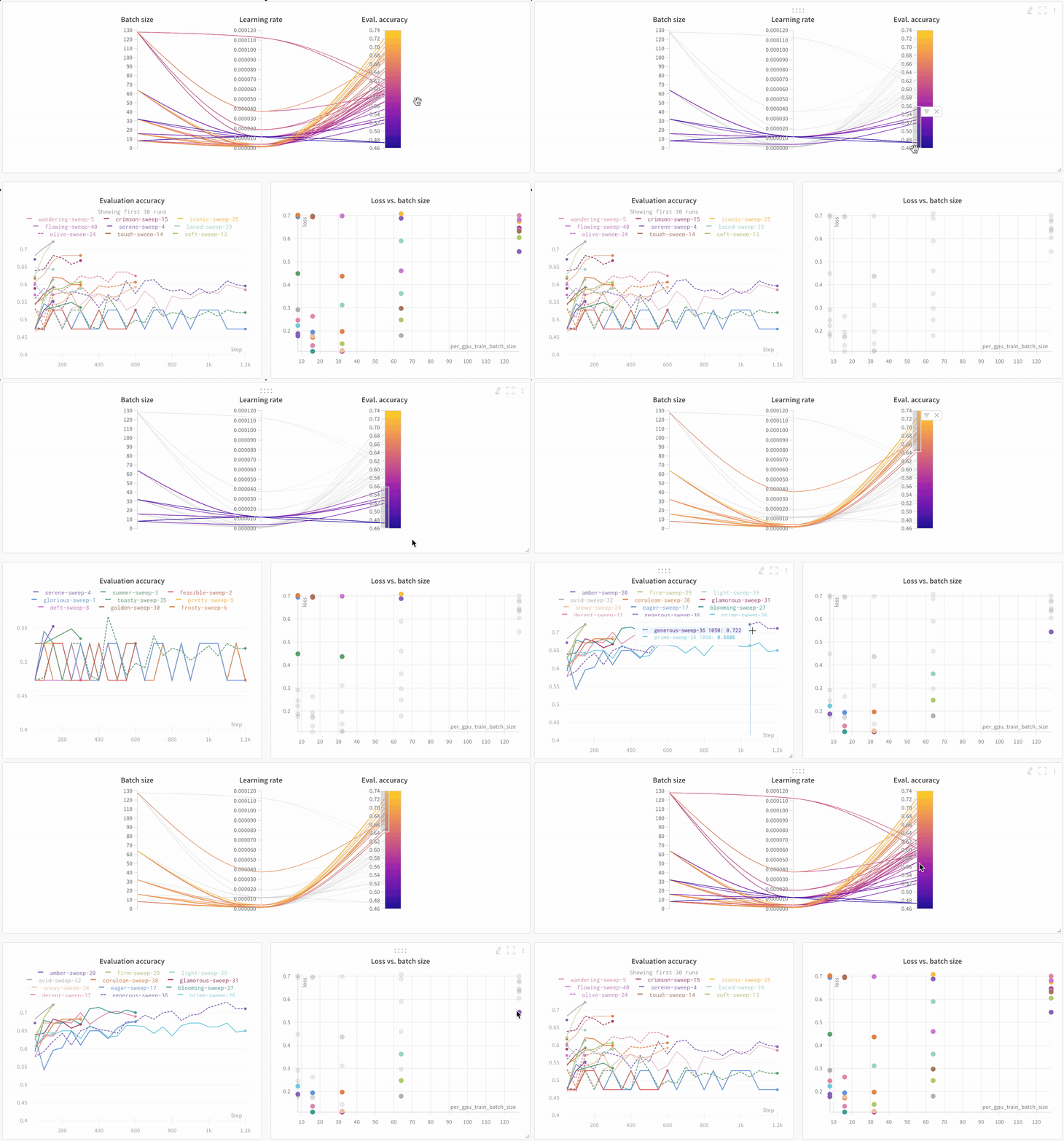
It's easy to look across dozens of experiments, zoom in on interesting findings, and visualize highly dimensional data.
**Compare Architectures**
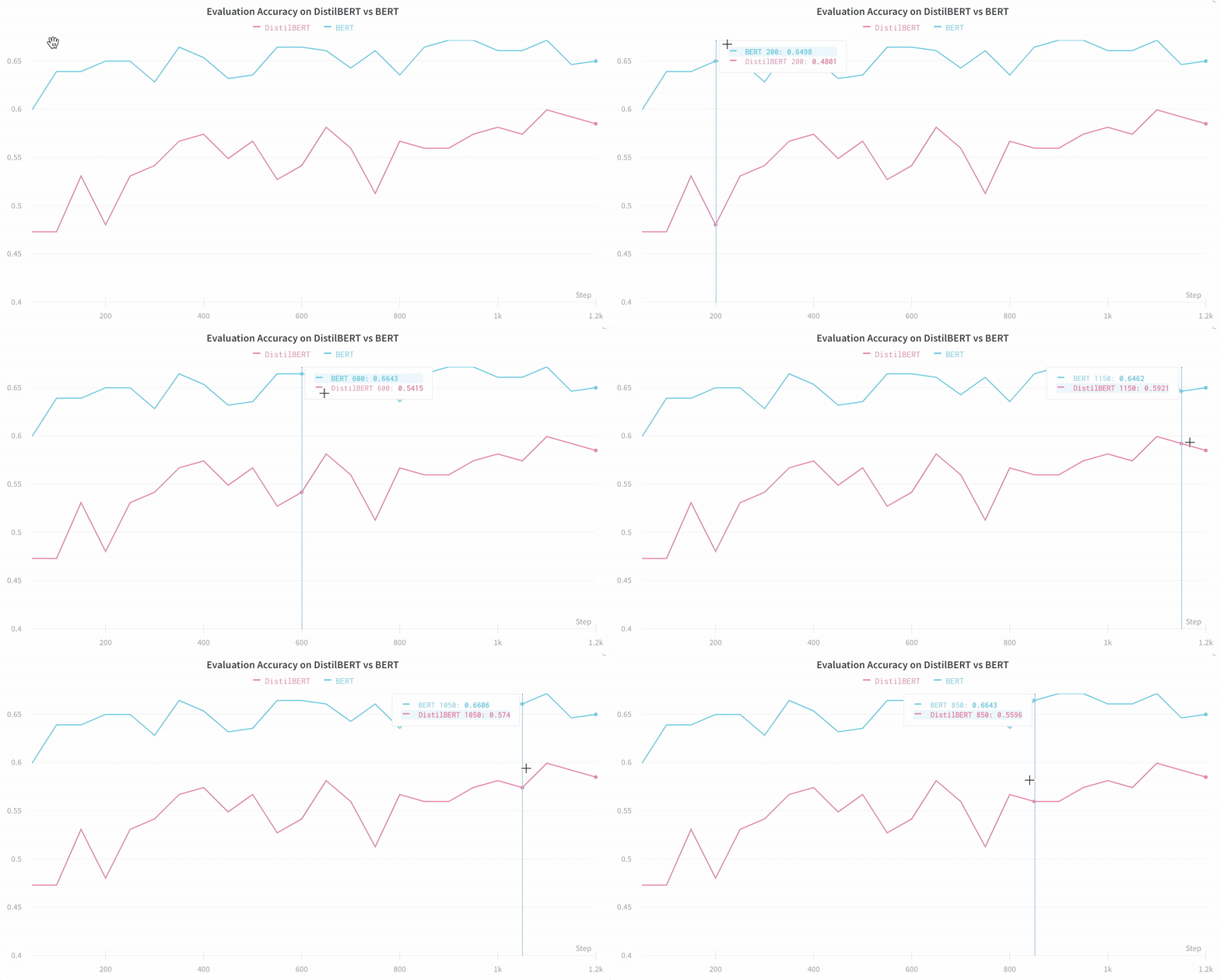
Here's an example comparing [BERT vs DistilBERT](https://app.wandb.ai/jack-morris/david-vs-goliath/reports/Does-model-size-matter%3F-Comparing-BERT-and-DistilBERT-using-Sweeps--VmlldzoxMDUxNzU). It's easy to see how different architectures effect the evaluation accuracy throughout training with automatic line plot visualizations.
## Track key information effortlessly by default
W\&B saves a new run for each experiment. Here's the information that gets saved by default:
* **Hyperparameters**: Settings for your model are saved in Config
* **Model Metrics**: Time series data of metrics streaming in are saved in Log
* **Terminal Logs**: Command line outputs are saved and available in a tab
* **System Metrics**: GPU and CPU utilization, memory, temperature etc.
## Learn more
* [Video walkthroughs on YouTube](http://wandb.me/youtube)
 * **Unified dashboard**: Central repository for all your model metrics and predictions
* **Lightweight**: No code changes required to integrate with Hugging Face
* **Accessible**: Free for individuals and academic teams
* **Secure**: All projects are private by default
* **Trusted**: Used by machine learning teams at OpenAI, Toyota, Lyft and more
Think of W\&B like GitHub for machine learning models— save machine learning experiments to your private, hosted dashboard. Experiment quickly with the confidence that all the versions of your models are saved for you, no matter where you're running your scripts.
W\&B lightweight integrations works with any Python script, and all you need to do is sign up for a free W\&B account to start tracking and visualizing your models.
In the Hugging Face Transformers repo, we've instrumented the Trainer to automatically log training and evaluation metrics to W\&B at each logging step.
Here's an in depth look at how the integration works: [Hugging Face + W\&B Report](https://app.wandb.ai/jxmorris12/huggingface-demo/reports/Train-a-model-with-Hugging-Face-and-Weights-%26-Biases--VmlldzoxMDE2MTU).
## Install, import, and log in
Install the Hugging Face and W\&B libraries, and the GLUE dataset and training script for this tutorial.
* [Hugging Face Transformers](https://github.com/huggingface/transformers): Natural language models and datasets
* [W\&B](/): Experiment tracking and visualization
* [GLUE dataset](https://gluebenchmark.com/): A language understanding benchmark dataset
* [GLUE script](https://raw.githubusercontent.com/huggingface/transformers/refs/heads/main/examples/pytorch/text-classification/run_glue.py): Model training script for sequence classification
```notebook theme={null}
!pip install datasets wandb evaluate accelerate -qU
!wget https://raw.githubusercontent.com/huggingface/transformers/refs/heads/main/examples/pytorch/text-classification/run_glue.py
```
```notebook theme={null}
# the run_glue.py script requires transformers dev
!pip install -q git+https://github.com/huggingface/transformers
```
Before continuing, [sign up for a free account](https://app.wandb.ai/login?signup=true).
## Put in your API key
Once you've signed up, run the next cell and click on the link to get your API key and authenticate this notebook.
```python theme={null}
import wandb
wandb.login()
```
Optionally, we can set environment variables to customize W\&B logging. See the [Hugging Face integration guide](/models/integrations/huggingface/).
```python theme={null}
# Optional: log both gradients and parameters
%env WANDB_WATCH=all
```
## Train the model
Next, call the downloaded training script [run\_glue.py](https://huggingface.co/transformers/examples.html#glue) and see training automatically get tracked to the W\&B dashboard. This script fine-tunes BERT on the Microsoft Research Paraphrase Corpus— pairs of sentences with human annotations indicating whether they are semantically equivalent.
```python theme={null}
%env WANDB_PROJECT=huggingface-demo
%env TASK_NAME=MRPC
!python run_glue.py \
--model_name_or_path bert-base-uncased \
--task_name $TASK_NAME \
--do_train \
--do_eval \
--max_seq_length 256 \
--per_device_train_batch_size 32 \
--learning_rate 2e-4 \
--num_train_epochs 3 \
--output_dir /tmp/$TASK_NAME/ \
--overwrite_output_dir \
--logging_steps 50
```
## Visualize results in dashboard
Click the link printed out above, or go to [wandb.ai](https://app.wandb.ai) to see your results stream in live. The link to see your run in the browser will appear after all the dependencies are loaded. Look for the following output: "**wandb**: View run at \[URL to your unique run]"
**Visualize Model Performance**
It's easy to look across dozens of experiments, zoom in on interesting findings, and visualize highly dimensional data.
* **Unified dashboard**: Central repository for all your model metrics and predictions
* **Lightweight**: No code changes required to integrate with Hugging Face
* **Accessible**: Free for individuals and academic teams
* **Secure**: All projects are private by default
* **Trusted**: Used by machine learning teams at OpenAI, Toyota, Lyft and more
Think of W\&B like GitHub for machine learning models— save machine learning experiments to your private, hosted dashboard. Experiment quickly with the confidence that all the versions of your models are saved for you, no matter where you're running your scripts.
W\&B lightweight integrations works with any Python script, and all you need to do is sign up for a free W\&B account to start tracking and visualizing your models.
In the Hugging Face Transformers repo, we've instrumented the Trainer to automatically log training and evaluation metrics to W\&B at each logging step.
Here's an in depth look at how the integration works: [Hugging Face + W\&B Report](https://app.wandb.ai/jxmorris12/huggingface-demo/reports/Train-a-model-with-Hugging-Face-and-Weights-%26-Biases--VmlldzoxMDE2MTU).
## Install, import, and log in
Install the Hugging Face and W\&B libraries, and the GLUE dataset and training script for this tutorial.
* [Hugging Face Transformers](https://github.com/huggingface/transformers): Natural language models and datasets
* [W\&B](/): Experiment tracking and visualization
* [GLUE dataset](https://gluebenchmark.com/): A language understanding benchmark dataset
* [GLUE script](https://raw.githubusercontent.com/huggingface/transformers/refs/heads/main/examples/pytorch/text-classification/run_glue.py): Model training script for sequence classification
```notebook theme={null}
!pip install datasets wandb evaluate accelerate -qU
!wget https://raw.githubusercontent.com/huggingface/transformers/refs/heads/main/examples/pytorch/text-classification/run_glue.py
```
```notebook theme={null}
# the run_glue.py script requires transformers dev
!pip install -q git+https://github.com/huggingface/transformers
```
Before continuing, [sign up for a free account](https://app.wandb.ai/login?signup=true).
## Put in your API key
Once you've signed up, run the next cell and click on the link to get your API key and authenticate this notebook.
```python theme={null}
import wandb
wandb.login()
```
Optionally, we can set environment variables to customize W\&B logging. See the [Hugging Face integration guide](/models/integrations/huggingface/).
```python theme={null}
# Optional: log both gradients and parameters
%env WANDB_WATCH=all
```
## Train the model
Next, call the downloaded training script [run\_glue.py](https://huggingface.co/transformers/examples.html#glue) and see training automatically get tracked to the W\&B dashboard. This script fine-tunes BERT on the Microsoft Research Paraphrase Corpus— pairs of sentences with human annotations indicating whether they are semantically equivalent.
```python theme={null}
%env WANDB_PROJECT=huggingface-demo
%env TASK_NAME=MRPC
!python run_glue.py \
--model_name_or_path bert-base-uncased \
--task_name $TASK_NAME \
--do_train \
--do_eval \
--max_seq_length 256 \
--per_device_train_batch_size 32 \
--learning_rate 2e-4 \
--num_train_epochs 3 \
--output_dir /tmp/$TASK_NAME/ \
--overwrite_output_dir \
--logging_steps 50
```
## Visualize results in dashboard
Click the link printed out above, or go to [wandb.ai](https://app.wandb.ai) to see your results stream in live. The link to see your run in the browser will appear after all the dependencies are loaded. Look for the following output: "**wandb**: View run at \[URL to your unique run]"
**Visualize Model Performance**
It's easy to look across dozens of experiments, zoom in on interesting findings, and visualize highly dimensional data.
 **Compare Architectures**
Here's an example comparing [BERT vs DistilBERT](https://app.wandb.ai/jack-morris/david-vs-goliath/reports/Does-model-size-matter%3F-Comparing-BERT-and-DistilBERT-using-Sweeps--VmlldzoxMDUxNzU). It's easy to see how different architectures effect the evaluation accuracy throughout training with automatic line plot visualizations.
**Compare Architectures**
Here's an example comparing [BERT vs DistilBERT](https://app.wandb.ai/jack-morris/david-vs-goliath/reports/Does-model-size-matter%3F-Comparing-BERT-and-DistilBERT-using-Sweeps--VmlldzoxMDUxNzU). It's easy to see how different architectures effect the evaluation accuracy throughout training with automatic line plot visualizations.
 ## Track key information effortlessly by default
W\&B saves a new run for each experiment. Here's the information that gets saved by default:
* **Hyperparameters**: Settings for your model are saved in Config
* **Model Metrics**: Time series data of metrics streaming in are saved in Log
* **Terminal Logs**: Command line outputs are saved and available in a tab
* **System Metrics**: GPU and CPU utilization, memory, temperature etc.
## Learn more
* [Video walkthroughs on YouTube](http://wandb.me/youtube)
## Track key information effortlessly by default
W\&B saves a new run for each experiment. Here's the information that gets saved by default:
* **Hyperparameters**: Settings for your model are saved in Config
* **Model Metrics**: Time series data of metrics streaming in are saved in Log
* **Terminal Logs**: Command line outputs are saved and available in a tab
* **System Metrics**: GPU and CPU utilization, memory, temperature etc.
## Learn more
* [Video walkthroughs on YouTube](http://wandb.me/youtube)