> ## Documentation Index
> Fetch the complete documentation index at: https://docs.wandb.ai/llms.txt
> Use this file to discover all available pages before exploring further.
> Integrate W&B with PyTorch Ignite to automatically log training metrics, model parameters, and experiment configs.
# PyTorch Ignite
* See the resulting visualizations in this [example W\&B report →](https://app.wandb.ai/example-team/pytorch-ignite-example/reports/PyTorch-Ignite-with-W%26B--Vmlldzo0NzkwMg)
* Try running the code yourself in this [example hosted notebook →](https://colab.research.google.com/drive/15e-yGOvboTzXU4pe91Jg-Yr7sae3zBOJ#scrollTo=ztVifsYAmnRr)
Ignite supports W\&B handler to log metrics, model/optimizer parameters, gradients during training and validation. It can also be used to log model checkpoints to the W\&B cloud. This class is also a wrapper for the wandb module. This means that you can call any wandb function using this wrapper. See examples on how to save model parameters and gradients.
## Basic setup
```python theme={null}
from argparse import ArgumentParser
import wandb
import torch
from torch import nn
from torch.optim import SGD
from torch.utils.data import DataLoader
import torch.nn.functional as F
from torchvision.transforms import Compose, ToTensor, Normalize
from torchvision.datasets import MNIST
from ignite.engine import Events, create_supervised_trainer, create_supervised_evaluator
from ignite.metrics import Accuracy, Loss
from tqdm import tqdm
class Net(nn.Module):
def __init__(self):
super(Net, self).__init__()
self.conv1 = nn.Conv2d(1, 10, kernel_size=5)
self.conv2 = nn.Conv2d(10, 20, kernel_size=5)
self.conv2_drop = nn.Dropout2d()
self.fc1 = nn.Linear(320, 50)
self.fc2 = nn.Linear(50, 10)
def forward(self, x):
x = F.relu(F.max_pool2d(self.conv1(x), 2))
x = F.relu(F.max_pool2d(self.conv2_drop(self.conv2(x)), 2))
x = x.view(-1, 320)
x = F.relu(self.fc1(x))
x = F.dropout(x, training=self.training)
x = self.fc2(x)
return F.log_softmax(x, dim=-1)
def get_data_loaders(train_batch_size, val_batch_size):
data_transform = Compose([ToTensor(), Normalize((0.1307,), (0.3081,))])
train_loader = DataLoader(MNIST(download=True, root=".", transform=data_transform, train=True),
batch_size=train_batch_size, shuffle=True)
val_loader = DataLoader(MNIST(download=False, root=".", transform=data_transform, train=False),
batch_size=val_batch_size, shuffle=False)
return train_loader, val_loader
```
Using `WandBLogger` in ignite is a modular process. First, you create a `WandBLogger` object. Next, you attach it to a trainer or evaluator to automatically log the metrics. This example shows:
* Logs training loss, attached to the trainer object.
* Logs validation loss, attached to the evaluator.
* Logs optional Parameters, such as learning rate.
* Watches the model.
```python theme={null}
from ignite.contrib.handlers.wandb_logger import *
def run(train_batch_size, val_batch_size, epochs, lr, momentum, log_interval):
train_loader, val_loader = get_data_loaders(train_batch_size, val_batch_size)
model = Net()
device = 'cpu'
if torch.cuda.is_available():
device = 'cuda'
optimizer = SGD(model.parameters(), lr=lr, momentum=momentum)
trainer = create_supervised_trainer(model, optimizer, F.nll_loss, device=device)
evaluator = create_supervised_evaluator(model,
metrics={'accuracy': Accuracy(),
'nll': Loss(F.nll_loss)},
device=device)
desc = "ITERATION - loss: {:.2f}"
pbar = tqdm(
initial=0, leave=False, total=len(train_loader),
desc=desc.format(0)
)
#WandBlogger Object Creation
wandb_logger = WandBLogger(
project="pytorch-ignite-integration",
name="cnn-mnist",
config={"max_epochs": epochs,"batch_size":train_batch_size},
tags=["pytorch-ignite", "mninst"]
)
wandb_logger.attach_output_handler(
trainer,
event_name=Events.ITERATION_COMPLETED,
tag="training",
output_transform=lambda loss: {"loss": loss}
)
wandb_logger.attach_output_handler(
evaluator,
event_name=Events.EPOCH_COMPLETED,
tag="training",
metric_names=["nll", "accuracy"],
global_step_transform=lambda *_: trainer.state.iteration,
)
wandb_logger.attach_opt_params_handler(
trainer,
event_name=Events.ITERATION_STARTED,
optimizer=optimizer,
param_name='lr' # optional
)
wandb_logger.watch(model)
```
You can optionally utilize ignite `EVENTS` to log the metrics directly to the terminal
```python theme={null}
@trainer.on(Events.ITERATION_COMPLETED(every=log_interval))
def log_training_loss(engine):
pbar.desc = desc.format(engine.state.output)
pbar.update(log_interval)
@trainer.on(Events.EPOCH_COMPLETED)
def log_training_results(engine):
pbar.refresh()
evaluator.run(train_loader)
metrics = evaluator.state.metrics
avg_accuracy = metrics['accuracy']
avg_nll = metrics['nll']
tqdm.write(
"Training Results - Epoch: {} Avg accuracy: {:.2f} Avg loss: {:.2f}"
.format(engine.state.epoch, avg_accuracy, avg_nll)
)
@trainer.on(Events.EPOCH_COMPLETED)
def log_validation_results(engine):
evaluator.run(val_loader)
metrics = evaluator.state.metrics
avg_accuracy = metrics['accuracy']
avg_nll = metrics['nll']
tqdm.write(
"Validation Results - Epoch: {} Avg accuracy: {:.2f} Avg loss: {:.2f}"
.format(engine.state.epoch, avg_accuracy, avg_nll))
pbar.n = pbar.last_print_n = 0
trainer.run(train_loader, max_epochs=epochs)
pbar.close()
if __name__ == "__main__":
parser = ArgumentParser()
parser.add_argument('--batch_size', type=int, default=64,
help='input batch size for training (default: 64)')
parser.add_argument('--val_batch_size', type=int, default=1000,
help='input batch size for validation (default: 1000)')
parser.add_argument('--epochs', type=int, default=10,
help='number of epochs to train (default: 10)')
parser.add_argument('--lr', type=float, default=0.01,
help='learning rate (default: 0.01)')
parser.add_argument('--momentum', type=float, default=0.5,
help='SGD momentum (default: 0.5)')
parser.add_argument('--log_interval', type=int, default=10,
help='how many batches to wait before logging training status')
args = parser.parse_args()
run(args.batch_size, args.val_batch_size, args.epochs, args.lr, args.momentum, args.log_interval)
```
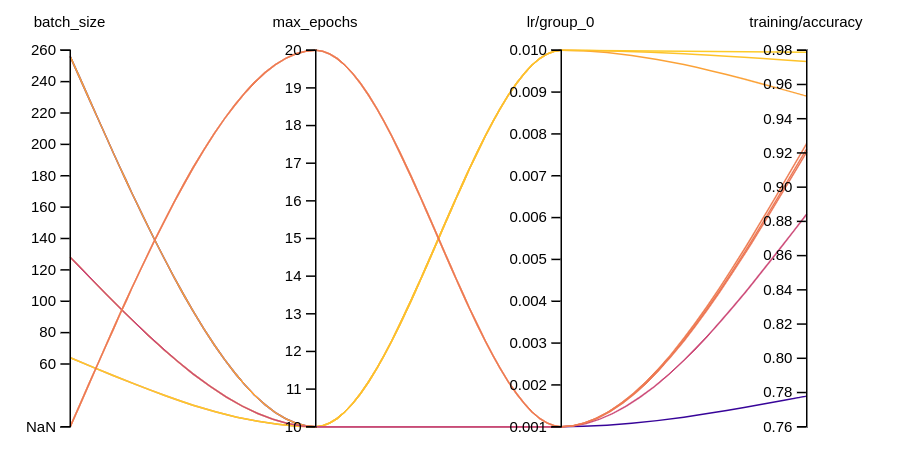
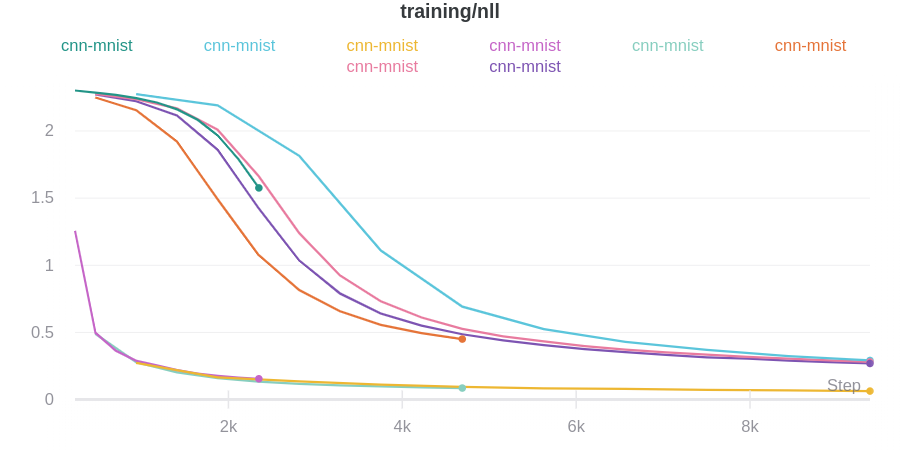
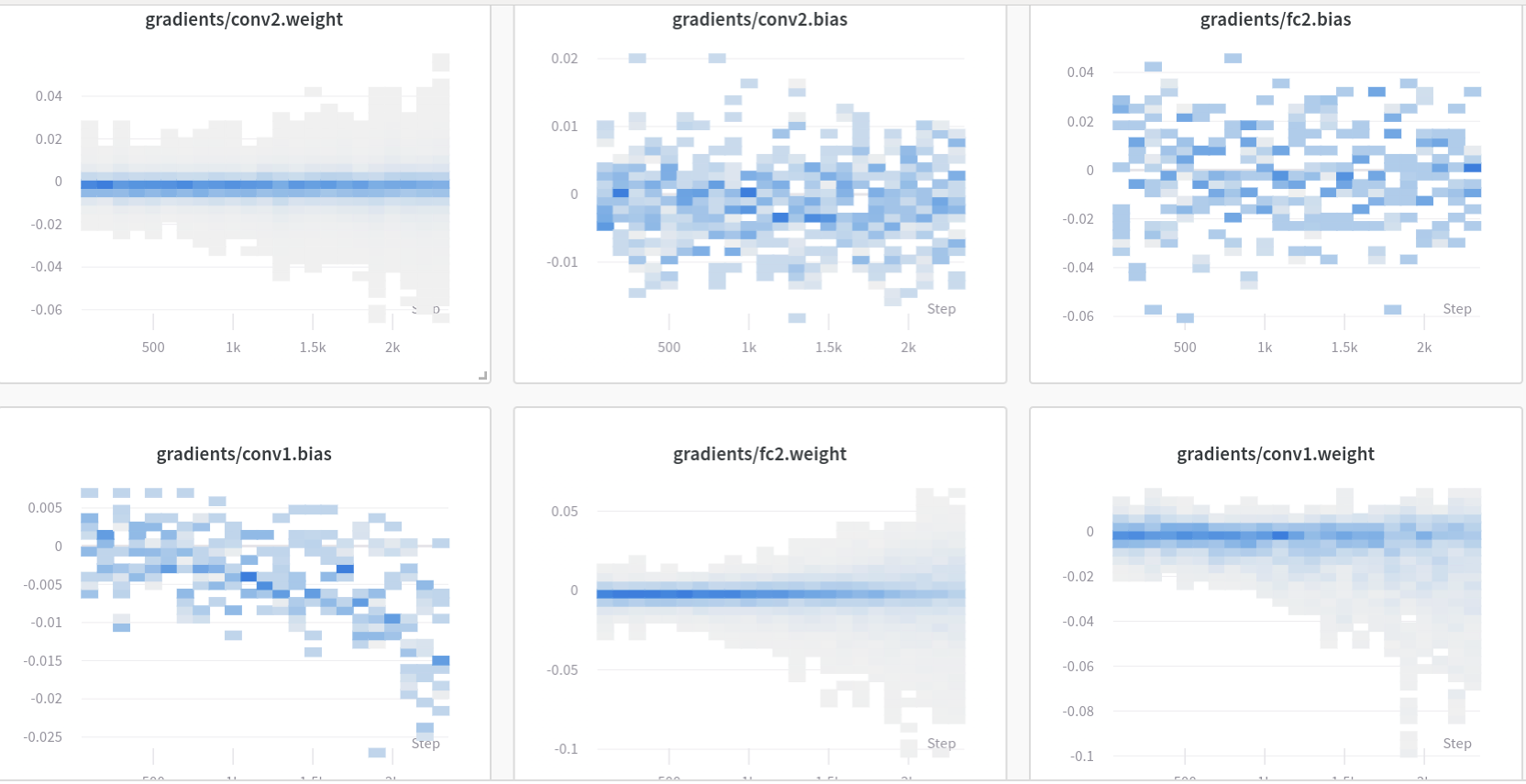
This code generates these visualizations::
 Refer to the [Ignite Docs](https://pytorch.org/ignite/contrib/handlers.html#module-ignite.contrib.handlers.wandb_logger) for more details.