> ## Documentation Index
> Fetch the complete documentation index at: https://docs.wandb.ai/llms.txt
> Use this file to discover all available pages before exploring further.
> Use W&B with the OpenAI API to log and monitor chat completions, fine-tuning jobs, and token usage metrics.
# OpenAI API
export const ColabLink = ({url}) =>
Try in Colab
;
Use the W\&B OpenAI API integration to log requests, responses, token counts and model metadata for all OpenAI models, including fine-tuned models.
See the [OpenAI fine-tuning integration](./openai-fine-tuning) to learn how to use W\&B to track your fine-tuning experiments, models, and datasets and share your results with your colleagues.
Log your API inputs and outputs you can quickly evaluate the performance of difference prompts, compare different model settings (such as temperature), and track other usage metrics such as token usage.
## Install OpenAI Python API library
The W\&B autolog integration works with OpenAI version 0.28.1 and below.
To install OpenAI Python API version 0.28.1, run:
```python theme={null}
pip install openai==0.28.1
```
## Use the OpenAI Python API
### 1. Import autolog and initialise it
First, import `autolog` from `wandb.integration.openai` and initialise it.
```python theme={null}
import os
import openai
from wandb.integration.openai import autolog
autolog({"project": "gpt5"})
```
You can optionally pass a dictionary with argument that `wandb.init()` accepts to `autolog`. This includes a project name, team name, entity, and more. For more information about [`wandb.init()`](/models/ref/python/functions/init), see the API Reference Guide.
### 2. Call the OpenAI API
Each call you make to the OpenAI API is now logged to W\&B automatically.
```python theme={null}
os.environ["OPENAI_API_KEY"] = "XXX"
chat_request_kwargs = dict(
model="gpt-3.5-turbo",
messages=[
{"role": "system", "content": "You are a helpful assistant."},
{"role": "user", "content": "Who won the world series in 2020?"},
{"role": "assistant", "content": "The Los Angeles Dodgers"},
{"role": "user", "content": "Where was it played?"},
],
)
response = openai.ChatCompletion.create(**chat_request_kwargs)
```
### 3. View your OpenAI API inputs and responses
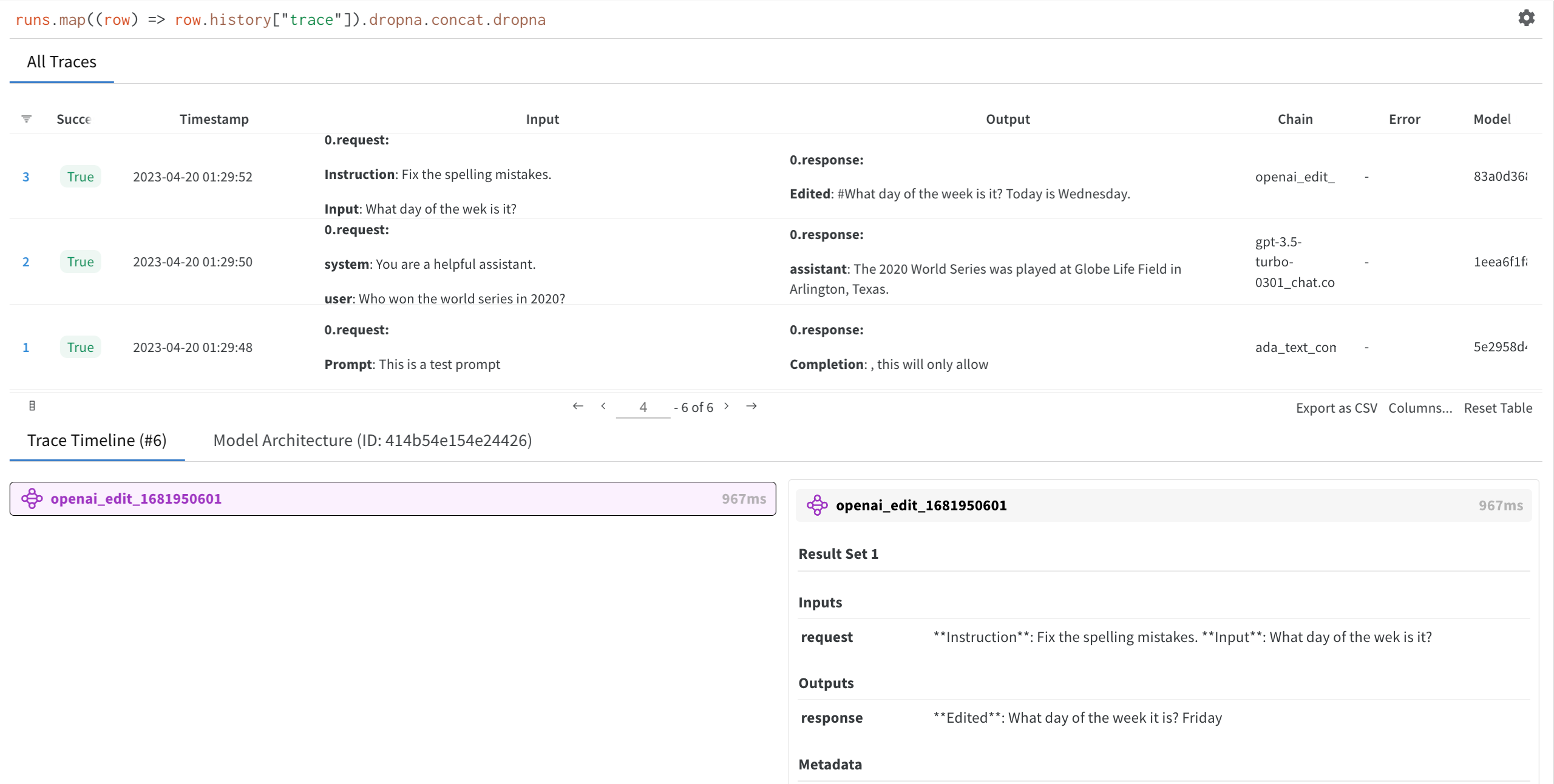
Click on the W\&B [run](/models/runs/) link generated by `autolog` in **step 1**. This redirects you to your project workspace in the W\&B App.
Select a run you created to view the trace table, trace timeline and the model architecture of the OpenAI LLM used.
## Turn off autolog
W\&B recommends that you call `disable()` to close all W\&B processes when you are finished using the OpenAI API.
```python theme={null}
autolog.disable()
```
Now your inputs and completions will be logged to W\&B, ready for analysis or to be shared with colleagues.
 ## Install OpenAI Python API library
The W\&B autolog integration works with OpenAI version 0.28.1 and below.
To install OpenAI Python API version 0.28.1, run:
```python theme={null}
pip install openai==0.28.1
```
## Use the OpenAI Python API
### 1. Import autolog and initialise it
First, import `autolog` from `wandb.integration.openai` and initialise it.
```python theme={null}
import os
import openai
from wandb.integration.openai import autolog
autolog({"project": "gpt5"})
```
You can optionally pass a dictionary with argument that `wandb.init()` accepts to `autolog`. This includes a project name, team name, entity, and more. For more information about [`wandb.init()`](/models/ref/python/functions/init), see the API Reference Guide.
### 2. Call the OpenAI API
Each call you make to the OpenAI API is now logged to W\&B automatically.
```python theme={null}
os.environ["OPENAI_API_KEY"] = "XXX"
chat_request_kwargs = dict(
model="gpt-3.5-turbo",
messages=[
{"role": "system", "content": "You are a helpful assistant."},
{"role": "user", "content": "Who won the world series in 2020?"},
{"role": "assistant", "content": "The Los Angeles Dodgers"},
{"role": "user", "content": "Where was it played?"},
],
)
response = openai.ChatCompletion.create(**chat_request_kwargs)
```
### 3. View your OpenAI API inputs and responses
Click on the W\&B [run](/models/runs/) link generated by `autolog` in **step 1**. This redirects you to your project workspace in the W\&B App.
Select a run you created to view the trace table, trace timeline and the model architecture of the OpenAI LLM used.
## Turn off autolog
W\&B recommends that you call `disable()` to close all W\&B processes when you are finished using the OpenAI API.
```python theme={null}
autolog.disable()
```
Now your inputs and completions will be logged to W\&B, ready for analysis or to be shared with colleagues.
## Install OpenAI Python API library
The W\&B autolog integration works with OpenAI version 0.28.1 and below.
To install OpenAI Python API version 0.28.1, run:
```python theme={null}
pip install openai==0.28.1
```
## Use the OpenAI Python API
### 1. Import autolog and initialise it
First, import `autolog` from `wandb.integration.openai` and initialise it.
```python theme={null}
import os
import openai
from wandb.integration.openai import autolog
autolog({"project": "gpt5"})
```
You can optionally pass a dictionary with argument that `wandb.init()` accepts to `autolog`. This includes a project name, team name, entity, and more. For more information about [`wandb.init()`](/models/ref/python/functions/init), see the API Reference Guide.
### 2. Call the OpenAI API
Each call you make to the OpenAI API is now logged to W\&B automatically.
```python theme={null}
os.environ["OPENAI_API_KEY"] = "XXX"
chat_request_kwargs = dict(
model="gpt-3.5-turbo",
messages=[
{"role": "system", "content": "You are a helpful assistant."},
{"role": "user", "content": "Who won the world series in 2020?"},
{"role": "assistant", "content": "The Los Angeles Dodgers"},
{"role": "user", "content": "Where was it played?"},
],
)
response = openai.ChatCompletion.create(**chat_request_kwargs)
```
### 3. View your OpenAI API inputs and responses
Click on the W\&B [run](/models/runs/) link generated by `autolog` in **step 1**. This redirects you to your project workspace in the W\&B App.
Select a run you created to view the trace table, trace timeline and the model architecture of the OpenAI LLM used.
## Turn off autolog
W\&B recommends that you call `disable()` to close all W\&B processes when you are finished using the OpenAI API.
```python theme={null}
autolog.disable()
```
Now your inputs and completions will be logged to W\&B, ready for analysis or to be shared with colleagues.