> ## Documentation Index
> Fetch the complete documentation index at: https://docs.wandb.ai/llms.txt
> Use this file to discover all available pages before exploring further.
# PyTorch torchtune
> Use W&B logging in PyTorch torchtune for tracking LLM fine-tuning experiments with the WandBLogger metric logger.
export const ColabLink = ({url}) =>
Try in Colab
;
[torchtune](https://meta-pytorch.org/torchtune/stable/index.html) is a PyTorch-based library designed to streamline the authoring, fine-tuning, and experimentation processes for large language models (LLMs). Additionally, torchtune has built-in support for [logging with W\&B](https://meta-pytorch.org/torchtune/stable/deep_dives/wandb_logging.html), enhancing tracking and visualization of training processes.
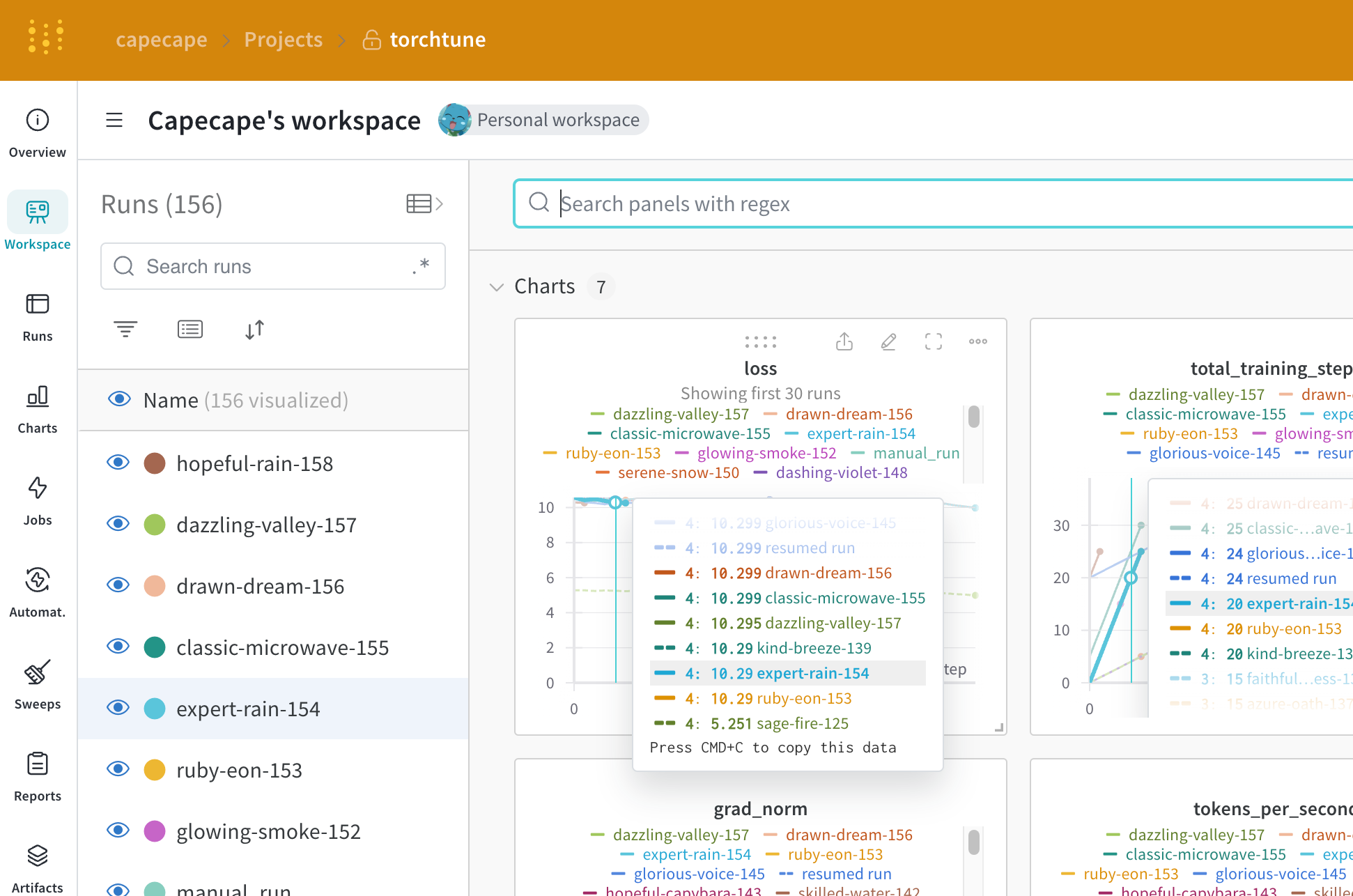
Check the W\&B blog post on [Fine-tuning Mistral 7B using torchtune](https://wandb.ai/capecape/torchtune-mistral/reports/torchtune-The-new-PyTorch-LLM-fine-tuning-library---Vmlldzo3NTUwNjM0).
## W\&B logging at your fingertips
Override command line arguments at launch:
```bash theme={null}
tune run lora_finetune_single_device --config llama3/8B_lora_single_device \
metric_logger._component_=torchtune.utils.metric_logging.WandBLogger \
metric_logger.project="llama3_lora" \
log_every_n_steps=5
```
Enable W\&B logging on the recipe's config:
```yaml theme={null}
# inside llama3/8B_lora_single_device.yaml
metric_logger:
_component_: torchtune.utils.metric_logging.WandBLogger
project: llama3_lora
log_every_n_steps: 5
```
## Use the W\&B metric logger
Enable W\&B logging on the recipe's config file by modifying the `metric_logger` section. Change the `_component_` to `torchtune.utils.metric_logging.WandBLogger` class. You can also pass a `project` name and `log_every_n_steps` to customize the logging behavior.
You can also pass any other `kwargs` as you would to the [wandb.init()](/models/ref/python/functions/init) method. For example, if you are working on a team, you can pass the `entity` argument to the `WandBLogger` class to specify the team name.
```yaml theme={null}
# inside llama3/8B_lora_single_device.yaml
metric_logger:
_component_: torchtune.utils.metric_logging.WandBLogger
project: llama3_lora
entity: my_project
job_type: lora_finetune_single_device
group: my_awesome_experiments
log_every_n_steps: 5
```
```shell theme={null}
tune run lora_finetune_single_device --config llama3/8B_lora_single_device \
metric_logger._component_=torchtune.utils.metric_logging.WandBLogger \
metric_logger.project="llama3_lora" \
metric_logger.entity="my_project" \
metric_logger.job_type="lora_finetune_single_device" \
metric_logger.group="my_awesome_experiments" \
log_every_n_steps=5
```
## What is logged?
You can explore the W\&B dashboard to see the logged metrics. By default W\&B logs all of the hyperparameters from the config file and the launch overrides.
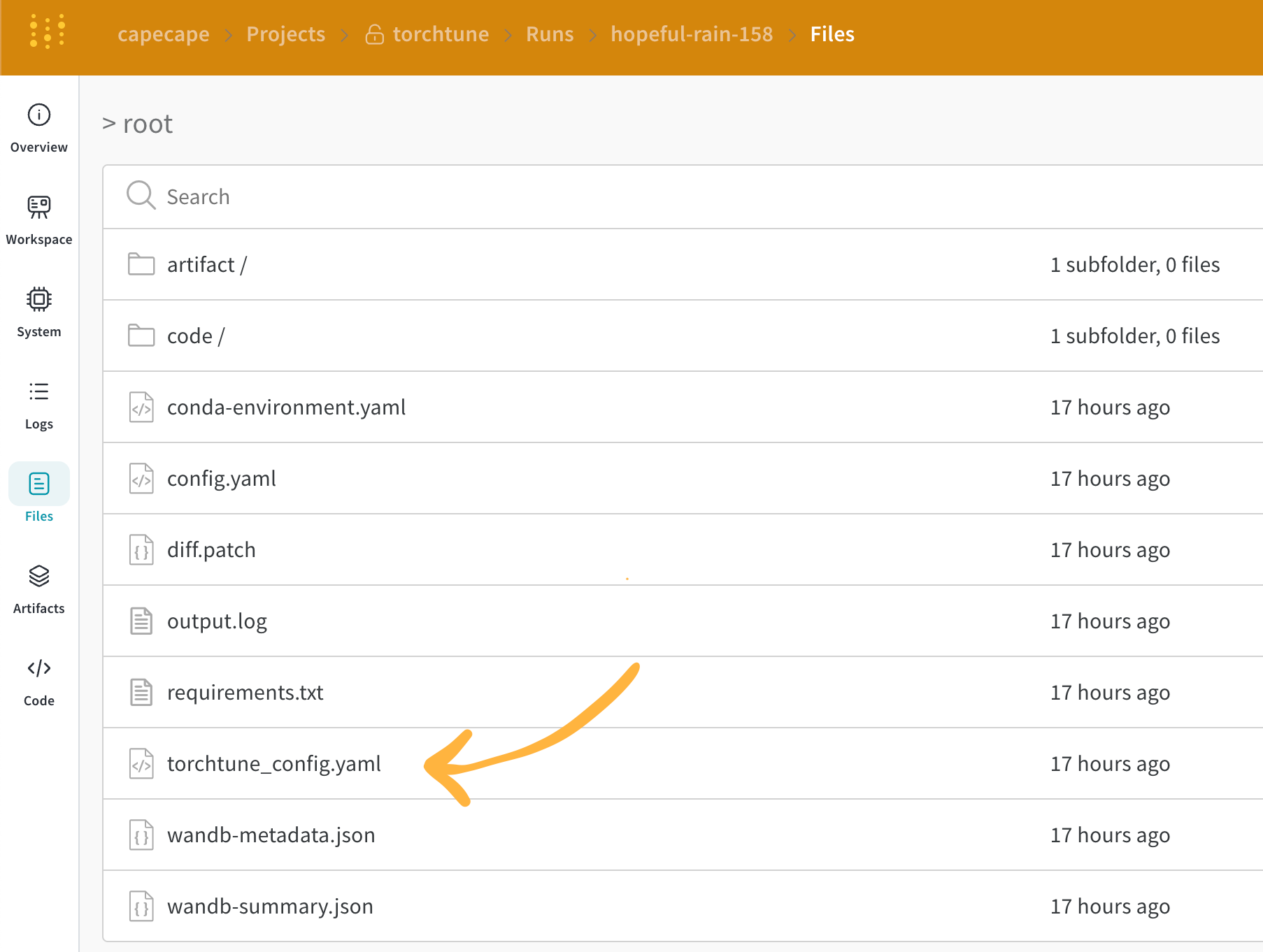
W\&B captures the resolved config on the **Overview** tab. W\&B also stores the config in YAML format on the [Files tab](https://wandb.ai/capecape/torchtune/runs/joyknwwa/files).
### Logged metrics
Each recipe has its own training loop. Check each individual recipe to see its logged metrics, which include these by default:
| Metric | Description |
| ------------------- | ---------------------------------------------------------------------------------------------------------------------------------------------------------------------------------------------------------------------------------------------------------------------- |
| `loss` | The loss of the model |
| `lr` | The learning rate |
| `tokens_per_second` | The tokens per second of the model |
| `grad_norm` | The gradient norm of the model |
| `global_step` | Corresponds to the current step in the training loop. Takes into account gradient accumulation, basically every time an optimizer step is taken, the model is updated, the gradients are accumulated and the model is updated once every `gradient_accumulation_steps` |
`global_step` is not the same as the number of training steps. It corresponds to the current step in the training loop. Takes into account gradient accumulation, basically every time an optimizer step is taken the `global_step` is incremented by 1. For example, if the dataloader has 10 batches, gradient accumulation steps is 2 and run for 3 epochs, the optimizer will step 15 times, in this case `global_step` will range from 1 to 15.
The streamlined design of torchtune allows to easily add custom metrics or modify the existing ones. It suffices to modify the corresponding [recipe file](https://github.com/meta-pytorch/torchtune/tree/main/recipes), for example, computing one could log `current_epoch` as a percentage of the total number of epochs as following:
```python theme={null}
# inside `train.py` function in the recipe file
self._metric_logger.log_dict(
{"current_epoch": self.epochs * self.global_step / self._steps_per_epoch},
step=self.global_step,
)
```
This is a fast evolving library, the current metrics are subject to change. If you want to add a custom metric, you should modify the recipe and call the corresponding `self._metric_logger.*` function.
## Save and load checkpoints
The torchtune library supports various [checkpoint formats](https://meta-pytorch.org/torchtune/stable/deep_dives/checkpointer.html). Depending on the origin of the model you are using, you should switch to the appropriate [checkpointer class](https://meta-pytorch.org/torchtune/stable/deep_dives/checkpointer.html).
If you want to save the model checkpoints to [W\&B Artifacts](/models/artifacts/), the simplest solution is to override the `save_checkpoint` functions inside the corresponding recipe.
Here is an example of how you can override the `save_checkpoint` function to save the model checkpoints to W\&B Artifacts.
```python theme={null}
def save_checkpoint(self, epoch: int) -> None:
...
## Let's save the checkpoint to W&B
## depending on the Checkpointer Class the file will be named differently
## Here is an example for the full_finetune case
checkpoint_file = Path.joinpath(
self._checkpointer._output_dir, f"torchtune_model_{epoch}"
).with_suffix(".pt")
wandb_artifact = wandb.Artifact(
name=f"torchtune_model_{epoch}",
type="model",
# description of the model checkpoint
description="Model checkpoint",
# you can add whatever metadata you want as a dict
metadata={
utils.SEED_KEY: self.seed,
utils.EPOCHS_KEY: self.epochs_run,
utils.TOTAL_EPOCHS_KEY: self.total_epochs,
utils.MAX_STEPS_KEY: self.max_steps_per_epoch,
},
)
wandb_artifact.add_file(checkpoint_file)
wandb.log_artifact(wandb_artifact)
```
 Check the W\&B blog post on [Fine-tuning Mistral 7B using torchtune](https://wandb.ai/capecape/torchtune-mistral/reports/torchtune-The-new-PyTorch-LLM-fine-tuning-library---Vmlldzo3NTUwNjM0).
## W\&B logging at your fingertips
Check the W\&B blog post on [Fine-tuning Mistral 7B using torchtune](https://wandb.ai/capecape/torchtune-mistral/reports/torchtune-The-new-PyTorch-LLM-fine-tuning-library---Vmlldzo3NTUwNjM0).
## W\&B logging at your fingertips
 ### Logged metrics
Each recipe has its own training loop. Check each individual recipe to see its logged metrics, which include these by default:
| Metric | Description |
| ------------------- | ---------------------------------------------------------------------------------------------------------------------------------------------------------------------------------------------------------------------------------------------------------------------- |
| `loss` | The loss of the model |
| `lr` | The learning rate |
| `tokens_per_second` | The tokens per second of the model |
| `grad_norm` | The gradient norm of the model |
| `global_step` | Corresponds to the current step in the training loop. Takes into account gradient accumulation, basically every time an optimizer step is taken, the model is updated, the gradients are accumulated and the model is updated once every `gradient_accumulation_steps` |
### Logged metrics
Each recipe has its own training loop. Check each individual recipe to see its logged metrics, which include these by default:
| Metric | Description |
| ------------------- | ---------------------------------------------------------------------------------------------------------------------------------------------------------------------------------------------------------------------------------------------------------------------- |
| `loss` | The loss of the model |
| `lr` | The learning rate |
| `tokens_per_second` | The tokens per second of the model |
| `grad_norm` | The gradient norm of the model |
| `global_step` | Corresponds to the current step in the training loop. Takes into account gradient accumulation, basically every time an optimizer step is taken, the model is updated, the gradients are accumulated and the model is updated once every `gradient_accumulation_steps` |