> ## Documentation Index
> Fetch the complete documentation index at: https://docs.wandb.ai/llms.txt
> Use this file to discover all available pages before exploring further.
> Integrate W&B with XGBoost to log gradient boosting metrics, feature importance, and model performance automatically.
# XGBoost
export const ColabLink = ({url}) =>
Try in Colab
;
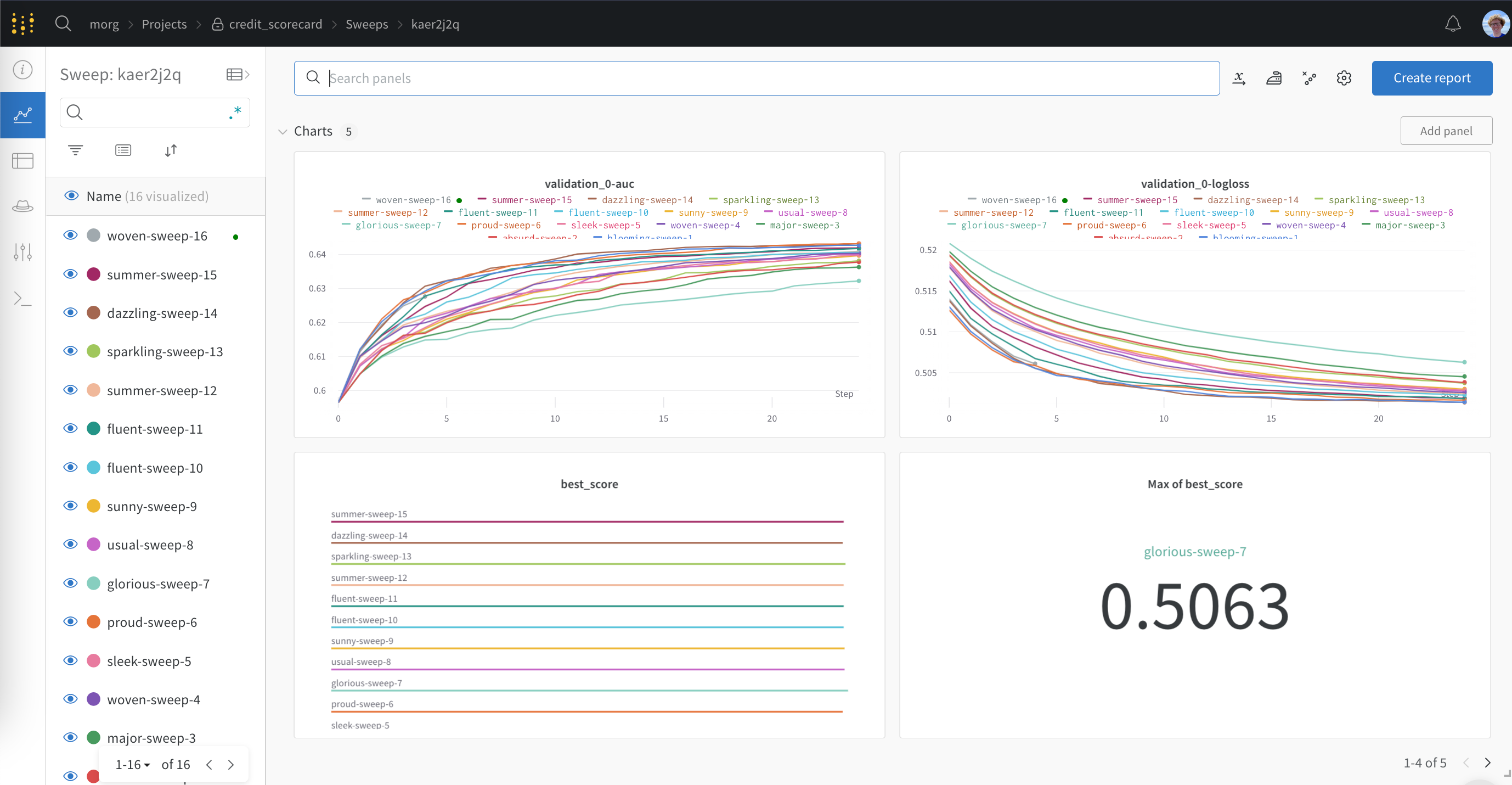
The `wandb` library has a `WandbCallback` callback for logging metrics, configs and saved boosters from training with XGBoost. Here you can see a [live W\&B Dashboard](https://wandb.ai/morg/credit_scorecard) with outputs from the XGBoost `WandbCallback`.
## Get started
Logging XGBoost metrics, configs and booster models to W\&B is as easy as passing the `WandbCallback` to XGBoost:
```python theme={null}
from wandb.integration.xgboost import WandbCallback
import xgboost as XGBClassifier
...
# Start a wandb run
with wandb.init() as run:
# Pass WandbCallback to the model
bst = XGBClassifier()
bst.fit(X_train, y_train, callbacks=[WandbCallback(log_model=True)])
```
You can open [this notebook](https://wandb.me/xgboost) for a comprehensive look at logging with XGBoost and W\&B
## `WandbCallback` reference
### Functionality
Passing `WandbCallback` to a XGBoost model will:
* log the booster model configuration to W\&B
* log evaluation metrics collected by XGBoost, such as rmse, accuracy etc to W\&B
* log training metrics collected by XGBoost (if you provide data to eval\_set)
* log the best score and the best iteration
* save and upload your trained model to W\&B Artifacts (when `log_model = True`)
* log feature importance plot when `log_feature_importance=True` (default).
* Capture the best eval metric in `wandb.Run.summary` when `define_metric=True` (default).
### Arguments
* `log_model`: (boolean) if True save and upload the model to W\&B Artifacts
* `log_feature_importance`: (boolean) if True log a feature importance bar plot
* `importance_type`: (str) one of `{weight, gain, cover, total_gain, total_cover}` for tree model. weight for linear model.
* `define_metric`: (boolean) if True (default) capture model performance at the best step, instead of the last step, of training in your `run.summary`.
You can review the [source code for WandbCallback](https://github.com/wandb/wandb/blob/main/wandb/integration/xgboost/xgboost.py).
For additional examples, check out the [repository of examples on GitHub](https://github.com/wandb/examples/tree/master/examples/boosting-algorithms).
## Tune your hyperparameters with Sweeps
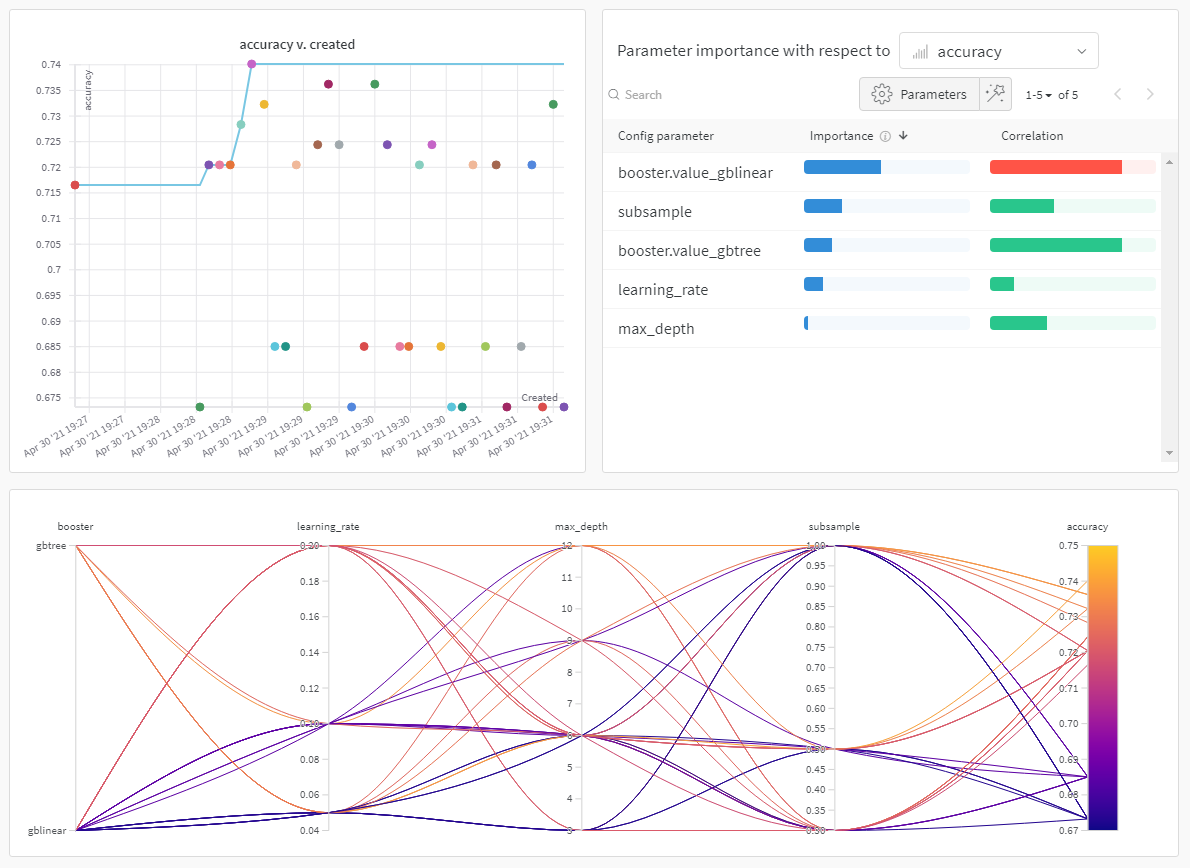
Attaining the maximum performance out of models requires tuning hyperparameters, like tree depth and learning rate. W\&B [Sweeps](/models/sweeps/) is a powerful toolkit for configuring, orchestrating, and analyzing large hyperparameter testing experiments.
You can also try this [XGBoost & Sweeps Python script](https://github.com/wandb/examples/blob/master/examples/wandb-sweeps/sweeps-xgboost/xgboost_tune.py).
 ## Get started
Logging XGBoost metrics, configs and booster models to W\&B is as easy as passing the `WandbCallback` to XGBoost:
```python theme={null}
from wandb.integration.xgboost import WandbCallback
import xgboost as XGBClassifier
...
# Start a wandb run
with wandb.init() as run:
# Pass WandbCallback to the model
bst = XGBClassifier()
bst.fit(X_train, y_train, callbacks=[WandbCallback(log_model=True)])
```
You can open [this notebook](https://wandb.me/xgboost) for a comprehensive look at logging with XGBoost and W\&B
## `WandbCallback` reference
### Functionality
Passing `WandbCallback` to a XGBoost model will:
* log the booster model configuration to W\&B
* log evaluation metrics collected by XGBoost, such as rmse, accuracy etc to W\&B
* log training metrics collected by XGBoost (if you provide data to eval\_set)
* log the best score and the best iteration
* save and upload your trained model to W\&B Artifacts (when `log_model = True`)
* log feature importance plot when `log_feature_importance=True` (default).
* Capture the best eval metric in `wandb.Run.summary` when `define_metric=True` (default).
### Arguments
* `log_model`: (boolean) if True save and upload the model to W\&B Artifacts
* `log_feature_importance`: (boolean) if True log a feature importance bar plot
* `importance_type`: (str) one of `{weight, gain, cover, total_gain, total_cover}` for tree model. weight for linear model.
* `define_metric`: (boolean) if True (default) capture model performance at the best step, instead of the last step, of training in your `run.summary`.
You can review the [source code for WandbCallback](https://github.com/wandb/wandb/blob/main/wandb/integration/xgboost/xgboost.py).
For additional examples, check out the [repository of examples on GitHub](https://github.com/wandb/examples/tree/master/examples/boosting-algorithms).
## Tune your hyperparameters with Sweeps
Attaining the maximum performance out of models requires tuning hyperparameters, like tree depth and learning rate. W\&B [Sweeps](/models/sweeps/) is a powerful toolkit for configuring, orchestrating, and analyzing large hyperparameter testing experiments.
## Get started
Logging XGBoost metrics, configs and booster models to W\&B is as easy as passing the `WandbCallback` to XGBoost:
```python theme={null}
from wandb.integration.xgboost import WandbCallback
import xgboost as XGBClassifier
...
# Start a wandb run
with wandb.init() as run:
# Pass WandbCallback to the model
bst = XGBClassifier()
bst.fit(X_train, y_train, callbacks=[WandbCallback(log_model=True)])
```
You can open [this notebook](https://wandb.me/xgboost) for a comprehensive look at logging with XGBoost and W\&B
## `WandbCallback` reference
### Functionality
Passing `WandbCallback` to a XGBoost model will:
* log the booster model configuration to W\&B
* log evaluation metrics collected by XGBoost, such as rmse, accuracy etc to W\&B
* log training metrics collected by XGBoost (if you provide data to eval\_set)
* log the best score and the best iteration
* save and upload your trained model to W\&B Artifacts (when `log_model = True`)
* log feature importance plot when `log_feature_importance=True` (default).
* Capture the best eval metric in `wandb.Run.summary` when `define_metric=True` (default).
### Arguments
* `log_model`: (boolean) if True save and upload the model to W\&B Artifacts
* `log_feature_importance`: (boolean) if True log a feature importance bar plot
* `importance_type`: (str) one of `{weight, gain, cover, total_gain, total_cover}` for tree model. weight for linear model.
* `define_metric`: (boolean) if True (default) capture model performance at the best step, instead of the last step, of training in your `run.summary`.
You can review the [source code for WandbCallback](https://github.com/wandb/wandb/blob/main/wandb/integration/xgboost/xgboost.py).
For additional examples, check out the [repository of examples on GitHub](https://github.com/wandb/examples/tree/master/examples/boosting-algorithms).
## Tune your hyperparameters with Sweeps
Attaining the maximum performance out of models requires tuning hyperparameters, like tree depth and learning rate. W\&B [Sweeps](/models/sweeps/) is a powerful toolkit for configuring, orchestrating, and analyzing large hyperparameter testing experiments.