> ## Documentation Index
> Fetch the complete documentation index at: https://docs.wandb.ai/llms.txt
> Use this file to discover all available pages before exploring further.
# Registry overview
> Use W&B Registry to manage and share artifact versions across your organization
export const ColabLink = ({url}) =>
Try in Colab
;
W\&B Registry is a curated central repository of [W\&B Artifact versions](/models/artifacts/create-a-new-artifact-version) within your organization. Users who [have permission](/models/registry/configure_registry/) within your organization can [download and use artifacts](/models/registry/download_use_artifact/), share, and collaboratively manage the lifecycle of all artifacts, regardless of the team that the user belongs to.
Use the Registry to track artifact versions, audit the history of an artifact's usage and changes, ensure governance and compliance of your artifacts, and [automate downstream processes such as model CI/CD](/models/automations/).
In summary, use W\&B Registry to:
* [Promote](/models/registry/link_version/) artifact versions that satisfy a machine learning task to other users in your organization.
* Organize [artifacts with tags](/models/registry/organize-with-tags/) so that you can find or reference specific artifacts.
* Track an [artifact’s lineage](/models/registry/lineage/) and audit the history of changes.
* [Automate](/models/automations/) downstream processes such as model CI/CD.
* [Manage who in your organization](/models/registry/configure_registry/) can access artifacts in each registry.
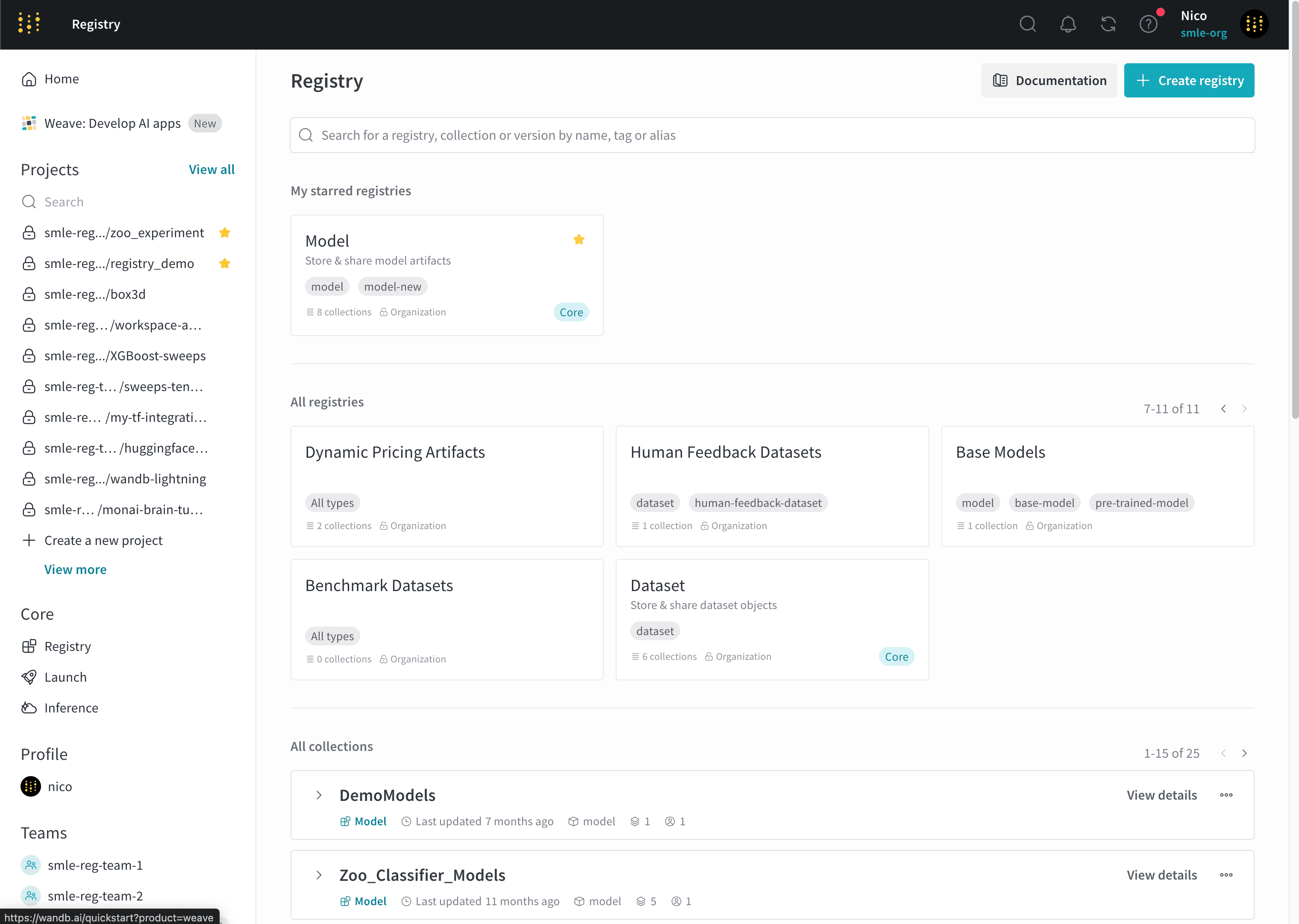
The following image shows the W\&B Registry landing page. A registry called `Model` is starred. Two collections are shown `DemoModels` and `Zoo_Classifier_Models`.
## Learn the basics
Each organization initially contains two registries that you can use to organize your model and dataset artifacts called **Models** and **Datasets**, respectively. You can create [additional registries to organize other artifact types based on your organization's needs](/models/registry/create_registry).
Each [*registry*](/models/registry/configure_registry/) consists of one or more [*collections*](/models/registry/create_collection/). Each collection represents a distinct task or use case.
To add an artifact to a registry, you first log a [specific artifact version to W\&B](/models/artifacts/create-a-new-artifact-version/). Each time you log an artifact, W\&B automatically assigns a version to that artifact. Artifact versions use 0 indexing, so the first version is `v0`, the second version is `v1`, and so on.
Once you log an artifact to W\&B, you can then link that specific artifact version to a collection in the registry.
The term "link" refers to pointers that connect where W\&B stores the artifact and where the artifact is accessible in the registry. W\&B does not duplicate artifacts when you link an artifact to a collection.
As an example, the following code example logs and links a model artifact called `"my_model.txt"` to a collection named `"first-collection"` within a registry called `"model"`:
1. Initialize a W\&B Run with `wandb.init()`.
2. Log the artifact to W\&B with `wandb.Run.log()`.
3. Specify the name of the collection and registry to link your artifact version to.
4. Link the artifact to the collection using `wandb.Run.link_artifact()`.
Save this Python code to a script and run it. W\&B Python SDK version 0.18.6 or newer is required.
```python title="hello_collection.py" theme={null}
import wandb
import random
# Initialize a W&B Run to track the artifact
with wandb.init(project="registry_quickstart") as run:
# Create a simulated model file so that you can log it
with open("my_model.txt", "w") as f:
f.write("Model: " + str(random.random()))
# Log the artifact to W&B
logged_artifact = run.log_artifact(
artifact_or_path="./my_model.txt",
name="gemma-finetuned",
type="model" # Specifies artifact type
)
# Specify the name of the collection and registry
# you want to publish the artifact to
COLLECTION_NAME = "first-collection"
REGISTRY_NAME = "model"
# Link the artifact to the registry
run.link_artifact(
artifact=logged_artifact,
target_path=f"wandb-registry-{REGISTRY_NAME}/{COLLECTION_NAME}"
)
```
W\&B automatically creates a collection for you if the collection you specify in the returned run object's `wandb.Run.link_artifact(target_path = "")` method does not exist within the registry you specify.
Continuing from the previous example, after you run the script, navigate to W\&B Registry to view artifact versions that you and other members of your organization publish. Select **Registry** in the project sidebar below **Applications**. Select the `"Model"` registry. Within the registry, you should see the `"first-collection"` collection with your linked artifact version.
Once you link an artifact version to a collection within a registry, members of your organization can [view](/models/registry/lineage), [download](/models/registry/download_use_artifact), [organize](/models/registry/organize-with-tags), and manage your artifact versions, create downstream automations, and more if they have the proper permissions.
If an artifact version logs metrics (such as by using `wandb.Run.log_artifact()`), you can view metrics for that version from its details page, and you can compare metrics across artifact versions from the collection's page. Refer to [View linked artifacts in a registry](/models/registry/link_version/#view-linked-artifacts-in-a-registry).
## Enable W\&B Registry
Based on your deployment type, satisfy the following conditions to enable W\&B Registry:
| Deployment type | How to enable |
| ------------------ | ------------------------------------------------------------------------------------------------------------------------------------------------------------------------ |
| Multi-tenant Cloud | No action required. W\&B Registry is available on the W\&B App. |
| Dedicated Cloud | Contact your account team to enable W\&B Registry for your deployment. |
| Self-Managed | For Server v0.71.0 or newer, no action required. Registry is enabled by default. For older supported Server versions, contact your W\&B account team to enable Registry. |
## Resources to get started
Depending on your use case, explore the following resources to get started with the W\&B Registry:
* Check out the tutorial video:
* [Getting started with Registry from W\&B](https://www.youtube.com/watch?v=p4XkVOsjIeM)
* Take the W\&B [Model CI/CD](https://www.wandb.courses/courses/enterprise-model-management) course and learn how to:
* Use W\&B Registry to manage and version your artifacts, track lineage, and promote models through different lifecycle stages.
* Automate your model management workflows using webhooks.
* Integrate the registry with external ML systems and tools for model evaluation, monitoring, and deployment.
 ## Learn the basics
Each organization initially contains two registries that you can use to organize your model and dataset artifacts called **Models** and **Datasets**, respectively. You can create [additional registries to organize other artifact types based on your organization's needs](/models/registry/create_registry).
Each [*registry*](/models/registry/configure_registry/) consists of one or more [*collections*](/models/registry/create_collection/). Each collection represents a distinct task or use case.
To add an artifact to a registry, you first log a [specific artifact version to W\&B](/models/artifacts/create-a-new-artifact-version/). Each time you log an artifact, W\&B automatically assigns a version to that artifact. Artifact versions use 0 indexing, so the first version is `v0`, the second version is `v1`, and so on.
Once you log an artifact to W\&B, you can then link that specific artifact version to a collection in the registry.
## Learn the basics
Each organization initially contains two registries that you can use to organize your model and dataset artifacts called **Models** and **Datasets**, respectively. You can create [additional registries to organize other artifact types based on your organization's needs](/models/registry/create_registry).
Each [*registry*](/models/registry/configure_registry/) consists of one or more [*collections*](/models/registry/create_collection/). Each collection represents a distinct task or use case.
To add an artifact to a registry, you first log a [specific artifact version to W\&B](/models/artifacts/create-a-new-artifact-version/). Each time you log an artifact, W\&B automatically assigns a version to that artifact. Artifact versions use 0 indexing, so the first version is `v0`, the second version is `v1`, and so on.
Once you log an artifact to W\&B, you can then link that specific artifact version to a collection in the registry.