> ## Documentation Index
> Fetch the complete documentation index at: https://docs.wandb.ai/llms.txt
> Use this file to discover all available pages before exploring further.
# Configure registry access
> Configure W&B Registry access by managing users and teams, assigning roles, and setting role-based permissions.
A registry admin can [configure registry roles](/models/registry/configure_registry/#configure-registry-roles), [add users](/models/registry/configure_registry/#add-a-user-or-a-team-to-a-registry), or [remove users](/models/registry/configure_registry/#remove-a-user-or-team-from-a-registry) from a registry by configuring the registry's settings.
## Manage users
### Add a user or a team
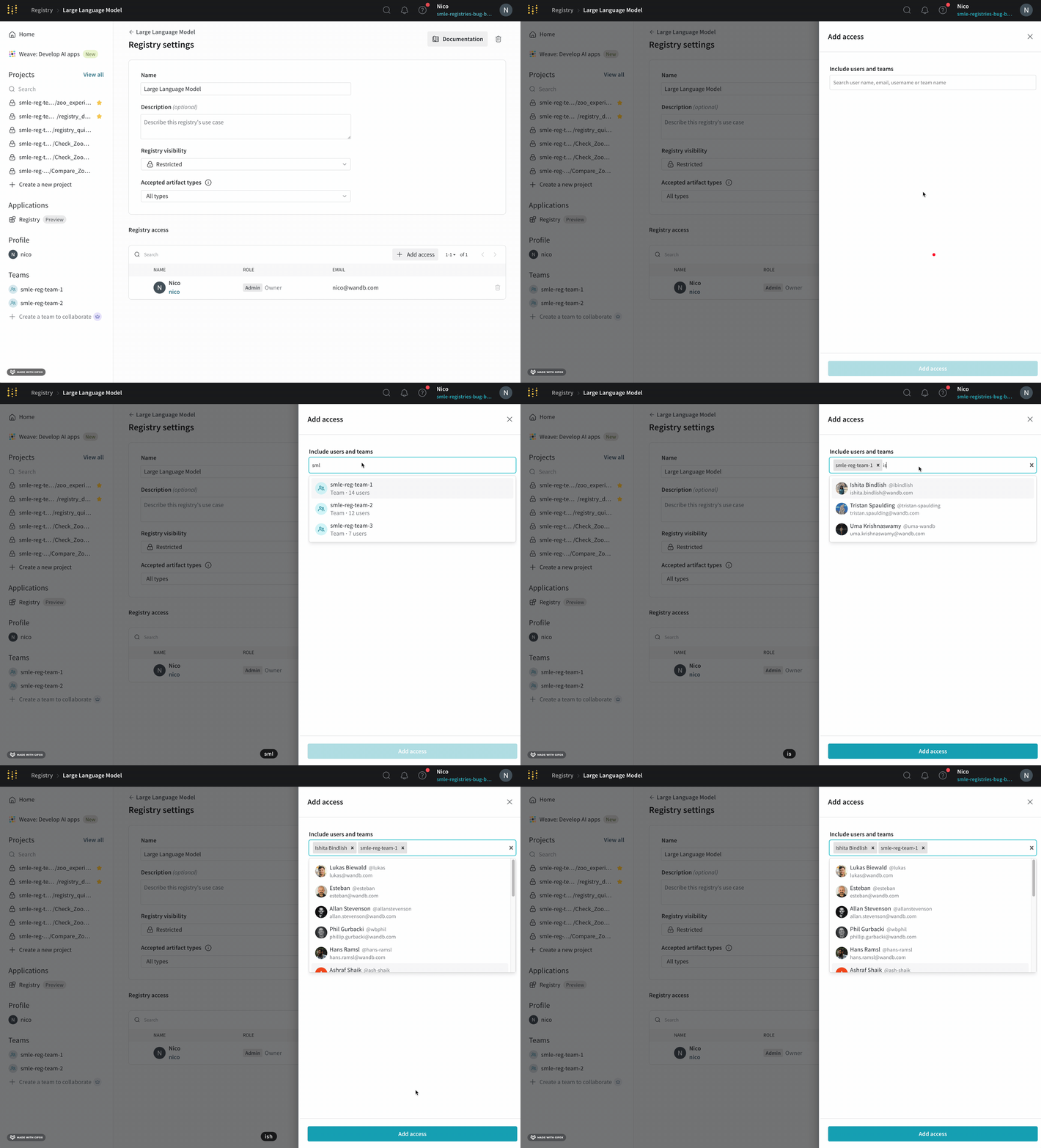
Registry admins can add individual users or entire teams to a registry. To add a user or team to a registry:
1. Navigate to the W\&B Registry.
2. Select the registry you want to add a user or team to.
3. Click on the gear icon on the upper right hand corner to access the registry settings.
4. In the **Registry access** section, click **Add access**.
5. Specify one or more user names, emails, or the team names to the **Include users and teams** field.
6. Click **Add access**.
 Learn more about [configuring user roles in a registry](/models/registry/configure_registry/#configure-registry-roles), or [registry role permissions](/models/registry/configure_registry/#registry-role-permissions) .
### Remove a user or team
A registry admin can remove individual users or entire teams from a registry. To remove a user or team from a registry:
1. Navigate to the W\&B Registry at [https://wandb.ai/registry/](https://wandb.ai/registry/).
2. Select the registry you want to remove a user from.
3. Click on the gear icon on the upper right hand corner to access the registry settings.
4. Navigate to the **Registry access** section and type in the username, email, or team you want to remove.
5. Click the **Delete** button.
Removing a user from a team also removes that user's access to the registry.
### Change the owner of a registry
A registry admin can designate any member as a registry's owner, including a **Restricted Viewer** or a **Viewer**. Registry ownership is primarily for accountability purposes and does not confer any additional permissions beyond those granted by the user's assigned role.
To change the owner:
1. Navigate to the W\&B Registry at [https://wandb.ai/registry/](https://wandb.ai/registry/).
2. Select the registry you want to configure.
3. Click the gear icon on the upper right hand corner.
4. Scroll to the **Registry members and roles** section.
5. Hover over the row for a member.
6. Click the **action ()** menu at the end of the row, then click **Make owner**.
## Configure Registry roles
This section shows how to configure roles for Registry members. For more information about Registry roles, including the cabilities of each role, order of precedence, defaults, and more, see [Details about Registry roles](#details-about-registry-roles).
1. Navigate to the W\&B Registry at [https://wandb.ai/registry/](https://wandb.ai/registry/).
2. Select the registry you want to configure.
3. Click the gear icon on the upper right hand corner.
4. Scroll to the **Registry members and roles** section.
5. Within the **Member** field, search for the user or team you want to edit permissions for.
6. In the **Registry role** column, click the user's role.
7. From the dropdown, select the role you want to assign to the user.
## Details about Registry roles
The following sections give more information about Registry roles.
Your [role in a team](/platform/app/settings-page/teams/#team-roles-and-permissions) has no impact or relationship to your role in any registry.
### Default roles
W\&B automatically assigns a default **registry role** to a user or team when they are added to a registry. This role determines what they can do in that registry.
| Entity | Default registry role
Learn more about [configuring user roles in a registry](/models/registry/configure_registry/#configure-registry-roles), or [registry role permissions](/models/registry/configure_registry/#registry-role-permissions) .
### Remove a user or team
A registry admin can remove individual users or entire teams from a registry. To remove a user or team from a registry:
1. Navigate to the W\&B Registry at [https://wandb.ai/registry/](https://wandb.ai/registry/).
2. Select the registry you want to remove a user from.
3. Click on the gear icon on the upper right hand corner to access the registry settings.
4. Navigate to the **Registry access** section and type in the username, email, or team you want to remove.
5. Click the **Delete** button.
Removing a user from a team also removes that user's access to the registry.
### Change the owner of a registry
A registry admin can designate any member as a registry's owner, including a **Restricted Viewer** or a **Viewer**. Registry ownership is primarily for accountability purposes and does not confer any additional permissions beyond those granted by the user's assigned role.
To change the owner:
1. Navigate to the W\&B Registry at [https://wandb.ai/registry/](https://wandb.ai/registry/).
2. Select the registry you want to configure.
3. Click the gear icon on the upper right hand corner.
4. Scroll to the **Registry members and roles** section.
5. Hover over the row for a member.
6. Click the **action ()** menu at the end of the row, then click **Make owner**.
## Configure Registry roles
This section shows how to configure roles for Registry members. For more information about Registry roles, including the cabilities of each role, order of precedence, defaults, and more, see [Details about Registry roles](#details-about-registry-roles).
1. Navigate to the W\&B Registry at [https://wandb.ai/registry/](https://wandb.ai/registry/).
2. Select the registry you want to configure.
3. Click the gear icon on the upper right hand corner.
4. Scroll to the **Registry members and roles** section.
5. Within the **Member** field, search for the user or team you want to edit permissions for.
6. In the **Registry role** column, click the user's role.
7. From the dropdown, select the role you want to assign to the user.
## Details about Registry roles
The following sections give more information about Registry roles.
Your [role in a team](/platform/app/settings-page/teams/#team-roles-and-permissions) has no impact or relationship to your role in any registry.
### Default roles
W\&B automatically assigns a default **registry role** to a user or team when they are added to a registry. This role determines what they can do in that registry.
| Entity | Default registry role
(Dedicated Cloud / Self-Managed) | Default registry role
(Multi-tenant Cloud) |
| ----------------------------------- | --------------------------------------------------------------------------- | ---------------------------------------------------------- |
| Team | Restricted Viewer (Server v0.75.0+)
Viewer (Server v0.74.x and below) | Restricted Viewer |
| User or service account (non admin) | Restricted Viewer (Server v0.75.0+)
Viewer (Server v0.74.x and below) | Restricted Viewer |
| Service account (non admin) | Member1 | Member1 |
| Org admin | Admin | Admin |
: Service accounts cannot have **Viewer** or **Restricted Viewer** roles.
A registry admin can assign or modify roles for users and teams in the registry.
See [Configure user roles in a registry](/models/registry/configure_registry/#configure-registry-roles) for more information.
### Role permissions
The following table lists each Registry role, along with the permissions provided by each role:
| Permission | Permission Group | Restricted Viewer
(Multi-tenant Cloud, by invitation) | Viewer | Member | Admin |
| ---------------------------------------------------------------------------------------------------- | ---------------- | ---------------------------------------------------------- | :----: | :----: | :---: |
| View a collection's details | Read | ✓ | ✓ | ✓ | ✓ |
| View a linked artifact's details | Read | ✓ | ✓ | ✓ | ✓ |
| Usage: Consume an artifact in a registry with use\_artifact | Read | | ✓ | ✓ | ✓ |
| Download a linked artifact | Read | | ✓ | ✓ | ✓ |
| Download files from an artifact's file viewer | Read | | ✓ | ✓ | ✓ |
| Search a registry | Read | ✓ | ✓ | ✓ | ✓ |
| View a registry's settings and user list | Read | ✓ | ✓ | ✓ | ✓ |
| Create a new automation for a collection | Create | | | ✓ | ✓ |
| Turn on Slack notifications for new version being added | Create | | | ✓ | ✓ |
| Create a new collection | Create | | | ✓ | ✓ |
| Create a new registry | Create | | | ✓ | ✓ |
| Edit collection card (description) | Update | | | ✓ | ✓ |
| Edit linked artifact description | Update | | | ✓ | ✓ |
| Add or delete a collection's tag | Update | | | ✓ | ✓ |
| Add or delete an alias from a linked artifact | Update | | | ✓ | ✓ |
| Add or delete a [protected alias](/models/registry/aliases#protected-aliases) from a linked artifact | Update | | | | ✓ |
| Create or delete a [protected alias](/models/registry/aliases#protected-aliases) | Update | | | | ✓ |
| Link a new artifact | Update | | | ✓ | ✓ |
| Edit allowed types list for a registry | Update | | | ✓ | ✓ |
| Edit registry name | Update | | | ✓ | ✓ |
| Delete a collection | Delete | | | ✓ | ✓ |
| Delete an automation | Delete | | | ✓ | ✓ |
| Unlink an artifact from a registry | Delete | | | ✓ | ✓ |
| Edit accepted artifact types for a registry | Admin | | | | ✓ |
| Change registry visibility (Organization or Restricted) | Admin | | | | ✓ |
| Add users to a registry | Admin | | | | ✓ |
| Assign or change a user's role in a registry | Admin | | | | ✓ |
### Inherited Registry role
The registry's membership list shows each user's inherited (effective) registry role (in light gray) next to the role dropdown in their row.
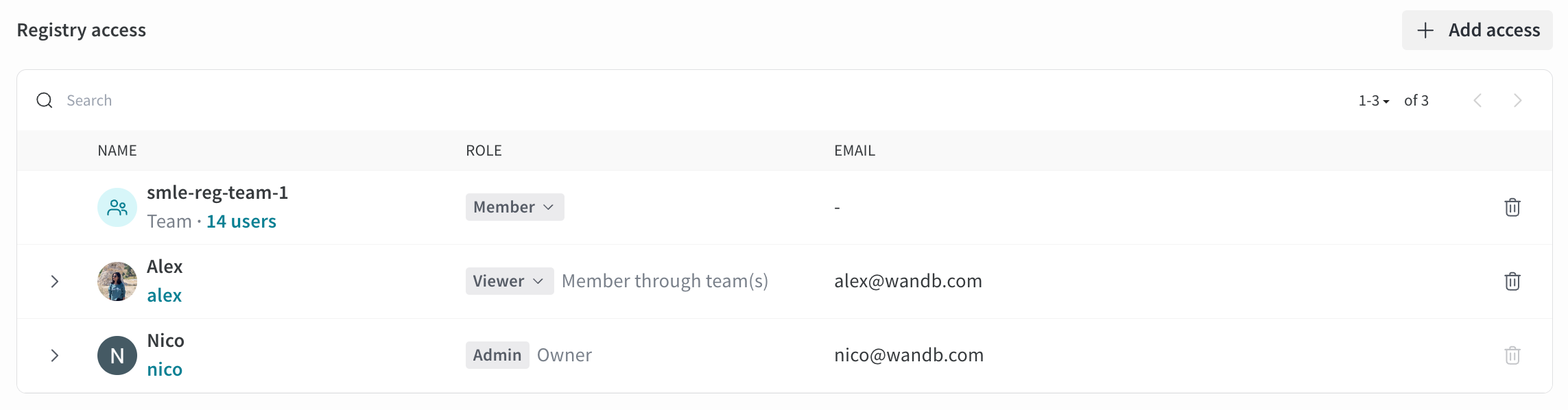 A user's effective role in a particular registry matches their *highest* role among their role in the organization, the registry, and the team that owns the registry, whether inherited or explicitly assigned. For example:
* A team **Admin** or organization **Admin** with the **Viewer** role in a particular registry owned by the team is effectively an **Admin** of the registry.
* A registry **Viewer** with the **Member** role in the team is effectively a **Member** of the registry.
* A team **Viewer** with the **Member** role in a particular registry is effectively a **Member** of the registry.
### Restricted Viewer role details
The **Restricted Viewer** role is Generally Available (GA). For Dedicated Cloud and Self-Managed, Server v0.75.0 or newer is required.
This role provides read-only access to registry artifacts without the ability to create, update, or delete collections, automations, or other registry resources.
Unlike a **Viewer**, a **Restricted Viewer**:
* Cannot download artifact files or access file contents.
* Cannot use artifacts with `wandb.Run.use_artifact()` in the W\&B SDK.
#### SDK compatibility
**SDK version requirement**
To use the W\&B SDK to access artifacts as a **Restricted Viewer**, you must use W\&B SDK version 0.19.9 or higher. Otherwise, some SDK commands will result in permission errors.
When a **Restricted Viewer** uses the SDK, certain functions are not available or work differently.
The following methods are not available and result in permission errors:
* [`Run.use_artifact()`](/models/ref/python/experiments/run/#method-runuse_artifact)
* [`Artifact.download()`](/models/ref/python/experiments/artifact/#method-artifactdownload)
* [`Artifact.file()`](/models/ref/python/experiments/artifact/#method-artifactfile)
* [`Artifact.files()`](/models/ref/python/experiments/artifact/#method-artifactfiles)
The following methods are limited to artifact metadata:
* [`Artifact.get_entry()`](/models/ref/python/experiments/artifact/#method-artifactget_entry)
* [`Artifact.get_path()`](/models/ref/python/experiments/artifact/#method-artifactget_path)
* [`Artifact.get()`](/models/ref/python/experiments/artifact/#method-artifactget)
* [`Artifact.verify()`](/models/ref/python/experiments/artifact/#method-artifactverify)
### Cross-registry permissions
A user can have different roles in different registries. For example, a user can be a **Restricted Viewer** in Registry A but a **Viewer** in Registry B. In this case:
* The same artifact linked to both registries will have different access levels
* In Registry A, the user is a **Restricted Viewer** and cannot download files or use the artifact
* In Registry B, the user is a **Viewer** and can download files and use the artifact
* In other words, access is determined by the registry in which the artifact is accessed
A user's effective role in a particular registry matches their *highest* role among their role in the organization, the registry, and the team that owns the registry, whether inherited or explicitly assigned. For example:
* A team **Admin** or organization **Admin** with the **Viewer** role in a particular registry owned by the team is effectively an **Admin** of the registry.
* A registry **Viewer** with the **Member** role in the team is effectively a **Member** of the registry.
* A team **Viewer** with the **Member** role in a particular registry is effectively a **Member** of the registry.
### Restricted Viewer role details
The **Restricted Viewer** role is Generally Available (GA). For Dedicated Cloud and Self-Managed, Server v0.75.0 or newer is required.
This role provides read-only access to registry artifacts without the ability to create, update, or delete collections, automations, or other registry resources.
Unlike a **Viewer**, a **Restricted Viewer**:
* Cannot download artifact files or access file contents.
* Cannot use artifacts with `wandb.Run.use_artifact()` in the W\&B SDK.
#### SDK compatibility
**SDK version requirement**
To use the W\&B SDK to access artifacts as a **Restricted Viewer**, you must use W\&B SDK version 0.19.9 or higher. Otherwise, some SDK commands will result in permission errors.
When a **Restricted Viewer** uses the SDK, certain functions are not available or work differently.
The following methods are not available and result in permission errors:
* [`Run.use_artifact()`](/models/ref/python/experiments/run/#method-runuse_artifact)
* [`Artifact.download()`](/models/ref/python/experiments/artifact/#method-artifactdownload)
* [`Artifact.file()`](/models/ref/python/experiments/artifact/#method-artifactfile)
* [`Artifact.files()`](/models/ref/python/experiments/artifact/#method-artifactfiles)
The following methods are limited to artifact metadata:
* [`Artifact.get_entry()`](/models/ref/python/experiments/artifact/#method-artifactget_entry)
* [`Artifact.get_path()`](/models/ref/python/experiments/artifact/#method-artifactget_path)
* [`Artifact.get()`](/models/ref/python/experiments/artifact/#method-artifactget)
* [`Artifact.verify()`](/models/ref/python/experiments/artifact/#method-artifactverify)
### Cross-registry permissions
A user can have different roles in different registries. For example, a user can be a **Restricted Viewer** in Registry A but a **Viewer** in Registry B. In this case:
* The same artifact linked to both registries will have different access levels
* In Registry A, the user is a **Restricted Viewer** and cannot download files or use the artifact
* In Registry B, the user is a **Viewer** and can download files and use the artifact
* In other words, access is determined by the registry in which the artifact is accessed