> ## Documentation Index
> Fetch the complete documentation index at: https://docs.wandb.ai/llms.txt
> Use this file to discover all available pages before exploring further.
> Export W&B Reports as PDF or LaTeX files, and clone reports using the App UI or the Report and Workspace API.
# Clone and export reports
W\&B Report and Workspace API is in Public Preview.
This page describes how to export a W\&B Report to a portable file format. It also describes how to clone an existing report to reuse its structure as a starting point for new work.
## Export a report
Export a report as a PDF or LaTeX file to share its contents outside of W\&B or to archive a static version of your analysis. In your report, select the **action ()** menu. Choose **Download** and select either PDF or LaTeX output format.
## Clone a report
Clone a report to reuse an existing project's template and formatting as the basis for a new report. You can clone reports in the W\&B App UI or programmatically with the Report and Workspace API.
In your report, select the **action ()** menu. Choose **Clone this report**. In the modal, pick a destination for your cloned report. Choose **Clone report**.
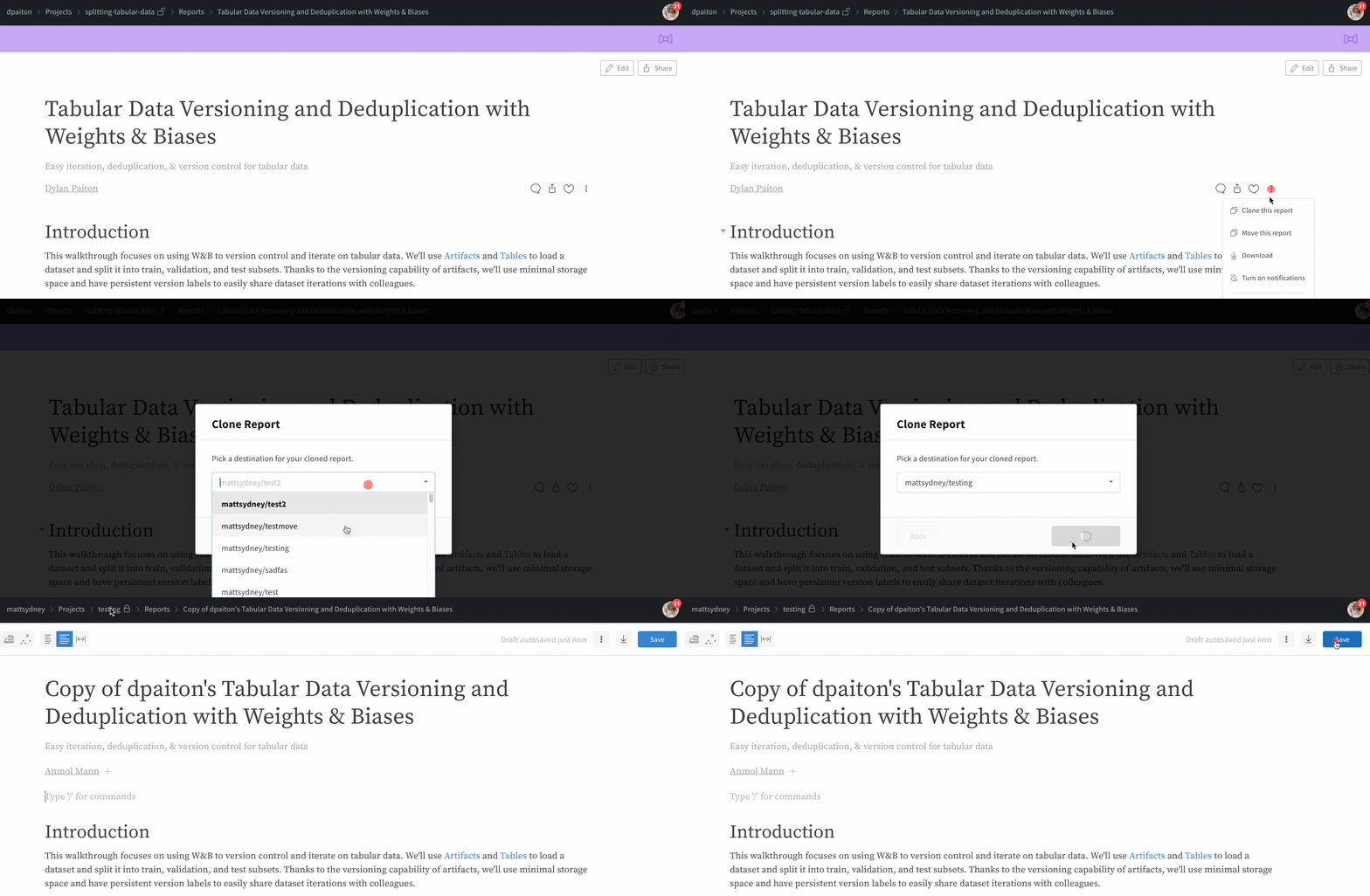 When you clone a report, you specify the destination. If you clone it to a team, all team members can view it. If you clone it to your personal account, only you can view it by default.
Use the Report and Workspace API to load an existing report from its URL and reuse it as a template for a new report.
Load a report from a URL to use it as a template. Replace `PROJECT` with the name of your W\&B project.
```python theme={null}
report = wr.Report(
project=PROJECT, title="Quickstart Report", description="That was easy!"
) # Create
report.save() # Save
new_report = wr.Report.from_url(report.url) # Load
```
After you load the report, edit the content in `new_report.blocks` to customize the cloned report, then save it. Replace `ENTITY` with your W\&B entity name.
```python theme={null}
pg = wr.PanelGrid(
runsets=[
wr.Runset(ENTITY, PROJECT, "First Run Set"),
wr.Runset(ENTITY, PROJECT, "Elephants Only!", query="elephant"),
],
panels=[
wr.LinePlot(x="Step", y=["val_acc"], smoothing_factor=0.8),
wr.BarPlot(metrics=["acc"]),
wr.MediaBrowser(media_keys="img", num_columns=1),
wr.RunComparer(diff_only="split", layout={"w": 24, "h": 9}),
],
)
new_report.blocks = (
report.blocks[:1] + [wr.H1("Panel Grid Example"), pg] + report.blocks[1:]
)
new_report.save()
```
When you clone a report, you specify the destination. If you clone it to a team, all team members can view it. If you clone it to your personal account, only you can view it by default.
Use the Report and Workspace API to load an existing report from its URL and reuse it as a template for a new report.
Load a report from a URL to use it as a template. Replace `PROJECT` with the name of your W\&B project.
```python theme={null}
report = wr.Report(
project=PROJECT, title="Quickstart Report", description="That was easy!"
) # Create
report.save() # Save
new_report = wr.Report.from_url(report.url) # Load
```
After you load the report, edit the content in `new_report.blocks` to customize the cloned report, then save it. Replace `ENTITY` with your W\&B entity name.
```python theme={null}
pg = wr.PanelGrid(
runsets=[
wr.Runset(ENTITY, PROJECT, "First Run Set"),
wr.Runset(ENTITY, PROJECT, "Elephants Only!", query="elephant"),
],
panels=[
wr.LinePlot(x="Step", y=["val_acc"], smoothing_factor=0.8),
wr.BarPlot(metrics=["acc"]),
wr.MediaBrowser(media_keys="img", num_columns=1),
wr.RunComparer(diff_only="split", layout={"w": 24, "h": 9}),
],
)
new_report.blocks = (
report.blocks[:1] + [wr.H1("Panel Grid Example"), pg] + report.blocks[1:]
)
new_report.save()
```