> ## Documentation Index
> Fetch the complete documentation index at: https://docs.wandb.ai/llms.txt
> Use this file to discover all available pages before exploring further.
> Learn about the basic building block of W&B, Runs.
# Overview
A *run* is a single unit of computation logged by W\&B. You can think of a W\&B Run as an atomic element of your whole project. In other words, each run is a record of a specific computation, such as training a model and logging the results, hyperparameter sweeps, and so forth.
Common use cases for initializing and logging to a run include:
* Training a model and [recording metrics](/models/ref/python/experiments/run#method-run-log) such as accuracy and loss
* Conducting [hyperparameter tuning](/models/sweeps/) and running new experiments
* Conducting a new machine learning experiment with a different model
* Tracking and saving datasets and models as [W\&B Artifacts](/models/artifacts/)
* [Downloading and using](/models/artifacts/download-and-use-an-artifact/) datasets or models used by other members of your team as W\&B Artifacts
To initialize a W\&B run, call the [`wandb.init()`](/models/ref/python/functions/init) method from the W\&B Python SDK. This starts a new run and returns a `wandb.Run` object that you can use to log metrics, artifacts, and other information to the run. For more information about initializing a run, see [Initialize runs](/models/runs/initialize-run).
Each run object has a [unique identifier known as a *run ID*](/models/runs/run-identifiers#unique-run-identifiers). [You can specify a unique ID](/models/runs/run-identifiers#unique-run-identifiers) or let [W\&B randomly generate one for you](/models/runs/run-identifiers#autogenerated-run-ids). Each run object also has a human-readable, non-unique [run name](/models/runs/run-identifiers#run-name). You can specify a name for your run or let W\&B randomly generate one for you. You can rename a run after initializing it.
W\&B logs your run to a [*project*](/models/track/project-page/). You specify the project when you initialize the run with `wandb.init(project="")`. W\&B creates a new project if the project does not exist. If the project does exist, W\&B logs the run to the project you specified.
If you do not specify a project name, W\&B stores the run in a project called `Uncategorized`.
`wandb.init()` returns a `wandb.Run` object that contains properties of the run, such as its ID, name, configuration, and state. Use the run object to log metrics, artifacts, and other information to the run with methods such as `wandb.Run.log()`, `wandb.Run.log_code()`, and `wandb.Run.use_artifact()`.
Each run has a state that describes the current status of the run. See [Run states](/models/runs/run-states) for a full list of possible run states.
[View runs and their properties](/models/runs/view-logged-runs) within the run's project workspace on the W\&B App. You can also programmatically access run properties with the [`wandb.Api.Run`](/models/ref/python/experiments/run) object.
As an example, consider the following code snippet that initializes a W\&B run and logs some metrics to it:
Pass your W\&B entity to the `entity` variable in the code snippets below if you want to follow along. Your entity is your W\&B username or team name. You can find it in the URL of your W\&B App workspace. For example, if your workspace URL is `https://wandb.ai/nico/awesome-project`, then your entity is `nico`.
```python theme={null}
import wandb
entity = "nico" # Replace with your W&B entity
project = "awesome-project"
with wandb.init(entity=entity, project=project) as run:
run.log({"accuracy": 0.9, "loss": 0.1})
```
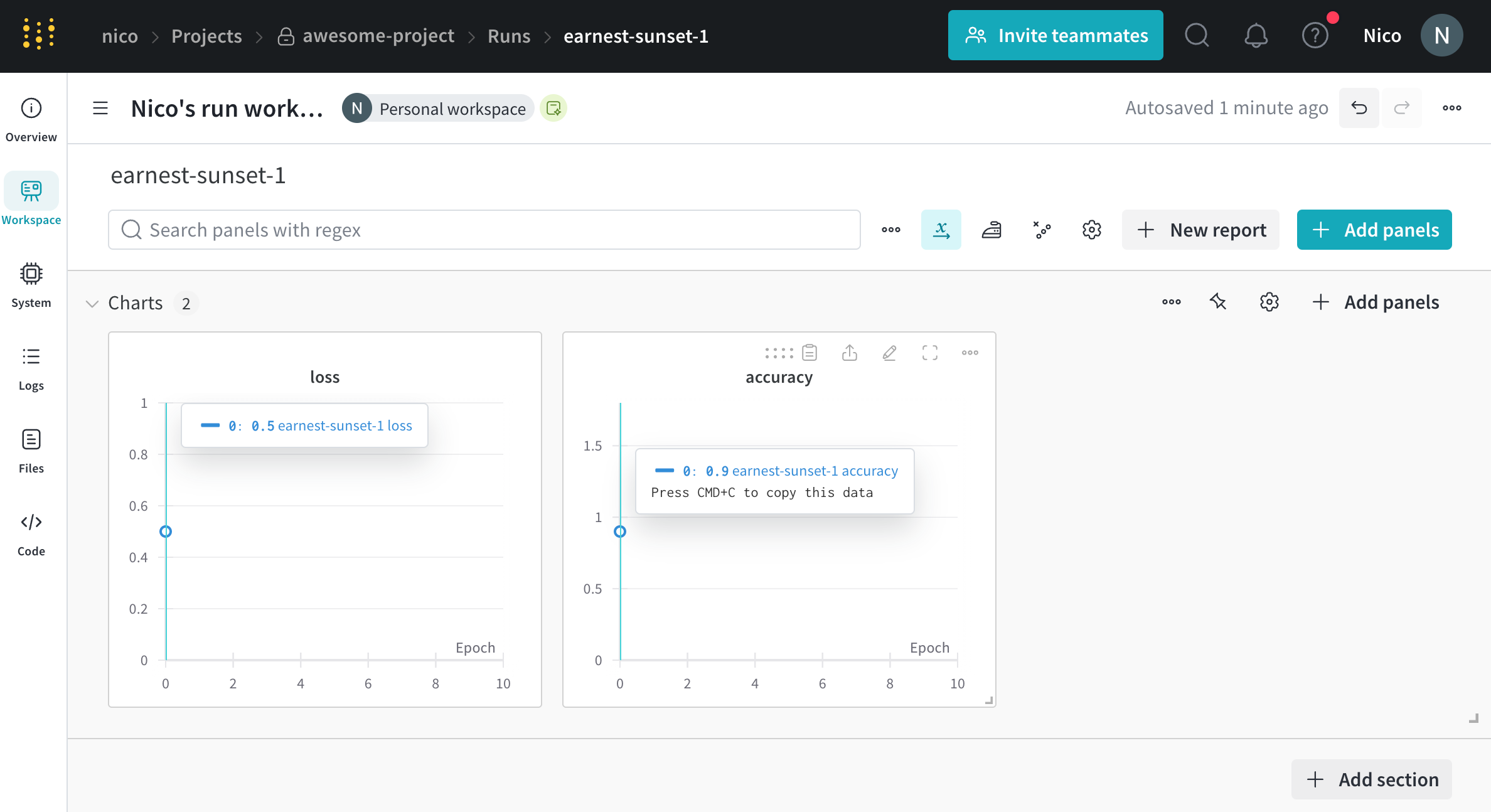
The first line imports the W\&B Python SDK. The second line initializes a run in the project `awesome-project` under the entity `nico`. The third line logs the accuracy and loss of the model to that run.
Within the terminal, W\&B returns:
```bash theme={null}
wandb: Syncing run earnest-sunset-1
wandb: ⭐️ View project at https://wandb.ai/nico/awesome-project
wandb: 🚀 View run at https://wandb.ai/nico/awesome-project/runs/1jx1ud12
wandb:
wandb:
wandb: Run history:
wandb: accuracy ▁
wandb: loss ▁
wandb:
wandb: Run summary:
wandb: accuracy 0.9
wandb: loss 0.5
wandb:
wandb: 🚀 View run earnest-sunset-1 at: https://wandb.ai/nico/awesome-project/runs/1jx1ud12
wandb: ⭐️ View project at: https://wandb.ai/nico/awesome-project
wandb: Synced 6 W&B file(s), 0 media file(s), 0 artifact file(s) and 0 other file(s)
wandb: Find logs at: ./wandb/run-20241105_111006-1jx1ud12/logs
```
W\&B returns two URLs in the terminal output. The first URL directs you to the [specific run's workspace](/models/runs/view-logged-runs), and the second URL directs you to the [project](/models/track/project-page) page.
 Logging a metric at a single point of time might not be that useful. A more realistic example in the case of training discriminative models is to log metrics at regular intervals. For example, consider the following code snippet:
```python theme={null}
import wandb
import random
config = {
"epochs": 10,
"learning_rate": 0.01,
}
with wandb.init(project="awesome-project", config=config) as run:
print(f"lr: {config['learning_rate']}")
# Simulating a training run
for epoch in range(config['epochs']):
offset = random.random() / 5
acc = 1 - 2**-epoch - random.random() / (epoch + 1) - offset
loss = 2**-epoch + random.random() / (epoch + 1) + offset
print(f"epoch={epoch}, accuracy={acc}, loss={loss}")
run.log({"accuracy": acc, "loss": loss})
```
The training script calls `wandb.Run.log()` 10 times. Each time the script calls `wandb.Run.log()`, W\&B logs the accuracy and loss for that epoch.
Within your terminal, you should see output similar to the following:
```bash theme={null}
wandb: Syncing run jolly-haze-4
wandb: ⭐️ View project at https://wandb.ai/nico/awesome-project
wandb: 🚀 View run at https://wandb.ai/nico/awesome-project/runs/pdo5110r
lr: 0.01
epoch=0, accuracy=-0.10070974957523078, loss=1.985328507123956
epoch=1, accuracy=0.2884687745057535, loss=0.7374362314407752
epoch=2, accuracy=0.7347387967382066, loss=0.4402409835486663
epoch=3, accuracy=0.7667969248039795, loss=0.26176963846423457
epoch=4, accuracy=0.7446848791003173, loss=0.24808611724405083
epoch=5, accuracy=0.8035095836268268, loss=0.16169791827329466
epoch=6, accuracy=0.861349032371624, loss=0.03432578493587426
epoch=7, accuracy=0.8794926436276016, loss=0.10331872172219471
epoch=8, accuracy=0.9424839917077272, loss=0.07767793473500445
epoch=9, accuracy=0.9584880427028566, loss=0.10531971149250456
wandb: 🚀 View run jolly-haze-4 at: https://wandb.ai/nico/awesome-project/runs/pdo5110r
wandb: Find logs at: wandb/run-20241105_111816-pdo5110r/logs
```
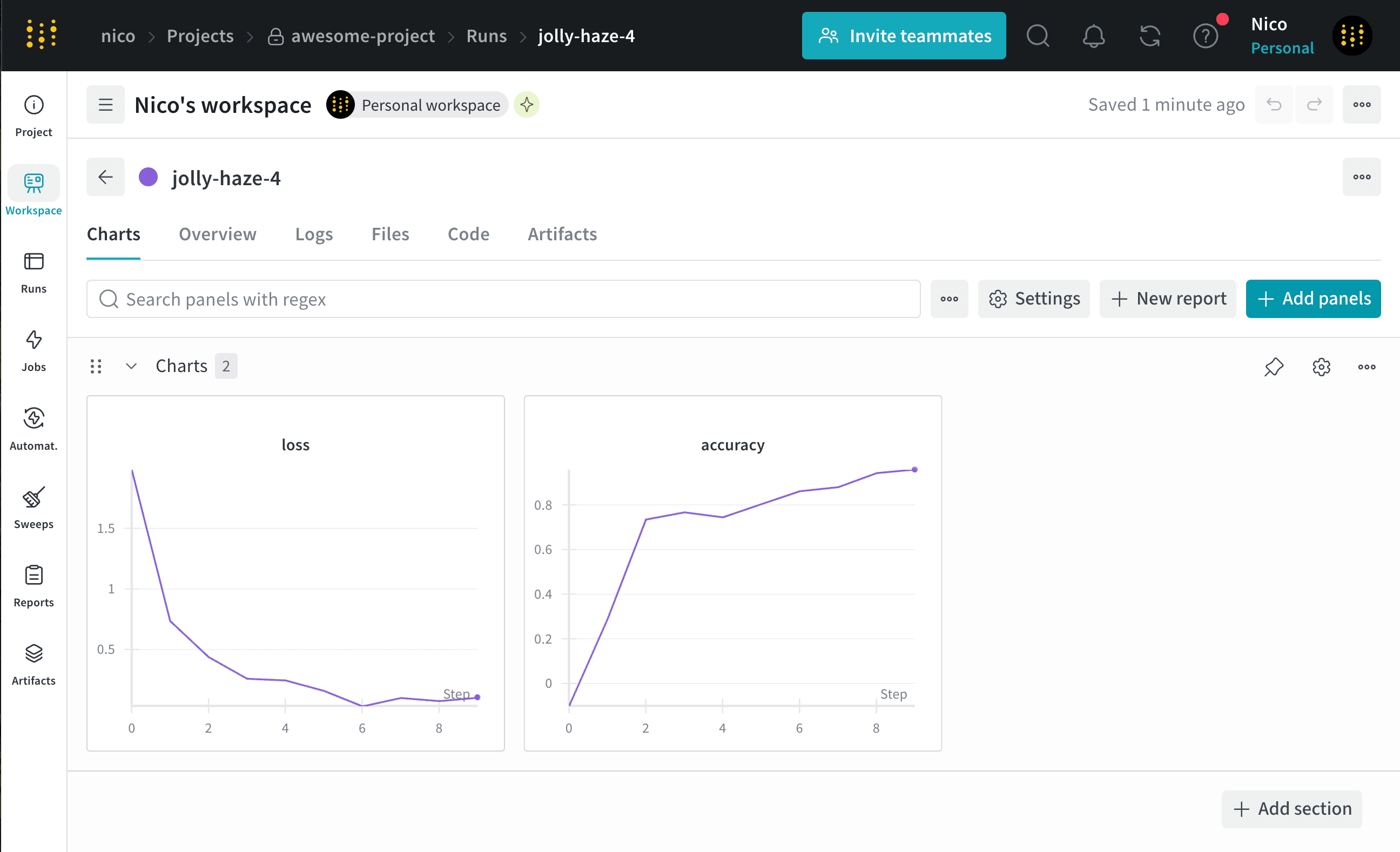
W\&B captures the simulated training loop within a single run called `jolly-haze-4`. This is because the script calls `wandb.init()` method only once.
Copy and paste the URL that W\&B prints from the previous output into your browser. The URL directs you to the run's workspace in the W\&B App UI. For example, the following image shows the workspace for the run `jolly-haze-4`:
Logging a metric at a single point of time might not be that useful. A more realistic example in the case of training discriminative models is to log metrics at regular intervals. For example, consider the following code snippet:
```python theme={null}
import wandb
import random
config = {
"epochs": 10,
"learning_rate": 0.01,
}
with wandb.init(project="awesome-project", config=config) as run:
print(f"lr: {config['learning_rate']}")
# Simulating a training run
for epoch in range(config['epochs']):
offset = random.random() / 5
acc = 1 - 2**-epoch - random.random() / (epoch + 1) - offset
loss = 2**-epoch + random.random() / (epoch + 1) + offset
print(f"epoch={epoch}, accuracy={acc}, loss={loss}")
run.log({"accuracy": acc, "loss": loss})
```
The training script calls `wandb.Run.log()` 10 times. Each time the script calls `wandb.Run.log()`, W\&B logs the accuracy and loss for that epoch.
Within your terminal, you should see output similar to the following:
```bash theme={null}
wandb: Syncing run jolly-haze-4
wandb: ⭐️ View project at https://wandb.ai/nico/awesome-project
wandb: 🚀 View run at https://wandb.ai/nico/awesome-project/runs/pdo5110r
lr: 0.01
epoch=0, accuracy=-0.10070974957523078, loss=1.985328507123956
epoch=1, accuracy=0.2884687745057535, loss=0.7374362314407752
epoch=2, accuracy=0.7347387967382066, loss=0.4402409835486663
epoch=3, accuracy=0.7667969248039795, loss=0.26176963846423457
epoch=4, accuracy=0.7446848791003173, loss=0.24808611724405083
epoch=5, accuracy=0.8035095836268268, loss=0.16169791827329466
epoch=6, accuracy=0.861349032371624, loss=0.03432578493587426
epoch=7, accuracy=0.8794926436276016, loss=0.10331872172219471
epoch=8, accuracy=0.9424839917077272, loss=0.07767793473500445
epoch=9, accuracy=0.9584880427028566, loss=0.10531971149250456
wandb: 🚀 View run jolly-haze-4 at: https://wandb.ai/nico/awesome-project/runs/pdo5110r
wandb: Find logs at: wandb/run-20241105_111816-pdo5110r/logs
```
W\&B captures the simulated training loop within a single run called `jolly-haze-4`. This is because the script calls `wandb.init()` method only once.
Copy and paste the URL that W\&B prints from the previous output into your browser. The URL directs you to the run's workspace in the W\&B App UI. For example, the following image shows the workspace for the run `jolly-haze-4`: