> ## Documentation Index
> Fetch the complete documentation index at: https://docs.wandb.ai/llms.txt
> Use this file to discover all available pages before exploring further.
> Sweeps quickstart shows how to define, initialize, and run a sweep. There are four main steps
# Tutorial: Define, initialize, and run a sweep
This page shows how to define, initialize, and run a sweep. There are four main steps:
1. [Set up your training code](#set-up-your-training-code)
2. [Define the search space with a sweep configuration](#define-the-search-space-with-a-sweep-configuration)
3. [Initialize the sweep](#initialize-the-sweep)
4. [Start the sweep agent](#start-the-sweep)
Copy and paste the following code into a Jupyter Notebook or Python script:
```python theme={null}
# Import the W&B Python Library and log into W&B
import wandb
# 1: Define objective/training function
def objective(config):
score = config.x**3 + config.y
return score
def main():
with wandb.init(project="my-first-sweep") as run:
score = objective(run.config)
run.log({"score": score})
# 2: Define the search space
sweep_configuration = {
"method": "random",
"metric": {"goal": "minimize", "name": "score"},
"parameters": {
"x": {"max": 0.1, "min": 0.01},
"y": {"values": [1, 3, 7]},
},
}
# 3: Start the sweep
sweep_id = wandb.sweep(sweep=sweep_configuration, project="my-first-sweep")
wandb.agent(sweep_id, function=main, count=10)
```
The following sections break down and explains each step in the code sample.
## Set up your training code
Define a training function that takes in hyperparameter values from `wandb.Run.config` and uses them to train a model and return metrics.
Optionally provide the name of the project where you want the output of the W\&B Run to be stored (project parameter in [`wandb.init()`](/models/ref/python/functions/init)). If the project is not specified, the run is put in an "Uncategorized" project.
Both the sweep and the run must be in the same project. Therefore, the name you provide when you initialize W\&B must match the name of the project you provide when you initialize a sweep.
```python theme={null}
# 1: Define objective/training function
def objective(config):
score = config.x**3 + config.y
return score
def main():
with wandb.init(project="my-first-sweep") as run:
score = objective(run.config)
run.log({"score": score})
```
## Define the search space with a sweep configuration
Specify the hyperparameters to sweep in a dictionary. For configuration options, see [Define sweep configuration](/models/sweeps/define-sweep-configuration/).
The following example demonstrates a sweep configuration that uses a random search (`'method':'random'`). The sweep will randomly select a random set of values listed in the configuration for the batch size, epoch, and the learning rate.
W\&B minimizes the metric specified in the `metric` key when `"goal": "minimize"` is associated with it. In this case, W\&B will optimize for minimizing the metric `score` (`"name": "score"`).
```python theme={null}
# 2: Define the search space
sweep_configuration = {
"method": "random",
"metric": {"goal": "minimize", "name": "score"},
"parameters": {
"x": {"max": 0.1, "min": 0.01},
"y": {"values": [1, 3, 7]},
},
}
```
## Initialize the Sweep
W\&B uses a *Sweep Controller* to manage sweeps on the cloud (standard), locally (local) across one or more machines. For more information about Sweep Controllers, see [Search and stop algorithms locally](./local-controller).
A sweep identification number is returned when you initialize a sweep:
```python theme={null}
sweep_id = wandb.sweep(sweep=sweep_configuration, project="my-first-sweep")
```
For more information about initializing sweeps, see [Initialize sweeps](./initialize-sweeps).
## Start the Sweep
Use the [`wandb.agent()`](/models/ref/python/functions/agent) API call to start a sweep.
```python theme={null}
wandb.agent(sweep_id, function=main, count=10)
```
**Multiprocessing**
You must wrap your `wandb.agent()` and `wandb.sweep()` calls with `if __name__ == '__main__':` if you use Python standard library's `multiprocessing` or PyTorch's `pytorch.multiprocessing` package. For example:
```python theme={null}
if __name__ == '__main__':
wandb.agent(sweep_id="", function="", count="")
```
Wrapping your code with this convention ensures that it is only executed when the script is run directly, and not when it is imported as a module in a worker process.
See [Python standard library `multiprocessing`](https://docs.python.org/3/library/multiprocessing.html#the-spawn-and-forkserver-start-methods) or [PyTorch `multiprocessing`](https://docs.pytorch.org/docs/stable/notes/multiprocessing.html#asynchronous-multiprocess-training-e-g-hogwild) for more information about multiprocessing. See [https://realpython.com/if-name-main-python/](https://realpython.com/if-name-main-python/) for information about the `if __name__ == '__main__':` convention.
## Visualize results (optional)
Open your project to see your live results in the W\&B App dashboard. With just a few clicks, construct rich, interactive charts like [parallel coordinates plots](/models/app/features/panels/parallel-coordinates/),[ parameter importance analyzes](/models/app/features/panels/parameter-importance/), and [additional chart types](/models/app/features/panels/).
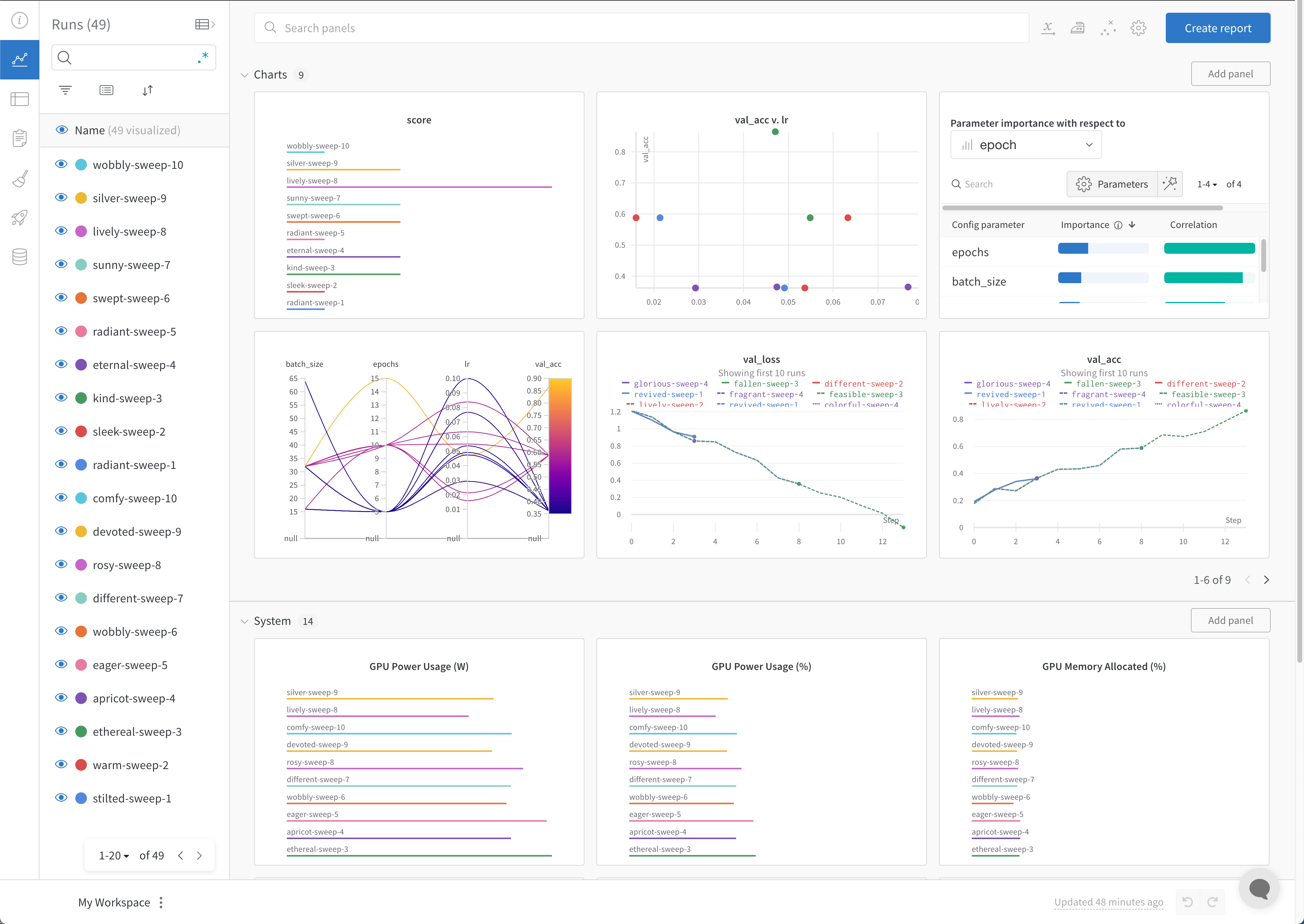 For more information about how to visualize results, see [Visualize sweep results](./visualize-sweep-results). For an example dashboard, see this sample [Sweeps Project](https://wandb.ai/anmolmann/pytorch-cnn-fashion/sweeps/pmqye6u3).
## Stop the agent (optional)
In the terminal, press `Ctrl+C` to stop the current run. Press it again to terminate the agent.
For more information about how to visualize results, see [Visualize sweep results](./visualize-sweep-results). For an example dashboard, see this sample [Sweeps Project](https://wandb.ai/anmolmann/pytorch-cnn-fashion/sweeps/pmqye6u3).
## Stop the agent (optional)
In the terminal, press `Ctrl+C` to stop the current run. Press it again to terminate the agent.