> ## Documentation Index
> Fetch the complete documentation index at: https://docs.wandb.ai/llms.txt
> Use this file to discover all available pages before exploring further.

> Configure a self-managed W&B Server installation using environment variables for database, storage, Redis, and IAM settings.

# Configure environment variables

In addition to configuring instance-level settings through the System Settings admin UI, W\&B also provides a way to configure these values in code using environment variables. Also, refer to [advanced configuration for IAM](./iam/advanced_env_vars).

## Environment variable reference

| Environment variable                    | Description                                                                                                                                                                                                                                                                                                                                                                                                                                                                                                                                                                                                                     |
| --------------------------------------- | ------------------------------------------------------------------------------------------------------------------------------------------------------------------------------------------------------------------------------------------------------------------------------------------------------------------------------------------------------------------------------------------------------------------------------------------------------------------------------------------------------------------------------------------------------------------------------------------------------------------------------- |
| `LICENSE`                               | Your wandb/local license                                                                                                                                                                                                                                                                                                                                                                                                                                                                                                                                                                                                        |
| `MYSQL`                                 | The MySQL connection string                                                                                                                                                                                                                                                                                                                                                                                                                                                                                                                                                                                                     |
| `BUCKET`                                | The S3 / GCS bucket for storing data                                                                                                                                                                                                                                                                                                                                                                                                                                                                                                                                                                                            |
| `BUCKET_QUEUE`                          | The SQS / Google PubSub queue for object creation events                                                                                                                                                                                                                                                                                                                                                                                                                                                                                                                                                                        |
| `NOTIFICATIONS_QUEUE`                   | The SQS queue on which to publish run events                                                                                                                                                                                                                                                                                                                                                                                                                                                                                                                                                                                    |
| `AWS_REGION`                            | The AWS Region where your bucket lives                                                                                                                                                                                                                                                                                                                                                                                                                                                                                                                                                                                          |
| `HOST`                                  | The FQD of your instance, that is `https://my.domain.net`                                                                                                                                                                                                                                                                                                                                                                                                                                                                                                                                                                       |
| `OIDC_ISSUER`                           | A URL to your Open ID Connect identity provider, that is `https://cognito-idp.us-east-1.amazonaws.com/us-east-1_uiIFNdacd`                                                                                                                                                                                                                                                                                                                                                                                                                                                                                                      |
| `OIDC_CLIENT_ID`                        | The Client ID of application in your identity provider                                                                                                                                                                                                                                                                                                                                                                                                                                                                                                                                                                          |
| `OIDC_AUTH_METHOD`                      | Implicit (default) or pkce, see below for more context                                                                                                                                                                                                                                                                                                                                                                                                                                                                                                                                                                          |
| `SLACK_CLIENT_ID`                       | The client ID of the Slack application you want to use for alerts                                                                                                                                                                                                                                                                                                                                                                                                                                                                                                                                                               |
| `SLACK_SECRET`                          | The secret of the Slack application you want to use for alerts                                                                                                                                                                                                                                                                                                                                                                                                                                                                                                                                                                  |
| `LOCAL_RESTORE`                         | You can temporarily set this to true if you're unable to access your instance. Check the logs from the container for temporary credentials.                                                                                                                                                                                                                                                                                                                                                                                                                                                                                     |
| `REDIS`                                 | Can be used to set up an external REDIS instance with W\&B.                                                                                                                                                                                                                                                                                                                                                                                                                                                                                                                                                                     |
| `LOGGING_ENABLED`                       | When set to true, access logs are streamed to stdout. You can also mount a sidecar container and tail `/var/log/gorilla.log` without setting this variable.                                                                                                                                                                                                                                                                                                                                                                                                                                                                     |
| `GORILLA_ALLOW_USER_TEAM_CREATION`      | When set to true, allows non-admin users to create a new team. False by default.                                                                                                                                                                                                                                                                                                                                                                                                                                                                                                                                                |
| `GORILLA_CUSTOMER_SECRET_STORE_SOURCE`  | Sets the secret manager for storing team secrets used by W\&B Weave. These secret managers are supported: <ul><li><b>Internal secret manager</b> (default): <code>k8s-secretmanager://wandb-secret</code></li><li><b>AWS Secret Manager</b>: <code>aws-secretmanager</code></li><li><b>Google Cloud Secret Manager</b>: <code>gcp-secretmanager</code></li><li><b>Azure</b>: <code>az-secretmanger</code></li></ul>                                                                                                                                                                                                             |
| `GORILLA_DATA_RETENTION_PERIOD`         | How long to retain deleted data from runs in hours. Deleted run data is unrecoverable. Append an `h` to the input value. For example, `"24h"`.                                                                                                                                                                                                                                                                                                                                                                                                                                                                                  |
| `GORILLA_DISABLE_PERSONAL_ENTITY`       | When set to true, turns off [personal entities](/support/models/articles/what-is-the-difference-between-team-and-). Prevents creation of new personal projects in their personal entities and prevents writing to existing personal projects.                                                                                                                                                                                                                                                                                                                                                                                   |
| `GORILLA_GRAPHQL_DISABLE_INTROSPECTION` | When set to true, disables GraphQL introspection: `__type` and `__schema` queries return no schema data while the request still succeeds. On **Self-Managed**, setting the Gorilla configuration field `graphql-disable-introspection` has the same effect. Set this variable under `spec.values.global.extraEnv` in your `WeightsAndBiases` custom resource (see the [`global.extraEnv` example](/platform/hosting/self-managed/operator#ldap) in the Operator guide). **Client applications need [W\&B SDK v0.26.0](/release-notes/sdk-releases#0-26-0) or later** against deployments with introspection already turned off. |
| `ENABLE_REGISTRY_UI`                    | When set to true, enables the new W\&B Registry UI.                                                                                                                                                                                                                                                                                                                                                                                                                                                                                                                                                                             |
| `GORILLA_ARTIFACT_GC_ENABLED`           | When set to true, enables garbage collection for deleted artifacts. Required for self-managed deployments. See [Delete an artifact](/models/artifacts/delete-artifacts) for more information.                                                                                                                                                                                                                                                                                                                                                                                                                                   |
| `WANDB_ARTIFACT_DIR`                    | Where to store all downloaded artifacts. If unset, defaults to the `artifacts` directory relative to your training script. Make sure this directory exists and the running user has permission to write to it. This does not control the location of generated metadata files, which you can set using the `WANDB_DIR` environment variable.                                                                                                                                                                                                                                                                                    |
| `WANDB_DATA_DIR`                        | Where to upload staging artifacts. The default location depends on your platform, because it uses the value of `user_data_dir` from the `platformdirs` Python package. Make sure this directory exists and the running user has permission to write to it.                                                                                                                                                                                                                                                                                                                                                                      |
| `WANDB_DIR`                             | Where to store all generated files. If unset, defaults to the `wandb` directory relative to your training script. Make sure this directory exists and the running user has permission to write to it. This does not control the location of downloaded artifacts, which you can set using the `WANDB_ARTIFACT_DIR` environment variable.                                                                                                                                                                                                                                                                                        |
| `WANDB_IDENTITY_TOKEN_FILE`             | For [identity federation](/platform/hosting/iam/identity_federation/), the absolute path to the local directory where Java Web Tokens (JWTs) are stored.                                                                                                                                                                                                                                                                                                                                                                                                                                                                        |

<Note>
  Use the `GORILLA_DATA_RETENTION_PERIOD` environment variable cautiously. It applies to **deleted run data** (including run-associated files such as media after deletion flows). It does **not** delete artifacts; use artifact deletion and `GORILLA_ARTIFACT_GC_ENABLED` as described in [Delete an artifact](/models/artifacts/delete-artifacts). For how deleting runs and files relates to storage and this setting, see [When deleted run data is removed from storage](/models/runs/delete-runs#when-deleted-run-data-is-removed-from-storage) in **Delete runs**. Data is removed according to the retention window once the variable is set. Back up both the database and the storage bucket before you enable or change this value.

  Background removal of objects from your bucket is **best-effort** and not guaranteed to finish within a specific time. For expectations, troubleshooting, and how this relates to storage costs, see [Manage bucket storage and costs](/platform/hosting/managing-bucket-storage).
</Note>

## Advanced reliability settings

### Redis

Configuring an external Redis server is optional but recommended for production systems. Redis helps improve the reliability of the service and enable caching to decrease load times, especially in large projects. Use a managed Redis service such ElastiCache with high availability (HA) and the following specifications:

* Minimum 4GB of memory, suggested 8GB
* Redis version 6.x
* In transit encryption
* Authentication enabled

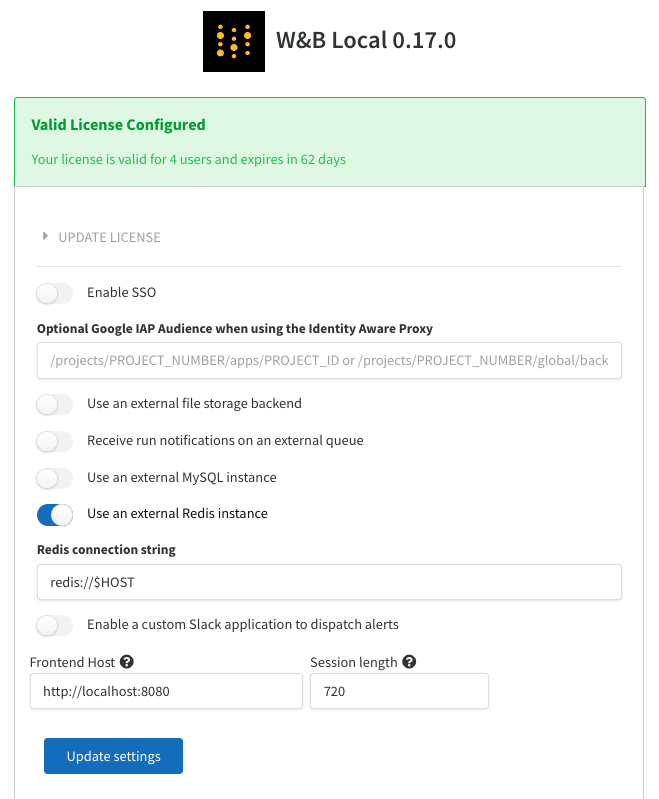
To configure the Redis instance with W\&B, you can navigate to the W\&B settings page at `http(s)://YOUR-W&B-SERVER-HOST/system-admin`. Enable the "Use an external Redis instance" option, and fill in the Redis connection string in the following format:
<Frame>
  <img src="https://mintcdn.com/wb-21fd5541/88iR80mZ8tuFCZUU/images/hosting/configure_redis.png?fit=max&auto=format&n=88iR80mZ8tuFCZUU&q=85&s=9c4824d9c143ebbff2b188867d0fa569" alt="Configuring REDIS in W&B" width="659" height="799" data-path="images/hosting/configure_redis.png" />
</Frame>

You can also configure Redis using the environment variable `REDIS` on the container or in your Kubernetes deployment. Alternatively, you could also set up `REDIS` as a Kubernetes secret.

This page assumes the Redis instance is running at the default port of `6379`. If you configure a different port, setup authentication and also want to have TLS enabled on the `redis` instance the connection string format would look something like: `redis://$USER:$PASSWORD@$HOST:$PORT?tls=true`
