> ## Documentation Index
> Fetch the complete documentation index at: https://docs.wandb.ai/llms.txt
> Use this file to discover all available pages before exploring further.
> Learn about W&B Dedicated Cloud deployment features including compliance, data security, IAM, and maintenance policies.
# Dedicated Cloud
W\&B Dedicated Cloud is a fully managed platform with dedicated, isolated infrastructure, deployed in W\&B's AWS, Google Cloud, or Azure cloud accounts. Each Dedicated Cloud instance has its own isolated network, compute, and storage from other W\&B Dedicated Cloud instances. W\&B stores your W\&B-specific metadata and data in isolated cloud storage and processes it using isolated cloud compute services.
Use Dedicated Cloud when you need the benefits of a managed W\&B platform along with isolation that helps you meet security, compliance, and data residency requirements. This page describes the compliance, data security, IAM, monitoring, and maintenance features available with Dedicated Cloud, and links to deeper documentation for each topic.
W\&B Dedicated Cloud is available in [multiple global regions for each cloud provider](./dedicated-cloud/regions).
## Rate limits
W\&B applies default rate limits on Dedicated Cloud to maintain instance stability. See [Rate limits](/platform/hosting/hosting-options/dedicated-cloud/rate-limits) for default values, how limits are enforced, and how to request higher limits when you scale up training.
## Compliance
W\&B Dedicated Cloud supports the following compliance frameworks:
* **SOC 2**: W\&B Dedicated Cloud's hosting platform meets the requirements of the [Service and Organization Controls (SOC) 2 Type 2](https://www.aicpa-cima.com/topic/audit-assurance/audit-and-assurance-greater-than-soc-2), published by the [Auditing Standards Board of the American Institute of Certified Public Accountants (AICPA)](https://www.aicpa-cima.com/home). A SOC 2 report evaluates a service organization's controls for security, availability, processing integrity, confidentiality, and privacy. W\&B Dedicated Cloud is subject to periodic internal and external audits to verify continued compliance. Refer to the [W\&B Security Portal](https://security.wandb.ai/) to request the SOC 2 report and other security and compliance documents.
* **HIPAA**: When configured appropriately, W\&B Dedicated Cloud meets the requirements of the [Health Insurance Portability and Accountability Act of 1996 (HIPAA)](https://www.hhs.gov/hipaa/for-professionals/index.html). Compliance with HIPAA is a shared responsibility that involves W\&B, the customer, and any third-party services involved in the deployment. Organizations subject to HIPAA must have a **Business Associate Agreement** on file with W\&B. Refer to the [W\&B Security Portal](https://security.wandb.ai/) to request more information.
## Data security
Dedicated Cloud provides several mechanisms for controlling where your data is stored and how it can be accessed. The following options let you bring your own storage, restrict network access, and connect privately to your instance.
You can bring your own bucket (BYOB) using the [secure storage connector](/platform/hosting/data-security/secure-storage-connector) at the [instance and team levels](/platform/hosting/data-security/secure-storage-connector#configuration-options) to store your files such as models, datasets, and more.
Similar to W\&B Multi-tenant Cloud, you can configure a single bucket for multiple teams or you can use separate buckets for different teams. If you don't configure secure storage connector for a team, W\&B stores that data in the instance-level bucket.
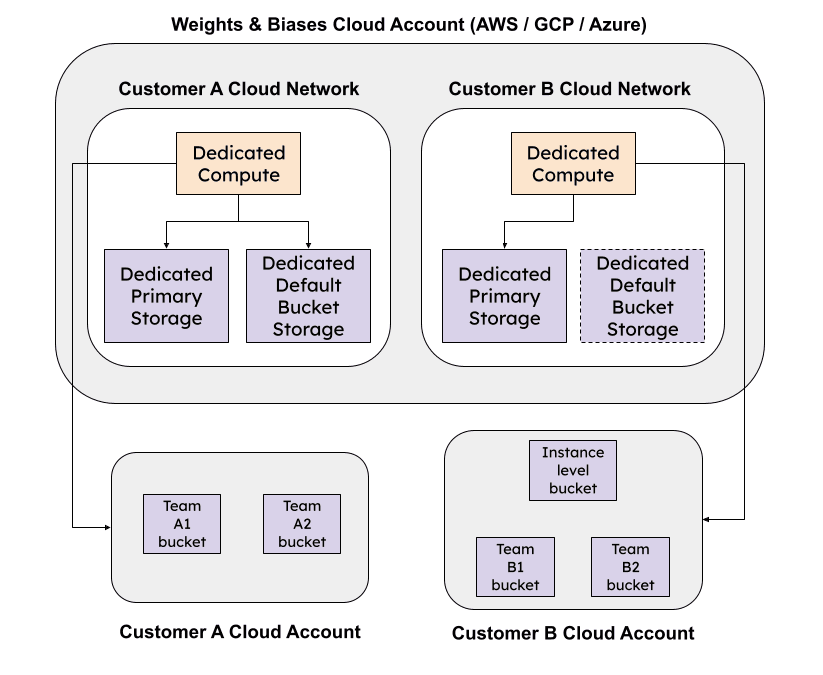 In addition to BYOB with secure storage connector, you can use [IP allowlisting](/platform/hosting/data-security/ip-allowlisting) to restrict access to your Dedicated Cloud instance from only trusted network locations.
You can connect privately to your Dedicated Cloud instance using [cloud provider's secure connectivity solution](/platform/hosting/data-security/private-connectivity).
You're responsible for ensuring that your deployment complies with your organization's policies and [Security Technical Implementation Guidelines (STIG)](https://en.wikipedia.org/wiki/Security_Technical_Implementation_Guide), if applicable.
## Identity and access management (IAM)
Use the identity and access management capabilities for secure authentication and effective authorization in your W\&B Organization. The following features are available for IAM in Dedicated Cloud instances:
* Authenticate with [SSO using OpenID Connect (OIDC)](/platform/hosting/iam/sso) or with [LDAP](/platform/hosting/iam/ldap).
* [Configure appropriate user roles](/platform/hosting/iam/access-management/manage-organization#assign-or-update-a-users-role) at the scope of the organization and within a team.
* Define the scope of a W\&B project to limit who can view, edit, and submit W\&B runs to it with [restricted projects](/platform/hosting/iam/access-management/restricted-projects).
* Use JSON Web Tokens with [identity federation](/platform/hosting/iam/identity_federation) to access W\&B APIs.
## Monitor
Use [Audit logs](/platform/hosting/monitoring-usage/audit-logging) to track user activity within your teams and to conform to your enterprise governance requirements. Also, you can view organization usage in your Dedicated Cloud instance with [W\&B Organization Dashboard](/platform/hosting/monitoring-usage/org_dashboard).
## Maintenance
Similar to W\&B Multi-tenant Cloud, you don't incur the overhead and costs of provisioning and maintaining the W\&B platform with Dedicated Cloud.
To understand how W\&B manages updates on Dedicated Cloud, refer to the [server release process](/platform/hosting/server-upgrade-process).
## Data retention policy
By default, a Dedicated Cloud instance retains the following items for 7 days after deletion:
* Runs and history
* Non-artifact run files, such as media, configuration files, and log files
* Artifacts and artifact references
Until this period elapses, you can restore these items. Contact [support](mailto:support@wandb.ai) or your AISE for assistance.
To meet your data retention requirements, you can change the data retention period for your Dedicated Cloud instance. Depending on your use case, select the **Environment variable** or **Helm** tab for details.
To change the data retention policy, set the environment variable `GORILLA_DATA_RETENTION_PERIOD` to a value in hours. For example, to retain deleted data for 14 days (336 hours):
```bash theme={null}
export GORILLA_DATA_RETENTION_PERIOD="336h"
```
To change the data retention policy, set the Helm value `env.dataRetentionPeriod` to a value in hours. For example, to retain deleted data for 14 days (336 hours):
```yaml theme={null}
env:
dataRetentionPeriod: "336h"
```
## Migration options
W\&B supports migration to Dedicated Cloud from a [Self-Managed instance](/platform/hosting/hosting-options/self-managed) or [Multi-tenant Cloud](/platform/hosting/hosting-options/multi_tenant_cloud), subject to specific limits and migration-related constraints.
## Next steps
If you're interested in using Dedicated Cloud, submit the [Dedicated SaaS trial request form](https://wandb.ai/site/for-enterprise/dedicated-saas-trial) to start the process with W\&B.
In addition to BYOB with secure storage connector, you can use [IP allowlisting](/platform/hosting/data-security/ip-allowlisting) to restrict access to your Dedicated Cloud instance from only trusted network locations.
You can connect privately to your Dedicated Cloud instance using [cloud provider's secure connectivity solution](/platform/hosting/data-security/private-connectivity).
You're responsible for ensuring that your deployment complies with your organization's policies and [Security Technical Implementation Guidelines (STIG)](https://en.wikipedia.org/wiki/Security_Technical_Implementation_Guide), if applicable.
## Identity and access management (IAM)
Use the identity and access management capabilities for secure authentication and effective authorization in your W\&B Organization. The following features are available for IAM in Dedicated Cloud instances:
* Authenticate with [SSO using OpenID Connect (OIDC)](/platform/hosting/iam/sso) or with [LDAP](/platform/hosting/iam/ldap).
* [Configure appropriate user roles](/platform/hosting/iam/access-management/manage-organization#assign-or-update-a-users-role) at the scope of the organization and within a team.
* Define the scope of a W\&B project to limit who can view, edit, and submit W\&B runs to it with [restricted projects](/platform/hosting/iam/access-management/restricted-projects).
* Use JSON Web Tokens with [identity federation](/platform/hosting/iam/identity_federation) to access W\&B APIs.
## Monitor
Use [Audit logs](/platform/hosting/monitoring-usage/audit-logging) to track user activity within your teams and to conform to your enterprise governance requirements. Also, you can view organization usage in your Dedicated Cloud instance with [W\&B Organization Dashboard](/platform/hosting/monitoring-usage/org_dashboard).
## Maintenance
Similar to W\&B Multi-tenant Cloud, you don't incur the overhead and costs of provisioning and maintaining the W\&B platform with Dedicated Cloud.
To understand how W\&B manages updates on Dedicated Cloud, refer to the [server release process](/platform/hosting/server-upgrade-process).
## Data retention policy
By default, a Dedicated Cloud instance retains the following items for 7 days after deletion:
* Runs and history
* Non-artifact run files, such as media, configuration files, and log files
* Artifacts and artifact references
Until this period elapses, you can restore these items. Contact [support](mailto:support@wandb.ai) or your AISE for assistance.
To meet your data retention requirements, you can change the data retention period for your Dedicated Cloud instance. Depending on your use case, select the **Environment variable** or **Helm** tab for details.
To change the data retention policy, set the environment variable `GORILLA_DATA_RETENTION_PERIOD` to a value in hours. For example, to retain deleted data for 14 days (336 hours):
```bash theme={null}
export GORILLA_DATA_RETENTION_PERIOD="336h"
```
To change the data retention policy, set the Helm value `env.dataRetentionPeriod` to a value in hours. For example, to retain deleted data for 14 days (336 hours):
```yaml theme={null}
env:
dataRetentionPeriod: "336h"
```
## Migration options
W\&B supports migration to Dedicated Cloud from a [Self-Managed instance](/platform/hosting/hosting-options/self-managed) or [Multi-tenant Cloud](/platform/hosting/hosting-options/multi_tenant_cloud), subject to specific limits and migration-related constraints.
## Next steps
If you're interested in using Dedicated Cloud, submit the [Dedicated SaaS trial request form](https://wandb.ai/site/for-enterprise/dedicated-saas-trial) to start the process with W\&B.