> ## Documentation Index
> Fetch the complete documentation index at: https://docs.wandb.ai/llms.txt
> Use this file to discover all available pages before exploring further.
# Manage job inputs
> Programmatically manage and configure job inputs such as hyperparameters and file-based configs for W&B Launch jobs.
The core experience of Launch is experimenting with different job inputs such as hyperparameters and datasets, and routing these jobs to appropriate hardware. After you create a job, users beyond the original author can adjust these inputs through the W\&B UI or CLI. For information about how to set job inputs when launching from the CLI or UI, see the [Enqueue jobs](./add-job-to-queue) guide.
This guide describes how to programmatically control which inputs you can adjust for a job, so that you expose only the parameters you want end users to change. By default, W\&B jobs capture the entire `Run.config` as the inputs to a job, but the Launch SDK provides a function to control select keys in the run config or to specify JSON or YAML files as inputs.
Launch SDK functions require `wandb-core`. For more information, see the [`wandb-core` README](https://github.com/wandb/wandb/blob/main/core/README).
## Reconfigure the `Run` object
By default, you can reconfigure the `Run` object returned by `wandb.init()` in a job. Use the Launch SDK to customize which parts of the `Run.config` object you can reconfigure when launching the job, so that you can hide internal settings while exposing the parameters that matter to end users.
```python theme={null}
import wandb
from wandb.sdk import launch
# Required for launch sdk use.
wandb.require("core")
config = {
"trainer": {
"learning_rate": 0.01,
"batch_size": 32,
"model": "resnet",
"dataset": "cifar10",
"private": {
"key": "value",
},
},
"seed": 42,
}
with wandb.init(config=config):
launch.manage_wandb_config(
include=["trainer"],
exclude=["trainer.private"],
)
# Etc.
```
The function `launch.manage_wandb_config()` configures the job to accept input values for the `Run.config` object. The optional `include` and `exclude` options take path prefixes within the nested config object. This is useful if, for example, a job uses a library whose options you don't want to expose to end users.
If you provide `include` prefixes, only paths within the config that match an `include` prefix accept input values. If you provide `exclude` prefixes, paths that match the `exclude` list are filtered out of the input values. If a path matches both an `include` and an `exclude` prefix, the `exclude` prefix takes precedence.
In the preceding example, the path `["trainer.private"]` filters out the `private` key from the `trainer` object, and the path `["trainer"]` filters out all keys not under the `trainer` object.
Use a `\`-escaped `.` to filter out keys with a `.` in their name.
For example, `r"trainer\.private"` filters out the `trainer.private` key rather than the `private` key under the `trainer` object.
The `r` prefix in the preceding example denotes a raw string.
If you package and run the preceding code as a job, the input types of the job are:
```json theme={null}
{
"trainer": {
"learning_rate": "float",
"batch_size": "int",
"model": "str",
"dataset": "str",
},
}
```
When launching the job from the W\&B CLI or UI, you can override only the four `trainer` parameters.
### Access run config inputs
Jobs launched with run config inputs can access the input values through the `Run.config`. The `Run` returned by `wandb.init()` in the job code has the input values automatically set. To load the run config input values anywhere in the job code, use `launch.load_wandb_config()`:
```python theme={null}
from wandb.sdk import launch
run_config_overrides = launch.load_wandb_config()
```
## Reconfigure a file
The Launch SDK can also manage input values stored in config files in the job code. This is a common pattern in many deep learning and large language model use cases, such as this [torchtune](https://github.com/meta-pytorch/torchtune/blob/main/recipes/configs/llama3/8B_lora.yaml) example or this [Axolotl config](https://github.com/OpenAccess-AI-Collective/axolotl/blob/main/examples/llama-3/qlora-fsdp-70b.yaml).
[Sweeps on Launch](/platform/launch/sweeps-on-launch/) does not support the use of config file inputs as sweep parameters. Sweep parameters must be controlled through the `Run.config` object.
Use the `launch.manage_config_file()` function to add a config file as an input to the Launch job, giving you access to edit values within the config file when launching the job.
By default, no run config inputs are captured if you use `launch.manage_config_file()`. Calling `launch.manage_wandb_config()` overrides this behavior.
Consider the following example:
```python theme={null}
import yaml
import wandb
from wandb.sdk import launch
# Required for launch sdk use.
wandb.require("core")
launch.manage_config_file("config.yaml")
with open("config.yaml", "r") as f:
config = yaml.safe_load(f)
with wandb.init(config=config):
# Etc.
pass
```
Imagine you run the code with an adjacent file `config.yaml`:
```yaml theme={null}
learning_rate: 0.01
batch_size: 32
model: resnet
dataset: cifar10
```
The call to `launch.manage_config_file()` adds the `config.yaml` file as an input to the job, making it reconfigurable when launching from the W\&B CLI or UI.
Use the `include` and `exclude` keyword arguments to filter the acceptable input keys for the config file in the same way as `launch.manage_wandb_config()`.
### Access config file inputs
When you call `launch.manage_config_file()` in a run created by Launch, `launch` patches the contents of the config file with the input values. The patched config file is available in the job environment.
Call `launch.manage_config_file()` before reading the config file in the job code to ensure input values are used.
## Customize a job's launch drawer UI
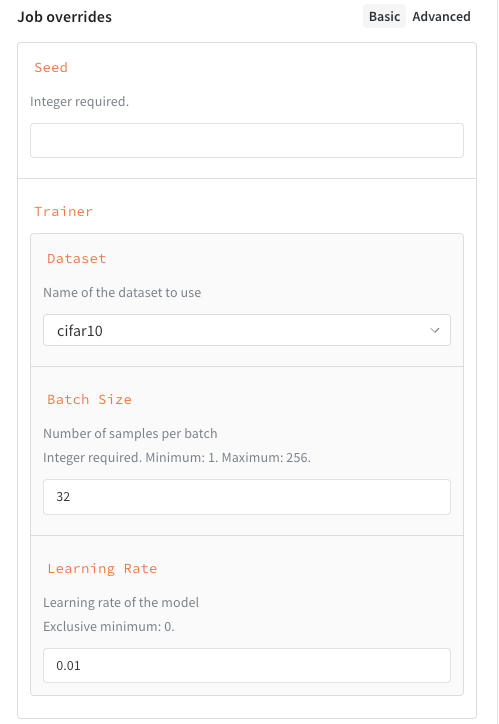
Beyond filtering which inputs you expose, you can define a schema for a job's inputs to create a custom UI for launching the job. This presents structured fields, validation hints, and dropdowns in the launch drawer instead of freeform text entry. To define a job's schema, include it in the call to `launch.manage_wandb_config()` or `launch.manage_config_file()`. The schema can be either a Python `dict` in the form of a [JSON Schema](https://json-schema.org/understanding-json-schema/reference) or a Pydantic model class.
Job input schemas don't validate inputs. They only define the UI in the launch drawer.
The following example shows a schema with these properties:
* `seed`, an integer.
* `trainer`, a dictionary with some keys specified:
* `trainer.learning_rate`, a float that must be greater than zero.
* `trainer.batch_size`, an integer that must be either 16, 64, or 256.
* `trainer.dataset`, a string that must be either `cifar10` or `cifar100`.
```python theme={null}
schema = {
"type": "object",
"properties": {
"seed": {
"type": "integer"
}
"trainer": {
"type": "object",
"properties": {
"learning_rate": {
"type": "number",
"description": "Learning rate of the model",
"exclusiveMinimum": 0,
},
"batch_size": {
"type": "integer",
"description": "Number of samples per batch",
"enum": [16, 64, 256]
},
"dataset": {
"type": "string",
"description": "Name of the dataset to use",
"enum": ["cifar10", "cifar100"]
}
}
}
}
}
launch.manage_wandb_config(
include=["seed", "trainer"],
exclude=["trainer.private"],
schema=schema,
)
```
In general, the following JSON Schema attributes are supported:
| Attribute | Required | Notes |
| ------------------ | -------- | ---------------------------------------------------------- |
| `type` | Yes | Must be one of `number`, `integer`, `string`, or `object` |
| `title` | No | Overrides the property's display name |
| `description` | No | Gives the property helper text |
| `enum` | No | Creates a dropdown select instead of a freeform text entry |
| `minimum` | No | Allowed only if `type` is `number` or `integer` |
| `maximum` | No | Allowed only if `type` is `number` or `integer` |
| `exclusiveMinimum` | No | Allowed only if `type` is `number` or `integer` |
| `exclusiveMaximum` | No | Allowed only if `type` is `number` or `integer` |
| `properties` | No | If `type` is `object`, defines nested configurations |
The following example shows a schema with these properties:
* `seed`, an integer.
* `trainer`, a schema with some sub-attributes specified:
* `trainer.learning_rate`, a float that must be greater than zero.
* `trainer.batch_size`, an integer that must be between 1 and 256, inclusive.
* `trainer.dataset`, a string that must be either `cifar10` or `cifar100`.
```python theme={null}
class DatasetEnum(str, Enum):
cifar10 = "cifar10"
cifar100 = "cifar100"
class Trainer(BaseModel):
learning_rate: float = Field(gt=0, description="Learning rate of the model")
batch_size: int = Field(ge=1, le=256, description="Number of samples per batch")
dataset: DatasetEnum = Field(title="Dataset", description="Name of the dataset to use")
class Schema(BaseModel):
seed: int
trainer: Trainer
launch.manage_wandb_config(
include=["seed", "trainer"],
exclude=["trainer.private"],
schema=Schema,
)
```
You can also use an instance of the class:
```python theme={null}
t = Trainer(learning_rate=0.01, batch_size=32, dataset=DatasetEnum.cifar10)
s = Schema(seed=42, trainer=t)
launch.manage_wandb_config(
include=["seed", "trainer"],
exclude=["trainer.private"],
input_schema=s,
)
```
Adding a job input schema creates a structured form in the launch drawer for users launching the job.