> ## Documentation Index
> Fetch the complete documentation index at: https://docs.wandb.ai/llms.txt
> Use this file to discover all available pages before exploring further.
# On a local instance, which files should I check when I have issues?
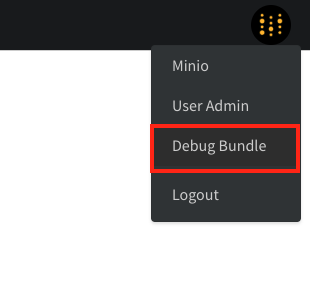
When you troubleshoot issues on a W\&B local instance, start by collecting the **Debug Bundle**. The bundle contains the logs and system information you need to diagnose problems.
To download the bundle, an admin opens the `/system-admin` page, selects the W\&B icon in the top-right corner, and then chooses **Debug Bundle**.
 ***
[Administrator](/support/models/tags/administrator)
***
[Administrator](/support/models/tags/administrator)