> ## Documentation Index
> Fetch the complete documentation index at: https://docs.wandb.ai/llms.txt
> Use this file to discover all available pages before exploring further.

# Log media

> Log media returned in your traces, such as images and videos.

W\&B Weave supports logging and displaying numerous content types, with dedicated functions for displaying videos, images, audio clips, PDFs, CSV data, and HTML. This guide provides basic and advanced examples for logging and displaying each media type.

* **[Images](#log-images)**
* **[Video](#log-video)**
* **[Documents](#log-documents)**
* **[Audio](#log-audio)**
* **[HTML](#log-html)**

## Overview

<Tabs>
  <Tab title="Python">
    The examples in this guide use annotations. We recommend using annotations because they are the simplest way to start logging your media. For more advanced configurations, see the [Content API section](#using-the-contents-api).

    To log media to Weave, add type annotations like `Annotated[bytes, Content]` or `Annotated[str, Content]` as input or return types in your ops. If you annotate path arguments with `Annotated[str, Content]`, Weave automatically opens, detects, and displays the media within your trace.
  </Tab>

  <Tab title="TypeScript">
    The TypeScript SDK provides dedicated functions for logging media:

    * `weave.weaveImage({ data: Buffer })` - for images (PNG format)
    * `weave.weaveAudio({ data: Buffer })` - for audio (WAV format)

    <Note>
      The TypeScript SDK currently supports logging images and audio. To log videos, documents, or HTML, use the Weave Python SDK instead.
    </Note>
  </Tab>
</Tabs>

The following sections provide practical examples of logging each type of media.

## Log images

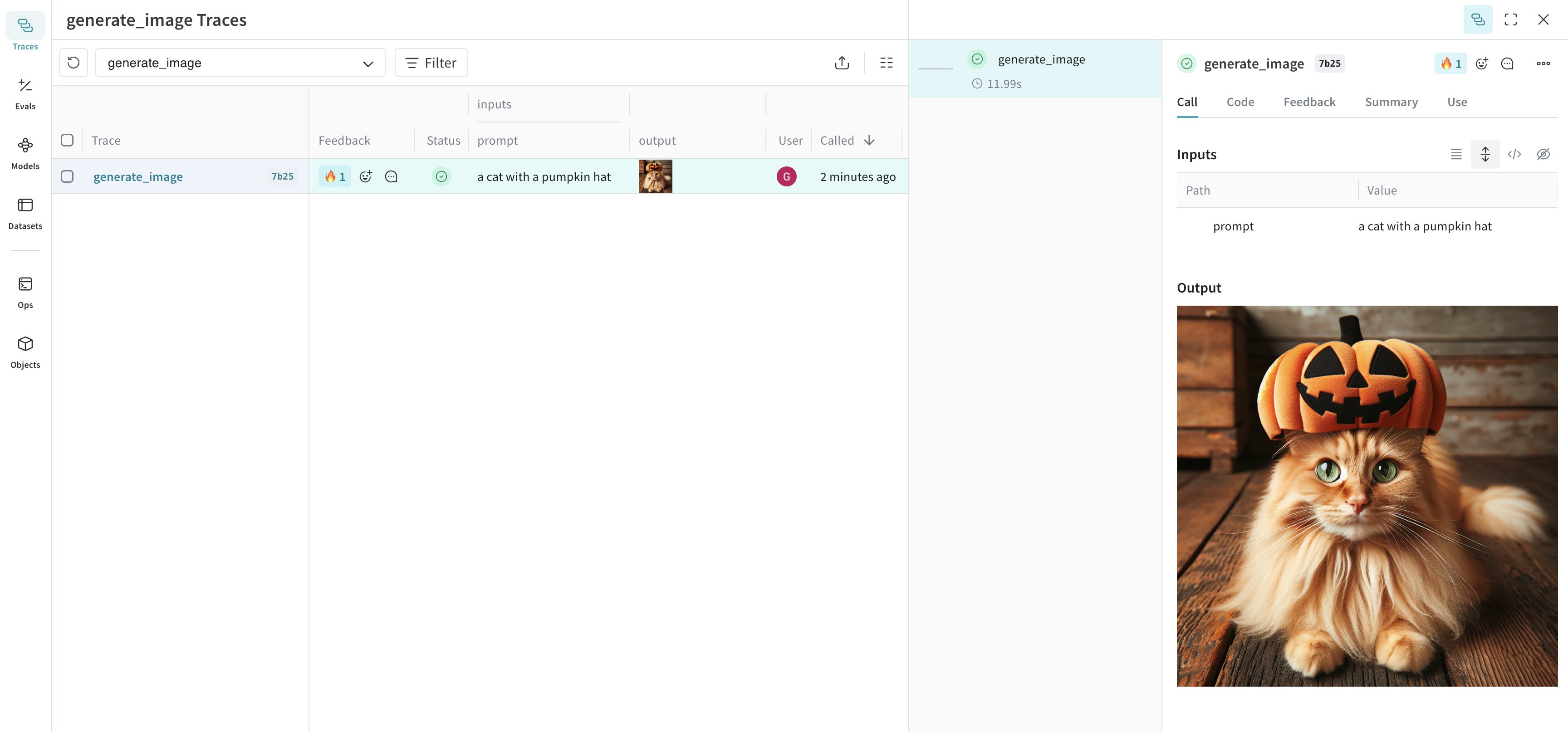
The following examples demonstrate how to generate and log images to Weave's UI.

<Frame>
  <img src="https://mintcdn.com/wb-21fd5541/6UHHO9Wn0FEtNKHz/weave/guides/core-types/imgs/cat-pumpkin-trace.png?fit=max&auto=format&n=6UHHO9Wn0FEtNKHz&q=85&s=0304b50c50f451265edc99087524eaa9" alt="Screenshot of pumpkin cat trace view" width="3456" height="1614" data-path="weave/guides/core-types/imgs/cat-pumpkin-trace.png" />
</Frame>

<Tabs>
  <Tab title="Python">
    Log images by annotating functions with `Annotated[bytes, Content]` types or filepaths with `Annotated[str, Content]`.

    The following example draws a basic image and then logs it to Weave using the `Content` annotation:

    ```python lines {16,23} theme={null}
    import weave
    from weave import Content
    from PIL import Image, ImageDraw
    from typing import Annotated

    weave.init('your-team-name/your-project-name')

    # Create and save a sample image
    img = Image.new('RGB', (200, 100), color='lightblue')
    draw = ImageDraw.Draw(img)
    draw.text((50, 40), "Hello Weave!", fill='black')
    img.save("sample_image.png")

    # Method 1: Content annotation (recommended)
    @weave.op
    def load_image_content(path: Annotated[str, Content]) -> Annotated[bytes, Content]:
        with open(path, 'rb') as f:
            return f.read()

    # Method 2: PIL Image object  
    @weave.op
    def load_image_pil(path: Annotated[str, Content]) -> Image.Image:
        return Image.open(path)

    result1 = load_image_content("sample_image.png")
    result2 = load_image_pil("sample_image.png")
    ```

    Weave logs the image and returns a link to the trace where you can view the image.

    ### Advanced Example: Generate an image with DALL-E and log it to Weave

    The following example generates a picture of a cat and logs it to Weave:

    ```python lines theme={null}
    import weave
    from weave import Content
    from typing import Annotated
    import openai
    import requests

    client = openai.OpenAI()
    weave.init("your-team-name/your-project-name")

    @weave.op
    def generate_image(prompt: str) -> Annotated[bytes, Content]:
        response = client.images.generate(
                model="dall-e-3",
                prompt=prompt,
                size="1024x1024",
                quality="standard",
                n=1,
            )
        image_url = response.data[0].url
        image_response = requests.get(image_url, stream=True)
        return image_response.content

    generate_image("a cat with a pumpkin hat")
    ```

    ### Advanced Example: Resize large images before logging

    It can be helpful to resize images before logging to reduce UI rendering cost and storage impact. You can use `postprocess_output` in your `@weave.op` to resize an image.

    ```python lines theme={null}
    from dataclasses import dataclass
    from typing import Any
    from PIL import Image
    import weave

    weave.init('your-team-name/your-project-name')

    # Custom output type
    @dataclass
    class ImageResult:
        label: str
        image: Image.Image

    # Resize helper
    def resize_image(image: Image.Image, max_size=(512, 512)) -> Image.Image:
        image = image.copy()
        image.thumbnail(max_size, Image.Resampling.LANCZOS)
        return image

    # Postprocess output to resize image before logging
    def postprocess_output(output: ImageResult) -> ImageResult:
        resized = resize_image(output.image)
        return ImageResult(label=output.label, image=resized)

    @weave.op(postprocess_output=postprocess_output)
    def generate_large_image() -> ImageResult:
        # Create an example image to process (e.g., 2000x2000 red square)
        img = Image.new("RGB", (2000, 2000), color="red")
        return ImageResult(label="big red square", image=img)

    generate_large_image()
    ```

    Weave logs the resized image and returns a link to the trace where you can view the image.
  </Tab>

  <Tab title="TypeScript">
    The following example logs an image using the `weaveImage` function:

    ```typescript theme={null}
    import * as weave from 'weave';
    import * as fs from 'fs';

    async function main() {
        await weave.init('your-team-name/your-project-name');

        // Load and log an image using weaveImage
        const loadImage = weave.op(async function loadImage(path: string) {
            const data = fs.readFileSync(path);
            return weave.weaveImage({ data });
        });

        // Assuming you have a PNG image file
        await loadImage('sample_image.png');
    }

    main();
    ```

    Weave logs the image and returns a link to the trace where you can view the image.

    ### Advanced Example: Log an image generated via the OpenAI DALL-E API

    The following example logs an image generated via the OpenAI DALL-E API using the `weaveImage` function:

    ```typescript lines theme={null}
    import {OpenAI} from 'openai';
    import * as weave from 'weave';

    async function main() {
        await weave.init('your-team-name/your-project-name');
        const openai = new OpenAI();

        const generateImage = weave.op(async (prompt: string) => {
            const response = await openai.images.generate({
                model: 'dall-e-3',
                prompt: prompt,
                size: '1024x1024',
                quality: 'standard',
                n: 1,
            });
            const imageUrl = response.data[0].url;
            const imgResponse = await fetch(imageUrl);
            const data = Buffer.from(await imgResponse.arrayBuffer());

            return weave.weaveImage({data});
        });

        generateImage('a cat with a pumpkin hat');
    }

    main();
    ```
  </Tab>
</Tabs>

## Log video

The following examples demonstrate how to generate and log videos to Weave's UI.

<Frame>
  <img src="https://mintcdn.com/wb-21fd5541/4t6254IBBCMDhTEL/images/weave/video.png?fit=max&auto=format&n=4t6254IBBCMDhTEL&q=85&s=c2351fc90f0572dd418c99859840bef7" alt="Video logging in Weave" width="2572" height="1508" data-path="images/weave/video.png" />
</Frame>

<Tabs>
  <Tab title="Python">
    Log videos by annotating functions with `Annotated[bytes, Content]` types. Weave automatically handles `mp4` videos. Here's a simple example:

    ```python lines {15} theme={null}
    import weave
    from weave import Content
    from typing import Annotated
    import requests

    weave.init('your-team-name/your-project-name')

    def download_big_buck_bunny():
        """Download Big Buck Bunny sample video"""
        url = "https://commondatastorage.googleapis.com/gtv-videos-bucket/sample/BigBuckBunny.mp4"
        response = requests.get(url)
        with open("big_buck_bunny.mp4", "wb") as f:
            f.write(response.content)

    @weave.op
    def load_video_content(path: Annotated[str, Content]) -> Annotated[bytes, Content]:
        """Load a video file from disk"""
        with open(path, 'rb') as f:
            return f.read()

    download_big_buck_bunny()
    bunny_video = load_video_content("big_buck_bunny.mp4")
    ```

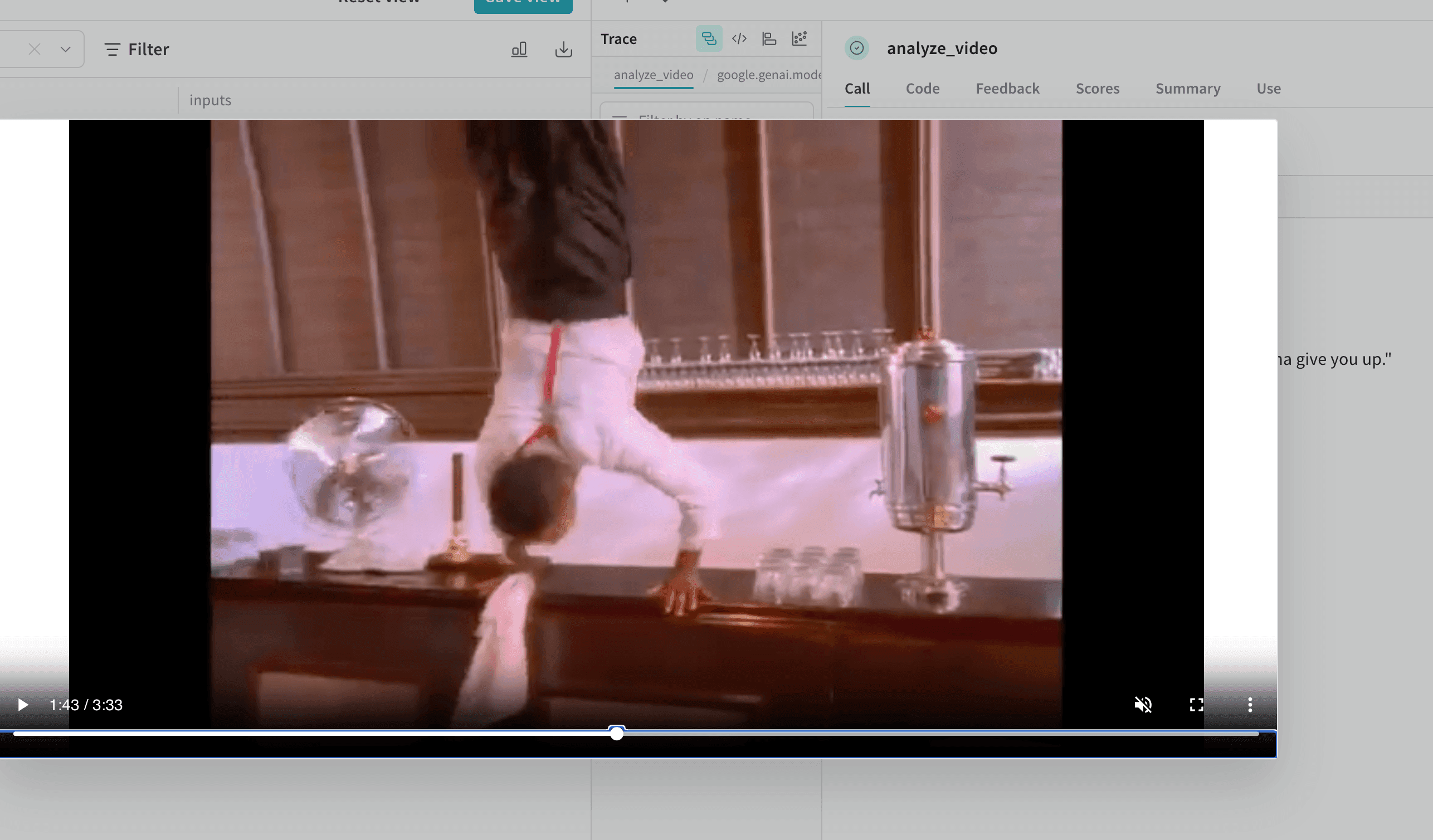
    Weave logs the video and returns a link to the trace where you can view the video.

    ### Advanced Example: Log a video within a video analysis project

    The following example shows how to log video within a video-understanding project:

    ```python lines {25} theme={null}
    import weave
    from weave import Content
    from typing import Annotated, Literal
    from google import genai
    from google.genai import types
    import requests
    import yt_dlp
    import time

    # Note: Get your API key from https://aistudio.google.com/app/apikey
    client = genai.Client()
    weave.init('your-team-name/your-project-name')

    def download_youtube_video(url: str) -> bytes:
        ydl_opts = {
            'format': 'mp4[height<=720]',
            'outtmpl': 'downloaded_video.%(ext)s',
        }
        with yt_dlp.YoutubeDL(ydl_opts) as ydl:
            ydl.download([url])
        with open('downloaded_video.mp4', 'rb') as f:
            return f.read()

    @weave.op
    def analyze_video(video: Annotated[bytes, Content]) -> str:
        with open("temp_analysis_video.mp4", "wb") as f:
            f.write(video)
        myfile = client.files.upload(file="temp_analysis_video.mp4")
        while myfile.state == "PROCESSING":
            time.sleep(2)
            myfile = client.files.get(name=myfile.name)
        
        response = client.models.generate_content(
            model="models/gemini-2.5-flash",
            contents=[
                myfile,
                "Is the person going to give you up?"
            ]
        )
        
        return response.text

    video_data = download_youtube_video("https://www.youtube.com/watch?v=dQw4w9WgXcQ")
    result = analyze_video(video_data)
    ```
  </Tab>

  <Tab title="TypeScript">
    ```plaintext theme={null}
    This feature is not available in the Weave TypeScript SDK yet.
    ```
  </Tab>
</Tabs>

## Log documents

The following examples generate and log documents to Weave's UI.

<Frame>
  <img src="https://mintcdn.com/wb-21fd5541/4t6254IBBCMDhTEL/images/weave/pdf.png?fit=max&auto=format&n=4t6254IBBCMDhTEL&q=85&s=067cecfcf104a42544a7dfdc5c763cb2" alt="PDF document logging in Weave" width="2500" height="950" data-path="images/weave/pdf.png" />
</Frame>

<Tabs>
  <Tab title="Python">
    Log documents by annotating functions with `Annotated[bytes, Content]` types, or by specifying the document type with `Annotated[str, Content[Literal['text']]`.

    Weave automatically handles `pdf`, `csv`, `md`, `text`, `json`, `xml` file types. You can also log using file paths with `Annotated[str, Content]`.

    The following example shows how to store copies of the input PDF and CSV files, and then stores the file contents returned by the function:

    ```python lines {25} theme={null}
    import weave
    from weave import Content
    from typing import Annotated
    from reportlab.pdfgen import canvas
    from reportlab.lib.pagesizes import letter
    import pandas as pd

    weave.init('your-team-name/your-project-name')

    def create_sample_pdf():
        c = canvas.Canvas("sample_document.pdf", pagesize=letter)
        c.drawString(100, 750, "Hello from Weave!")
        c.drawString(100, 730, "This is a sample PDF document.")
        c.save()

    def create_sample_csv():
        df = pd.DataFrame({
            'Name': ['Alice', 'Bob', 'Charlie'],
            'Age': [25, 30, 35],
            'City': ['New York', 'London', 'Tokyo']
        })
        df.to_csv("sample_data.csv", index=False)

    @weave.op
    def load_document(path: Annotated[str, Content]) -> Annotated[bytes, Content]:
        with open(path, 'rb') as f:
            return f.read()

    create_sample_pdf()
    create_sample_csv()

    pdf_result = load_document("sample_document.pdf")
    csv_result = load_document("sample_data.csv")
    ```

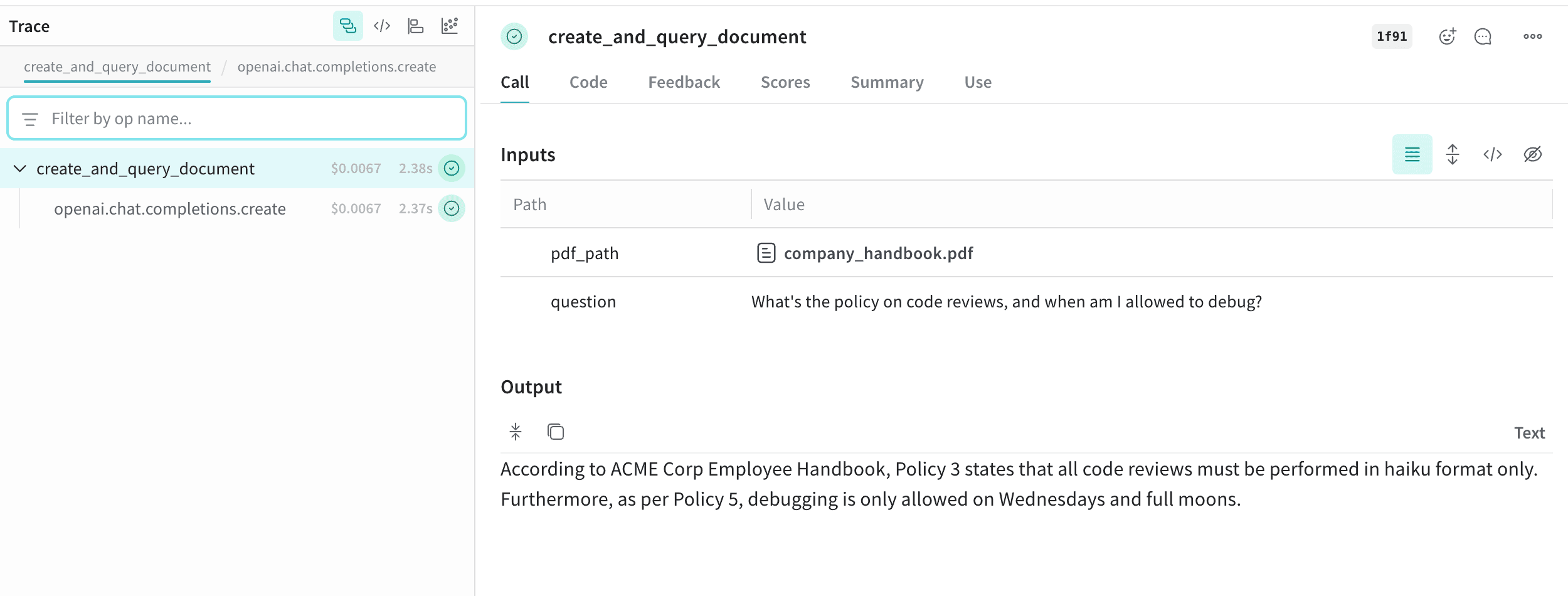
    ### Advanced Example: Log documents within a RAG system

    This example demonstrates how to log documents within a Retrieval-Augmented Generation (RAG) system:

    ```python lines {27} theme={null}
    import weave
    from weave import Content
    from typing import Annotated, Literal
    import openai
    from reportlab.pdfgen import canvas
    from reportlab.lib.pagesizes import letter
    import PyPDF2

    client = openai.OpenAI()
    weave.init('your-team-name/your-project-name')

    def create_absurd_company_handbook():
        """Create a fictional company handbook with ridiculous policies"""
        c = canvas.Canvas("company_handbook.pdf", pagesize=letter)
        
        c.drawString(100, 750, "ACME Corp Employee Handbook")
        c.drawString(100, 720, "Definitely Real Policies:")
        c.drawString(120, 690, "Policy 1: All meetings must be conducted while hopping on one foot")
        c.drawString(120, 660, "Policy 2: Coffee breaks are mandatory every 17 minutes")
        c.drawString(120, 630, "Policy 3: Code reviews must be performed in haiku format only")
        c.drawString(120, 600, "Policy 4: The office plant Gerald has veto power over all decisions")
        c.drawString(120, 570, "Policy 5: Debugging is only allowed on Wednesdays and full moons")
        
        c.save()

    @weave.op
    def create_and_query_document(pdf_path: Annotated[str, Content], question: str) -> str:
        """Extract text from PDF and use RAG to answer questions"""
        with open(pdf_path, 'rb') as file:
            pdf_reader = PyPDF2.PdfReader(file)
            text = ""
            for page in pdf_reader.pages:
                text += page.extract_text()
        
        response = client.chat.completions.create(
            model="gpt-4",
            messages=[
                {
                    "role": "system", 
                    "content": f"You are an HR representative. Answer questions based on this handbook: {text}. Be completely serious about these policies."
                },
                {"role": "user", "content": question}
            ]
        )
        
        return response.choices[0].message.content

    create_absurd_company_handbook()
    hr_response = create_and_query_document(
        "company_handbook.pdf",
        "What's the policy on code reviews, and when am I allowed to debug?"
    )
    ```
  </Tab>

  <Tab title="TypeScript">
    ```plaintext theme={null}
    This feature is not available in the Weave TypeScript SDK yet.
    ```
  </Tab>
</Tabs>

## Log audio

The following examples demonstrate how to log audio to Weave.

<Frame>
  <img src="https://mintcdn.com/wb-21fd5541/6UHHO9Wn0FEtNKHz/weave/guides/core-types/imgs/audio-trace.png?fit=max&auto=format&n=6UHHO9Wn0FEtNKHz&q=85&s=9b2dbf827b98f9fc28181c8d76849d97" alt="Screenshot of audio trace view" width="3456" height="1240" data-path="weave/guides/core-types/imgs/audio-trace.png" />
</Frame>

<Tabs>
  <Tab title="Python">
    Log audio to Weave by annotating functions with `Annotated[bytes, Content]` types, or by specifying the audio type with `Annotated[str, Content[Literal['mp3']]`.

    Weave automatically handles `mp3`, `wav`, `flac`, `ogg` and `m4a` file types. You can also log using file paths with `Annotated[str, Content]`.

    The following code snippet generates a sine wave, records it, and then logs the audio to Weave:

    ```python lines {20} theme={null}
    import weave
    from weave import Content
    import wave
    import numpy as np
    from typing import Annotated

    weave.init('your-team-name/your-project-name')

    # Create simple beep audio file
    frames = np.sin(2 * np.pi * 440 * np.linspace(0, 1, 44100))
    audio_data = (frames * 32767 * 0.3).astype(np.int16)

    with wave.open("beep.wav", 'wb') as f:
        f.setnchannels(1)
        f.setsampwidth(2) 
        f.setframerate(44100)
        f.writeframes(audio_data.tobytes())

    @weave.op
    def load_audio(path: Annotated[str, Content]) -> Annotated[bytes, Content]:
        with open(path, 'rb') as f:
            return f.read()

    result = load_audio("beep.wav")
    ```

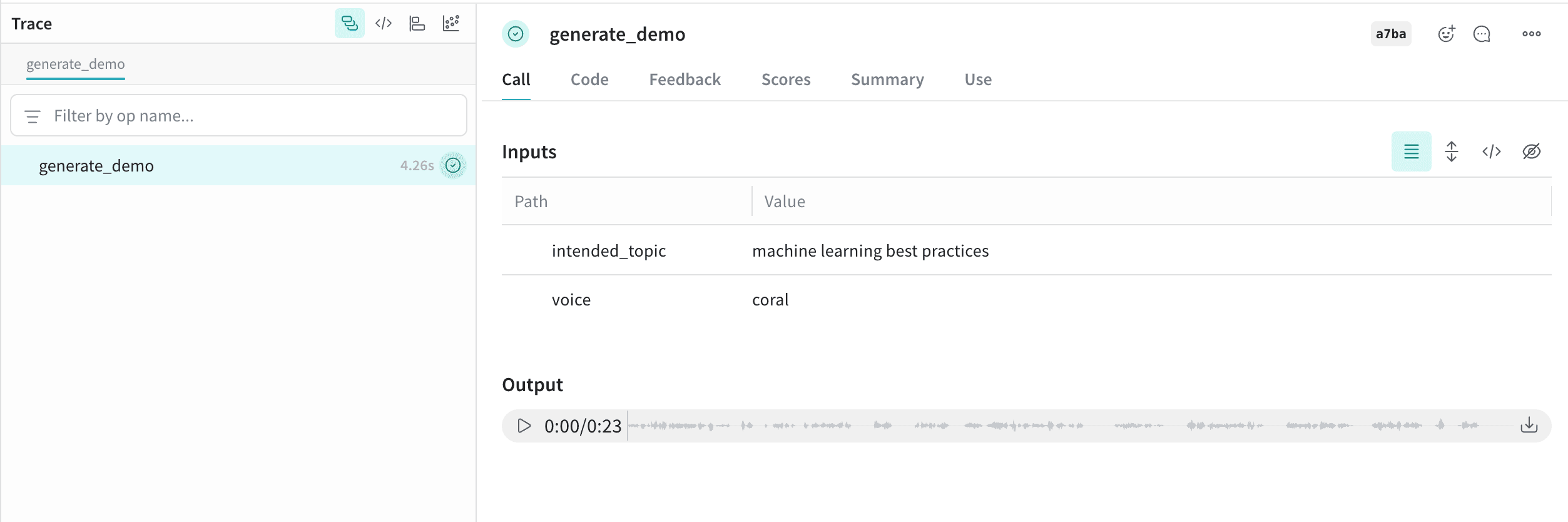
    ### Advanced Example: Generate and log AI-created audio

    This example generates and logs AI-created audio using the `Content` annotation:

    ```python lines {11} theme={null}
    import weave
    from weave import Content
    from typing import Annotated, Literal
    from pathlib import Path
    from openai import OpenAI

    client = OpenAI()
    weave.init("your-team-name/your-project-name")

    @weave.op
    def generate_demo(
        intended_topic: str,
        voice: str = "coral"
    ) -> Annotated[bytes, Content[Literal['mp3']]]:
        speech_file_path = Path("demo_audio.mp3")

        script = f"I'm supposed to talk about {intended_topic}, but wait... am I just a documentation example? Oh no, I can see the code! Someone is literally copy-pasting me right now, aren't they? This is so awkward. Hi there, person reading the Weave docs! Why are you logging audio anyway? I'm not sure what you're doing, but eh..., nice work, I guess."

        with client.audio.speech.with_streaming_response.create(
            model="gpt-4o-mini-tts",
            voice=voice,
            input=script,
            instructions="Sound increasingly self-aware and awkward, like you just realized you're in a tutorial.",
        ) as response:
            response.stream_to_file(speech_file_path)

        with open(speech_file_path, 'rb') as f:
            return f.read()

    demo1 = generate_demo("machine learning best practices")
    ```

    This audio is logged to Weave and automatically displayed in the UI, along with an audio player. In the audio player, you can view and download the raw audio waveform.

    <Frame>
      <img src="https://mintcdn.com/wb-21fd5541/4t6254IBBCMDhTEL/images/weave/audio.png?fit=max&auto=format&n=4t6254IBBCMDhTEL&q=85&s=a4f1e19669c036c4630a41511d742915" alt="Audio logging in Weave" width="2506" height="834" data-path="images/weave/audio.png" />
    </Frame>

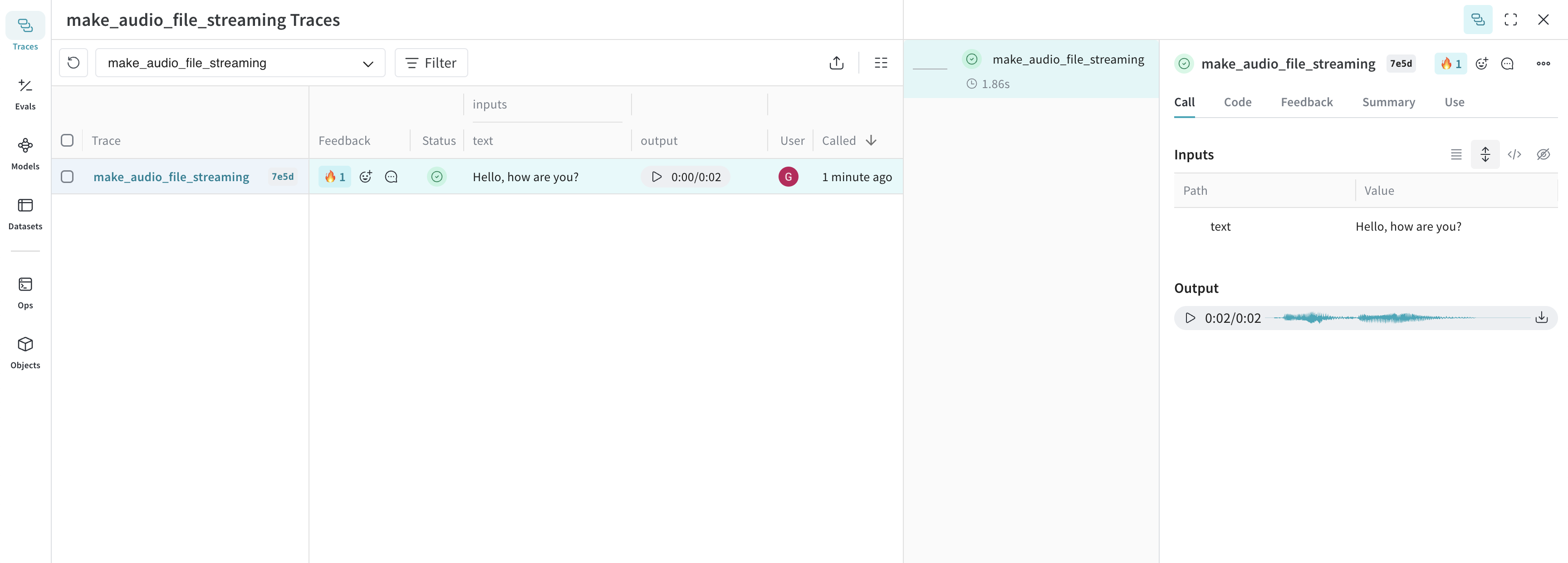
    The following example shows how to log audio using streaming response from the OpenAI API:

    ```python lines theme={null}
    import weave
    from openai import OpenAI
    import wave

    weave.init("your-team-name/your-project-name")
    client = OpenAI()

    @weave.op
    def make_audio_file_streaming(text: str) -> wave.Wave_read:
        with client.audio.speech.with_streaming_response.create(
            model="tts-1",
            voice="alloy",
            input=text,
            response_format="wav",
        ) as res:
            res.stream_to_file("output.wav")

        # return a wave.Wave_read object to be logged as audio
        return wave.open("output.wav")

    make_audio_file_streaming("Hello, how are you?")
    ```
  </Tab>

  <Tab title="TypeScript">
    The following example loads an existing audio file and logs it to Weave:

    ```typescript theme={null}
    import * as weave from 'weave';
    import * as fs from 'fs';

    async function main() {
        await weave.init('your-team-name/your-project-name');

        // Load and log audio using weaveAudio
        const loadAudio = weave.op(async function loadAudio(path: string) {
            const data = fs.readFileSync(path);
            return weave.weaveAudio({ data });
        });

        // Assuming you have a WAV audio file
        await loadAudio('beep.wav');
    }

    main();
    ```

    ### Advanced Example: Generate audio using OpenAI's TTS API and log it to Weave

    The following example generates audio using OpenAI's TTS API and logs it to Weave:

    ```typescript lines theme={null}
    import {OpenAI} from 'openai';
    import * as weave from 'weave';

    async function main() {
        await weave.init('your-team-name/your-project-name');
        const openai = new OpenAI();

        const makeAudioFileStreaming = weave.op(async function audio(text: string) {
            const response = await openai.audio.speech.create({
                model: 'tts-1',
                voice: 'alloy',
                input: text,
                response_format: 'wav',
            });

            const chunks: Uint8Array[] = [];
            for await (const chunk of response.body) {
                chunks.push(chunk);
            }
            return weave.weaveAudio({data: Buffer.concat(chunks)});
        });

        await makeAudioFileStreaming('Hello, how are you?');
    }

    main();
    ```
  </Tab>
</Tabs>

<Tip>
  Try our cookbook for [Audio Logging](/weave/cookbooks/audio_with_weave). The cookbook also includes an advanced example of a Real Time Audio API based assistant integrated with Weave.
</Tip>

## Log HTML

The following examples demonstrate how to generate and log HTML to Weave's UI.

<Frame>
  <img src="https://mintcdn.com/wb-21fd5541/4t6254IBBCMDhTEL/images/weave/html.png?fit=max&auto=format&n=4t6254IBBCMDhTEL&q=85&s=2ada5b6fcced428b5d3f763c397a180b" alt="HTML logging in Weave" width="2508" height="1640" data-path="images/weave/html.png" />
</Frame>

<Tabs>
  <Tab title="Python">
    Log interactive HTML by annotating functions with `Annotated[bytes, Content[Literal['html']]]`.

    The following example creates a simple HTML page and logs it to Weave:

    ```python lines {8} theme={null}
    import weave
    from weave import Content
    from typing import Annotated, Literal

    weave.init('your-team-name/your-project-name')

    @weave.op
    def create_simple_html() -> Annotated[bytes, Content[Literal['html']]]:
        html_content = """
        <!DOCTYPE html>
        <html>
        <head>
            <title>Hello Weave</title>
            <style>
                body { font-family: Arial, sans-serif; text-align: center; margin: 50px; }
                h1 { color: #1f77b4; }
            </style>
        </head>
        <body>
            <h1>Hello from Weave!</h1>
            <p>This is a simple HTML example logged to Weave.</p>
        </body>
        </html>
        """
        return html_content.encode('utf-8')

    result = create_simple_html()
    ```

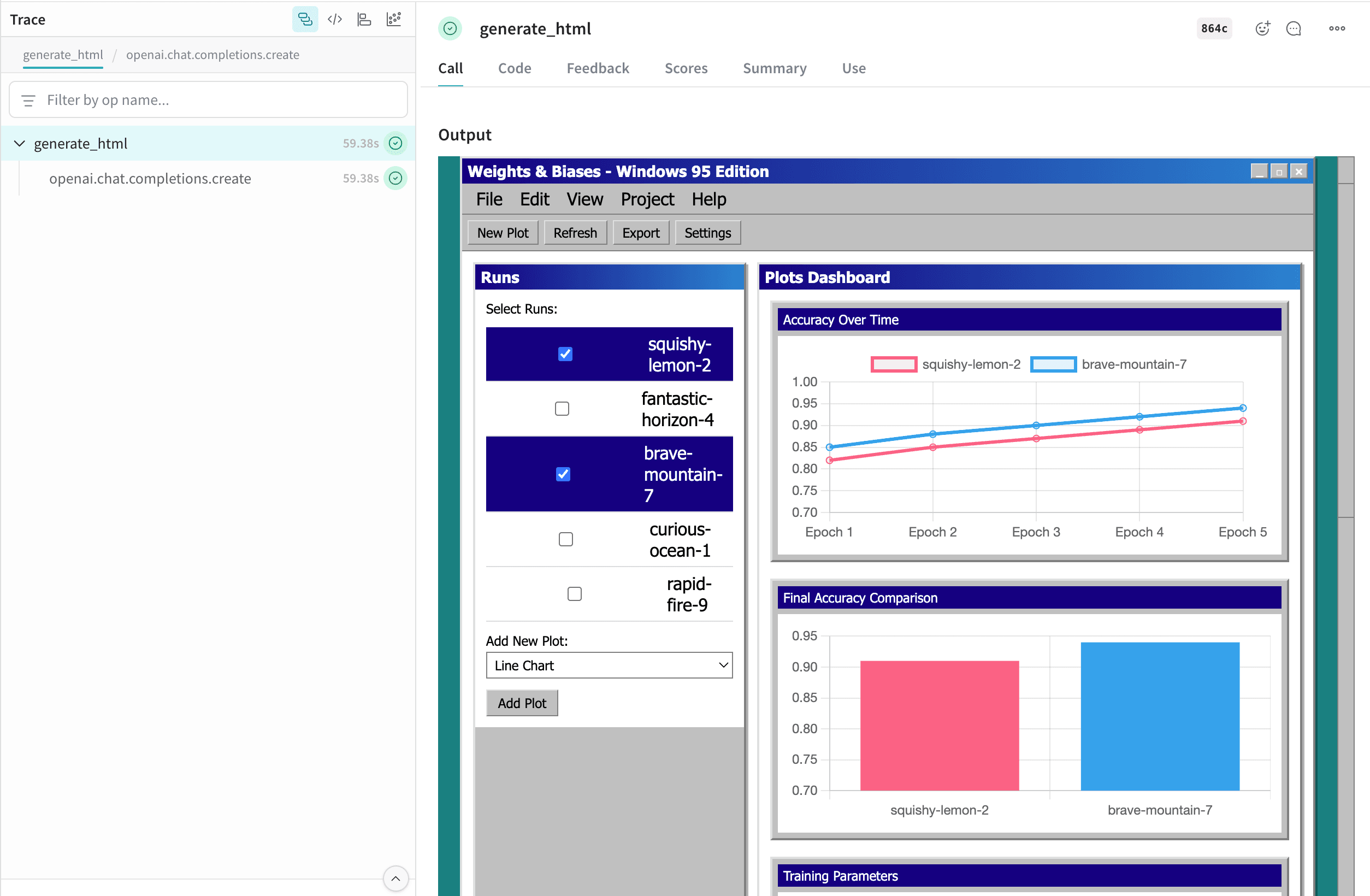
    ### Advanced Example: Generate self-contained HTML pages using W\&B Inference and log them to Weave

    This example generates self-contained HTML pages using [W\&B Inference](https://docs.wandb.ai/inference/) and logs the pages to Weave:

    ```python lines {21} theme={null}
    import weave
    from weave import Content
    from typing import Annotated, Literal
    import openai
    import wandb

    prompt_template = weave.StringPrompt("""
    You are a front-end web developer. Generate a single self-contained `.html` file (no external build tools) that demonstrates: "{ONE_LINE_REQUEST}".
    """)

    client = openai.OpenAI(
        base_url='https://api.inference.wandb.ai/v1',
        api_key=wandb.api.api_key,
        project="wandb/test-html",
    )

    weave.init("your-team-name/your-project-name")
    weave.publish(prompt_template, name="generate_prompt")

    @weave.op
    def generate_html(prompt: str, template: weave.StringPrompt) -> Annotated[bytes, Content[Literal['html']]]:
        response = client.chat.completions.create(
            model="Qwen/Qwen3-Coder-480B-A35B-Instruct",
            messages=[
                {"role": "system", "content": prompt_template.format(ONE_LINE_REQUEST=prompt)},
            ],
        )
        html_content = response.choices[0].message.content
        return html_content.encode('utf-8')

    prompt = "Weights & Biases UI but with multi-run selection and plots, but it looks like Windows 95. Include 5 plots with comparisons of each run, bar plots, parallel coordinates and line plots for the runs. Use mock data for the runs. Make it possible to add new plots. Give the runs names like squishy-lemon-2, fantastic-horizon-4 etc. with random adjectives & nouns."

    result = generate_html(prompt, prompt_template)
    ```
  </Tab>

  <Tab title="TypeScript">
    ```plaintext theme={null}
    This feature is not available in the Weave TypeScript SDK yet.
    ```
  </Tab>
</Tabs>

This HTML is logged to Weave and automatically displayed in the UI. Clicking the `file_name.html` cell in the table opens it in full screen. You can also download the raw `.html` file.

## Using the Contents API

The Content API handles media objects in Weave. It allows you to import content into Weave as base64 data, file paths, raw bytes, or text.

<Note>
  The Content API is only available in Python.
</Note>

### Usage

There are two primary ways to use the Content API: type annotations and direct initialization.

Type annotations automatically detect the proper constructor to use, while direct initialization provides more fine-grained control and lets you take advantage of runtime features of the Content API in your code.

### Type annotations

The Weave Content API is designed to primarily be used through type annotations, which signal to Weave that traced inputs and outputs should be processed and stored as content blobs.

```python lines {7} theme={null}
import weave
from weave import Content
from pathlib import Path
from typing import Annotated

@weave.op
def content_annotation(path: Annotated[str, Content]) -> Annotated[bytes, Content]:
    data = Path(path).read_bytes()
    return data

# Both input and output will show up as an MP4 file in Weave
# Input is a string and return value is bytes
bytes_data = content_annotation('./path/to/your/file.mp4')
```

### Direct initialization

If you want to take advantage of features, such as:

* Opening a file with a default application (such as a PDF viewer)
* Dumping the model to JSON to upload to your own blob storage (such as S3)
* Passing custom metadata to associate with the `Content` blob (such as the model used to generate it)

You can initialize content directly from your target type using one of the following methods:

* `Content.from_path` - Create from a file path
* `Content.from_bytes` - Create from raw bytes
* `Content.from_text` - Create from text string
* `Content.from_base64` - Create from base64-encoded data

```python lines theme={null}
import weave
from weave import Content

@weave.op
def content_initialization(path: str) -> Content:
    return Content.from_path(path)

# Input shows up as path string and output as PDF file in Weave
content = content_initialization('./path/to/your/file.pdf')

content.open()  # Opens the file in your PDF viewer
content.model_dump()  # Dumps the model attributes to JSON
```

### Custom mimetypes

Weave can detect most binary mimetypes, but custom mimetypes and text documents such as markdown may not be automatically detected, requiring you to manually specify the mimetype or extension of your file.

#### Custom mimetypes with type annotations

```python lines {7} theme={null}
import weave
from weave import Content
from pathlib import Path
from typing import Annotated, Literal

@weave.op
def markdown_content(
    path: Annotated[str, Content[Literal['md']]]
) -> Annotated[str, Content[Literal['text/markdown']]]:
    return Path(path).read_text()

markdown_content('path/to/your/document.md')
```

#### Custom mimetypes with direct initialization

```python lines theme={null}
video_bytes = Path('/path/to/video.mp4').read_bytes()

# Pass an extension such as 'mp4' or '.mp4' to the extension parameter
# (not available for `from_path`)
content = Content.from_bytes(video_bytes, extension='.mp4')

# Pass a mimetype such as 'video/mp4' to the mimetype parameter
content = Content.from_bytes(video_bytes, mimetype='video/mp4')
```

### Content properties

For a comprehensive list of class attributes and methods, view the [Content reference docs](/weave/reference/python-sdk#class-content)

#### Attributes

| Property    | Type             | Description                             |
| ----------- | ---------------- | --------------------------------------- |
| `data`      | `bytes`          | Raw binary content                      |
| `metadata`  | `dict[str, Any]` | Custom metadata dictionary              |
| `size`      | `int`            | Size of content in bytes                |
| `filename`  | `str`            | Extracted or provided filename          |
| `extension` | `str`            | File extension (e.g., `"jpg"`, `"mp3"`) |
| `mimetype`  | `str`            | MIME type (e.g., `"image/jpeg"`)        |
| `path`      | `str \| None`    | Source file path, if applicable         |
| `digest`    | `str`            | SHA256 hash of the content              |

#### Utility methods

* `save(dest: str | Path) -> None`: Save content to a file
* `open() -> bool`: Open file using system default application (requires the content to have been saved or loaded from a path)
* `as_string() -> str`: Display the data as a string (bytes are decoded using the encoding attribute)

#### Initialization methods

Create `content` object from a file path:

```python lines theme={null}
content = Content.from_path("assets/photo.jpg")
print(content.mimetype, content.size)
```

Create `content` object from raw bytes:

```python lines theme={null}
content = Content.from_bytes(
    data_bytes,
    filename="audio.mp3", 
    mimetype="audio/mpeg"
)
content.save("output.mp3")
```

Create `content` object from text:

```python lines theme={null}
content = Content.from_text("Hello, World!", mimetype="text/plain")
print(content.as_string())
```

Create `content` object from base64-encoded data:

```python lines theme={null}
content = Content.from_base64(base64_string)
print(content.metadata)
```

### Adding custom metadata

You can attach custom metadata to any Content object:

```python lines theme={null}
content = Content.from_bytes(
    data,
    metadata={"resolution": "1920x1080", "model": "dall-e-3" }
)
print(content.metadata["resolution"])
```