> ## Documentation Index
> Fetch the complete documentation index at: https://docs.wandb.ai/llms.txt
> Use this file to discover all available pages before exploring further.
# Hugging Face Hub
> Integrate Hugging Face Hub with W&B Weave to track and analyze your machine learning applications
All code samples shown on this page are in Python.
This page explains how to integrate [Hugging Face Hub](https://huggingface.co/) with W\&B Weave to track and analyze your machine learning applications. You'll learn how to log model inferences, monitor function calls, and organize experiments using Weave's tracing and versioning capabilities. By following the examples provided, you can capture valuable insights, debug your applications efficiently, and compare different model configurations—all within the Weave web interface.
**Try Hugging Face Hub with Weave in Google Colab**
Do you want to experiment with Hugging Face Hub and Weave without any of the set up? You can try the code samples shown here as a Jupyter Notebook on Google Colab.
 ## Overview
[Hugging Face Hub](https://huggingface.co/) is a machine learning platform for creators and collaborators, offering a vast collection of pre-trained models and datasets for various projects.
The `huggingface_hub` Python library provides a unified interface to run inference across multiple services for models hosted on the Hub. You can invoke these models using the [`InferenceClient`](https://huggingface.co/docs/huggingface_hub/en/package_reference/inference_client).
Weave will automatically capture traces for [`InferenceClient`](https://huggingface.co/docs/huggingface_hub/en/package_reference/inference_client). To start tracking, calling `weave.init()` and use the library as normal.
## Prerequisites
1. Before you can use `huggingface_hub` with Weave, you must install the necessary libraries, or upgrade to the latest versions. The following command installs or upgrades `huggingface_hub` and `weave` to the latest version if it's already installed, and reduces installation output.
```python lines theme={null}
pip install -U huggingface_hub weave -qqq
```
2. To use inference with a model on the Hugging Face Hub, set your [User Access Token](https://huggingface.co/docs/hub/security-tokens). You can either set the token from your [Hugging Face Hub Settings page](https://huggingface.co/login?next=%2Fsettings%2Ftokens) or programmatically. The following code sample prompts the user to enter their `HUGGINGFACE_TOKEN` and sets the token as an environment variable.
```python lines theme={null}
import os
import getpass
os.environ["HUGGINGFACE_TOKEN"] = getpass.getpass("Enter your Hugging Face Hub Token: ")
```
## Basic tracing
Storing traces of language model applications in a central location is essential during development and production. These traces help with debugging and serve as valuable datasets for improving your application.
Weave automatically captures traces for the [`InferenceClient`](https://huggingface.co/docs/huggingface_hub/en/package_reference/inference_client). To start tracking, initialize Weave by calling `weave.init()`, then use the library as usual.
The following example demonstrates how to log inference calls to the Hugging Face Hub using Weave:
```python lines theme={null}
import weave
from huggingface_hub import InferenceClient
# Initialize Weave
weave.init(project_name="quickstart-huggingface")
# Initialize Hugging Face Inference Client
huggingface_client = InferenceClient(
api_key=os.environ.get("HUGGINGFACE_TOKEN")
)
# Make a chat completion inference call to the Hugging Face Hub with the Llama-3.2-11B-Vision-Instruct model
image_url = "https://cdn.britannica.com/61/93061-050-99147DCE/Statue-of-Liberty-Island-New-York-Bay.jpg"
response = huggingface_client.chat_completion(
model="meta-llama/Llama-3.2-11B-Vision-Instruct",
messages=[
{
"role": "user",
"content": [
{"type": "image_url", "image_url": {"url": image_url}},
{"type": "text", "text": "Describe this image in one sentence."},
],
}
],
max_tokens=500,
seed=42,
)
```
After the code shown above runs, Weave tracks and logs all LLM calls made with the Hugging Face Inference Client. You can view these traces in the Weave web interface.
## Overview
[Hugging Face Hub](https://huggingface.co/) is a machine learning platform for creators and collaborators, offering a vast collection of pre-trained models and datasets for various projects.
The `huggingface_hub` Python library provides a unified interface to run inference across multiple services for models hosted on the Hub. You can invoke these models using the [`InferenceClient`](https://huggingface.co/docs/huggingface_hub/en/package_reference/inference_client).
Weave will automatically capture traces for [`InferenceClient`](https://huggingface.co/docs/huggingface_hub/en/package_reference/inference_client). To start tracking, calling `weave.init()` and use the library as normal.
## Prerequisites
1. Before you can use `huggingface_hub` with Weave, you must install the necessary libraries, or upgrade to the latest versions. The following command installs or upgrades `huggingface_hub` and `weave` to the latest version if it's already installed, and reduces installation output.
```python lines theme={null}
pip install -U huggingface_hub weave -qqq
```
2. To use inference with a model on the Hugging Face Hub, set your [User Access Token](https://huggingface.co/docs/hub/security-tokens). You can either set the token from your [Hugging Face Hub Settings page](https://huggingface.co/login?next=%2Fsettings%2Ftokens) or programmatically. The following code sample prompts the user to enter their `HUGGINGFACE_TOKEN` and sets the token as an environment variable.
```python lines theme={null}
import os
import getpass
os.environ["HUGGINGFACE_TOKEN"] = getpass.getpass("Enter your Hugging Face Hub Token: ")
```
## Basic tracing
Storing traces of language model applications in a central location is essential during development and production. These traces help with debugging and serve as valuable datasets for improving your application.
Weave automatically captures traces for the [`InferenceClient`](https://huggingface.co/docs/huggingface_hub/en/package_reference/inference_client). To start tracking, initialize Weave by calling `weave.init()`, then use the library as usual.
The following example demonstrates how to log inference calls to the Hugging Face Hub using Weave:
```python lines theme={null}
import weave
from huggingface_hub import InferenceClient
# Initialize Weave
weave.init(project_name="quickstart-huggingface")
# Initialize Hugging Face Inference Client
huggingface_client = InferenceClient(
api_key=os.environ.get("HUGGINGFACE_TOKEN")
)
# Make a chat completion inference call to the Hugging Face Hub with the Llama-3.2-11B-Vision-Instruct model
image_url = "https://cdn.britannica.com/61/93061-050-99147DCE/Statue-of-Liberty-Island-New-York-Bay.jpg"
response = huggingface_client.chat_completion(
model="meta-llama/Llama-3.2-11B-Vision-Instruct",
messages=[
{
"role": "user",
"content": [
{"type": "image_url", "image_url": {"url": image_url}},
{"type": "text", "text": "Describe this image in one sentence."},
],
}
],
max_tokens=500,
seed=42,
)
```
After the code shown above runs, Weave tracks and logs all LLM calls made with the Hugging Face Inference Client. You can view these traces in the Weave web interface.
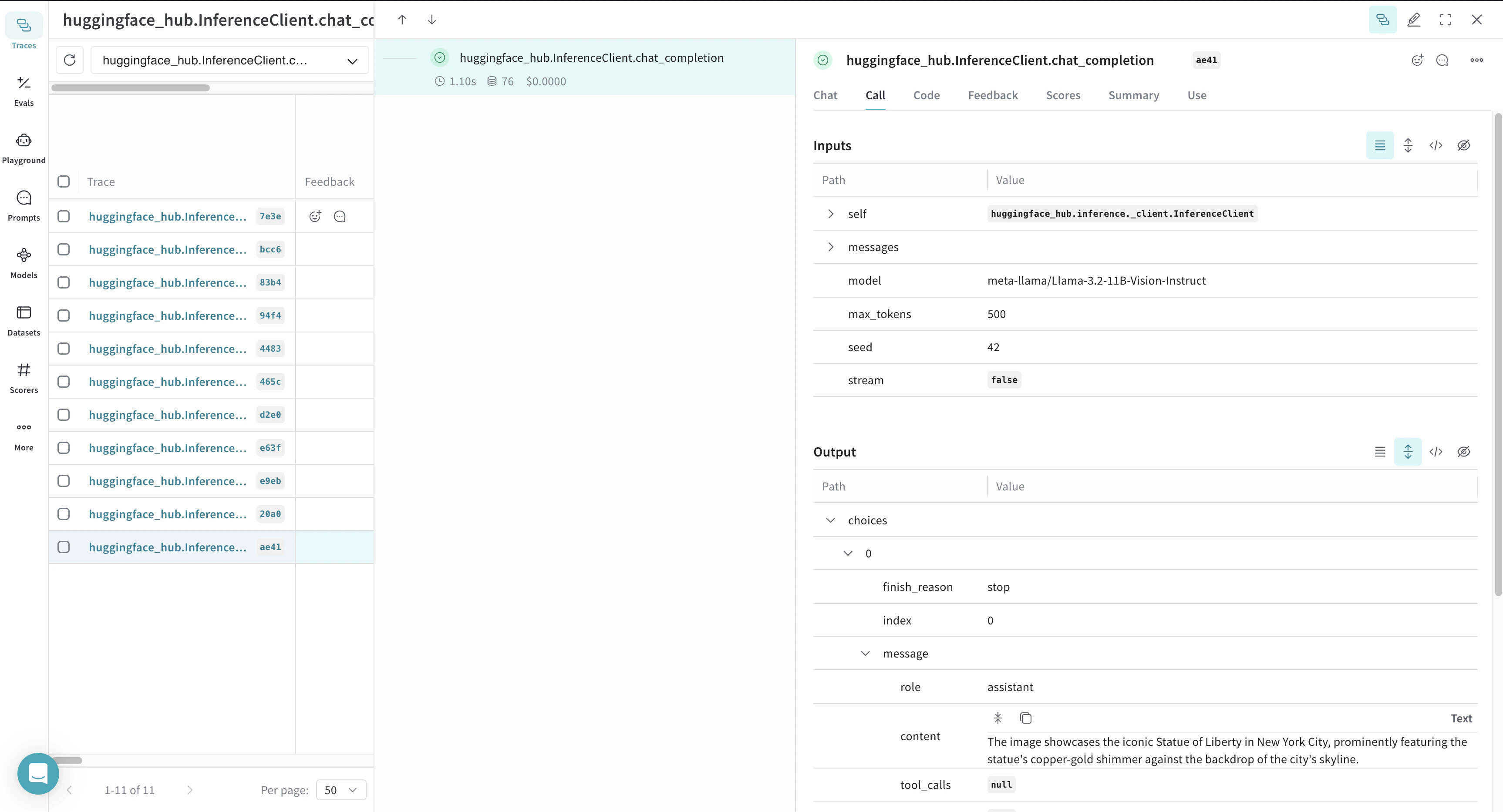 Weave logs each inference call, providing details about inputs, outputs, and metadata.
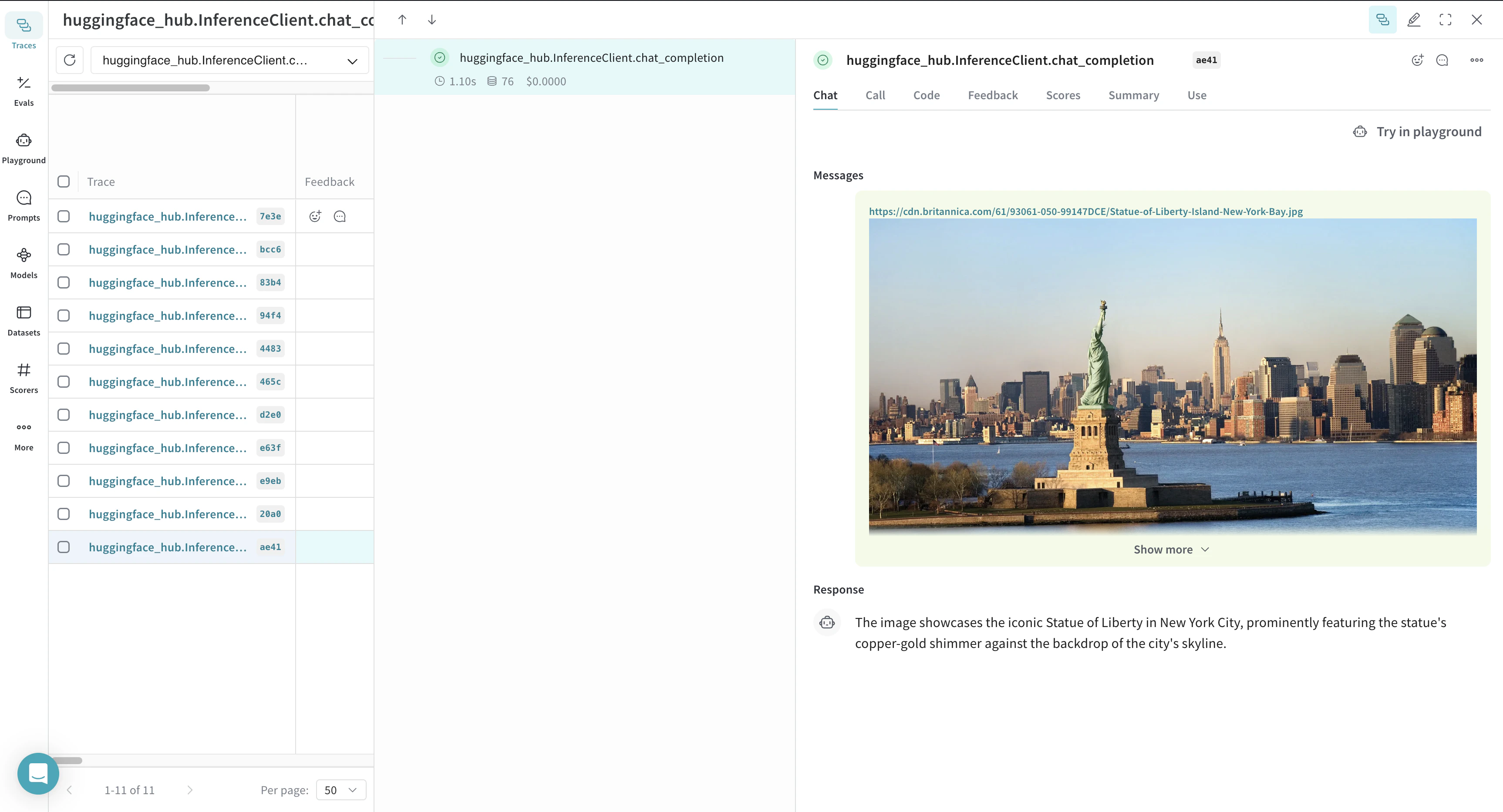 Weave also renders the call as a chat view in the UI, displaying the entire chat history with the model.
## Trace a function
To gain deeper insights into how data flows through your application, you can use `@weave.op` to track function calls. This captures inputs, outputs, and execution logic, helping with debugging and performance analysis.
By nesting multiple ops, you can build a structured tree of tracked functions. Weave also automatically versions your code, preserving intermediate states as you experiment, even before committing changes to Git.
To start tracking, decorate the functions that you want to track with `@weave.op`.
In the following example, Weave tracks three functions: `generate_image`, `check_image_correctness`, and `generate_image_and_check_correctness`. These functions generate an image and validate whether it matches a given prompt.
```python lines theme={null}
import base64
from PIL import Image
def encode_image(pil_image):
import io
buffer = io.BytesIO()
pil_image.save(buffer, format="JPEG")
buffer.seek(0)
encoded_image = base64.b64encode(buffer.read()).decode("utf-8")
return f"data:image/jpeg;base64,{encoded_image}"
@weave.op
def generate_image(prompt: str):
return huggingface_client.text_to_image(
prompt=prompt,
model="black-forest-labs/FLUX.1-schnell",
num_inference_steps=4,
)
@weave.op
def check_image_correctness(image: Image.Image, image_generation_prompt: str):
return huggingface_client.chat_completion(
model="meta-llama/Llama-3.2-11B-Vision-Instruct",
messages=[
{
"role": "user",
"content": [
{"type": "image_url", "image_url": {"url": encode_image(image)}},
{
"type": "text",
"text": f"Is this image correct for the prompt: {image_generation_prompt}? Answer with only one word: yes or no",
},
],
}
],
max_tokens=500,
seed=42,
).choices[0].message.content
@weave.op
def generate_image_and_check_correctness(prompt: str):
image = generate_image(prompt)
return {
"image": image,
"is_correct": check_image_correctness(image, prompt),
}
response = generate_image_and_check_correctness("A cute puppy")
```
Weave now logs all function calls wrapped with `@weave.op`, allowing you to analyze execution details in the Weave UI.
Weave also renders the call as a chat view in the UI, displaying the entire chat history with the model.
## Trace a function
To gain deeper insights into how data flows through your application, you can use `@weave.op` to track function calls. This captures inputs, outputs, and execution logic, helping with debugging and performance analysis.
By nesting multiple ops, you can build a structured tree of tracked functions. Weave also automatically versions your code, preserving intermediate states as you experiment, even before committing changes to Git.
To start tracking, decorate the functions that you want to track with `@weave.op`.
In the following example, Weave tracks three functions: `generate_image`, `check_image_correctness`, and `generate_image_and_check_correctness`. These functions generate an image and validate whether it matches a given prompt.
```python lines theme={null}
import base64
from PIL import Image
def encode_image(pil_image):
import io
buffer = io.BytesIO()
pil_image.save(buffer, format="JPEG")
buffer.seek(0)
encoded_image = base64.b64encode(buffer.read()).decode("utf-8")
return f"data:image/jpeg;base64,{encoded_image}"
@weave.op
def generate_image(prompt: str):
return huggingface_client.text_to_image(
prompt=prompt,
model="black-forest-labs/FLUX.1-schnell",
num_inference_steps=4,
)
@weave.op
def check_image_correctness(image: Image.Image, image_generation_prompt: str):
return huggingface_client.chat_completion(
model="meta-llama/Llama-3.2-11B-Vision-Instruct",
messages=[
{
"role": "user",
"content": [
{"type": "image_url", "image_url": {"url": encode_image(image)}},
{
"type": "text",
"text": f"Is this image correct for the prompt: {image_generation_prompt}? Answer with only one word: yes or no",
},
],
}
],
max_tokens=500,
seed=42,
).choices[0].message.content
@weave.op
def generate_image_and_check_correctness(prompt: str):
image = generate_image(prompt)
return {
"image": image,
"is_correct": check_image_correctness(image, prompt),
}
response = generate_image_and_check_correctness("A cute puppy")
```
Weave now logs all function calls wrapped with `@weave.op`, allowing you to analyze execution details in the Weave UI.
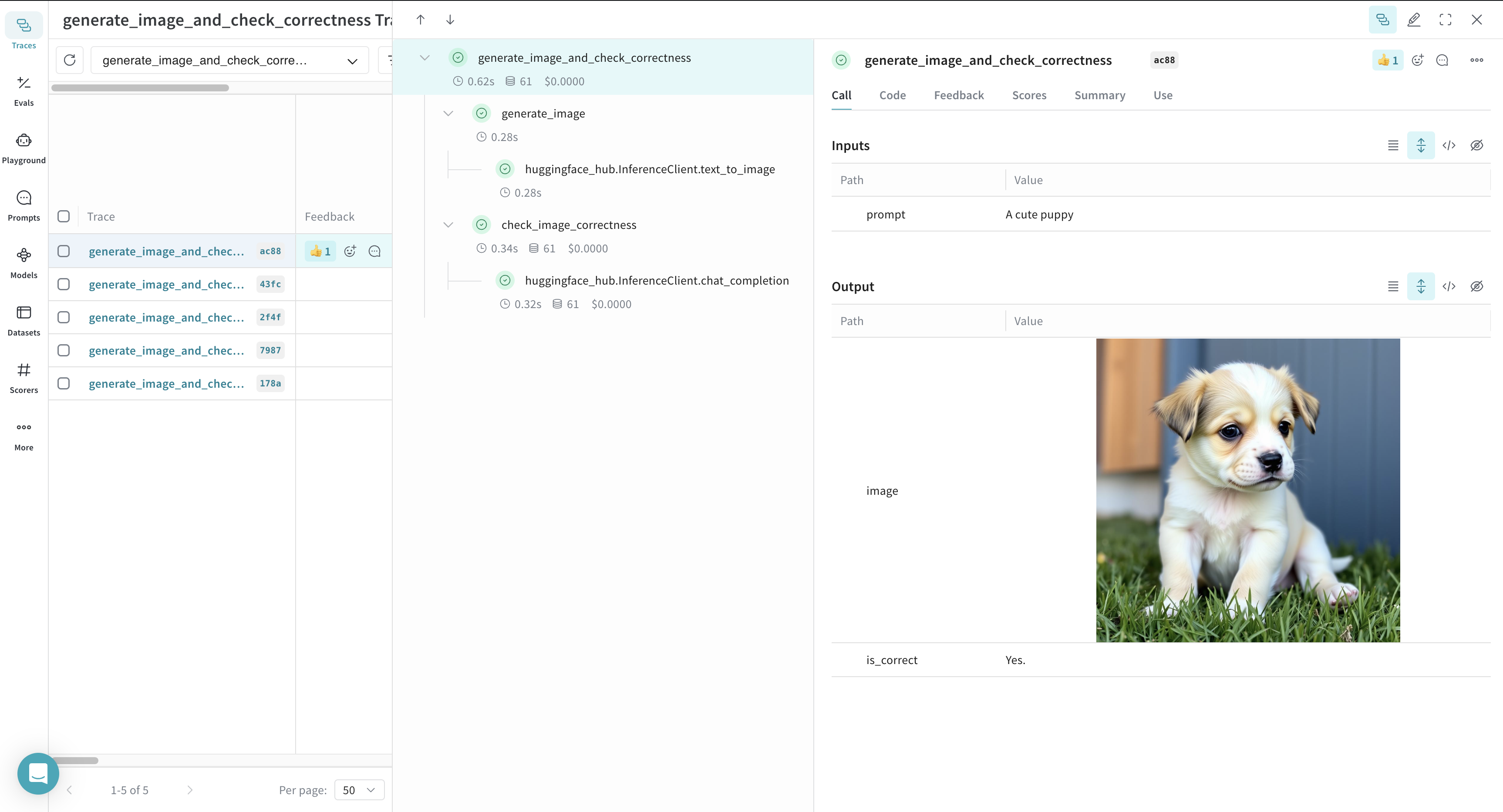 Weave also captures and visualizes function execution, helping you to understand data flow and logic within your application.
## Use `Model`s for experimentation
Managing LLM experiments can be challenging when multiple components are involved. The Weave [`Model`](../core-types/models) class helps capture and organize experimental details, such as system prompts and model configurations, allowing you to easily compare different iterations.
In addition to versioning code and capturing inputs/outputs, a `Model` stores structured parameters that control application behavior. This makes it easier to track which configurations produced the best results. You can also integrate a Weave `Model` with Weave [Serve](../tools/serve) and [Evaluations](../evaluation/scorers) for further insights.
The example below demonstrates defines a `CityVisitRecommender` model for travel recommendations. Each modification to its parameters generates a new version, making experimentation easy.
```python lines theme={null}
import rich
class CityVisitRecommender(weave.Model):
model: str
temperature: float = 0.7
max_tokens: int = 500
seed: int = 42
@weave.op()
def predict(self, city: str) -> str:
return huggingface_client.chat_completion(
model=self.model,
messages=[
{
"role": "system",
"content": "You are a helpful assistant meant to suggest places to visit in a city",
},
{"role": "user", "content": city},
],
max_tokens=self.max_tokens,
temperature=self.temperature,
seed=self.seed,
).choices[0].message.content
city_visit_recommender = CityVisitRecommender(
model="meta-llama/Llama-3.2-11B-Vision-Instruct",
temperature=0.7,
max_tokens=500,
seed=42,
)
rich.print(city_visit_recommender.predict("New York City"))
rich.print(city_visit_recommender.predict("Paris"))
```
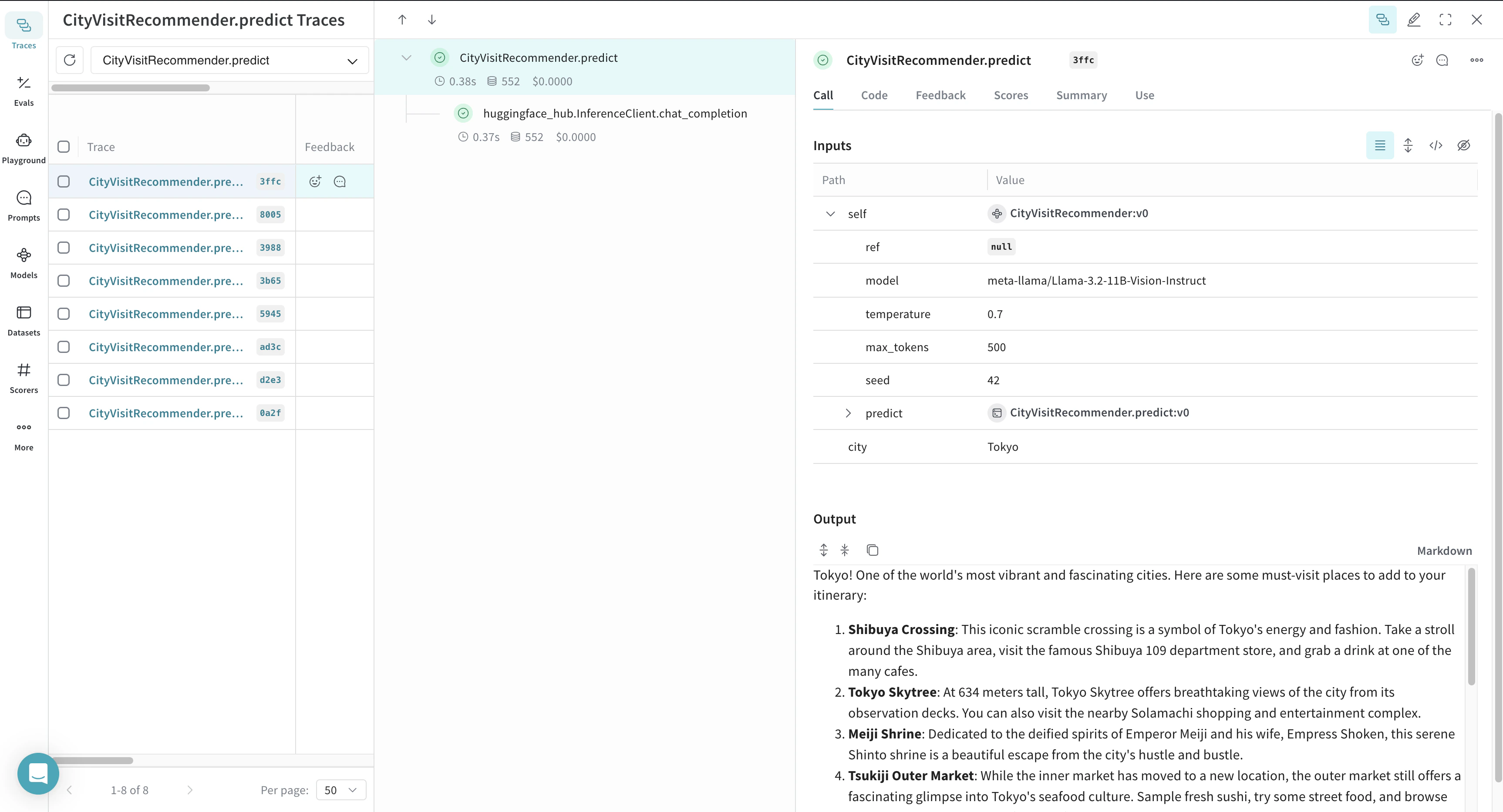
Weave automatically logs models and tracks different versions, making it easy to analyze performance and experiment history.
Weave also captures and visualizes function execution, helping you to understand data flow and logic within your application.
## Use `Model`s for experimentation
Managing LLM experiments can be challenging when multiple components are involved. The Weave [`Model`](../core-types/models) class helps capture and organize experimental details, such as system prompts and model configurations, allowing you to easily compare different iterations.
In addition to versioning code and capturing inputs/outputs, a `Model` stores structured parameters that control application behavior. This makes it easier to track which configurations produced the best results. You can also integrate a Weave `Model` with Weave [Serve](../tools/serve) and [Evaluations](../evaluation/scorers) for further insights.
The example below demonstrates defines a `CityVisitRecommender` model for travel recommendations. Each modification to its parameters generates a new version, making experimentation easy.
```python lines theme={null}
import rich
class CityVisitRecommender(weave.Model):
model: str
temperature: float = 0.7
max_tokens: int = 500
seed: int = 42
@weave.op()
def predict(self, city: str) -> str:
return huggingface_client.chat_completion(
model=self.model,
messages=[
{
"role": "system",
"content": "You are a helpful assistant meant to suggest places to visit in a city",
},
{"role": "user", "content": city},
],
max_tokens=self.max_tokens,
temperature=self.temperature,
seed=self.seed,
).choices[0].message.content
city_visit_recommender = CityVisitRecommender(
model="meta-llama/Llama-3.2-11B-Vision-Instruct",
temperature=0.7,
max_tokens=500,
seed=42,
)
rich.print(city_visit_recommender.predict("New York City"))
rich.print(city_visit_recommender.predict("Paris"))
```
Weave automatically logs models and tracks different versions, making it easy to analyze performance and experiment history.