> ## Documentation Index
> Fetch the complete documentation index at: https://docs.wandb.ai/llms.txt
> Use this file to discover all available pages before exploring further.
# LiteLLM
> Automatically track and log LLM calls made via LiteLLM
 Weave automatically tracks and logs LLM calls made via LiteLLM, after `weave.init()` is called.
## Traces
It's important to store traces of LLM applications in a central database, both during development and in production. You'll use these traces for debugging, and as a dataset that will help you improve your application.
> **Note:** When using LiteLLM, make sure to import the library using `import litellm` and call the completion function with `litellm.completion()` instead of `from litellm import completion`. This ensures that all functions and parameters are correctly referenced.
Weave will automatically capture traces for LiteLLM. You can use the library as usual, start by calling `weave.init()`:
```python lines {4} theme={null}
import litellm
import weave
weave.init("weave_litellm_integration")
openai_response = litellm.completion(
model="gpt-3.5-turbo",
messages=[{"role": "user", "content": "Translate 'Hello, how are you?' to French"}],
max_tokens=1024
)
print(openai_response.choices[0].message.content)
claude_response = litellm.completion(
model="claude-3-5-sonnet-20240620",
messages=[{"role": "user", "content": "Translate 'Hello, how are you?' to French"}],
max_tokens=1024
)
print(claude_response.choices[0].message.content)
```
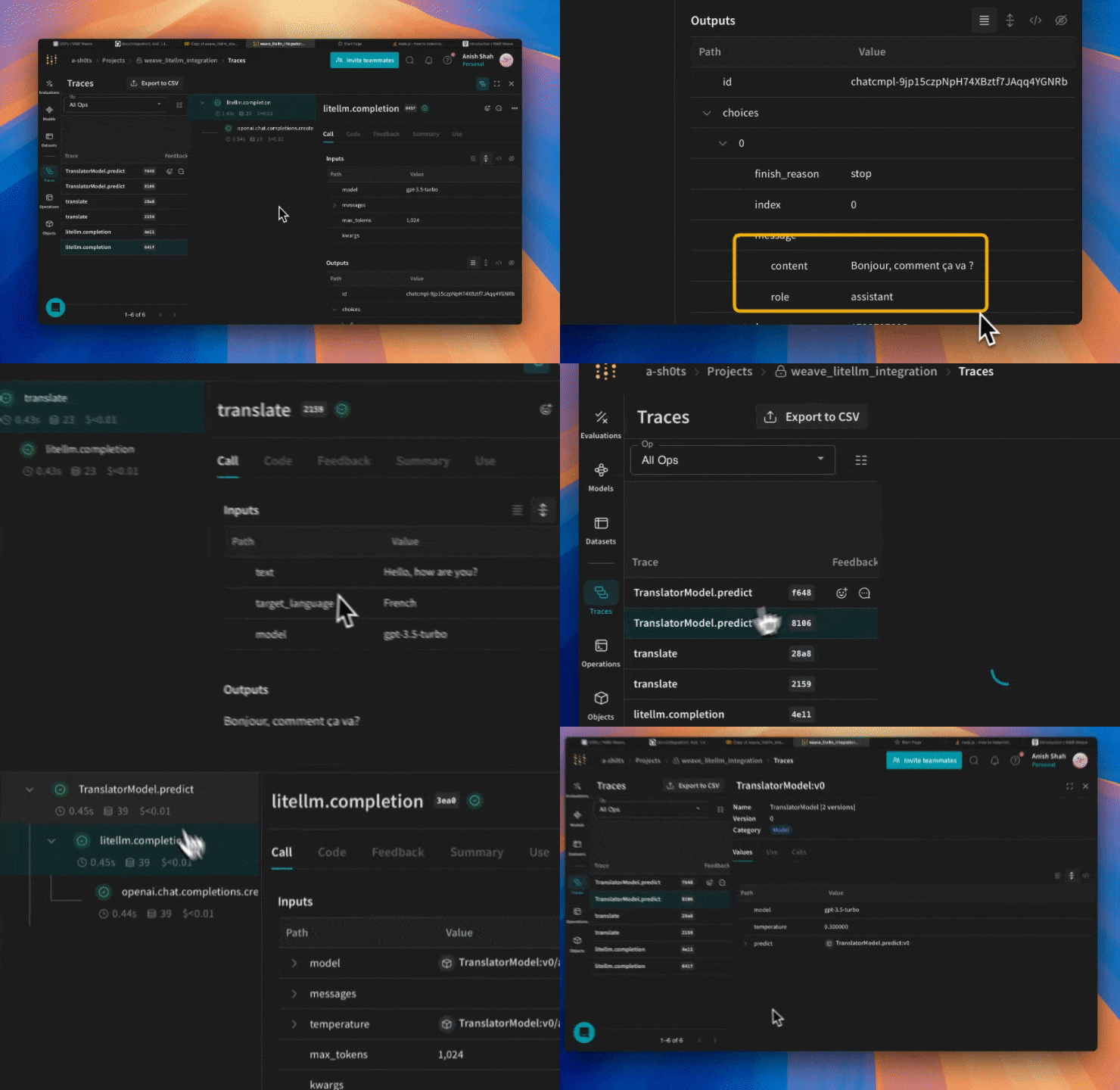
Weave will now track and log all LLM calls made through LiteLLM. You can view the traces in the Weave web interface.
## Wrapping with your own ops
Weave ops make results reproducible by automatically versioning code as you experiment, and they capture their inputs and outputs. Simply create a function decorated with `@weave.op()` that calls into LiteLLM's completion function and Weave will track the inputs and outputs for you. Here's an example:
```python lines {4,6} theme={null}
import litellm
import weave
weave.init("weave_litellm_integration")
@weave.op()
def translate(text: str, target_language: str, model: str) -> str:
response = litellm.completion(
model=model,
messages=[{"role": "user", "content": f"Translate '{text}' to {target_language}"}],
max_tokens=1024
)
return response.choices[0].message.content
print(translate("Hello, how are you?", "French", "gpt-3.5-turbo"))
print(translate("Hello, how are you?", "Spanish", "claude-3-5-sonnet-20240620"))
```
## Create a `Model` for easier experimentation
Organizing experimentation is difficult when there are many moving pieces. By using the `Model` class, you can capture and organize the experimental details of your app like your system prompt or the model you're using. This helps organize and compare different iterations of your app.
In addition to versioning code and capturing inputs/outputs, Models capture structured parameters that control your application's behavior, making it easy to find what parameters worked best. You can also use Weave Models with `serve`, and Evaluations.
In the example below, you can experiment with different models and temperatures:
```python lines {4,6,10} theme={null}
import litellm
import weave
weave.init('weave_litellm_integration')
class TranslatorModel(weave.Model):
model: str
temperature: float
@weave.op()
def predict(self, text: str, target_language: str):
response = litellm.completion(
model=self.model,
messages=[
{"role": "system", "content": f"You are a translator. Translate the given text to {target_language}."},
{"role": "user", "content": text}
],
max_tokens=1024,
temperature=self.temperature
)
return response.choices[0].message.content
# Create instances with different models
gpt_translator = TranslatorModel(model="gpt-3.5-turbo", temperature=0.3)
claude_translator = TranslatorModel(model="claude-3-5-sonnet-20240620", temperature=0.1)
# Use different models for translation
english_text = "Hello, how are you today?"
print("GPT-3.5 Translation to French:")
print(gpt_translator.predict(english_text, "French"))
print("\nClaude-3.5 Sonnet Translation to Spanish:")
print(claude_translator.predict(english_text, "Spanish"))
```
## Function calling
LiteLLM supports function calling for compatible models. Weave will automatically track these function calls.
```python lines {4} theme={null}
import litellm
import weave
weave.init("weave_litellm_integration")
response = litellm.completion(
model="gpt-3.5-turbo",
messages=[{"role": "user", "content": "Translate 'Hello, how are you?' to French"}],
functions=[
{
"name": "translate",
"description": "Translate text to a specified language",
"parameters": {
"type": "object",
"properties": {
"text": {
"type": "string",
"description": "The text to translate",
},
"target_language": {
"type": "string",
"description": "The language to translate to",
}
},
"required": ["text", "target_language"],
},
},
],
)
print(response)
```
We automatically capture the functions you used in the prompt and keep them versioned.
[
Weave automatically tracks and logs LLM calls made via LiteLLM, after `weave.init()` is called.
## Traces
It's important to store traces of LLM applications in a central database, both during development and in production. You'll use these traces for debugging, and as a dataset that will help you improve your application.
> **Note:** When using LiteLLM, make sure to import the library using `import litellm` and call the completion function with `litellm.completion()` instead of `from litellm import completion`. This ensures that all functions and parameters are correctly referenced.
Weave will automatically capture traces for LiteLLM. You can use the library as usual, start by calling `weave.init()`:
```python lines {4} theme={null}
import litellm
import weave
weave.init("weave_litellm_integration")
openai_response = litellm.completion(
model="gpt-3.5-turbo",
messages=[{"role": "user", "content": "Translate 'Hello, how are you?' to French"}],
max_tokens=1024
)
print(openai_response.choices[0].message.content)
claude_response = litellm.completion(
model="claude-3-5-sonnet-20240620",
messages=[{"role": "user", "content": "Translate 'Hello, how are you?' to French"}],
max_tokens=1024
)
print(claude_response.choices[0].message.content)
```
Weave will now track and log all LLM calls made through LiteLLM. You can view the traces in the Weave web interface.
## Wrapping with your own ops
Weave ops make results reproducible by automatically versioning code as you experiment, and they capture their inputs and outputs. Simply create a function decorated with `@weave.op()` that calls into LiteLLM's completion function and Weave will track the inputs and outputs for you. Here's an example:
```python lines {4,6} theme={null}
import litellm
import weave
weave.init("weave_litellm_integration")
@weave.op()
def translate(text: str, target_language: str, model: str) -> str:
response = litellm.completion(
model=model,
messages=[{"role": "user", "content": f"Translate '{text}' to {target_language}"}],
max_tokens=1024
)
return response.choices[0].message.content
print(translate("Hello, how are you?", "French", "gpt-3.5-turbo"))
print(translate("Hello, how are you?", "Spanish", "claude-3-5-sonnet-20240620"))
```
## Create a `Model` for easier experimentation
Organizing experimentation is difficult when there are many moving pieces. By using the `Model` class, you can capture and organize the experimental details of your app like your system prompt or the model you're using. This helps organize and compare different iterations of your app.
In addition to versioning code and capturing inputs/outputs, Models capture structured parameters that control your application's behavior, making it easy to find what parameters worked best. You can also use Weave Models with `serve`, and Evaluations.
In the example below, you can experiment with different models and temperatures:
```python lines {4,6,10} theme={null}
import litellm
import weave
weave.init('weave_litellm_integration')
class TranslatorModel(weave.Model):
model: str
temperature: float
@weave.op()
def predict(self, text: str, target_language: str):
response = litellm.completion(
model=self.model,
messages=[
{"role": "system", "content": f"You are a translator. Translate the given text to {target_language}."},
{"role": "user", "content": text}
],
max_tokens=1024,
temperature=self.temperature
)
return response.choices[0].message.content
# Create instances with different models
gpt_translator = TranslatorModel(model="gpt-3.5-turbo", temperature=0.3)
claude_translator = TranslatorModel(model="claude-3-5-sonnet-20240620", temperature=0.1)
# Use different models for translation
english_text = "Hello, how are you today?"
print("GPT-3.5 Translation to French:")
print(gpt_translator.predict(english_text, "French"))
print("\nClaude-3.5 Sonnet Translation to Spanish:")
print(claude_translator.predict(english_text, "Spanish"))
```
## Function calling
LiteLLM supports function calling for compatible models. Weave will automatically track these function calls.
```python lines {4} theme={null}
import litellm
import weave
weave.init("weave_litellm_integration")
response = litellm.completion(
model="gpt-3.5-turbo",
messages=[{"role": "user", "content": "Translate 'Hello, how are you?' to French"}],
functions=[
{
"name": "translate",
"description": "Translate text to a specified language",
"parameters": {
"type": "object",
"properties": {
"text": {
"type": "string",
"description": "The text to translate",
},
"target_language": {
"type": "string",
"description": "The language to translate to",
}
},
"required": ["text", "target_language"],
},
},
],
)
print(response)
```
We automatically capture the functions you used in the prompt and keep them versioned.
[ ](https://wandb.ai/a-sh0ts/weave_litellm_integration/weave/calls)