> ## Documentation Index
> Fetch the complete documentation index at: https://docs.wandb.ai/llms.txt
> Use this file to discover all available pages before exploring further.
# Trace your code
> Instrument your running code so its execution appears as detailed traces in W&B Weave.
To see your running code as detailed traces in Weave you create Calls. You can do that in three main ways:
## 1. Automatic tracking of LLM library calls
Weave integrates automatically with many common integrations and frameworks, such as `openai`, `anthropic`, `cohere`, `mistral`, and `LangChain`.\
Import the LLM or framework library, initialize your Weave project, and then Weave automatically traces all of Calls made to the LLM or platform to your project
without any additional code changes. For a complete list of supported library integrations, see [Integrations overview](/weave/guides/integrations/).
```python lines theme={null}
import weave
from openai import OpenAI
client = OpenAI()
# Initialize Weave Tracing
weave.init('intro-example')
response = client.chat.completions.create(
model="gpt-4",
messages=[
{
"role": "user",
"content": "How are you?"
}
],
temperature=0.8,
max_tokens=64,
top_p=1,
)
```
```typescript lines theme={null}
import OpenAI from 'openai'
import * as weave from 'weave'
const client = new OpenAI()
// Initialize Weave Tracing
await weave.init('intro-example')
const response = await client.chat.completions.create({
model: 'gpt-4',
messages: [
{
role: 'user',
content: 'How are you?',
},
],
temperature: 0.8,
max_tokens: 64,
top_p: 1,
});
```
For a complete setup guide for JS / TS projects, see the [TypeScript SDK: Third-Party Integration Guide](/weave/guides/integrations/js).
If you want more control over automatic behavior, see [Configure automatic LLM call tracking](/weave/guides/integrations/autopatching).
## 2. Tracking of custom functions
Often LLM applications have additional logic (such as pre/post processing, prompts, and more) that you want to track.
Weave allows you to manually track these Calls using the [`@weave.op`](/weave/reference/python-sdk/#function-op) decorator. For example:
```python lines theme={null}
import weave
# Initialize Weave Tracing
weave.init('intro-example')
# Decorate your function
@weave.op
def my_function(name: str):
return f"Hello, {name}!"
# Call your function -- Weave will automatically track inputs and outputs
print(my_function("World"))
```
You can also track [methods on classes](#track-class-and-object-methods).
Weave allows you to manually track these Calls by wrapping your function with [`weave.op`](/weave/reference/typescript-sdk/functions/op). For example:
```typescript lines theme={null}
import * as weave from 'weave'
await weave.init('intro-example')
function myFunction(name: string) {
return `Hello, ${name}!`
}
const myFunctionOp = weave.op(myFunction)
```
You can also define the wrapping inline:
```typescript lines theme={null}
const myFunctionOp = weave.op((name: string) => `Hello, ${name}!`)
```
This works for both functions as well as methods on classes:
```typescript lines theme={null}
class MyClass {
constructor() {
this.myMethod = weave.op(this.myMethod)
}
myMethod(name: string) {
return `Hello, ${name}!`
}
}
```
### Track class and object methods
You can also track class and object methods. You can track any method in a class by decorating the method with `weave.op`.
```python lines theme={null}
import weave
# Initialize Weave Tracing
weave.init("intro-example")
class MyClass:
# Decorate your method
@weave.op
def my_method(self, name: str):
return f"Hello, {name}!"
instance = MyClass()
# Call your method -- Weave will automatically track inputs and outputs
print(instance.my_method("World"))
```
**Using decorators in TypeScript**
To use the `@weave.op` decorator with your TypeScript code, make sure your environment is properly configured:
* **TypeScript v5.0 or newer**: Decorators are supported out of the box and no additional configuration is required.
* **TypeScript older than v5.0**: Enable experimental support for decorators. For more details, see the [official TypeScript documentation on decorators](https://www.typescriptlang.org/docs/handbook/decorators.html).
You can apply `@weave.op` to instance methods for tracing.
```typescript lines theme={null}
class Foo {
@weave.op
async predict(prompt: string) {
return "bar"
}
}
```
You can also apply `@weave.op` to static methods to monitor utility functions within a class.
```typescript lines theme={null}
class MathOps {
@weave.op
static square(n: number): number {
return n * n;
}
}
```
### Trace parallel (multi-threaded) function calls
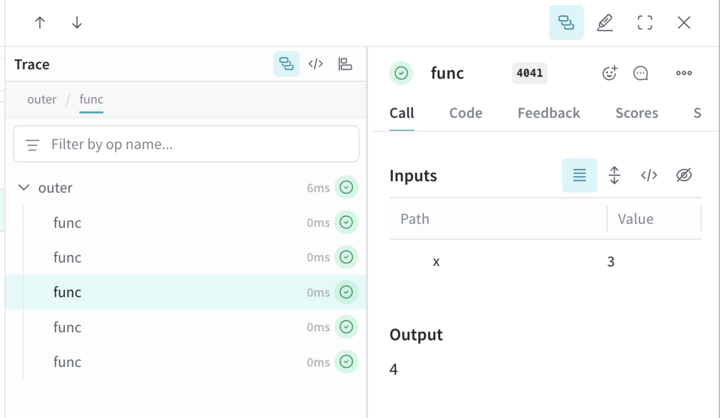
By default, parallel Calls all show up in Weave as separate root Calls. To get correct nesting under the same parent Op, use a `ThreadPoolExecutor`.
The following code sample demonstrates the use of [`ThreadPoolExecutor`](/weave/reference/python-sdk/trace/util#class-contextawarethreadpoolexecutor).
The first function, `func`, is a simple Op that takes `x` and returns `x+1`. The second function, `outer`, is another Op that accepts a list of inputs.
Inside `outer`, the use of `ThreadPoolExecutor` and `exc.map(func, inputs)` means that each call to `func` still carries the same parent trace context.
```python lines theme={null}
import weave
@weave.op
def func(x):
return x+1
@weave.op
def outer(inputs):
with weave.ThreadPoolExecutor() as exc:
exc.map(func, inputs)
# Update your Weave project name
client = weave.init('my-weave-project')
outer([1,2,3,4,5])
```
```plaintext theme={null}
This feature is not available in the TypeScript SDK yet.
```
In the Weave UI, this produces a single parent Call with five nested child Calls, so that you get a fully hierarchical trace even though the increments run in parallel.
 ## 3. Manual Call tracking
You can also manually create Calls using the API directly.
```python lines theme={null}
import weave
# Initialize Weave Tracing
client = weave.init('intro-example')
def my_function(name: str):
# Start a Call
call = client.create_call(op="my_function", inputs={"name": name})
# ... your function code ...
# End a Call
client.finish_call(call, output="Hello, World!")
# Call your function
print(my_function("World"))
```
```plaintext theme={null}
This feature is not available in the TypeScript SDK yet.
```
* Start a Call: [POST `/call/start`](https://docs.wandb.ai/weave/reference/service-api/calls/call-start).
* End a Call: [POST `/call/end`](https://docs.wandb.ai/weave/reference/service-api/calls/call-end).
```bash lines theme={null}
curl -L 'https://trace.wandb.ai/call/start' \
-H 'Content-Type: application/json' \
-H 'Accept: application/json' \
-d '{
"start": {
"project_id": "string",
"id": "string",
"op_name": "string",
"display_name": "string",
"trace_id": "string",
"parent_id": "string",
"started_at": "2024-09-08T20:07:34.849Z",
"attributes": {},
"inputs": {},
"wb_run_id": "string"
}
}
```
## 3. Manual Call tracking
You can also manually create Calls using the API directly.
```python lines theme={null}
import weave
# Initialize Weave Tracing
client = weave.init('intro-example')
def my_function(name: str):
# Start a Call
call = client.create_call(op="my_function", inputs={"name": name})
# ... your function code ...
# End a Call
client.finish_call(call, output="Hello, World!")
# Call your function
print(my_function("World"))
```
```plaintext theme={null}
This feature is not available in the TypeScript SDK yet.
```
* Start a Call: [POST `/call/start`](https://docs.wandb.ai/weave/reference/service-api/calls/call-start).
* End a Call: [POST `/call/end`](https://docs.wandb.ai/weave/reference/service-api/calls/call-end).
```bash lines theme={null}
curl -L 'https://trace.wandb.ai/call/start' \
-H 'Content-Type: application/json' \
-H 'Accept: application/json' \
-d '{
"start": {
"project_id": "string",
"id": "string",
"op_name": "string",
"display_name": "string",
"trace_id": "string",
"parent_id": "string",
"started_at": "2024-09-08T20:07:34.849Z",
"attributes": {},
"inputs": {},
"wb_run_id": "string"
}
}
```