> ## Documentation Index
> Fetch the complete documentation index at: https://docs.wandb.ai/llms.txt
> Use this file to discover all available pages before exploring further.
# Set attributes and events on agent spans
> Attach custom attributes and record events on agent spans (Turn, LLM, Tool, and SubAgent) to filter and analyze agent activity in Weave.
When you instrument an agent with the Weave SDK, each span object (`Turn`, `LLM`, `Tool`, and `SubAgent`) exposes methods to attach custom metadata. Use these methods to stamp contextual information such as user IDs, tenants, experiment names, or environment labels onto agent spans, then filter and group agent activity by that metadata in the Weave UI.
This metadata comes in two forms:
* **Attributes**: Key-value properties of a span as a whole. Use `set_attributes()` (Python) or `setAttributes()` (TypeScript) to stamp attributes on a single span, or set session-wide attributes that apply to every span a session emits.
* **Events**: Point-in-time markers that occur during a span's lifetime, such as a permission prompt or a lifecycle transition. Use `add_event()` (Python) or `addEvent()` (TypeScript).
These methods mirror the [OpenTelemetry (OTel) span API](https://opentelemetry.io/docs/specs/semconv/gen-ai/gen-ai-spans/): `set_attributes` mirrors OTel's `Span.set_attributes`, and `add_event` mirrors OTel's `Span.add_event`. The Weave SDK emits OTel spans and stores all attributes, so they remain queryable in Weave.
## Set attributes on a span
Use `set_attributes()` (Python) or `setAttributes()` (TypeScript) to stamp arbitrary attributes on a single span. Pass a dictionary or object whether you have one key or many. The method returns the span, so you can chain calls.
```python lines theme={null}
import weave
weave.init("[TEAM-NAME]/[PROJECT-NAME]")
with weave.start_session(agent_name="my-agent"):
with weave.start_turn(user_message="What is the weather in Tokyo?") as turn:
# Stamp attributes on this turn span
turn.set_attributes({"user_id": "12345", "tenant": "acme", "env": "production"})
```
```typescript lines twoslash theme={null}
// @noErrors
import * as weave from 'weave';
await weave.init('[TEAM-NAME]/[PROJECT-NAME]');
const session = weave.startSession({ agentName: 'my-agent' });
const turn = weave.startTurn({ agentName: 'my-agent' });
// Stamp attributes on this turn span
turn.setAttributes({ user_id: '12345', tenant: 'acme', env: 'production' });
turn.end();
session.end();
```
The same methods are available on every span class. For example, you can tag an individual tool call or LLM call:
```python lines theme={null}
with weave.start_turn(user_message="What is the weather in Tokyo?") as turn:
with turn.tool(name="get_weather") as tool:
tool.set_attributes({"weave.display_name": "Weather lookup"})
```
```typescript lines twoslash theme={null}
// @noErrors
const turn = weave.startTurn({ agentName: 'my-agent' });
const tool = turn.startTool({ name: 'get_weather' });
tool.setAttributes({ 'weave.display_name': 'Weather lookup' });
tool.end();
turn.end();
```
Most attribute keys are arbitrary custom metadata, but Weave reserves two prefixes for special handling. Keys under `weave.*` map to built-in Weave fields, and keys under `gen_ai.*` map to OpenTelemetry GenAI semantic-convention fields. In the preceding example, `weave.display_name` is a reserved key that sets the span's display name in the Agents and Traces UI. For arbitrary metadata that you want to filter and group by, use your own keys such as `user_id` or `tenant`, which Weave stores as filterable custom attributes.
## Set attributes on every span in a session
Stamping attributes one span at a time works well for span-specific metadata, but some metadata applies to an entire session. To apply the same attributes to every span a session emits, pass `attributes` when you start the session. This is useful for propagating session-wide metadata such as an integration identity or a deployment environment.
```python lines theme={null}
import weave
weave.init("[TEAM-NAME]/[PROJECT-NAME]")
session = weave.start_session(
agent_name="my-agent",
attributes={"weave.integration.name": "my-harness", "env": "production"},
)
# Every turn, LLM, tool, and sub-agent span in this session carries these attributes.
```
```typescript lines twoslash theme={null}
// @noErrors
import * as weave from 'weave';
await weave.init('[TEAM-NAME]/[PROJECT-NAME]');
const session = weave.startSession({
agentName: 'my-agent',
attributes: { 'weave.integration.name': 'my-harness', env: 'production' },
});
// Every turn, LLM, tool, and sub-agent span in this session carries these attributes.
```
As with per-span attributes, use your own custom keys for session attributes. Set semantic-convention fields, such as the agent name, session name, or model, through their typed parameters (`agent_name`, `session_name`, `model`) rather than through `attributes`. Avoid keys under the reserved `gen_ai.*` and `weave.*` prefixes. Weave extracts those into typed fields during ingestion, so a custom value under a reserved key is unsupported.
## Record events on a span
Use `add_event()` (Python) or `addEvent()` (TypeScript) to record a marker at a specific point in time within a span's lifetime. Unlike an attribute, which describes the span as a whole, an event captures something that happens at a moment during the span, such as a permission prompt, a context-compaction step, or a lifecycle transition like `spawned`, `streaming`, or `finished`.
Each event takes a name and an optional dictionary or object of attributes.
```python lines theme={null}
with weave.start_turn(user_message="Delete the temp files") as turn:
# Record a marker when the agent requests permission
turn.add_event("weave.permission_request", {"tool": "shell", "command": "rm -rf ./tmp"})
# ... agent continues ...
turn.add_event("finished")
```
```typescript lines twoslash theme={null}
// @noErrors
const turn = weave.startTurn({ agentName: 'my-agent' });
// Record a marker when the agent compacts its context
turn.addEvent('context_compacted', { removedMessages: 12 });
turn.end();
```
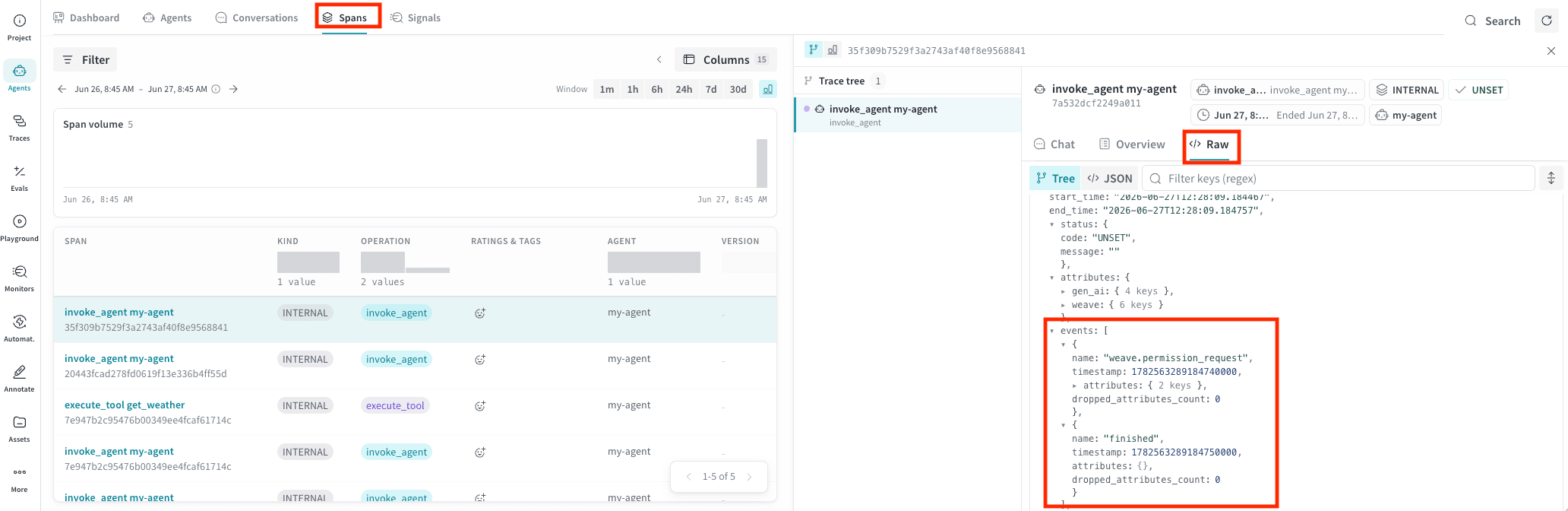
In the UI, recorded events can be viewed by selecting the **Spans** tab, then choosing the associated span. In the span detail panel, select the **Raw** data tab and expand the `events` array in the JSON tree, as shown in the following image.
 ## When you can set attributes and events
Set attributes and events while the span is recording, that is, after the span starts and before it ends. In Python, this is inside the `with` block. In TypeScript, this is after `start*()` and before `end()`.
If you call `set_attributes()`, `add_event()`, or their TypeScript equivalents on a span that hasn't started yet or has already ended, the call is a no-op and logs a warning that names the fix.
The call is silent (no warning) only when OTel isn't installed or Weave is disabled.
To attach attributes when logging completed agent activity in a single batch rather than during live execution, populate the span object's declared fields directly and pass the object to `log_turn` or `log_session`. See [Log agent activity in batches](/weave/guides/tracking/trace-agents-batch).
## View and filter attributes in the UI
Adding attributes is only the first step. Their value comes from using them to analyze agent activity. After you stamp attributes on agent spans, you can filter and group agent conversations by those attributes in the **Agents** tab of your Weave project. For details, see [View agent activity](/weave/guides/tracking/view-agent-activity).
## When you can set attributes and events
Set attributes and events while the span is recording, that is, after the span starts and before it ends. In Python, this is inside the `with` block. In TypeScript, this is after `start*()` and before `end()`.
If you call `set_attributes()`, `add_event()`, or their TypeScript equivalents on a span that hasn't started yet or has already ended, the call is a no-op and logs a warning that names the fix.
The call is silent (no warning) only when OTel isn't installed or Weave is disabled.
To attach attributes when logging completed agent activity in a single batch rather than during live execution, populate the span object's declared fields directly and pass the object to `log_turn` or `log_session`. See [Log agent activity in batches](/weave/guides/tracking/trace-agents-batch).
## View and filter attributes in the UI
Adding attributes is only the first step. Their value comes from using them to analyze agent activity. After you stamp attributes on agent spans, you can filter and group agent conversations by those attributes in the **Agents** tab of your Weave project. For details, see [View agent activity](/weave/guides/tracking/view-agent-activity).