> ## Documentation Index
> Fetch the complete documentation index at: https://docs.wandb.ai/llms.txt
> Use this file to discover all available pages before exploring further.
# Update and delete Calls
> Modify display names, add feedback, and delete Calls in W&B Weave
Most Call properties are immutable after creation. The following mutations are supported:
* [Set display name](#set-display-name)
* [Add feedback](#add-feedback)
* [Delete a Call](#delete-a-call)
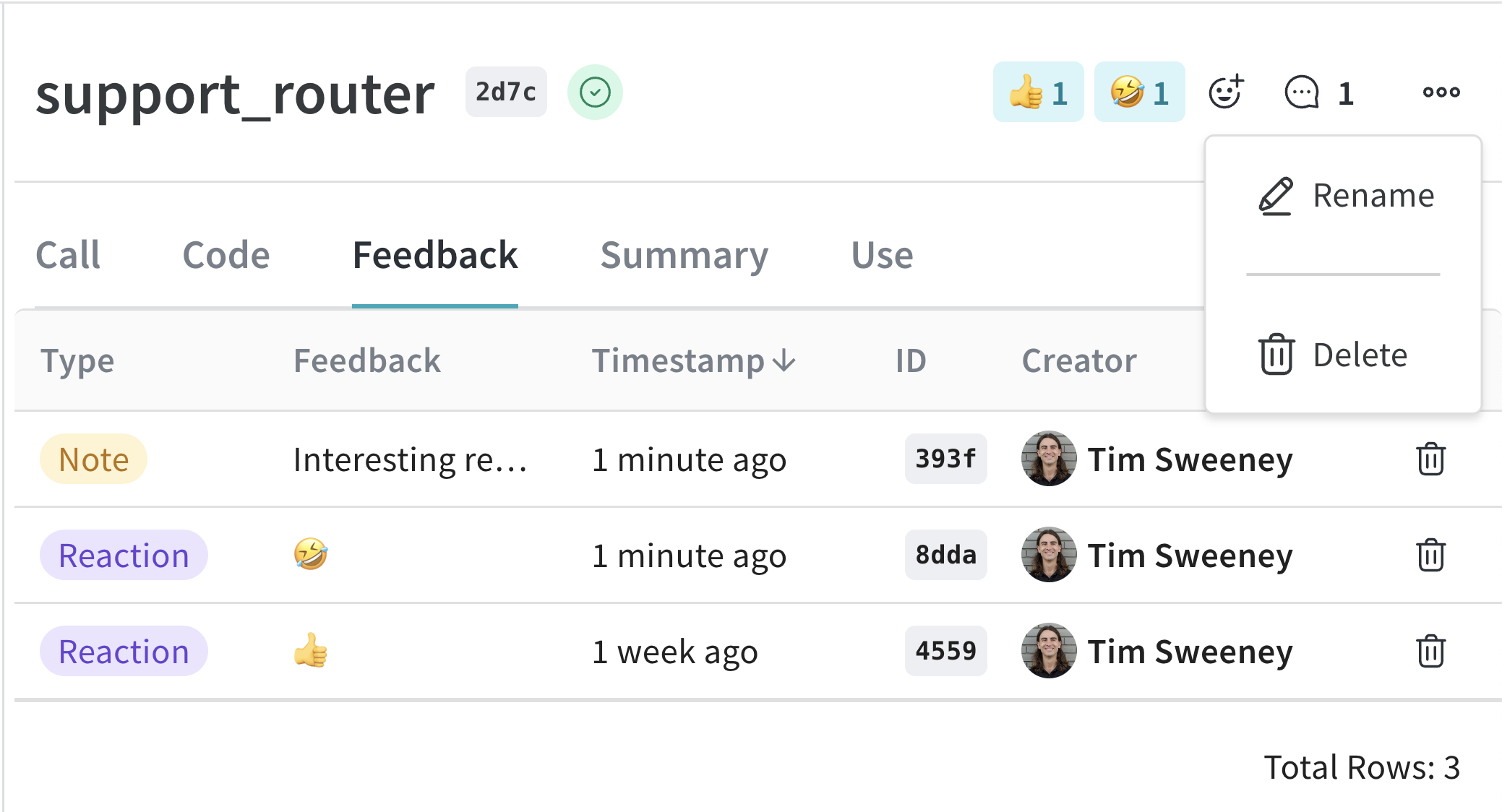
You can perform all of these mutations from the UI by navigating to the Call detail page:
To update a Call in the web app:
1. Navigate to [wandb.ai](https://wandb.ai/) and select your project.
2. In the Weave project sidebar, click **Traces**.
3. Find the Call you want to view in the table.
4. Click on the Call to open its details page.
5. Click the `Feedback` tab in the Call detail's tab bar.
Here you can edit the display name of the Call, add feedback, or delete the Call.
 ### Set display name
To set the display name of a Call, use the [`Call.set_display_name()`](/weave/reference/python-sdk/trace/weave_client#method-set-display-name) method.
```python lines theme={null}
import weave
# Initialize the client
client = weave.init("your-project-name")
# Get a specific Call by its ID
call = client.get_call("call-uuid-here")
# Set the display name of the Call
call.set_display_name("My Custom Display Name")
```
To set the display name of a Call, use [`client.updateCall`](/weave/reference/typescript-sdk/classes/weaveclient#updatecall) to update by call ID directly:
```typescript lines theme={null}
import * as weave from 'weave'
// Initialize the client
const client = await weave.init('your-project-name')
// Update the display name of a Call by its ID
await client.updateCall('call-uuid-here', 'My Custom Display Name')
```
To set the display name of a Call using the Service API, make a request to the [`/call/update`](https://docs.wandb.ai/weave/reference/service-api/calls/call-update) endpoint.
```bash lines theme={null}
curl -L 'https://trace.wandb.ai/call/update' \
-H 'Content-Type: application/json' \
-H 'Accept: application/json' \
-d '{
"project_id": "string",
"call_id": "string",
"display_name": "string",
}'
```
You can also [set a Call's display name at execution](/weave/guides/tracking/get-call-object).
### Add feedback
Please see the [Feedback Documentation](/weave/guides/tracking/feedback) for more details.
### Delete a Call
To delete a Call using the Python API, use the [`Call.delete`](/weave/reference/python-sdk/trace/weave_client#method-delete) method.
```python lines theme={null}
import weave
# Initialize the client
client = weave.init("your-project-name")
# Get a specific Call by its ID
call = client.get_call("call-uuid-here")
# Delete the Call
call.delete()
```
```plaintext lines theme={null}
This feature is not available in the TypeScript SDK yet.
```
To delete a Call using the Service API, make a request to the [`/calls/delete`](https://docs.wandb.ai/weave/reference/service-api/calls/calls-delete) endpoint.
```bash lines theme={null}
curl -L 'https://trace.wandb.ai/calls/delete' \
-H 'Content-Type: application/json' \
-H 'Accept: application/json' \
-d '{
"project_id": "string",
"call_ids": [
"string"
],
}'
```
### Delete multiple Calls
To delete batches of Calls using the Python API, pass a list of Call IDs to `delete_calls()`.
* The maximum amount of Calls that can be deleted is `1000`.
* Deleting a Call also deletes all of its children.
```python lines theme={null}
import weave
# Initialize the client
client = weave.init("my-project")
# Get all Calls from client
all_calls = client.get_calls()
# Get list of first 1000 Call objects
first_1000_calls = all_calls[:1000]
# Get list of first 1000 Call IDs
first_1000_calls_ids = [c.id for c in first_1000_calls]
# Delete first 1000 Calls by ID
client.delete_calls(call_ids=first_1000_calls_ids)
```
```plaintext lines theme={null}
This feature is not available in the TypeScript SDK yet.
```
### Set display name
To set the display name of a Call, use the [`Call.set_display_name()`](/weave/reference/python-sdk/trace/weave_client#method-set-display-name) method.
```python lines theme={null}
import weave
# Initialize the client
client = weave.init("your-project-name")
# Get a specific Call by its ID
call = client.get_call("call-uuid-here")
# Set the display name of the Call
call.set_display_name("My Custom Display Name")
```
To set the display name of a Call, use [`client.updateCall`](/weave/reference/typescript-sdk/classes/weaveclient#updatecall) to update by call ID directly:
```typescript lines theme={null}
import * as weave from 'weave'
// Initialize the client
const client = await weave.init('your-project-name')
// Update the display name of a Call by its ID
await client.updateCall('call-uuid-here', 'My Custom Display Name')
```
To set the display name of a Call using the Service API, make a request to the [`/call/update`](https://docs.wandb.ai/weave/reference/service-api/calls/call-update) endpoint.
```bash lines theme={null}
curl -L 'https://trace.wandb.ai/call/update' \
-H 'Content-Type: application/json' \
-H 'Accept: application/json' \
-d '{
"project_id": "string",
"call_id": "string",
"display_name": "string",
}'
```
You can also [set a Call's display name at execution](/weave/guides/tracking/get-call-object).
### Add feedback
Please see the [Feedback Documentation](/weave/guides/tracking/feedback) for more details.
### Delete a Call
To delete a Call using the Python API, use the [`Call.delete`](/weave/reference/python-sdk/trace/weave_client#method-delete) method.
```python lines theme={null}
import weave
# Initialize the client
client = weave.init("your-project-name")
# Get a specific Call by its ID
call = client.get_call("call-uuid-here")
# Delete the Call
call.delete()
```
```plaintext lines theme={null}
This feature is not available in the TypeScript SDK yet.
```
To delete a Call using the Service API, make a request to the [`/calls/delete`](https://docs.wandb.ai/weave/reference/service-api/calls/calls-delete) endpoint.
```bash lines theme={null}
curl -L 'https://trace.wandb.ai/calls/delete' \
-H 'Content-Type: application/json' \
-H 'Accept: application/json' \
-d '{
"project_id": "string",
"call_ids": [
"string"
],
}'
```
### Delete multiple Calls
To delete batches of Calls using the Python API, pass a list of Call IDs to `delete_calls()`.
* The maximum amount of Calls that can be deleted is `1000`.
* Deleting a Call also deletes all of its children.
```python lines theme={null}
import weave
# Initialize the client
client = weave.init("my-project")
# Get all Calls from client
all_calls = client.get_calls()
# Get list of first 1000 Call objects
first_1000_calls = all_calls[:1000]
# Get list of first 1000 Call IDs
first_1000_calls_ids = [c.id for c in first_1000_calls]
# Delete first 1000 Calls by ID
client.delete_calls(call_ids=first_1000_calls_ids)
```
```plaintext lines theme={null}
This feature is not available in the TypeScript SDK yet.
```