> ## Documentation Index
> Fetch the complete documentation index at: https://docs.wandb.ai/llms.txt
> Use this file to discover all available pages before exploring further.
# View and customize trace display
> View calls in the UI and customize how trace data is displayed
After you create Calls in W\&B Weave, you often want to open a single call to inspect its inputs, outputs, and metadata. This page shows how to view a call in the UI or in the SDK, and how to customize how trace data is rendered in the UI using `weave.Markdown`.
To view a Call in the UI:
1. Navigate to [wandb.ai](https://wandb.ai/) and select your project.
2. In the Weave project sidebar, click **Traces**.
3. Find the Call you want to view in the table.
4. Click on the Call to open its details page.
For details on the Trace view, see [Navigate the Weave Trace view](/weave/guides/tracking/trace-tree).
To view a call using the W\&B Weave Python SDK, use the [`get_call`](/weave/reference/python-sdk/trace/weave_client#method-get_call) method:
```python lines theme={null}
import weave
# Initialize the client
client = weave.init("your-project-name")
# Get a specific call by its ID
call = client.get_call("call-uuid-here")
print(call)
```
```typescript lines theme={null}
import * as weave from 'weave'
// Initialize the client
const client = await weave.init('intro-example')
// Get a specific call by its ID
const call = await client.getCall('call-uuid-here')
console.log(call)
```
To view a call using the Service API, make a request to the [`/call/read`](https://docs.wandb.ai/weave/reference/service-api/calls/call-read) endpoint.
```bash theme={null}
curl -L 'https://trace.wandb.ai/call/read' \
-H 'Content-Type: application/json' \
-H 'Accept: application/json' \
-d '{
"project_id": "string",
"id": "string",
}'
```
## Customize rendered traces with `weave.Markdown`
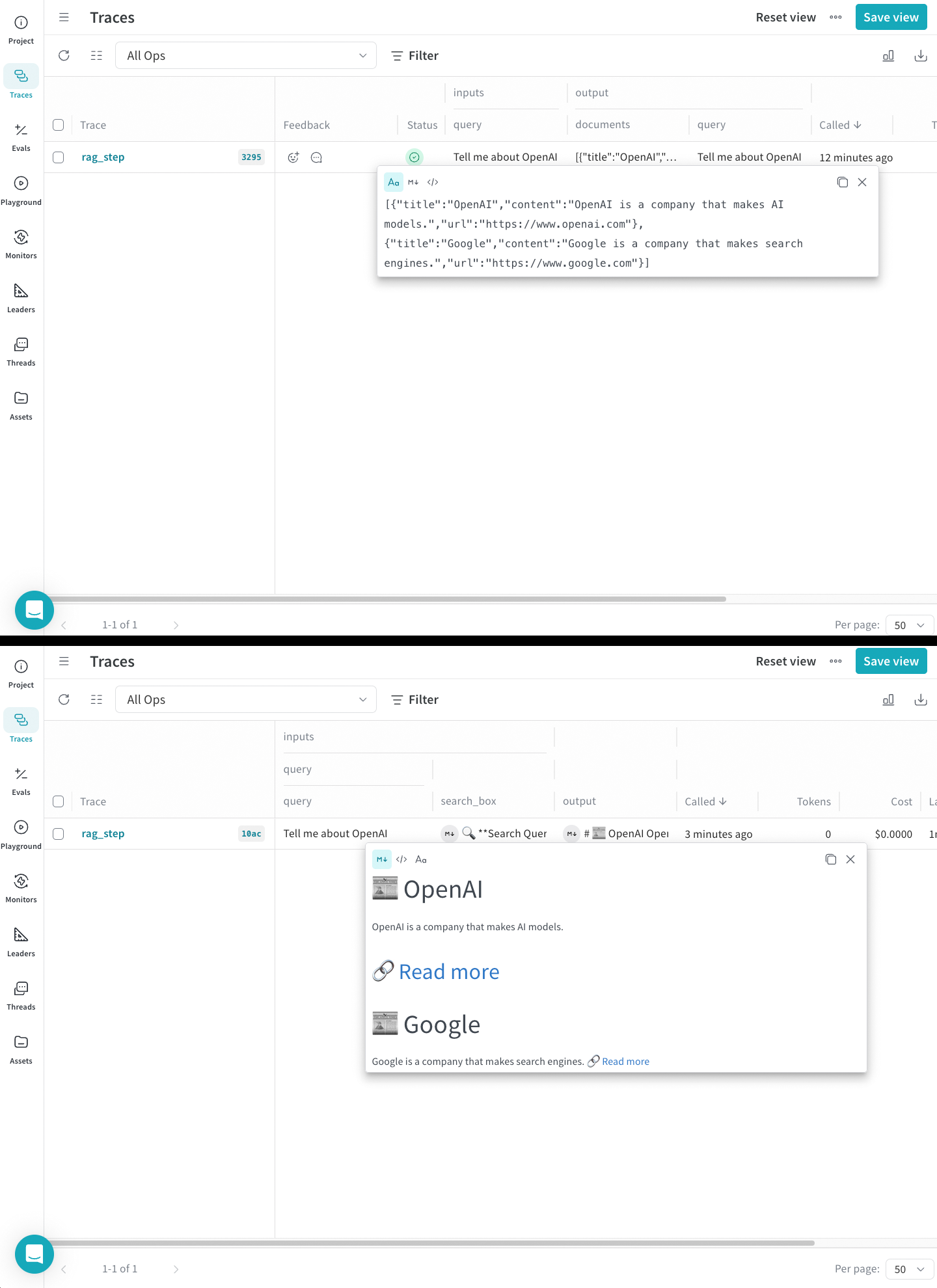
Use `weave.Markdown` to customize how your trace information is displayed without losing the original data. This allows you to render your inputs and outputs as readable blocks of formatted content while preserving the underlying data structure.
Use `postprocess_inputs` and `postprocess_output` functions in your `@weave.op` decorator to format your trace data. The following code sample uses postprocessors to render a call in Weave with emojis and more readable formatting:
```python lines theme={null}
import weave
def postprocess_inputs(query) -> weave.Markdown:
search_box = f"""
**Search Query:**
``+`
{query}
``+`
"""
return {"search_box": weave.Markdown(search_box),
"query": query}
def postprocess_output(docs) -> weave.Markdown:
formatted_docs = f"""
# {docs[0]["title"]}
{docs[0]["content"]}
[Read more]({docs[0]["url"]})
---
# {docs[1]["title"]}
{docs[1]["content"]}
[Read more]({docs[1]["url"]})
"""
return weave.Markdown(formatted_docs)
@weave.op(
postprocess_inputs=postprocess_inputs,
postprocess_output=postprocess_output,
)
def rag_step(query):
# example newspaper articles of the companies on the S&P 500
docs = [
{
"title": "OpenAI",
"content": "OpenAI is a company that makes AI models.",
"url": "https://www.openai.com",
},
{
"title": "Google",
"content": "Google is a company that makes search engines.",
"url": "https://www.google.com",
},
]
return docs
if __name__ == "__main__":
weave.init('markdown_renderers')
rag_step("Tell me about OpenAI")
```
```plaintext theme={null}
This feature is not available in the TypeScript SDK yet.
```
In the following screenshot, you can see the unformatted and formatted outputs side by side.