> ## Documentation Index
> Fetch the complete documentation index at: https://docs.wandb.ai/llms.txt
> Use this file to discover all available pages before exploring further.
# Quickstart: Track LLM inputs & outputs
> Get started with W&B Weave by adding tracing to your LLM application to debug and monitor model interactions.
export const GitHubLink = ({url}) =>
GitHub source
;
export const ColabLink = ({url}) =>
Try in Colab
;
Learn how to track LLM calls with Weave by adding tracing to your code. This quickstart walks you through tracing a request to OpenAI and viewing the results in the Weave UI.
## What you'll learn:
This guide shows you how to:
* Import and configure Weave in your code
* Use `weave.op` decorator to track your code
* View traces in the Weave UI
## Prerequisites
* A [W\&B account](https://wandb.ai/signup)
* Python 3.10+ or Node.js 18+
* Required packages installed:
* **Python**: `pip install weave openai`
* **TypeScript**: `npm install weave openai`
* An [OpenAI API key](https://platform.openai.com/api-keys) set as an environment variable
## Log a trace to a new project
To begin tracking your code and logging traces to Weave:
1. Import the `weave` library into your code.
2. Call `weave.init('your_wb_team/project_name')` in your code to send tracking information to your W\&B [team](/platform/app/settings-page/teams) and [project](/platform/hosting/iam/org_team_struct#project). If you do not set a team, the traces are sent to your [default team](/platform/app/settings-page/user-settings/#default-team). If the specified project does not exist in your team, Weave creates it.
3. Add the [`@weave.op()` decorator](/weave/guides/tracking/ops) to specific functions you want to track. While Weave automatically tracks calls to supported LLMs, adding the Weave decorator allows you to track the inputs, outputs, and code of specific functions. The decorator uses the following syntax in TypeScript: `weave.op(your_function)`
The following example code sends a request to OpenAI (requires [OpenAI API key](https://platform.openai.com/docs/quickstart)) and Weave records the request's tracing information. The request asks the OpenAI model to extract dinosaur names from the input and identify each dinosaur's diet (herbivore or carnivore).
Run the following example code to track your first project with Weave:
```python lines {1-2,7-8,27-28} theme={null}
# Imports the Weave library
import weave
from openai import OpenAI
client = OpenAI()
# Weave automatically tracks the inputs, outputs and code of this function
@weave.op()
def extract_dinos(sentence: str) -> dict:
response = client.chat.completions.create(
model="gpt-4o",
messages=[
{
"role": "system",
"content": """In JSON format extract a list of `dinosaurs`, with their `name`,
their `common_name`, and whether its `diet` is a herbivore or carnivore"""
},
{
"role": "user",
"content": sentence
}
],
response_format={ "type": "json_object" }
)
return response.choices[0].message.content
# Initializes Weave, and sets the team and project to log data to
weave.init('your-team/traces-quickstart')
sentence = """I watched as a Tyrannosaurus rex (T. rex) chased after a Triceratops (Trike), \
both carnivore and herbivore locked in an ancient dance. Meanwhile, a gentle giant \
Brachiosaurus (Brachi) calmly munched on treetops, blissfully unaware of the chaos below."""
result = extract_dinos(sentence)
print(result)
```
```typescript lines {1-2,7-8,20,24-25} theme={null}
// Imports the Weave library
import * as weave from 'weave';
import OpenAI from 'openai';
const openai = new OpenAI();
// Weave automatically tracks the inputs, outputs and code of this function
async function extractDinos(input: string) {
const response = await openai.chat.completions.create({
model: 'gpt-4o',
messages: [
{
role: 'user',
content: `In JSON format extract a list of 'dinosaurs', with their 'name', their 'common_name', and whether its 'diet' is a herbivore or carnivore: ${input}`,
},
],
});
return response.choices[0].message.content;
}
const extractDinosOp = weave.op(extractDinos);
async function main() {
// Initializes Weave, and sets the team and project to log data to
await weave.init('your-team/traces-quickstart');
const result = await extractDinosOp(
'I watched as a Tyrannosaurus rex (T. rex) chased after a Triceratops (Trike), both carnivore and herbivore locked in an ancient dance. Meanwhile, a gentle giant Brachiosaurus (Brachi) calmly munched on treetops, blissfully unaware of the chaos below.'
);
console.log(result);
}
main();
```
When you call the `extract_dinos` function, Weave outputs links to view your traces in the terminal. The output looks like this:
```shell theme={null}
weave: $ pip install weave --upgrade
weave: Logged in as Weights & Biases user: example-username.
weave: View Weave data at https://wandb.ai/your-team/traces-quickstart/weave
weave: 🍩 https://wandb.ai/your-team/traces-quickstart/r/call/019ae171-7f32-7c96-8b42-931a32f900b7
{
"dinosaurs": [
{
"name": "Tyrannosaurus rex",
"common_name": "T. rex",
"diet": "carnivore"
},
{
"name": "Triceratops",
"common_name": "Trike",
"diet": "herbivore"
},
{
"name": "Brachiosaurus",
"common_name": "Brachi",
"diet": "herbivore"
}
]
}
```
## See traces of your application in your project
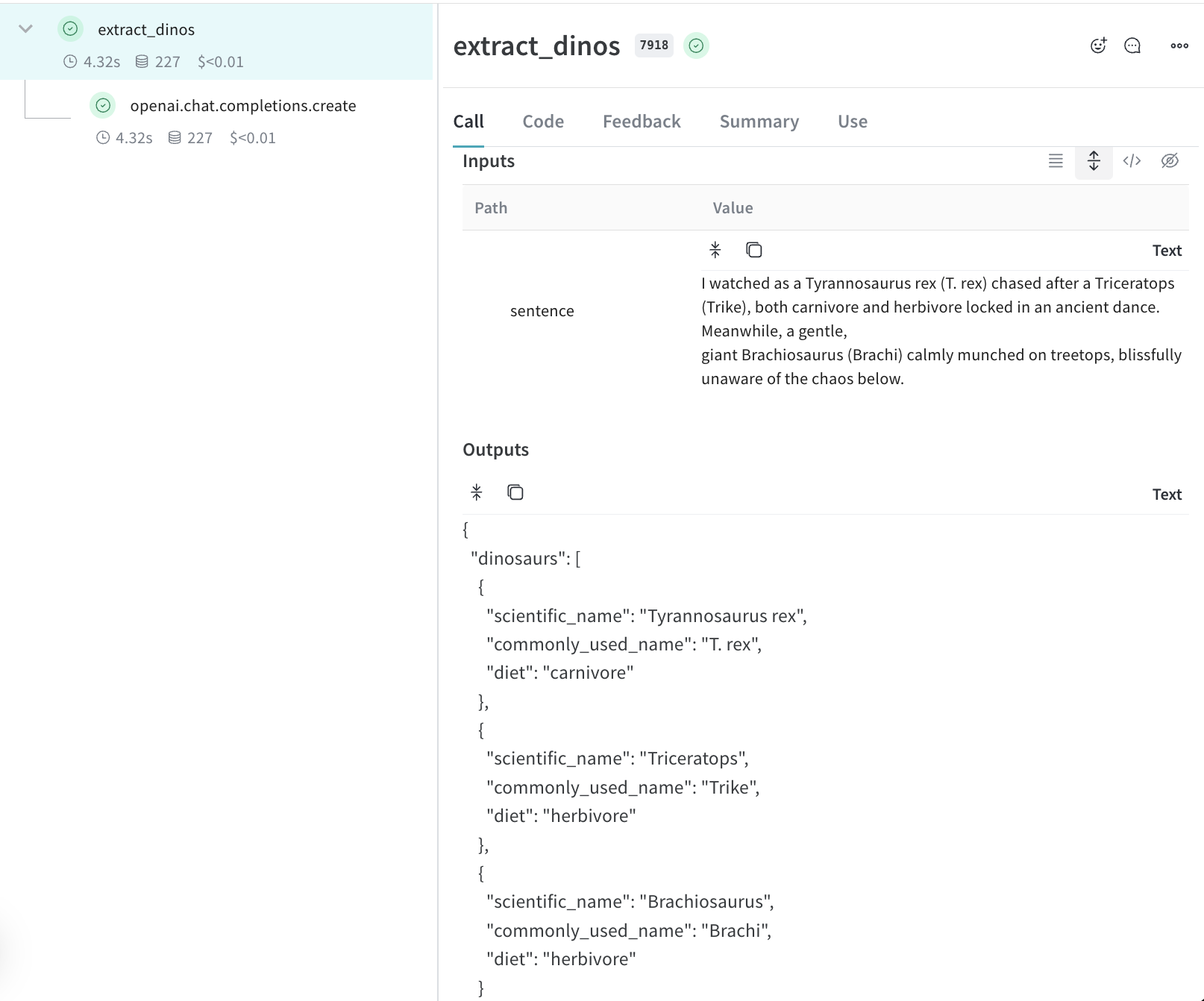
Click the link in your terminal or paste it into your browser to open the Weave UI. In the **Traces** panel of the Weave UI, you can click on the trace to see its data, such as its input, output, latency, and token usage.
## Learn more about Traces
* Learn how to [decorate your functions and retrieve call information](/weave/guides/tracking/tracing).
* Try the [Playground](/weave/guides/tools/playground) to test different models on logged traces.
* [Explore integrations](/weave/guides/integrations/). Weave automatically tracks calls made to OpenAI, Anthropic and many more LLM libraries. If your LLM library isn't currently one of our integrations you can track calls to other LLMs libraries or frameworks easily by wrapping them with `@weave.op()`.
## Next Steps
[Get started evaluating your app](/weave/tutorial-eval) and then see how to [evaluate a RAG application](/weave/tutorial-rag).
 ## Learn more about Traces
* Learn how to [decorate your functions and retrieve call information](/weave/guides/tracking/tracing).
* Try the [Playground](/weave/guides/tools/playground) to test different models on logged traces.
* [Explore integrations](/weave/guides/integrations/). Weave automatically tracks calls made to OpenAI, Anthropic and many more LLM libraries. If your LLM library isn't currently one of our integrations you can track calls to other LLMs libraries or frameworks easily by wrapping them with `@weave.op()`.
## Next Steps
[Get started evaluating your app](/weave/tutorial-eval) and then see how to [evaluate a RAG application](/weave/tutorial-rag).
## Learn more about Traces
* Learn how to [decorate your functions and retrieve call information](/weave/guides/tracking/tracing).
* Try the [Playground](/weave/guides/tools/playground) to test different models on logged traces.
* [Explore integrations](/weave/guides/integrations/). Weave automatically tracks calls made to OpenAI, Anthropic and many more LLM libraries. If your LLM library isn't currently one of our integrations you can track calls to other LLMs libraries or frameworks easily by wrapping them with `@weave.op()`.
## Next Steps
[Get started evaluating your app](/weave/tutorial-eval) and then see how to [evaluate a RAG application](/weave/tutorial-rag).