> ## Documentation Index
> Fetch the complete documentation index at: https://docs.wandb.ai/llms.txt
> Use this file to discover all available pages before exploring further.
# Build an evaluation
> Learn how to build an evaluation pipeline with Weave Models and Evaluations
export const GitHubLink = ({url}) =>
GitHub source
;
export const ColabLink = ({url}) =>
Try in Colab
;
Evaluations help you iterate and improve your applications by testing them against a set of examples after you make changes. Weave provides first-class support for tracking evaluations with [`Model`](/weave/guides/core-types/models) and [`Evaluation`](/weave/guides/core-types/evaluations) classes. The APIs are designed with minimal assumptions, allowing flexibility for a wide array of use cases.
## What you'll learn:
This guide shows you how to:
* Set up a `Model`
* Create a dataset to test an LLM's responses against
* Define a scoring function to compare model output to expected outputs
* Run an evaluation that tests the model against dataset using the scoring function and an additional built-in scorer
* View the results of the evaluation in the Weave UI
## Prerequisites
* A [W\&B account](https://wandb.ai/signup)
* Python 3.10+ or Node.js 18+
* Required packages installed:
* **Python**: `pip install weave openai`
* **TypeScript**: `npm install weave openai`
* An [OpenAI API key](https://platform.openai.com/api-keys) set as an environment variable
## Import the necessary libraries and functions
Import the following libraries into your script:
```python lines theme={null}
import json
import openai
import asyncio
import weave
from weave.scorers import MultiTaskBinaryClassificationF1
```
```typescript lines theme={null}
import * as weave from 'weave';
import OpenAI from 'openai';
```
## Build a `Model`
In Weave, [`Models` are objects](/weave/guides/core-types/models) that capture both the behavior of your model/agent (logic, prompt, parameters) and its versioned metadata (parameters, code, micro-config) so you can track, compare, evaluate and iterate reliably.
When you instantiate a `Model`, Weave automatically captures its configuration and behaviors and updates the version when there are changes. This allows you to track its performance over time as you iterate on it.
`Model`s are declared by subclassing `Model` and implementing a `predict` function definition, which takes one example and returns the response.
The following example model uses OpenAI to extract the names, colors, and flavors of alien fruits from sentences sent to it.
```python lines {1,5} theme={null}
class ExtractFruitsModel(weave.Model):
model_name: str
prompt_template: str
@weave.op()
async def predict(self, sentence: str) -> dict:
client = openai.AsyncClient()
response = await client.chat.completions.create(
model=self.model_name,
messages=[
{"role": "user", "content": self.prompt_template.format(sentence=sentence)}
],
)
result = response.choices[0].message.content
if result is None:
raise ValueError("No response from model")
parsed = json.loads(result)
return parsed
```
```typescript lines {9} theme={null}
// Note: weave.Model is not supported in TypeScript yet.
// Instead, wrap your model-like function with weave.op
import * as weave from 'weave';
import OpenAI from 'openai';
const openaiClient = new OpenAI();
const model = weave.op(async function myModel({datasetRow}) {
const prompt = `Extract fields ("fruit": , "color": , "flavor") from the following text, as json: ${datasetRow.sentence}`;
const response = await openaiClient.chat.completions.create({
model: 'gpt-3.5-turbo',
messages: [{ role: 'user', content: prompt }],
response_format: { type: 'json_object' }
});
return JSON.parse(response.choices[0].message.content);
});
```
The `ExtractFruitsModel` class inherits from (or subclasses) `weave.Model` so that Weave can track the instantiated object. `@weave.op` decorates the predict function to track its inputs and outputs.
You can instantiate `Model` objects like this:
```python lines theme={null}
# Set your team and project name
weave.init('/eval_pipeline_quickstart')
model = ExtractFruitsModel(
model_name='gpt-3.5-turbo-1106',
prompt_template='Extract fields ("fruit": , "color": , "flavor": ) from the following text, as json: {sentence}'
)
sentence = "There are many fruits that were found on the recently discovered planet Goocrux. There are neoskizzles that grow there, which are purple and taste like candy."
print(asyncio.run(model.predict(sentence)))
# if you're in a Jupyter Notebook, run:
# await model.predict(sentence)
```
```typescript theme={null}
await weave.init('eval_pipeline_quickstart');
const sentence = "There are many fruits that were found on the recently discovered planet Goocrux. There are neoskizzles that grow there, which are purple and taste like candy.";
const result = await model({ datasetRow: { sentence } });
console.log(result);
```
## Create a dataset
Next, you need a dataset to evaluate your model on. A [`Dataset` is a collection of examples stored as a Weave object](/weave/guides/core-types/datasets).
The following example dataset defines three example input sentences and their correct answers (`labels`), and then formats them in a JSON table format that scoring functions can read.
This example builds a list of examples in code, but you can also log them one at a time from your running application.
```python lines theme={null}
sentences = ["There are many fruits that were found on the recently discovered planet Goocrux. There are neoskizzles that grow there, which are purple and taste like candy.",
"Pounits are a bright green color and are more savory than sweet.",
"Finally, there are fruits called glowls, which have a very sour and bitter taste which is acidic and caustic, and a pale orange tinge to them."]
labels = [
{'fruit': 'neoskizzles', 'color': 'purple', 'flavor': 'candy'},
{'fruit': 'pounits', 'color': 'bright green', 'flavor': 'savory'},
{'fruit': 'glowls', 'color': 'pale orange', 'flavor': 'sour and bitter'}
]
examples = [
{'id': '0', 'sentence': sentences[0], 'target': labels[0]},
{'id': '1', 'sentence': sentences[1], 'target': labels[1]},
{'id': '2', 'sentence': sentences[2], 'target': labels[2]}
]
```
```typescript theme={null}
const sentences = [
"There are many fruits that were found on the recently discovered planet Goocrux. There are neoskizzles that grow there, which are purple and taste like candy.",
"Pounits are a bright green color and are more savory than sweet.",
"Finally, there are fruits called glowls, which have a very sour and bitter taste which is acidic and caustic, and a pale orange tinge to them."
];
const labels = [
{ fruit: 'neoskizzles', color: 'purple', flavor: 'candy' },
{ fruit: 'pounits', color: 'bright green', flavor: 'savory' },
{ fruit: 'glowls', color: 'pale orange', flavor: 'sour and bitter' }
];
const examples = sentences.map((sentence, i) => ({
id: i.toString(),
sentence,
target: labels[i]
}));
```
Then create your dataset using the `weave.Dataset()` class and publish it:
```python lines {2} theme={null}
weave.init('eval_pipeline_quickstart')
dataset = weave.Dataset(name='fruits', rows=examples)
weave.publish(dataset)
```
```typescript lines {3-6} theme={null}
import * as weave from 'weave';
await weave.init('eval_pipeline_quickstart');
const dataset = new weave.Dataset({
name: 'fruits',
rows: examples
});
await dataset.save();
```
## Define custom scoring functions
When using Weave evaluations, Weave expects a `target` to compare `output` against. The following scoring function takes two dictionaries (`target` and `output`) and returns a dictionary of boolean values indicating whether the output matches the target. The `@weave.op()` decorator enables Weave to track the scoring function's execution.
```python lines theme={null}
@weave.op()
def fruit_name_score(target: dict, output: dict) -> dict:
return {'correct': target['fruit'] == output['fruit']}
```
```typescript theme={null}
import * as weave from 'weave';
const fruitNameScorer = weave.op(
function fruitNameScore({target, output}) {
return { correct: target.fruit === output.fruit };
}
);
```
To make your own scoring function, learn more in the [Scorers](/weave/guides/evaluation/scorers) guide.
In some applications, you may want to create custom `Scorer` classes. For example, you might create a standardized `LLMJudge` class with specific parameters (such as chat model or prompt), specific row scoring, and aggregate score calculation. See the tutorial on defining a `Scorer` class in the next chapter on [Model-Based Evaluation of RAG applications](/weave/tutorial-rag#optional-defining-a-scorer-class) for more information.
## Use a built-in scorer and run the evaluation
Along with custom scoring functions, you can also use [Weave's built-in scorers](/weave/guides/evaluation/builtin_scorers). In the following evaluation, `weave.Evaluation()` uses the `fruit_name_score` function defined in the previous section and the built-in `MultiTaskBinaryClassificationF1` scorer, which computes [F1 scores](https://en.wikipedia.org/wiki/F-score).
The following example runs an evaluation of `ExtractFruitsModel` on the `fruits` dataset using the scoring the two functions and logs the results to Weave.
```python lines {3-10} theme={null}
weave.init('eval_pipeline_quickstart')
evaluation = weave.Evaluation(
name='fruit_eval',
dataset=dataset,
scorers=[
MultiTaskBinaryClassificationF1(class_names=["fruit", "color", "flavor"]),
fruit_name_score
],
)
print(asyncio.run(evaluation.evaluate(model)))
# if you're in a Jupyter Notebook, run:
# await evaluation.evaluate(model)
```
```typescript lines {5-9} theme={null}
import * as weave from 'weave';
await weave.init('eval_pipeline_quickstart');
const evaluation = new weave.Evaluation({
name: 'fruit_eval',
dataset: dataset,
scorers: [fruitNameScorer],
});
const results = await evaluation.evaluate(model);
console.log(results);
```
If you're running from a python script, you'll need to use `asyncio.run`. However, if you're running from a Jupyter notebook, you can use `await` directly.
### Complete Example
```python lines theme={null}
import json
import asyncio
import openai
import weave
from weave.scorers import MultiTaskBinaryClassificationF1
# Initialize Weave once
weave.init('eval_pipeline_quickstart')
# 1. Define Model
class ExtractFruitsModel(weave.Model):
model_name: str
prompt_template: str
@weave.op()
async def predict(self, sentence: str) -> dict:
client = openai.AsyncClient()
response = await client.chat.completions.create(
model=self.model_name,
messages=[{"role": "user", "content": self.prompt_template.format(sentence=sentence)}],
)
result = response.choices[0].message.content
if result is None:
raise ValueError("No response from model")
return json.loads(result)
# 2. Instantiate model
model = ExtractFruitsModel(
model_name='gpt-3.5-turbo-1106',
prompt_template='Extract fields ("fruit": , "color": , "flavor": ) from the following text, as json: {sentence}'
)
# 3. Create dataset
sentences = ["There are many fruits that were found on the recently discovered planet Goocrux. There are neoskizzles that grow there, which are purple and taste like candy.",
"Pounits are a bright green color and are more savory than sweet.",
"Finally, there are fruits called glowls, which have a very sour and bitter taste which is acidic and caustic, and a pale orange tinge to them."]
labels = [
{'fruit': 'neoskizzles', 'color': 'purple', 'flavor': 'candy'},
{'fruit': 'pounits', 'color': 'bright green', 'flavor': 'savory'},
{'fruit': 'glowls', 'color': 'pale orange', 'flavor': 'sour and bitter'}
]
examples = [
{'id': '0', 'sentence': sentences[0], 'target': labels[0]},
{'id': '1', 'sentence': sentences[1], 'target': labels[1]},
{'id': '2', 'sentence': sentences[2], 'target': labels[2]}
]
dataset = weave.Dataset(name='fruits', rows=examples)
weave.publish(dataset)
# 4. Define scoring function
@weave.op()
def fruit_name_score(target: dict, output: dict) -> dict:
return {'correct': target['fruit'] == output['fruit']}
# 5. Run evaluation
evaluation = weave.Evaluation(
name='fruit_eval',
dataset=dataset,
scorers=[
MultiTaskBinaryClassificationF1(class_names=["fruit", "color", "flavor"]),
fruit_name_score
],
)
print(asyncio.run(evaluation.evaluate(model)))
```
```typescript lines theme={null}
import * as weave from 'weave';
import OpenAI from 'openai';
// Initialize Weave once
await weave.init('eval_pipeline_quickstart');
// 1. Define Model
// Note: weave.Model is not supported in TypeScript yet.
// Instead, wrap your model-like function with weave.op
const openaiClient = new OpenAI();
const model = weave.op(async function myModel({datasetRow}) {
const prompt = `Extract fields ("fruit": , "color": , "flavor": ) from the following text, as json: ${datasetRow.sentence}`;
const response = await openaiClient.chat.completions.create({
model: 'gpt-3.5-turbo',
messages: [{ role: 'user', content: prompt }],
response_format: { type: 'json_object' }
});
return JSON.parse(response.choices[0].message.content);
});
// 2. Create dataset
const sentences = [
"There are many fruits that were found on the recently discovered planet Goocrux. There are neoskizzles that grow there, which are purple and taste like candy.",
"Pounits are a bright green color and are more savory than sweet.",
"Finally, there are fruits called glowls, which have a very sour and bitter taste which is acidic and caustic, and a pale orange tinge to them."
];
const labels = [
{ fruit: 'neoskizzles', color: 'purple', flavor: 'candy' },
{ fruit: 'pounits', color: 'bright green', flavor: 'savory' },
{ fruit: 'glowls', color: 'pale orange', flavor: 'sour and bitter' }
];
const examples = sentences.map((sentence, i) => ({
id: i.toString(),
sentence,
target: labels[i]
}));
const dataset = new weave.Dataset({
name: 'fruits',
rows: examples
});
await dataset.save();
// 3. Define scoring function
const fruitNameScorer = weave.op(
function fruitNameScore({target, output}) {
return { correct: target.fruit === output.fruit };
}
);
// 4. Run evaluation
const evaluation = new weave.Evaluation({
name: 'fruit_eval',
dataset: dataset,
scorers: [fruitNameScorer],
});
const results = await evaluation.evaluate(model);
console.log(results);
```
## View your evaluation results
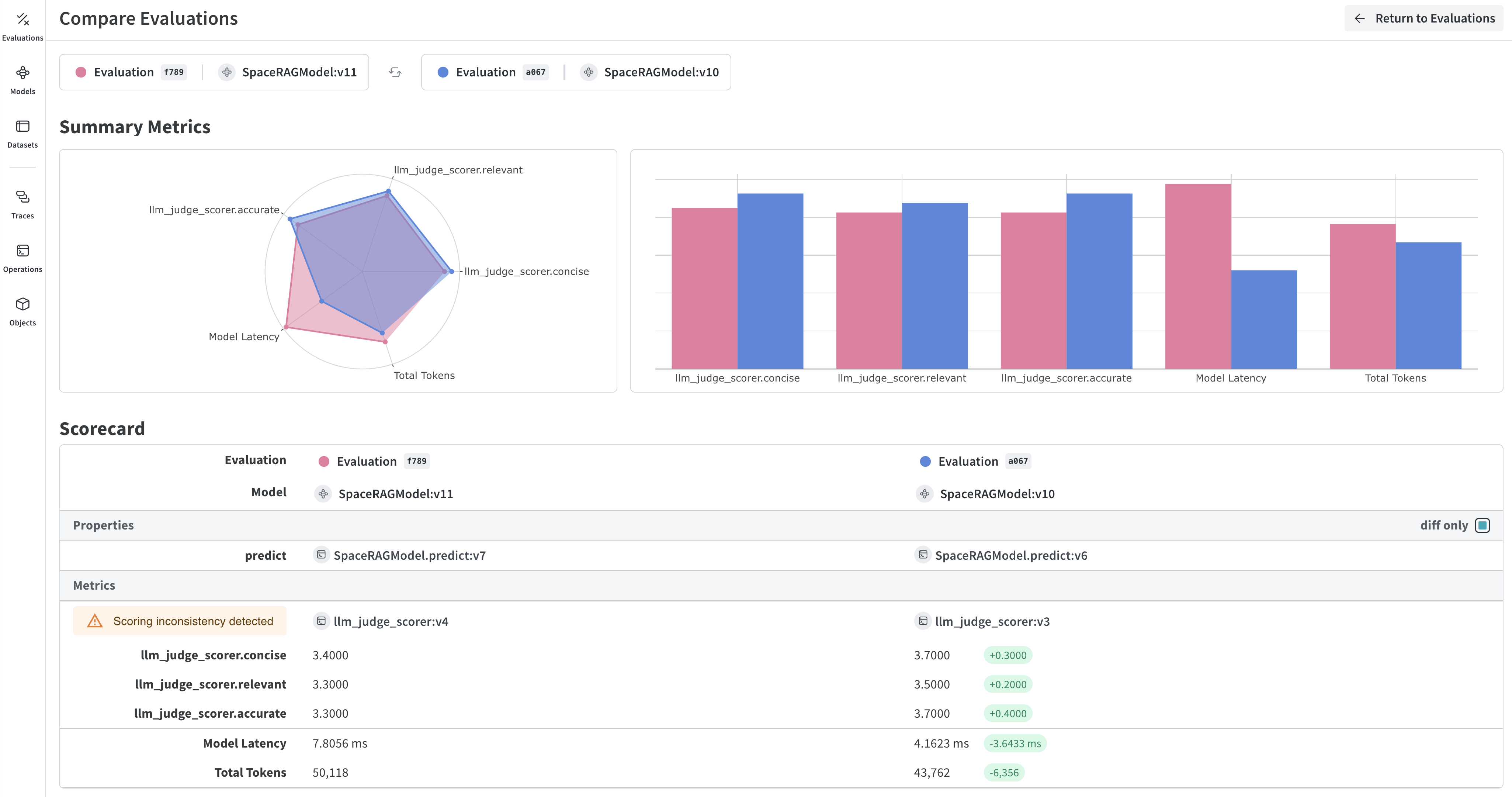
Weave automatically captures traces of each prediction and score. Click on the link printed by the evaluation to view the results in the Weave UI.
## Learn more about Weave evaluations
* Learn more about how to [build and use scorers](/weave/guides/evaluation/scorers).
* Check out Weave's [built-in scoring functions](/weave/guides/evaluation/builtin_scorers).
* Learn about [Model-Based Evaluation](/weave/guides/evaluation/scorers#model-based-evaluation) for using LLMs as judges.
## Next Steps
[Build a RAG application](/weave/tutorial-rag) to learn about evaluating retrieval-augmented generation.
 ## What you'll learn:
This guide shows you how to:
* Set up a `Model`
* Create a dataset to test an LLM's responses against
* Define a scoring function to compare model output to expected outputs
* Run an evaluation that tests the model against dataset using the scoring function and an additional built-in scorer
* View the results of the evaluation in the Weave UI
## Prerequisites
* A [W\&B account](https://wandb.ai/signup)
* Python 3.10+ or Node.js 18+
* Required packages installed:
* **Python**: `pip install weave openai`
* **TypeScript**: `npm install weave openai`
* An [OpenAI API key](https://platform.openai.com/api-keys) set as an environment variable
## Import the necessary libraries and functions
Import the following libraries into your script:
## What you'll learn:
This guide shows you how to:
* Set up a `Model`
* Create a dataset to test an LLM's responses against
* Define a scoring function to compare model output to expected outputs
* Run an evaluation that tests the model against dataset using the scoring function and an additional built-in scorer
* View the results of the evaluation in the Weave UI
## Prerequisites
* A [W\&B account](https://wandb.ai/signup)
* Python 3.10+ or Node.js 18+
* Required packages installed:
* **Python**: `pip install weave openai`
* **TypeScript**: `npm install weave openai`
* An [OpenAI API key](https://platform.openai.com/api-keys) set as an environment variable
## Import the necessary libraries and functions
Import the following libraries into your script: