> ## Documentation Index
> Fetch the complete documentation index at: https://docs.wandb.ai/llms.txt
> Use this file to discover all available pages before exploring further.
# Trace nested functions
> Learn how to track deeply nested Call structures with W&B tracing
LLM-powered applications can contain multiple LLMs calls, additional data processing, and validation logic that is important to monitor. You can track these nested functions and their parent-child relationships in Weave using the `@weave.op()` decorator (Python), or wrap it with `weave.op()` (TypeScript).
We recommend decorating functions and sub-functions as granularly as possible to capture the application's complete execution flow. This can help you better understand and shape your application's behavior.
The following code builds on the [quickstart example](/weave/quickstart) and adds logic to count the returned items from the LLM and wrap them in a higher-level function. Additionally, the example uses `weave.op()` to trace every function, its call order, and its parent-child relationship:
```python {1,7,26,32,42} theme={null}
import weave
import json
from openai import OpenAI
client = OpenAI()
@weave.op()
def extract_dinos(sentence: str) -> dict:
response = client.chat.completions.create(
model="gpt-4o",
messages=[
{
"role": "system",
"content": """Extract any dinosaur `name`, their `common_name`, \
names and whether its `diet` is a herbivore or carnivore, in JSON format."""
},
{
"role": "user",
"content": sentence
}
],
response_format={ "type": "json_object" }
)
return response.choices[0].message.content
@weave.op()
def count_dinos(dino_data: dict) -> int:
# count the number of items in the returned list
k = list(dino_data.keys())[0]
return len(dino_data[k])
@weave.op()
def dino_tracker(sentence: str) -> dict:
# extract dinosaurs using a LLM
dino_data = extract_dinos(sentence)
# count the number of dinosaurs returned
dino_data = json.loads(dino_data)
n_dinos = count_dinos(dino_data)
return {"n_dinosaurs": n_dinos, "dinosaurs": dino_data}
weave.init('jurassic-park')
sentence = """I watched as a Tyrannosaurus rex (T. rex) chased after a Triceratops (Trike), \
both carnivore and herbivore locked in an ancient dance. Meanwhile, a gentle giant \
Brachiosaurus (Brachi) calmly munched on treetops, blissfully unaware of the chaos below."""
result = dino_tracker(sentence)
print(result)
```
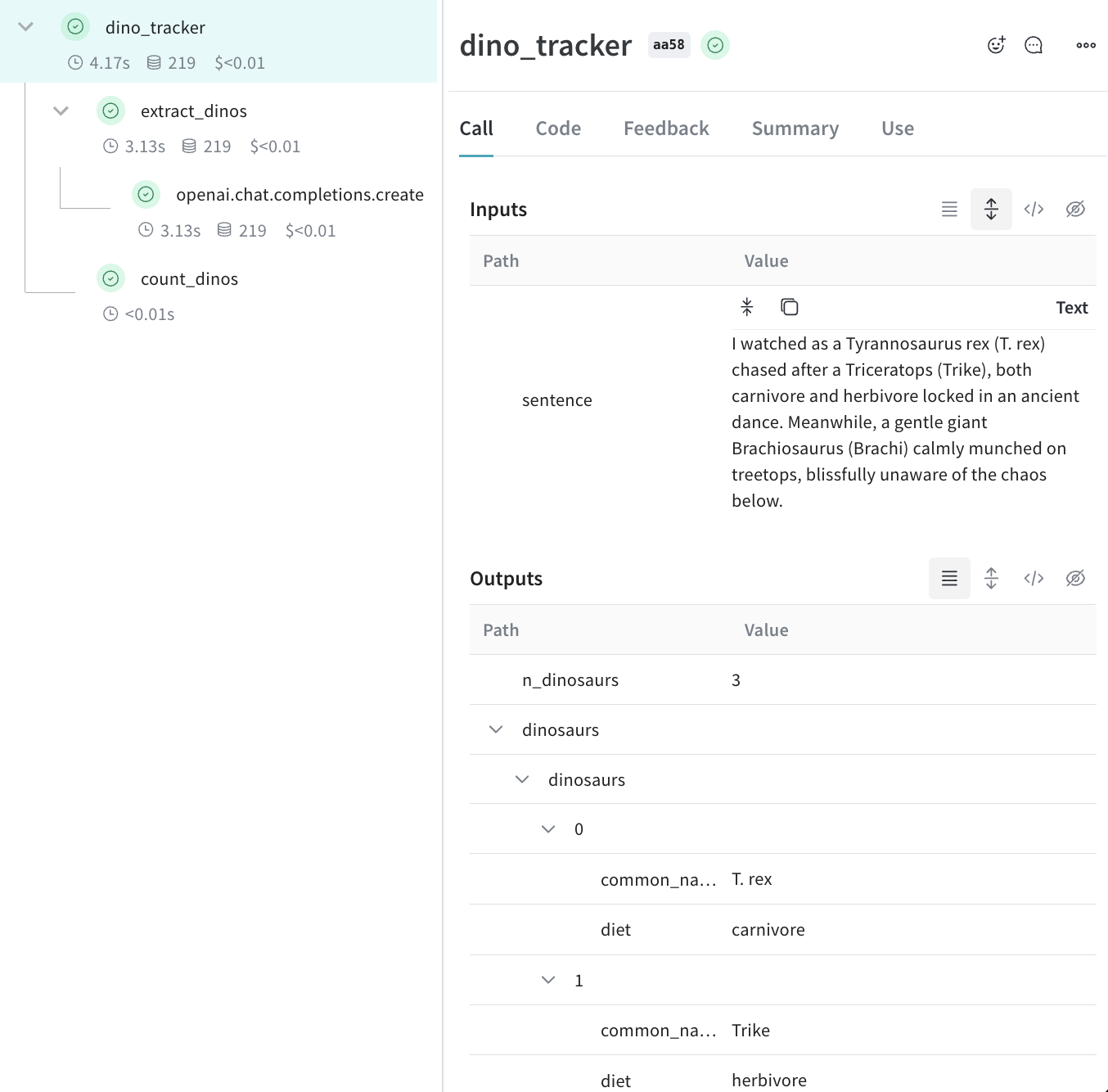
**Nested functions**
When you run the preceding code, the **Traces** page shows the inputs and outputs from the two nested functions (`extract_dinos` and `count_dinos`), as well as the automatically-logged OpenAI trace.
 ```typescript theme={null}
import OpenAI from 'openai';
import * as weave from 'weave';
const openai = new OpenAI();
const extractDinos = weave.op(async (sentence: string) => {
const response = await openai.chat.completions.create({
model: 'gpt-4o',
messages: [
{
role: 'system',
content:
'Extract any dinosaur `name`, their `common_name`, names and whether its `diet` is a herbivore or carnivore, in JSON format.',
},
{role: 'user', content: sentence},
],
response_format: {type: 'json_object'},
});
return response.choices[0].message.content;
});
const countDinos = weave.op(async (dinoData: string) => {
const parsed = JSON.parse(dinoData);
return Object.keys(parsed).length;
});
const dinoTracker = weave.op(async (sentence: string) => {
const dinoData = await extractDinos(sentence);
const nDinos = await countDinos(dinoData);
return {nDinos, dinoData};
});
async function main() {
await weave.init('jurassic-park');
const sentence = `I watched as a Tyrannosaurus rex (T. rex) chased after a Triceratops (Trike),
both carnivore and herbivore locked in an ancient dance. Meanwhile, a gentle giant
Brachiosaurus (Brachi) calmly munched on treetops, blissfully unaware of the chaos below.`;
const result = await dinoTracker(sentence);
console.log(result);
}
main();
```
**Nested functions**
When you run the preceding code, the **Traces** page shows the inputs and outputs from the two nested functions (`extract_dinos` and `count_dinos`), as well as the automatically-logged OpenAI trace.
## Tracking metadata
You can track metadata by using the `weave.attributes` context manager and passing it a dictionary of the metadata to track at call time.
Continuing our example from above:
```python lines {1,10-11} theme={null}
import weave
weave.init('jurassic-park')
sentence = """I watched as a Tyrannosaurus rex (T. rex) chased after a Triceratops (Trike), \
both carnivore and herbivore locked in an ancient dance. Meanwhile, a gentle giant \
Brachiosaurus (Brachi) calmly munched on treetops, blissfully unaware of the chaos below."""
# track metadata alongside our previously defined function
with weave.attributes({'user_id': 'lukas', 'env': 'production'}):
result = dino_tracker(sentence)
```
```plaintext theme={null}
This feature is not available in TypeScript yet.
```
We recommend that you track metadata at run time, such as your user IDs and your code's environment status (development, staging, or production).
We recommennd that to track system settings, such as a system prompt, use [Weave Models](/weave/guides/core-types/models).
For more information on using attributes, see [Define and log attributes](/weave/guides/tools/attributes).
## What's next?
* Follow the [App Versioning tutorial](/weave/tutorial-weave_models) to capture, version, and organize ad-hoc prompt, model, and application changes.
```typescript theme={null}
import OpenAI from 'openai';
import * as weave from 'weave';
const openai = new OpenAI();
const extractDinos = weave.op(async (sentence: string) => {
const response = await openai.chat.completions.create({
model: 'gpt-4o',
messages: [
{
role: 'system',
content:
'Extract any dinosaur `name`, their `common_name`, names and whether its `diet` is a herbivore or carnivore, in JSON format.',
},
{role: 'user', content: sentence},
],
response_format: {type: 'json_object'},
});
return response.choices[0].message.content;
});
const countDinos = weave.op(async (dinoData: string) => {
const parsed = JSON.parse(dinoData);
return Object.keys(parsed).length;
});
const dinoTracker = weave.op(async (sentence: string) => {
const dinoData = await extractDinos(sentence);
const nDinos = await countDinos(dinoData);
return {nDinos, dinoData};
});
async function main() {
await weave.init('jurassic-park');
const sentence = `I watched as a Tyrannosaurus rex (T. rex) chased after a Triceratops (Trike),
both carnivore and herbivore locked in an ancient dance. Meanwhile, a gentle giant
Brachiosaurus (Brachi) calmly munched on treetops, blissfully unaware of the chaos below.`;
const result = await dinoTracker(sentence);
console.log(result);
}
main();
```
**Nested functions**
When you run the preceding code, the **Traces** page shows the inputs and outputs from the two nested functions (`extract_dinos` and `count_dinos`), as well as the automatically-logged OpenAI trace.
## Tracking metadata
You can track metadata by using the `weave.attributes` context manager and passing it a dictionary of the metadata to track at call time.
Continuing our example from above:
```python lines {1,10-11} theme={null}
import weave
weave.init('jurassic-park')
sentence = """I watched as a Tyrannosaurus rex (T. rex) chased after a Triceratops (Trike), \
both carnivore and herbivore locked in an ancient dance. Meanwhile, a gentle giant \
Brachiosaurus (Brachi) calmly munched on treetops, blissfully unaware of the chaos below."""
# track metadata alongside our previously defined function
with weave.attributes({'user_id': 'lukas', 'env': 'production'}):
result = dino_tracker(sentence)
```
```plaintext theme={null}
This feature is not available in TypeScript yet.
```
We recommend that you track metadata at run time, such as your user IDs and your code's environment status (development, staging, or production).
We recommennd that to track system settings, such as a system prompt, use [Weave Models](/weave/guides/core-types/models).
For more information on using attributes, see [Define and log attributes](/weave/guides/tools/attributes).
## What's next?
* Follow the [App Versioning tutorial](/weave/tutorial-weave_models) to capture, version, and organize ad-hoc prompt, model, and application changes.