메인 콘텐츠로 건너뛰기
이것은 인터랙티브 노트북입니다. 로컬에서 실행하거나 아래 링크를 사용할 수 있습니다:

3자 시스템에서 Traces 가져오기

때로는 GenAI 애플리케이션의 실시간 trace를 얻기 위해 Weave의 간편한 인테그레이션을 사용하여 Python 또는 Javascript 코드를 인스트루먼트(instrument)하는 것이 불가능할 수 있습니다. 이러한 trace가 나중에 csv 또는 json 형식으로 제공되는 경우가 종종 있습니다. 이 쿡북에서는 CSV 파일에서 데이터를 추출하고 이를 Weave로 가져와 인사이트를 도출하고 엄격한 평가를 수행하기 위한 하위 수준의 Weave Python API를 살펴봅니다. 이 쿡북에서 가정하는 샘플 데이터셋의 구조는 다음과 같습니다:
conversation_id,turn_index,start_time,user_input,ground_truth,answer_text
1234,1,2024-09-04 13:05:39,This is the beginning, ['This was the beginning'], That was the beginning
1235,1,2024-09-04 13:02:11,This is another trace,, That was another trace
1235,2,2024-09-04 13:04:19,This is the next turn,, That was the next turn
1236,1,2024-09-04 13:02:10,This is a 3 turn conversation,, Woah thats a lot of turns
1236,2,2024-09-04 13:02:30,This is the second turn, ['That was definitely the second turn'], You are correct
1236,3,2024-09-04 13:02:53,This is the end,, Well good riddance!

이 쿡북의 데이터 가져오기 결정을 이해하려면, Weave trace가 1:다(1:Many) 관계이며 연속적인 부모-자식 관계를 갖는다는 점을 알아야 합니다. 즉, 하나의 부모가 여러 자식을 가질 수 있으며, 그 부모 자체가 다른 부모의 자식이 될 수도 있습니다. 따라서 우리는 전체 대화 로깅을 제공하기 위해 conversation_id를 부모 식별자로, turn_index를 자식 식별자로 사용합니다. 필요에 따라 변수를 수정해야 합니다.

환경 설정

필요한 모든 패키지를 설치하고 임포트합니다. wandb.login()으로 쉽게 로그인할 수 있도록 WANDB_API_KEY를 환경 변수에 설정합니다 (Colab에서는 보안 비밀로 제공되어야 합니다). Colab에 업로드할 파일 이름을 name_of_file에 설정하고, 이를 로그할 W&B 프로젝트를 name_of_wandb_project에 설정합니다. 참고: name_of_wandb_project는 trace를 기록할 팀을 지정하기 위해 {team_name}/{project_name} 형식을 사용할 수도 있습니다. 그런 다음 weave.init()을 호출하여 weave 클라이언트를 가져옵니다.
%pip install wandb weave pandas datetime --quiet
python
import os

import pandas as pd
import wandb
from google.colab import userdata

import weave

## 샘플 파일을 디스크에 작성합니다
with open("/content/import_cookbook_data.csv", "w") as f:
    f.write(
        "conversation_id,turn_index,start_time,user_input,ground_truth,answer_text\n"
    )
    f.write(
        '1234,1,2024-09-04 13:05:39,This is the beginning, ["This was the beginning"], That was the beginning\n'
    )
    f.write(
        "1235,1,2024-09-04 13:02:11,This is another trace,, That was another trace\n"
    )
    f.write(
        "1235,2,2024-09-04 13:04:19,This is the next turn,, That was the next turn\n"
    )
    f.write(
        "1236,1,2024-09-04 13:02:10,This is a 3 turn conversation,, Woah thats a lot of turns\n"
    )
    f.write(
        '1236,2,2024-09-04 13:02:30,This is the second turn, ["That was definitely the second turn"], You are correct\n'
    )
    f.write("1236,3,2024-09-04 13:02:53,This is the end,, Well good riddance!\n")

os.environ["WANDB_API_KEY"] = userdata.get("WANDB_API_KEY")
name_of_file = "/content/import_cookbook_data.csv"
name_of_wandb_project = "import-weave-traces-cookbook"

wandb.login()
python
weave_client = weave.init(name_of_wandb_project)

데이터 로딩

데이터를 Pandas 데이터프레임으로 로드하고, 부모와 자식이 올바르게 정렬되도록 conversation_idturn_index를 기준으로 정렬합니다. 결과적으로 conversation_data 아래에 대화 턴(turns)이 배열로 포함된 두 개의 컬럼을 가진 Pandas DF가 생성됩니다.
## 데이터 로드 및 셰이핑
df = pd.read_csv(name_of_file)

sorted_df = df.sort_values(["conversation_id", "turn_index"])

# 각 대화에 대해 딕셔너리 배열을 생성하는 함수
def create_conversation_dict_array(group):
    return group.drop("conversation_id", axis=1).to_dict("records")

# conversation_id별로 데이터프레임을 그룹화하고 집계 적용
result_df = (
    sorted_df.groupby("conversation_id")
    .apply(create_conversation_dict_array)
    .reset_index()
)
result_df.columns = ["conversation_id", "conversation_data"]

# 집계된 데이터의 형태 확인
result_df.head()

Weave에 Traces 로그하기

이제 Pandas DF를 순회합니다:
  • conversation_id에 대해 부모 call을 생성합니다.
  • 턴 배열을 순회하여 turn_index별로 정렬된 자식 call을 생성합니다.
하위 수준 Python API의 중요한 개념:
  • Weave call은 Weave trace와 동일하며, 이 call은 연결된 부모 또는 자식을 가질 수 있습니다.
  • Weave call은 피드백, 메타데이터 등 다른 항목들과 연결될 수 있습니다. 여기서는 입력과 출력만 연결하지만, 데이터가 제공된다면 이러한 항목들을 추가할 수도 있습니다.
  • Weave call은 실시간 추적을 위해 설계되었으므로 createdfinished 상태를 가집니다. 여기서는 사후에 가져오는 것이므로, 오브젝트가 정의되고 서로 연결되면 생성하고 종료합니다.
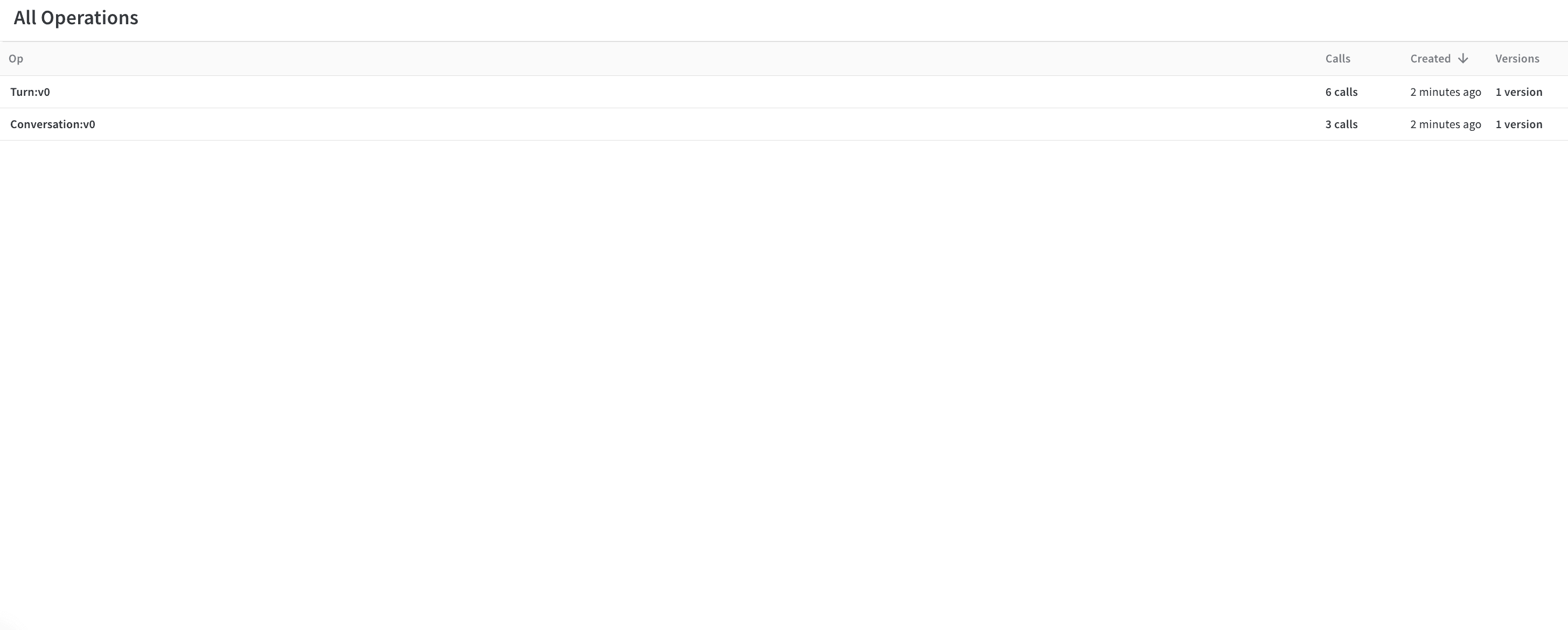
  • call의 op 값은 Weave가 동일한 구성의 call을 분류하는 방식입니다. 이 예제에서 모든 부모 call은 Conversation 타입이고, 모든 자식 call은 Turn 타입입니다. 필요에 따라 이를 수정할 수 있습니다.
  • call은 inputsoutput을 가질 수 있습니다. inputs는 생성 시 정의되고 output은 call이 종료될 때 정의됩니다.
# Weave에 trace 로그하기

# 집계된 대화들을 순회합니다
for _, row in result_df.iterrows():
    # 대화 부모를 정의합니다,
    # 이전에 정의한 weave_client로 "call"을 생성합니다
    parent_call = weave_client.create_call(
        # Op 값은 이를 Weave Op로 등록하여 나중에 그룹으로 쉽게 검색할 수 있게 합니다
        op="Conversation",
        # 상위 레벨 대화의 입력을 그 아래의 모든 턴으로 설정합니다
        inputs={
            "conversation_data": row["conversation_data"][:-1]
            if len(row["conversation_data"]) > 1
            else row["conversation_data"]
        },
        # 대화 부모는 상위 부모를 가지지 않습니다
        parent=None,
        # UI에 이 특정 대화가 표시될 이름
        display_name=f"conversation-{row['conversation_id']}",
    )

    # 부모의 출력을 대화의 마지막 trace로 설정합니다
    parent_output = row["conversation_data"][len(row["conversation_data"]) - 1]

    # 이제 부모에 대한 모든 대화 턴을 순회하며
    # 대화의 자식으로 로그합니다
    for item in row["conversation_data"]:
        item_id = f"{row['conversation_id']}-{item['turn_index']}"

        # 대화 아래로 분류되도록 여기서 다시 call을 생성합니다
        call = weave_client.create_call(
            # 단일 대화 trace를 "Turn"으로 지정합니다
            op="Turn",
            # RAG 'ground_truth'를 포함한 턴의 모든 입력을 제공합니다
            inputs={
                "turn_index": item["turn_index"],
                "start_time": item["start_time"],
                "user_input": item["user_input"],
                "ground_truth": item["ground_truth"],
            },
            # 이를 정의한 부모의 자식으로 설정합니다
            parent=parent_call,
            # Weave에서 식별할 이름을 제공합니다
            display_name=item_id,
        )

        # call의 출력을 답변으로 설정합니다
        output = {
            "answer_text": item["answer_text"],
        }

        # 이미 발생한 trace이므로 단일 턴 call을 종료합니다
        weave_client.finish_call(call=call, output=output)
    # 모든 자식을 로그했으므로 부모 call도 종료합니다
    weave_client.finish_call(call=parent_call, output=parent_output)

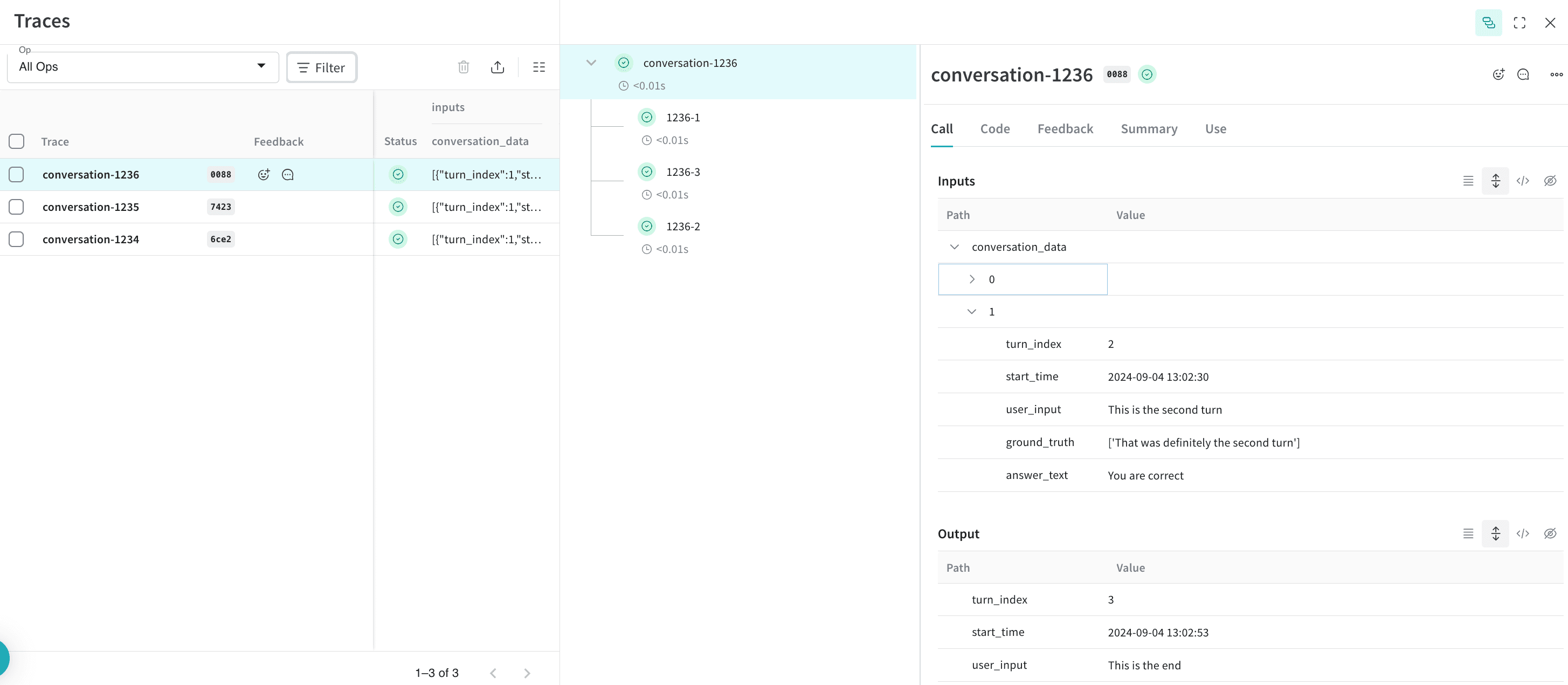
결과: Weave에 Traces가 로그됨

Traces:
image.png
Operations:
image.png

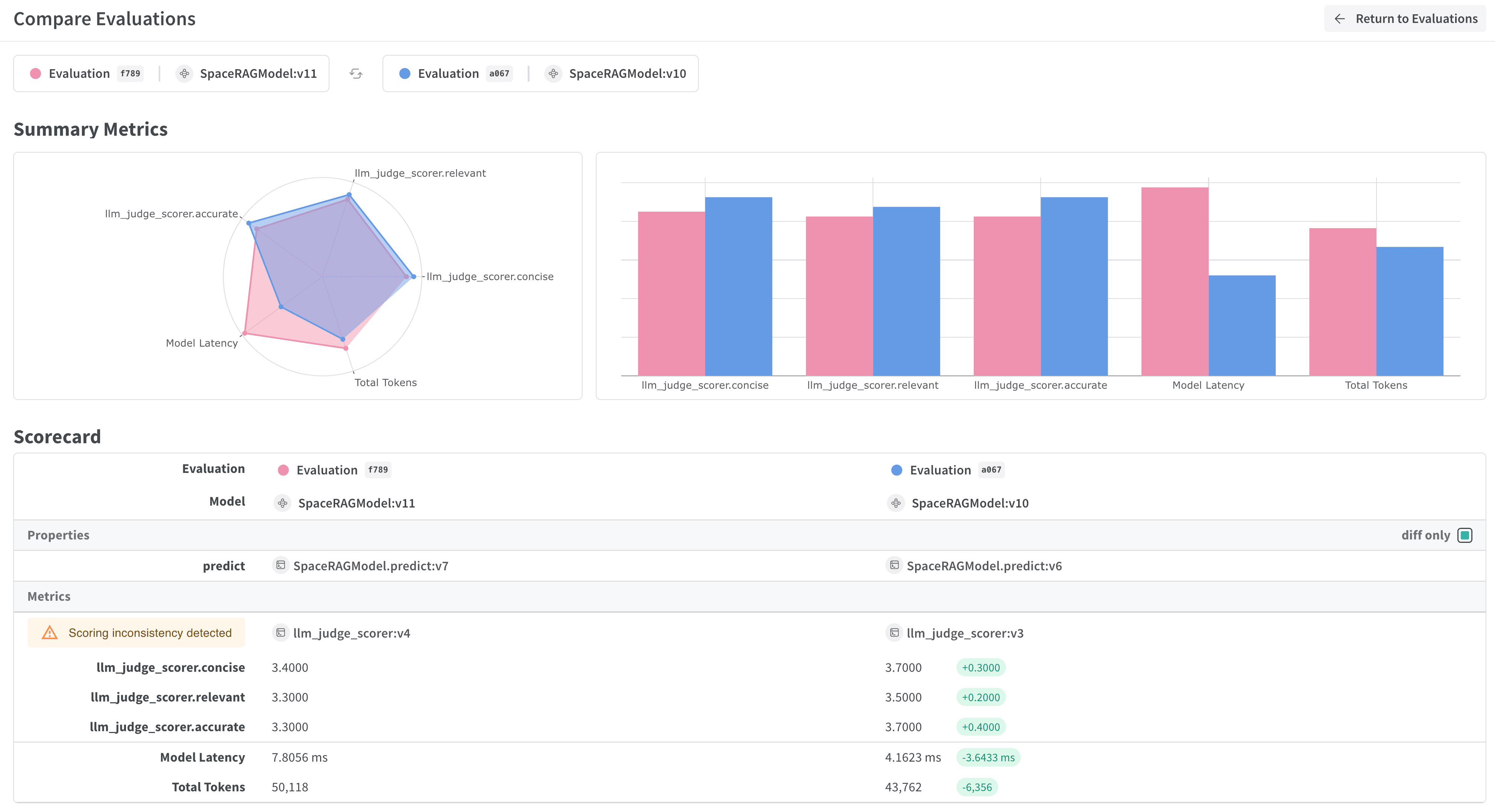
보너스: 엄격한 평가를 실행하기 위해 trace 내보내기!

trace가 Weave에 저장되고 대화가 어떻게 진행되는지 파악했다면, 나중에 이를 다른 프로세스로 내보내 Weave Evaluations를 실행할 수 있습니다.
image.png
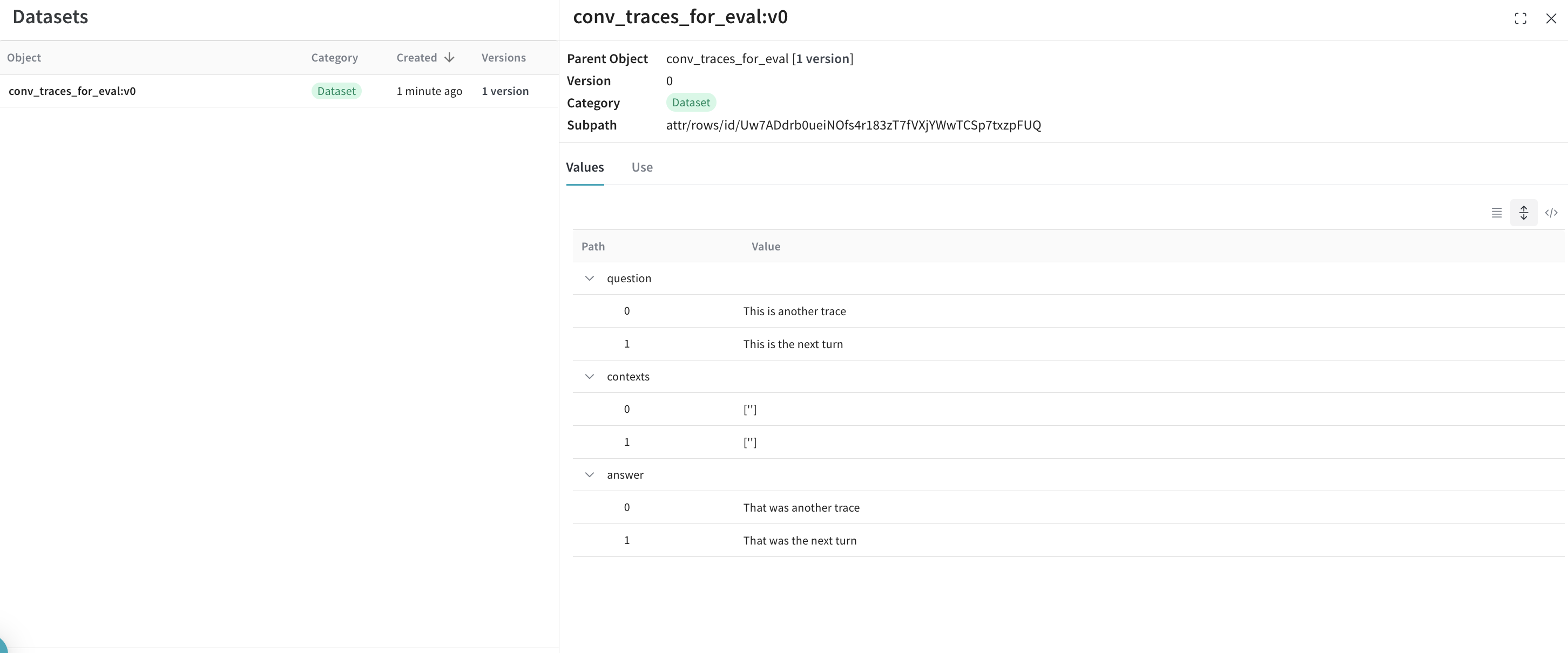
이를 위해 간단한 쿼리 API를 통해 W&B에서 모든 대화를 가져와 데이터셋을 생성합니다.
## 이 셀은 기본적으로 실행되지 않습니다. 이 스크립트를 실행하려면 아래 줄을 주석 처리하세요.
%%script false --no-raise-error
## 평가를 위해 모든 Conversation trace를 가져오고 평가용 데이터셋을 준비합니다

# 모든 Conversation 오브젝트를 가져오는 쿼리 필터를 생성합니다
# 아래에 표시된 ref는 프로젝트에 고유하며, UI의 프로젝트 Operations로 이동하여
# "Conversations" 오브젝트를 클릭한 다음 사이드 패널의 "Use" 탭을 클릭하여 얻을 수 있습니다.
weave_ref_for_conversation_op = "weave://wandb-smle/import-weave-traces-cookbook/op/Conversation:tzUhDyzVm5bqQsuqh5RT4axEXSosyLIYZn9zbRyenaw"
filter = weave.trace_server.trace_server_interface.CallsFilter(
    op_names=[weave_ref_for_conversation_op],
  )

# 쿼리를 실행합니다
conversation_traces = weave_client.get_calls(filter=filter)

rows = []

# 대화 trace를 살펴보며 데이터셋 행을 구성합니다
for single_conv in conversation_traces:
  # 이 예제에서는 RAG 파이프라인을 사용한 대화에만 관심이 있을 수 있으므로
  # 해당 유형의 대화만 필터링합니다
  is_rag = False
  for single_trace in single_conv.inputs['conversation_data']:
    if single_trace['ground_truth'] is not None:
      is_rag = True
      break
  if single_conv.output['ground_truth'] is not None:
      is_rag = True

  # RAG를 사용한 대화로 식별되면 데이터셋에 추가합니다
  if is_rag:
    inputs = []
    ground_truths = []
    answers = []

    # 대화의 모든 턴을 살펴봅니다
    for turn in single_conv.inputs['conversation_data']:
      inputs.append(turn.get('user_input', ''))
      ground_truths.append(turn.get('ground_truth', ''))
      answers.append(turn.get('answer_text', ''))
    ## 대화가 단일 턴인 경우를 처리합니다
    if len(single_conv.inputs) != 1 or single_conv.inputs['conversation_data'][0].get('turn_index') != single_conv.output.get('turn_index'):
      inputs.append(single_conv.output.get('user_input', ''))
      ground_truths.append(single_conv.output.get('ground_truth', ''))
      answers.append(single_conv.output.get('answer_text', ''))

    data = {
        'question': inputs,
        'contexts': ground_truths,
        'answer': answers
    }

    rows.append(data)

# 데이터셋 행이 생성되면 Dataset 오브젝트를 생성하고
# 나중에 검색할 수 있도록 Weave에 다시 게시(publish)합니다
dset = weave.Dataset(name = "conv_traces_for_eval", rows=rows)
weave.publish(dset)

결과

image.png
평가에 대해 더 자세히 알아보려면 새로 생성된 데이터셋을 사용하여 RAG 애플리케이션을 평가하는 방법에 대한 퀵스타트를 확인하세요!