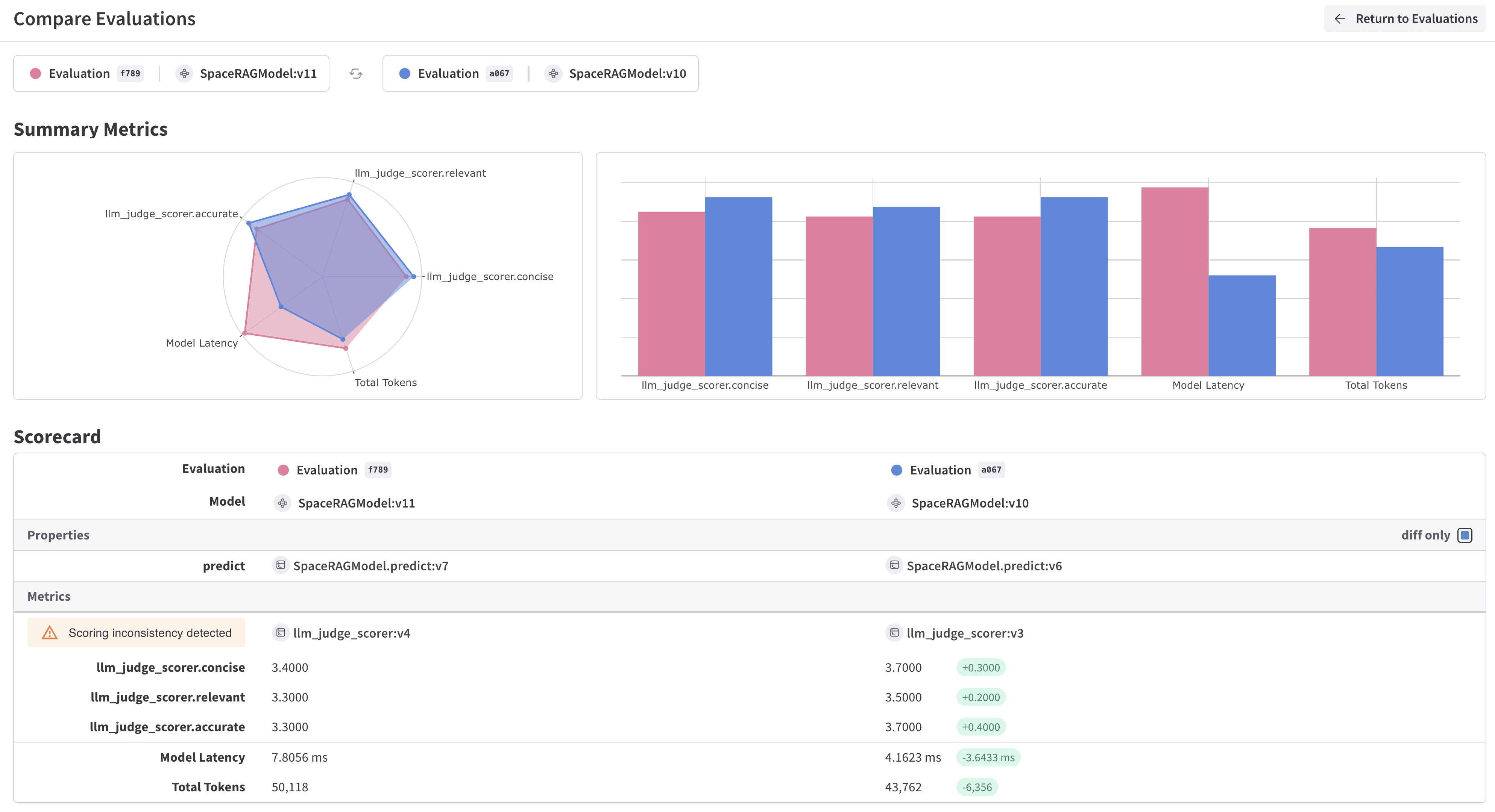
평가(Evaluations)는 변경 사항을 적용한 후 일련의 예제에 대해 테스트함으로써 애플리케이션을 반복하고 개선하는 데 도움을 줍니다. Weave는 Model 및 Evaluation 클래스를 통해 평가 추적을 위한 최고 수준의 지원을 제공합니다. 이 API들은 최소한의 가정을 바탕으로 설계되어 다양한 유스 케이스에 유연하게 대응할 수 있습니다.
Weave에서 Models는 오브젝트입니다. 이 오브젝트는 모델/에이전트의 행동(로직, 프롬프트, 파라미터)과 버전이 지정된 메타데이터(파라미터, 코드, micro-config)를 모두 캡처하여 신뢰성 있게 추적, 비교, 평가 및 반복할 수 있도록 합니다.Model을 인스턴스화하면 Weave는 자동으로 설정과 행동을 캡처하고, 변경 사항이 있을 때 버전을 업데이트합니다. 이를 통해 반복 작업 과정에서 시간에 따른 성능 변화를 추적할 수 있습니다.Model은 Model 클래스를 상속받고, 하나의 예제를 받아 응답을 반환하는 predict 함수 정의를 구현하여 선언합니다.다음 예제 모델은 OpenAI를 사용하여 전달된 문장에서 외계 과일의 이름, 색상, 맛을 추출합니다.
Python
TypeScript
잘못된 코드 신고
복사
AI에게 묻기
class ExtractFruitsModel(weave.Model): model_name: str prompt_template: str @weave.op() async def predict(self, sentence: str) -> dict: client = openai.AsyncClient() response = await client.chat.completions.create( model=self.model_name, messages=[ {"role": "user", "content": self.prompt_template.format(sentence=sentence)} ], ) result = response.choices[0].message.content if result is None: raise ValueError("No response from model") parsed = json.loads(result) return parsed
잘못된 코드 신고
복사
AI에게 묻기
// 참고: weave.Model은 아직 TypeScript에서 지원되지 않습니다.// 대신 모델과 유사한 함수를 weave.op로 래핑하세요.import * as weave from 'weave';import OpenAI from 'openai';const openaiClient = new OpenAI();const model = weave.op(async function myModel({datasetRow}) { const prompt = `Extract fields ("fruit": <str>, "color": <str>, "flavor") from the following text, as json: ${datasetRow.sentence}`; const response = await openaiClient.chat.completions.create({ model: 'gpt-3.5-turbo', messages: [{ role: 'user', content: prompt }], response_format: { type: 'json_object' } }); return JSON.parse(response.choices[0].message.content);});
ExtractFruitsModel 클래스는 weave.Model을 상속받으므로 Weave가 인스턴스화된 오브젝트를 추적할 수 있습니다. @weave.op는 입력과 출력을 추적하기 위해 predict 함수를 데코레이트합니다.다음과 같이 Model 오브젝트를 인스턴스화할 수 있습니다:
Python
TypeScript
잘못된 코드 신고
복사
AI에게 묻기
# 팀 및 프로젝트 이름 설정weave.init('<team-name>/eval_pipeline_quickstart')model = ExtractFruitsModel( model_name='gpt-3.5-turbo-1106', prompt_template='Extract fields ("fruit": <str>, "color": <str>, "flavor": <str>) from the following text, as json: {sentence}')sentence = "There are many fruits that were found on the recently discovered planet Goocrux. There are neoskizzles that grow there, which are purple and taste like candy."print(asyncio.run(model.predict(sentence)))# Jupyter Notebook 환경인 경우 다음을 실행하세요:# await model.predict(sentence)
잘못된 코드 신고
복사
AI에게 묻기
await weave.init('eval_pipeline_quickstart');const sentence = "There are many fruits that were found on the recently discovered planet Goocrux. There are neoskizzles that grow there, which are purple and taste like candy.";const result = await model({ datasetRow: { sentence } });console.log(result);
다음으로 모델을 평가할 데이터셋이 필요합니다. Dataset은 Weave 오브젝트로 저장된 예제들의 컬렉션입니다.다음 예제 데이터셋은 세 개의 입력 문장과 정답(labels)을 정의한 후, 스코어링 함수가 읽을 수 있는 JSON 테이블 형식으로 구성합니다.이 예제는 코드에서 예제 리스트를 만들지만, 실행 중인 애플리케이션에서 하나씩 로그를 기록할 수도 있습니다.
Python
TypeScript
잘못된 코드 신고
복사
AI에게 묻기
sentences = ["There are many fruits that were found on the recently discovered planet Goocrux. There are neoskizzles that grow there, which are purple and taste like candy.","Pounits are a bright green color and are more savory than sweet.","Finally, there are fruits called glowls, which have a very sour and bitter taste which is acidic and caustic, and a pale orange tinge to them."]labels = [ {'fruit': 'neoskizzles', 'color': 'purple', 'flavor': 'candy'}, {'fruit': 'pounits', 'color': 'bright green', 'flavor': 'savory'}, {'fruit': 'glowls', 'color': 'pale orange', 'flavor': 'sour and bitter'}]examples = [ {'id': '0', 'sentence': sentences[0], 'target': labels[0]}, {'id': '1', 'sentence': sentences[1], 'target': labels[1]}, {'id': '2', 'sentence': sentences[2], 'target': labels[2]}]
잘못된 코드 신고
복사
AI에게 묻기
const sentences = [ "There are many fruits that were found on the recently discovered planet Goocrux. There are neoskizzles that grow there, which are purple and taste like candy.", "Pounits are a bright green color and are more savory than sweet.", "Finally, there are fruits called glowls, which have a very sour and bitter taste which is acidic and caustic, and a pale orange tinge to them."];const labels = [ { fruit: 'neoskizzles', color: 'purple', flavor: 'candy' }, { fruit: 'pounits', color: 'bright green', flavor: 'savory' }, { fruit: 'glowls', color: 'pale orange', flavor: 'sour and bitter' }];const examples = sentences.map((sentence, i) => ({ id: i.toString(), sentence, target: labels[i]}));
그런 다음 weave.Dataset() 클래스를 사용하여 데이터셋을 생성하고 이를 게시합니다:
Weave 평가를 사용할 때, Weave는 output과 비교할 target을 기대합니다. 다음 스코어링 함수는 두 개의 사전(target 및 output)을 받아 출력이 타겟과 일치하는지 여부를 나타내는 불리언 값의 사전을 반환합니다. @weave.op() 데코레이터는 Weave가 스코어링 함수의 실행을 추적할 수 있게 합니다.
import * as weave from 'weave';const fruitNameScorer = weave.op( function fruitNameScore({target, output}) { return { correct: target.fruit === output.fruit }; });
나만의 스코어링 함수를 만드는 방법에 대해 자세히 알아보려면 Scorers 가이드를 확인하세요.일부 애플리케이션에서는 커스텀 Scorer 클래스를 만들고 싶을 수 있습니다. 예를 들어, 특정 파라미터(채팅 모델 또는 프롬프트 등), 특정 행 스코어링 및 집계 점수 계산 기능이 있는 표준화된 LLMJudge 클래스를 만들 수 있습니다. 자세한 내용은 다음 챕터인 RAG 애플리케이션의 모델 기반 평가에서 Scorer 클래스 정의에 관한 튜토리얼을 참조하세요.
커스텀 스코어링 함수 외에도 Weave의 내장 스코어러를 사용할 수 있습니다. 다음 평가에서 weave.Evaluation()은 이전 섹션에서 정의한 fruit_name_score 함수와 F1 점수를 계산하는 내장 MultiTaskBinaryClassificationF1 스코어러를 사용합니다.다음 예제는 두 함수를 사용하여 fruits 데이터셋에서 ExtractFruitsModel에 대한 평가를 실행하고 결과를 Weave에 기록합니다.
Python
TypeScript
잘못된 코드 신고
복사
AI에게 묻기
weave.init('eval_pipeline_quickstart')evaluation = weave.Evaluation( name='fruit_eval', dataset=dataset, scorers=[ MultiTaskBinaryClassificationF1(class_names=["fruit", "color", "flavor"]), fruit_name_score ],)print(asyncio.run(evaluation.evaluate(model)))# Jupyter Notebook 환경인 경우 다음을 실행하세요:# await evaluation.evaluate(model)
잘못된 코드 신고
복사
AI에게 묻기
import * as weave from 'weave';await weave.init('eval_pipeline_quickstart');const evaluation = new weave.Evaluation({ name: 'fruit_eval', dataset: dataset, scorers: [fruitNameScorer],});const results = await evaluation.evaluate(model);console.log(results);
Python 스크립트에서 실행하는 경우 asyncio.run을 사용해야 합니다. 하지만 Jupyter 노트북에서 실행하는 경우 await를 직접 사용할 수 있습니다.
import jsonimport asyncioimport openaiimport weavefrom weave.scorers import MultiTaskBinaryClassificationF1# Weave 초기화weave.init('eval_pipeline_quickstart')# 1. 모델 정의class ExtractFruitsModel(weave.Model): model_name: str prompt_template: str @weave.op() async def predict(self, sentence: str) -> dict: client = openai.AsyncClient() response = await client.chat.completions.create( model=self.model_name, messages=[{"role": "user", "content": self.prompt_template.format(sentence=sentence)}], ) result = response.choices[0].message.content if result is None: raise ValueError("No response from model") return json.loads(result)# 2. 모델 인스턴스화model = ExtractFruitsModel( model_name='gpt-3.5-turbo-1106', prompt_template='Extract fields ("fruit": <str>, "color": <str>, "flavor": <str>) from the following text, as json: {sentence}')# 3. 데이터셋 생성sentences = ["There are many fruits that were found on the recently discovered planet Goocrux. There are neoskizzles that grow there, which are purple and taste like candy.","Pounits are a bright green color and are more savory than sweet.","Finally, there are fruits called glowls, which have a very sour and bitter taste which is acidic and caustic, and a pale orange tinge to them."]labels = [ {'fruit': 'neoskizzles', 'color': 'purple', 'flavor': 'candy'}, {'fruit': 'pounits', 'color': 'bright green', 'flavor': 'savory'}, {'fruit': 'glowls', 'color': 'pale orange', 'flavor': 'sour and bitter'}]examples = [ {'id': '0', 'sentence': sentences[0], 'target': labels[0]}, {'id': '1', 'sentence': sentences[1], 'target': labels[1]}, {'id': '2', 'sentence': sentences[2], 'target': labels[2]}]dataset = weave.Dataset(name='fruits', rows=examples)weave.publish(dataset)# 4. 스코어링 함수 정의@weave.op()def fruit_name_score(target: dict, output: dict) -> dict: return {'correct': target['fruit'] == output['fruit']}# 5. 평가 실행evaluation = weave.Evaluation( name='fruit_eval', dataset=dataset, scorers=[ MultiTaskBinaryClassificationF1(class_names=["fruit", "color", "flavor"]), fruit_name_score ],)print(asyncio.run(evaluation.evaluate(model)))
잘못된 코드 신고
복사
AI에게 묻기
import * as weave from 'weave';import OpenAI from 'openai';// Weave 초기화await weave.init('eval_pipeline_quickstart');// 1. 모델 정의// 참고: weave.Model은 아직 TypeScript에서 지원되지 않습니다.// 대신 모델과 유사한 함수를 weave.op로 래핑하세요.const openaiClient = new OpenAI();const model = weave.op(async function myModel({datasetRow}) { const prompt = `Extract fields ("fruit": <str>, "color": <str>, "flavor": <str>) from the following text, as json: ${datasetRow.sentence}`; const response = await openaiClient.chat.completions.create({ model: 'gpt-3.5-turbo', messages: [{ role: 'user', content: prompt }], response_format: { type: 'json_object' } }); return JSON.parse(response.choices[0].message.content);});// 2. 데이터셋 생성const sentences = [ "There are many fruits that were found on the recently discovered planet Goocrux. There are neoskizzles that grow there, which are purple and taste like candy.", "Pounits are a bright green color and are more savory than sweet.", "Finally, there are fruits called glowls, which have a very sour and bitter taste which is acidic and caustic, and a pale orange tinge to them."];const labels = [ { fruit: 'neoskizzles', color: 'purple', flavor: 'candy' }, { fruit: 'pounits', color: 'bright green', flavor: 'savory' }, { fruit: 'glowls', color: 'pale orange', flavor: 'sour and bitter' }];const examples = sentences.map((sentence, i) => ({ id: i.toString(), sentence, target: labels[i]}));const dataset = new weave.Dataset({ name: 'fruits', rows: examples});await dataset.save();// 3. 스코어링 함수 정의const fruitNameScorer = weave.op( function fruitNameScore({target, output}) { return { correct: target.fruit === output.fruit }; });// 4. 평가 실행const evaluation = new weave.Evaluation({ name: 'fruit_eval', dataset: dataset, scorers: [fruitNameScorer],});const results = await evaluation.evaluate(model);console.log(results);