

- Python
- TypeScript
In Weave, the core of the workflow is the
Evaluation object, which defines:- A
Datasetor list of dictionaries for test examples. - One or more scoring functions.
- Optional configuration like input preprocessing.
Evaluation, you can run it against a Model object or any custom function containing LLM application logic. Each call to .evaluate() triggers an evaluation run. Think of the Evaluation object as a blueprint, and each run as a measurement of how your application performs under that setup.- Create an
Evaluationobject - Define a dataset of examples
- Define scoring functions
- Define a model or function to evaluate
- Run the evaluation
Create an Evaluation object
Creating an Evaluation object is the first step in setting up your evaluation configuration. An Evaluation consists of example data, scoring logic, and optional preprocessing. You later use it to run one or more evaluations.
Weave takes each example, passes it through your application, and scores the output on multiple custom scoring functions. This gives you a view of the performance of your application, and a rich UI to drill into individual outputs and scores.
Custom naming is optional but helps you distinguish between different evaluation configurations and runs in the Weave UI. If you only have one evaluation, you can skip this section.
Optional: Custom naming
- Python
- TypeScript
There are two types of customizable names in the evaluation flow:Name the
To name the
- Evaluation object name (
evaluation_name): A persistent label for your configuredEvaluationobject. - Evaluation run display name (
__weave["display_name"]): A label for a specific evaluation execution, shown in the UI.
Name the Evaluation object
To name the Evaluation object itself, pass an evaluation_name parameter to the Evaluation class. This name helps you identify the Evaluation in code and UI listings.Name individual evaluation runs
To name a specific evaluation run (a call toevaluate()), use the __weave dictionary with a display_name. This affects what’s shown in the UI for that run.Define a dataset of test examples
First, define a Dataset object or list of examples with a collection of examples to evaluate. These examples are often failure cases that you want to test for, similar to unit tests in Test-Driven Development (TDD).- Python
- TypeScript
The following example shows a dataset defined as a list of dictionaries:
Define scoring functions
Then, create one or more scoring functions. Weave uses these to score each example in theDataset.
- Python
- TypeScript
Each scoring function must have an Optional: Define a custom
In some applications, you may want to create custom
output parameter, and return a dictionary with the scores. Optionally, you can include other inputs from your examples.Scoring functions need to have an output keyword argument, but the other arguments are user defined and are taken from the dataset examples. Weave only takes the necessary keys by using a dictionary key based on the argument name.The following example scorer function match_score1 uses the expected value from the examples dictionary for scoring:Optional: Define a custom Scorer class
In some applications, you may want to create custom Scorer classes. For example, a standardized LLMJudge class can be created with specific parameters (for example, chat model, prompt), specific scoring of each row, and specific calculation of an aggregate score.See the tutorial on defining a Scorer class in Model-Based Evaluation of RAG applications for more information.Define a model or function to evaluate
- Python
- TypeScript
To evaluate a This runs
Model, call .evaluate() using an Evaluation. Use Model objects when you have parameters that you want to experiment with and capture in Weave.predict on each example and scores the output with each scoring function.Optional: Define a function to evaluate
Alternatively, you can evaluate a custom function tracked by@weave.op():Run the evaluation
With yourEvaluation object, dataset, scorers, and model defined, you’re ready to execute the evaluation and capture results in Weave. To run an evaluation, call .evaluate() on the Evaluation object.
- Python
- TypeScript
Assuming an
Evaluation object called evaluation and a Model object to evaluate called model, the following code instantiates an evaluation run:Optional: Run multiple trials
You can set thetrials parameter on the Evaluation object to run each example multiple times:Full evaluation code example
The following example brings together each of the previous steps in a single, runnable script. Use it as a reference when adapting the evaluation workflow to your own application.- Python
- TypeScript
The following code sample demonstrates a complete evaluation run from start to finish. The
examples dictionary is used by the match_score1 and match_score2 scoring functions to evaluate MyModel given the value of prompt, as well as a custom function function_to_evaluate. The evaluation runs for both the Model and the function are invoked with asyncio.run(evaluation.evaluate()).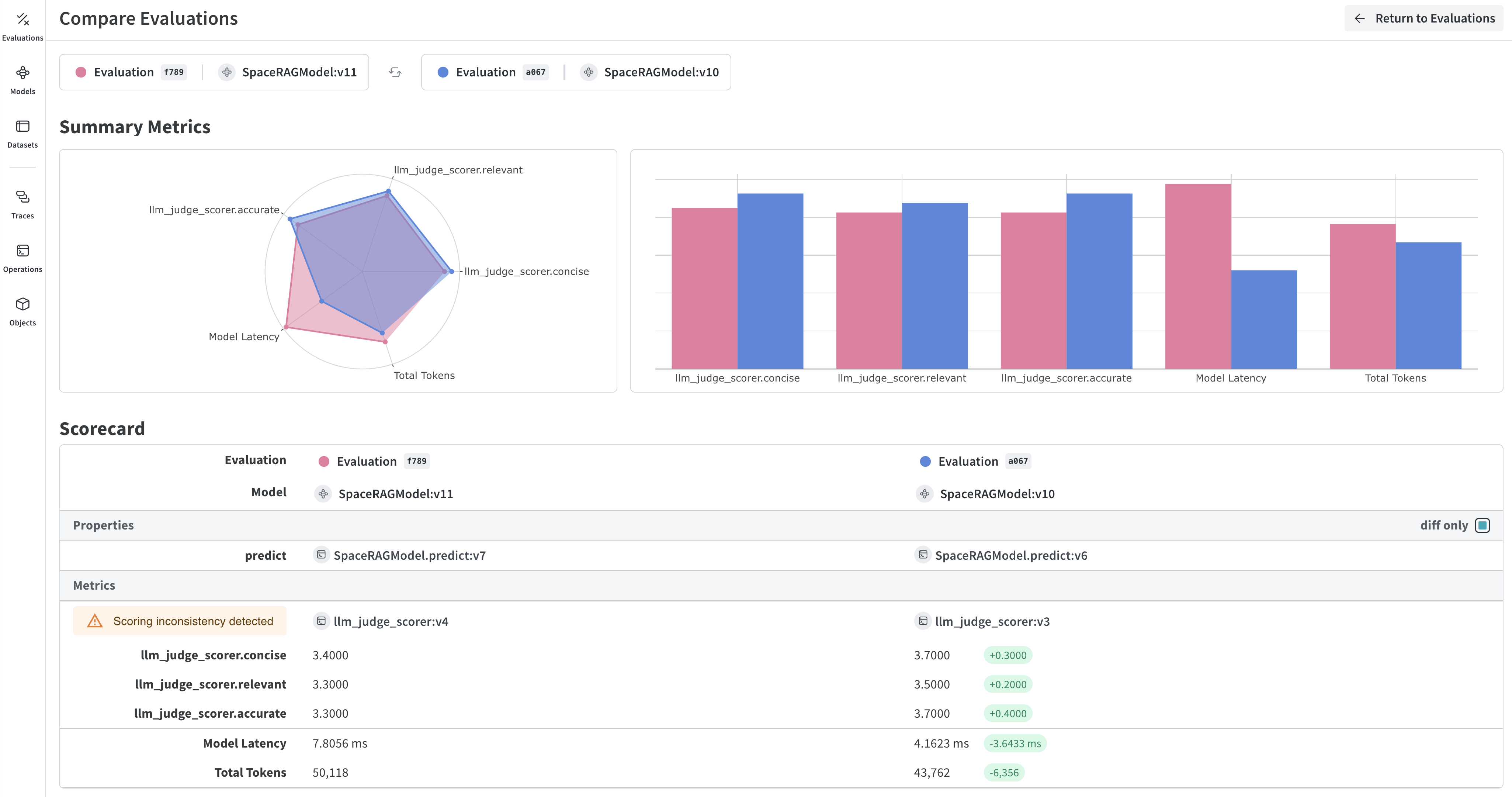
Advanced evaluation usage
The following sections cover optional features for more complex evaluation workflows, including dataset preprocessing, third-party dataset integration, saved UI views, and an imperative logging API.Format dataset rows before evaluating
- Python
- TypeScript
The In this example, the dataset contains examples with an
preprocess_model_input parameter lets you transform your dataset examples before Weave passes them to your evaluation function. This is useful when you need to:- Rename fields to match your model’s expected input.
- Transform data into the correct format.
- Add or remove fields.
- Load additional data for each example.
preprocess_model_input to rename fields:input_text field, but the evaluation function expects a question parameter. The preprocess_example function transforms each example by renaming the field, which lets the evaluation work correctly.The preprocessing function:- Receives the raw example from your dataset.
- Returns a dictionary with the fields your model expects.
- Runs on each example before Weave passes it to your evaluation function.
Use HuggingFace datasets with evaluations
- Python
- TypeScript
You can use
preprocess_model_input as a workaround for using HuggingFace Datasets in Weave evaluations.See the Using HuggingFace datasets in evaluations cookbook for details.Saved views
You can save your Evals table configurations, filters, and sorts as saved views for quick access to your preferred setup. You can configure and access saved views in the UI and with the Python SDK. For more information, see Saved Views.Imperative evaluations (EvaluationLogger)
If you prefer a more flexible evaluation framework, see Weave’s EvaluationLogger. The EvaluationLogger is available in both Python and TypeScript and offers more flexibility for complex workflows, while the standard evaluation framework provides more structure and guidance.