

EvaluationLogger to record predictions and scores from your existing Python or TypeScript code, so you can evaluate model performance in Weave without first defining a full dataset and scorer suite. Use this approach when your dataset or scorers aren’t defined upfront, or when you need to log evaluation data incrementally as your workflow runs.
In contrast to the standard Evaluation object, which requires a predefined Dataset and list of Scorer objects, the EvaluationLogger lets you log individual predictions and their associated scores incrementally as they become available.
Prefer a more structured evaluation?If you prefer a more opinionated evaluation framework with predefined datasets and scorers, see the standard Evaluation framework.The
EvaluationLogger offers flexibility while the standard framework offers structure and guidance.Basic workflow
Following these steps records a complete evaluation in Weave, with per-prediction scores and an aggregated summary that you can review in the Weave UI.- Initialize the logger: Create an instance of
EvaluationLogger, optionally providing metadata about themodelanddataset. Weave uses defaults if omitted.To capture token usage and cost for LLM calls (for example, OpenAI), initializeEvaluationLoggerbefore any LLM invocations. If you call your LLM first and then log predictions afterward, Weave doesn’t capture token and cost data. - Log predictions: Call
log_prediction()for each input and output pair from your system. - Log scores: Use the returned
ScoreLoggertolog_score()for the prediction. Multiple scores per prediction are supported. - Finish prediction: Always call
finish()after logging scores for a prediction to finalize it. - Log summary: After all predictions are processed, call
log_summary()to aggregate scores and add optional custom metrics.
log_example().
Basic example
The following example shows how to useEvaluationLogger to log predictions and scores inline with your existing code. Replace [YOUR-TEAM]/[YOUR-PROJECT] with your W&B entity and project.
- Python
- TypeScript
The
user_model function is defined and applied to a list of inputs. For each example:- The input and output are logged using
log_prediction. - A correctness score (
correctness_score) is logged throughlog_score. finish()finalizes logging for that prediction.
log_summary records any aggregate metrics and triggers automatic score summarization in Weave.Simplified logging with log_example()
Use log_example() to log inputs, an output, and scores in a single call. This convenience method combines log_prediction(), log_score(), and finish() into one step, and it’s useful when you already have the inputs, model outputs, and scores ready to log, such as during batch or offline evaluations.
log_example() call is equivalent to:
log_example() is not available for the Weave TypeScript SDK. TypeScript users should use the logPrediction() and logScore() pattern shown in the basic example.Advanced usage
TheEvaluationLogger offers flexible patterns beyond the basic workflow to accommodate more complex evaluation scenarios. The following sections describe advanced techniques, including how to use context managers for automatic resource management, link agent traces to evaluation rows, separate model execution from logging, work with rich media data, and compare multiple model evaluations side by side.
Use context managers
TheEvaluationLogger supports context managers (with statements) for both predictions and scores. This can provide cleaner code, automatic resource cleanup, and better tracking of nested operations like LLM judge calls.
Using with statements in this context provides:
- Automatic
finish()calls when exiting the context. - Better token and cost tracking for nested LLM calls.
- Setting output after model execution within the prediction context.
- Python
- TypeScript
Link agent traces to evaluations
In Python, keep each traced agent call inside itslog_prediction() context. EvaluationLogger sets the evaluation run, example, and trial metadata on spans created in that context, and Weave uses that metadata to link the trace to its evaluation result.
Automatic evaluation-to-agent span linking is available only in Python. Neither the TypeScript
EvaluationLogger nor Evaluation.evaluate() creates an active evaluation scope that links agent spans. In TypeScript, you can link a span only by setting the OTel attributes described in this section directly, and only when both Call IDs are already available.[YOUR-TEAM]/[YOUR-PROJECT] with your W&B entity and project.
- Python
- TypeScript
log_prediction() context and a Weave integration traces it, as in the preceding code example. Otherwise, you set the two linking IDs on the agent spans yourself. How you do this depends on where the spans are created:
- Same process, your own instrumentation: Set the attributes directly on each span.
- A separate service: Send both IDs to that service, then set them on the spans it creates.
Link spans you instrument yourself
When spans are created inside thelog_prediction() context, the EvaluationLogger sets all the attributes automatically. However, if you send spans with your own OpenTelemetry (OTel) instrumentation, you must set the attributes directly on each span that you want to link. You can set the following attributes for evaluations:
Send the span to the same Weave project as the evaluation through the
/agents/otel/v1/traces endpoint. OTel span attributes don’t propagate from parent spans to child spans, so set the attributes on every span that you want to link.
For more information about the endpoint:
- To send spans from an existing OTel pipeline, see Send OpenTelemetry spans to the Agents view.
- For the endpoint specification, see Export a GenAI trace.
weave.eval.run_id and weave.eval.predict_and_score_call_id establish the evaluation and result links. The row digest, example ID, trial index, kind, and evaluation name add context and support filtering, but don’t create a link by themselves. Use Weave Call IDs for the two linking attributes, not OTel trace or span IDs.
You can obtain both IDs from the evaluation results query API. Each evaluation in the response has an evaluation_call_id, and each trial has a predict_and_score_call_id.
The following examples assume that span is the OTel span for the agent operation. Replace each bracketed value with metadata from the evaluation run and result that the span belongs to.
The TypeScript example works because it sets the OTel attributes directly rather than relying on a prediction scope. Use it only when both Call IDs are already available.
- Python
- TypeScript
Link an agent that runs in a separate service
When your agent runs as a separate service, the evaluation process and the agent don’t share memory: Weave can’t set the linking attributes automatically, and you can’t reach the agent’s span objects directly. Instead, get both Call IDs in the evaluation process, send them to the service, and set them on the spans created there. This distributedEvaluationLogger pattern is Python-only.
- Python
- TypeScript
Entering the In the agent service, copy the received attributes onto every agent span that you want to associate with the result. The following function demonstrates the receiving side with a raw OTel span. Configure the service to export spans to the same The wrapper span in this example is linked to the evaluation result. If the agent framework creates additional spans, copy
log_prediction() context creates the Evaluation.predict_and_score call before the context body runs. The context yields a ScoreLogger (bound to prediction in the following example) that exposes both Call IDs. Keep the context open until the service returns so that you can log its output and scores on the same evaluation result.In the evaluation process, replace [AGENT-SERVICE-URL] with the endpoint that runs your agent, and replace [YOUR-TEAM]/[YOUR-PROJECT] as well:[YOUR-TEAM]/[YOUR-PROJECT] as the evaluation.eval_context onto those spans as well. OTel doesn’t inherit span attributes from the wrapper.View linked agent spans from your evaluations
To inspect linked spans in the Weave UI:- Navigate to wandb.ai.
- In the Weave sidebar menu, click Evals.
- Select your evaluation run.
- In the evaluation detail panel that opens, in the Evaluation tab, click View spans. This opens the Agents page with the Spans tab filtered to that evaluation.
Link to an existing dataset
When you pass raw datasets asinputs to log_prediction, Weave reimports the data with every evaluation run. This stores duplicate data, which can waste space if the dataset is large or if many evaluations reuse it.
To avoid this duplication, publish your dataset to Weave before running any evaluations, then pass the published dataset’s rows as inputs. Weave resolves references to published rows using internal references instead of reimporting the data. This technique gives you the same linked experience as the standard Evaluation framework, where each prediction links back to a specific dataset row in the Weave UI.
The following example publishes a dataset, links it in the EvaluationLogger, and retrieves and iterates over it like any other dataset.
- Python
- TypeScript
Get outputs before logging
You can first compute your model outputs, then separately log predictions and scores. This separates evaluation and logging logic, which can make code easier to test and maintain when different parts of your system handle prediction generation and scoring.- Python
- TypeScript
Log rich media
Inputs, outputs, and scores can include rich media such as images, videos, audio, or structured tables. Logging rich media lets you inspect the actual content alongside scores in the Weave UI, which is helpful for qualitative analysis of multimodal models. Pass a dict or media object into thelog_prediction or log_score methods.
- Python
- TypeScript
Log and compare multiple evaluations
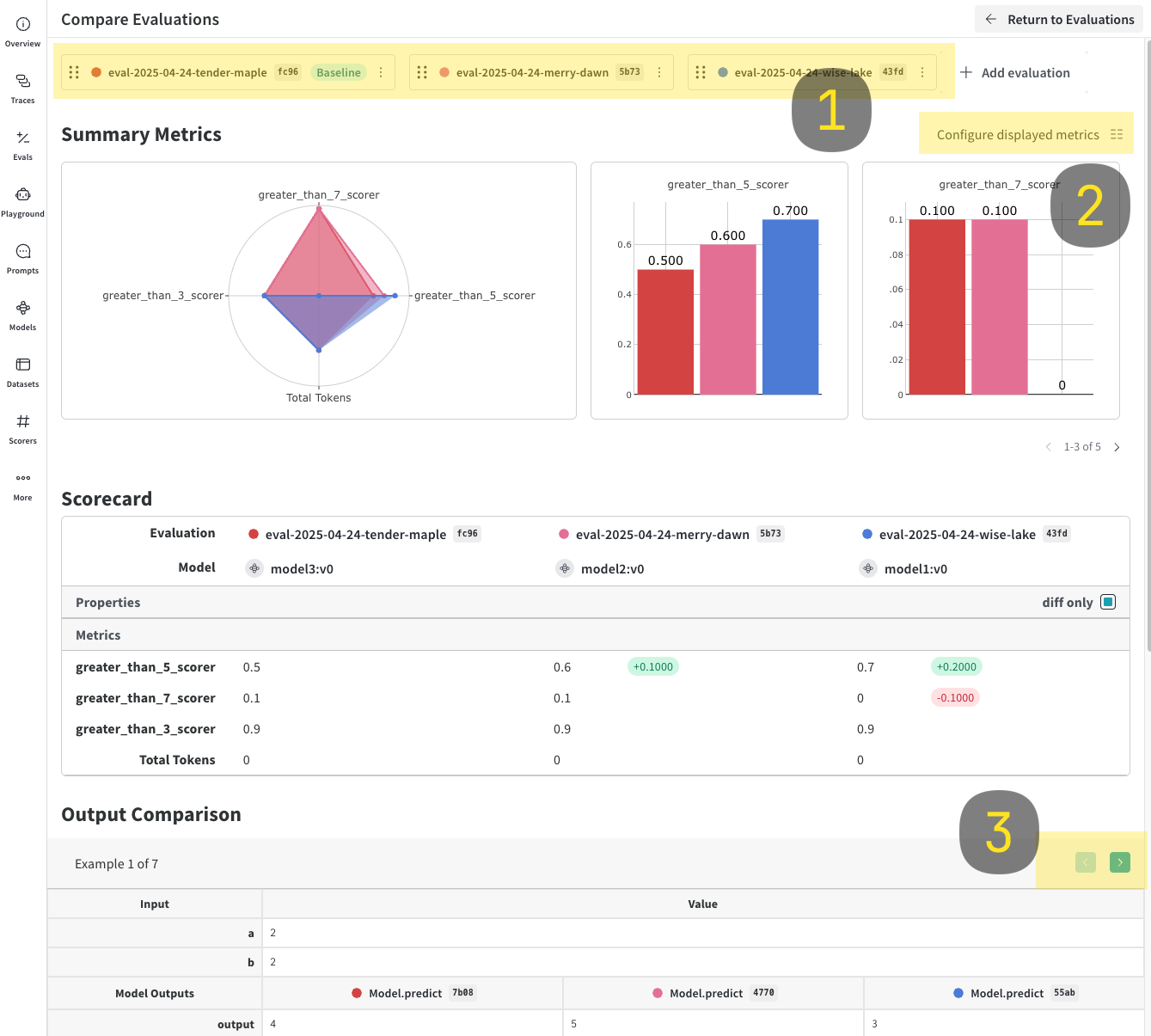
WithEvaluationLogger, you can log and compare multiple evaluations side by side in the Weave UI. This is useful for assessing how different models perform on the same dataset.
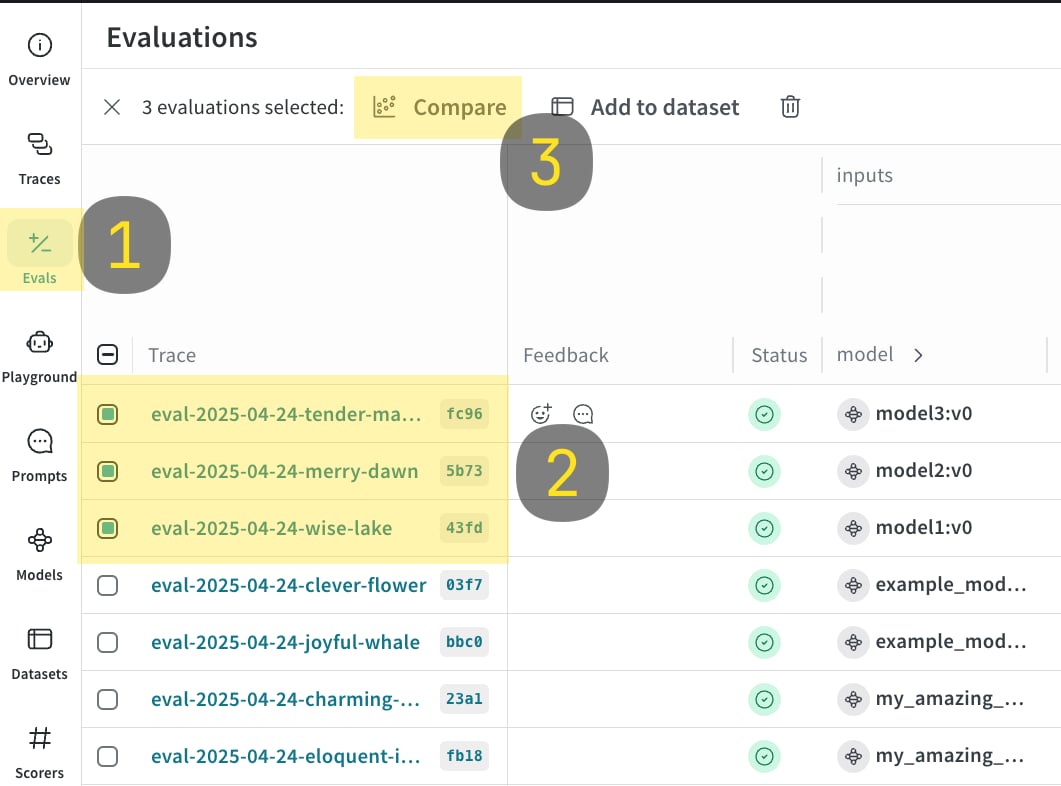
- Run the following code sample.
- In the Weave UI, open the Evals tab.
- Select the evaluations that you want to compare.
- Click Compare. In the Compare view, you can:
- Choose which evaluations to add or remove.
- Choose which metrics to show or hide.
- Page through specific examples to see how different models performed for the same input on a given dataset.
- Python
- TypeScript
Usage tips
The following tips help you get the most out ofEvaluationLogger:
- Python
- TypeScript
- Call
finish()promptly after each prediction. - Use
log_summaryto capture metrics not tied to single predictions (for example, overall latency). - Rich media logging is useful for qualitative analysis.