메인 콘텐츠로 건너뛰기
Track LLM inputs & outputs 튜토리얼에서는 LLM의 입력과 출력을 추적하는 기본 방법을 다루었습니다. 이 튜토리얼에서는 다음 내용을 배우게 됩니다:
  • 애플리케이션을 통해 흐르는 데이터 추적
  • 호출 시점의 메타데이터 추적

중첩된 함수 호출 추적

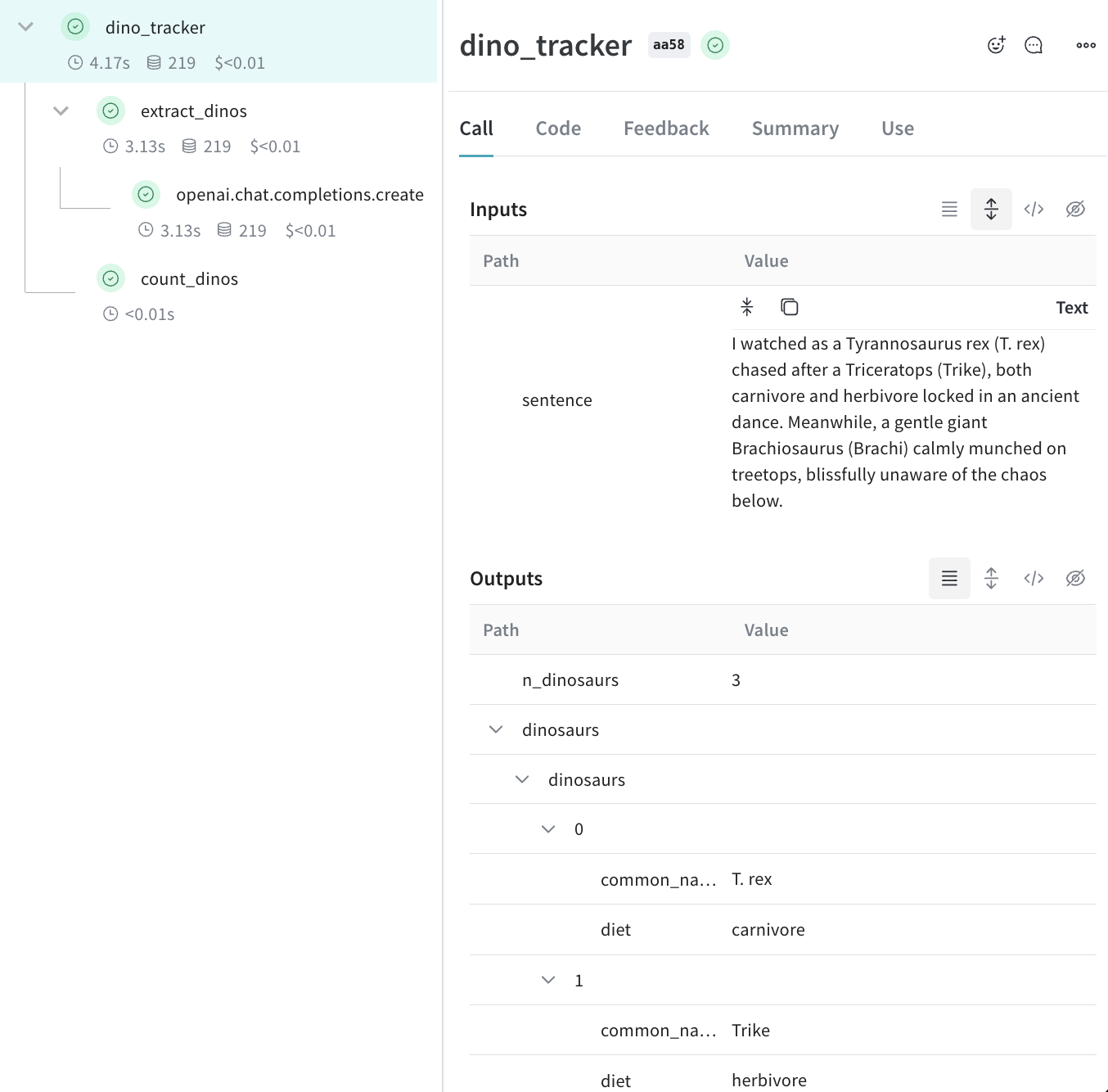
LLM 기반 애플리케이션은 여러 번의 LLM 호출과 추가적인 데이터 처리 및 검증 로직을 포함할 수 있으며, 이를 모니터링하는 것은 매우 중요합니다. 많은 앱에서 흔히 볼 수 있는 깊게 중첩된 호출 구조에서도, 추적하려는 모든 함수에 weave.op()를 추가하기만 하면 Weave 가 중첩된 함수들 사이의 부모-자식 관계를 추적합니다. 퀵스타트 예제를 확장하여, 다음 코드는 LLM에서 반환된 아이템의 개수를 세고 이를 상위 레벨 함수로 감싸는 추가 로직을 더합니다. 또한, weave.op()를 사용하여 모든 함수, 호출 순서 및 부모-자식 관계를 추적합니다:
import weave
import json
from openai import OpenAI

client = OpenAI()

@weave.op()
def extract_dinos(sentence: str) -> dict:
    response = client.chat.completions.create(
        model="gpt-4o",
        messages=[
            {
                "role": "system",
                "content": """Extract any dinosaur `name`, their `common_name`, \
names and whether its `diet` is a herbivore or carnivore, in JSON format."""
            },
            {
                "role": "user",
                "content": sentence
            }
            ],
            response_format={ "type": "json_object" }
        )
    return response.choices[0].message.content

@weave.op()
def count_dinos(dino_data: dict) -> int:
    # 반환된 리스트의 아이템 개수를 셉니다
    k = list(dino_data.keys())[0]
    return len(dino_data[k])

@weave.op()
def dino_tracker(sentence: str) -> dict:
    # LLM을 사용하여 공룡 데이터를 추출합니다
    dino_data = extract_dinos(sentence)

    # 반환된 공룡의 개수를 셉니다
    dino_data = json.loads(dino_data)
    n_dinos = count_dinos(dino_data)
    return {"n_dinosaurs": n_dinos, "dinosaurs": dino_data}

weave.init('jurassic-park')

sentence = """I watched as a Tyrannosaurus rex (T. rex) chased after a Triceratops (Trike), \
both carnivore and herbivore locked in an ancient dance. Meanwhile, a gentle giant \
Brachiosaurus (Brachi) calmly munched on treetops, blissfully unaware of the chaos below."""

result = dino_tracker(sentence)
print(result)
중첩된 함수위 코드를 실행하면 두 개의 중첩된 함수(extract_dinoscount_dinos)의 입력과 결과는 물론, 자동으로 로그된 OpenAI trace를 확인할 수 있습니다.Nested Weave Trace

메타데이터 추적

weave.attributes 컨텍스트 매니저를 사용하여 호출 시점에 추적할 메타데이터 사전을 전달함으로써 메타데이터를 추적할 수 있습니다. 위의 예제를 이어가겠습니다:
import weave

weave.init('jurassic-park')

sentence = """I watched as a Tyrannosaurus rex (T. rex) chased after a Triceratops (Trike), \
both carnivore and herbivore locked in an ancient dance. Meanwhile, a gentle giant \
Brachiosaurus (Brachi) calmly munched on treetops, blissfully unaware of the chaos below."""

# 이전에 정의된 함수와 함께 메타데이터를 추적합니다
with weave.attributes({'user_id': 'lukas', 'env': 'production'}):
    result = dino_tracker(sentence)
사용자 ID나 코드의 환경 상태(development, staging 또는 production)와 같은 메타데이터는 run 타임에 추적하는 것을 권장합니다.시스템 프롬프트와 같은 시스템 설정을 추적하려면 Weave Models 사용을 권장합니다.

다음 단계는?

  • App Versioning 튜토리얼을 따라 임시 프롬프트, 모델 및 애플리케이션 변경 사항을 캡처하고 버전 관리하며 정리하는 방법을 알아보세요.