

Rate limits
W&B applies default rate limits on Dedicated Cloud to maintain instance stability. See Rate limits for default values, how limits are enforced, and how to request higher limits when you scale up training.Compliance
W&B Dedicated Cloud supports the following compliance frameworks:- SOC 2: W&B Dedicated Cloud’s hosting platform meets the requirements of the Service and Organization Controls (SOC) 2 Type 2, published by the Auditing Standards Board of the American Institute of Certified Public Accountants (AICPA). A SOC 2 report evaluates a service organization’s controls for security, availability, processing integrity, confidentiality, and privacy. W&B Dedicated Cloud is subject to periodic internal and external audits to verify continued compliance. Refer to the W&B Security Portal to request the SOC 2 report and other security and compliance documents.
- HIPAA: When configured appropriately, W&B Dedicated Cloud meets the requirements of the Health Insurance Portability and Accountability Act of 1996 (HIPAA). Compliance with HIPAA is a shared responsibility that involves W&B, the customer, and any third-party services involved in the deployment. Organizations subject to HIPAA must have a Business Associate Agreement on file with W&B. Refer to the W&B Security Portal to request more information.
Data security
Dedicated Cloud provides several mechanisms for controlling where your data is stored and how it can be accessed. The following options let you bring your own storage, restrict network access, and connect privately to your instance. You can bring your own bucket (BYOB) using the secure storage connector at the instance and team levels to store your files such as models, datasets, and more. Similar to W&B Multi-tenant Cloud, you can configure a single bucket for multiple teams or you can use separate buckets for different teams. If you don’t configure secure storage connector for a team, W&B stores that data in the instance-level bucket.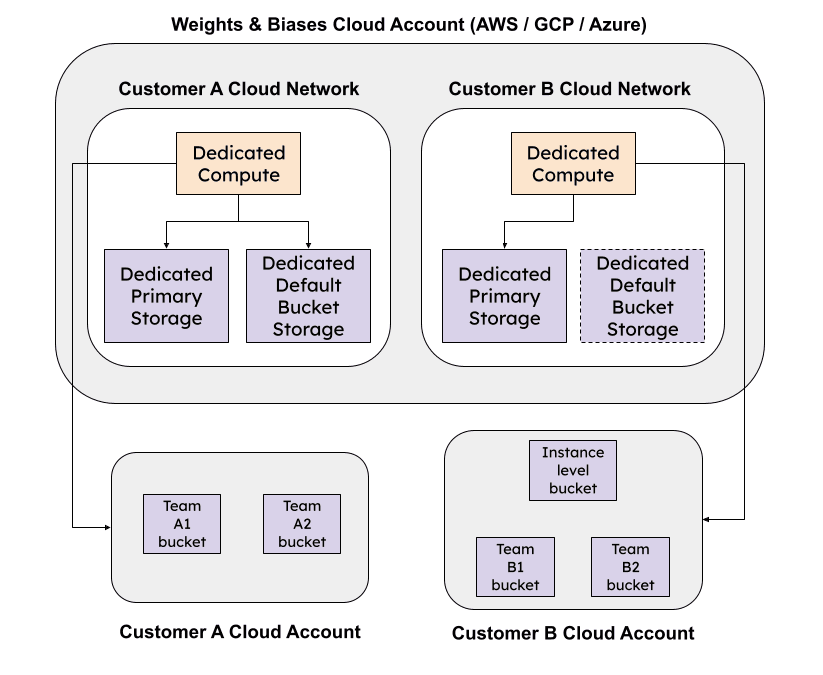
Identity and access management (IAM)
Use the identity and access management capabilities for secure authentication and effective authorization in your W&B Organization. The following features are available for IAM in Dedicated Cloud instances:- Authenticate with SSO using OpenID Connect (OIDC) or with LDAP.
- Configure appropriate user roles at the scope of the organization and within a team.
- Define the scope of a W&B project to limit who can view, edit, and submit W&B runs to it with restricted projects.
- Use JSON Web Tokens with identity federation to access W&B APIs.
Monitor
Use Audit logs to track user activity within your teams and to conform to your enterprise governance requirements. Also, you can view organization usage in your Dedicated Cloud instance with W&B Organization Dashboard.Maintenance
Similar to W&B Multi-tenant Cloud, you don’t incur the overhead and costs of provisioning and maintaining the W&B platform with Dedicated Cloud. To understand how W&B manages updates on Dedicated Cloud, refer to the server release process.Data retention policy
By default, a Dedicated Cloud instance retains the following items for 7 days after deletion:- Runs and history
- Non-artifact run files, such as media, configuration files, and log files
- Artifacts and artifact references
- Environment variable
- Helm
To change the data retention policy, set the environment variable
GORILLA_DATA_RETENTION_PERIOD to a value in hours. For example, to retain deleted data for 14 days (336 hours):